
mcp-imessage can:
- read recent iMessage threads
- fetch full conversations by name, number, or group chat
- search messages and conversations
- look up contacts from Contacts.app
- draft messages in the UI before sending
- send iMessages, SMS messages, and file attachments
- render threads in a native-style embedded UI with a live-updating composer
It is built in Rust for the server layer, with a small React/Vite app bundled into the binary for the UI.
UI stack: shadcn/ui and json-render.
Quick start
Install with Homebrew
brew tap antondkg/homebrew-tap
brew install mcp-imessage
Then add this to your MCP client config:
{
  "mcpServers": {
    "imessage": {
      "command": "/opt/homebrew/opt/mcp-imessage/bin/mcp-imessage",
      "env": {
        "MCP_IMESSAGE_ENABLE_SEND": "1"
      }
    }
  }
}
Common MCP config files:
- Claude Desktop:
~/Library/Application Support/Claude/claude_desktop_config.json - Codex / local agent config:
~/.agents/mcp.json - Generic MCP clients: whatever config file your client uses for
mcpServers
Homebrew binary paths:
- Apple Silicon:
/opt/homebrew/opt/mcp-imessage/bin/mcp-imessage - Intel Macs:
/usr/local/opt/mcp-imessage/bin/mcp-imessage
If you do not want send support yet, remove the env block and keep only the command.
Build from source
git clone https://github.com/antondkg/mcp-imessage.git
cd mcp-imessage
cargo build --release
The Rust build installs UI dependencies with npm ci and bundles the frontend into ui/dist/index.html.
Then point your MCP client at:
/absolute/path/to/mcp-imessage/target/release/mcp-imessage
Screenshots



Requirements
- macOS
- Node.js 20+
- Rust stable
- Messages.app signed in to iMessage
- permission to access Messages data, Contacts, and Automation access for Messages.app when sending
Full Disk Access
macOS protects ~/Library/Messages/chat.db, so the mcp-imessage server process itself needs Full Disk Access to read message history reliably.
- Open
System Settings. - Go to
Privacy & Security->Full Disk Access. - Add and enable
mcp-imessage. - Grant access to the actual
mcp-imessagebinary, not just the host app. - If your MCP host still inherits the host app's privacy boundary, also grant Full Disk Access to that host app.
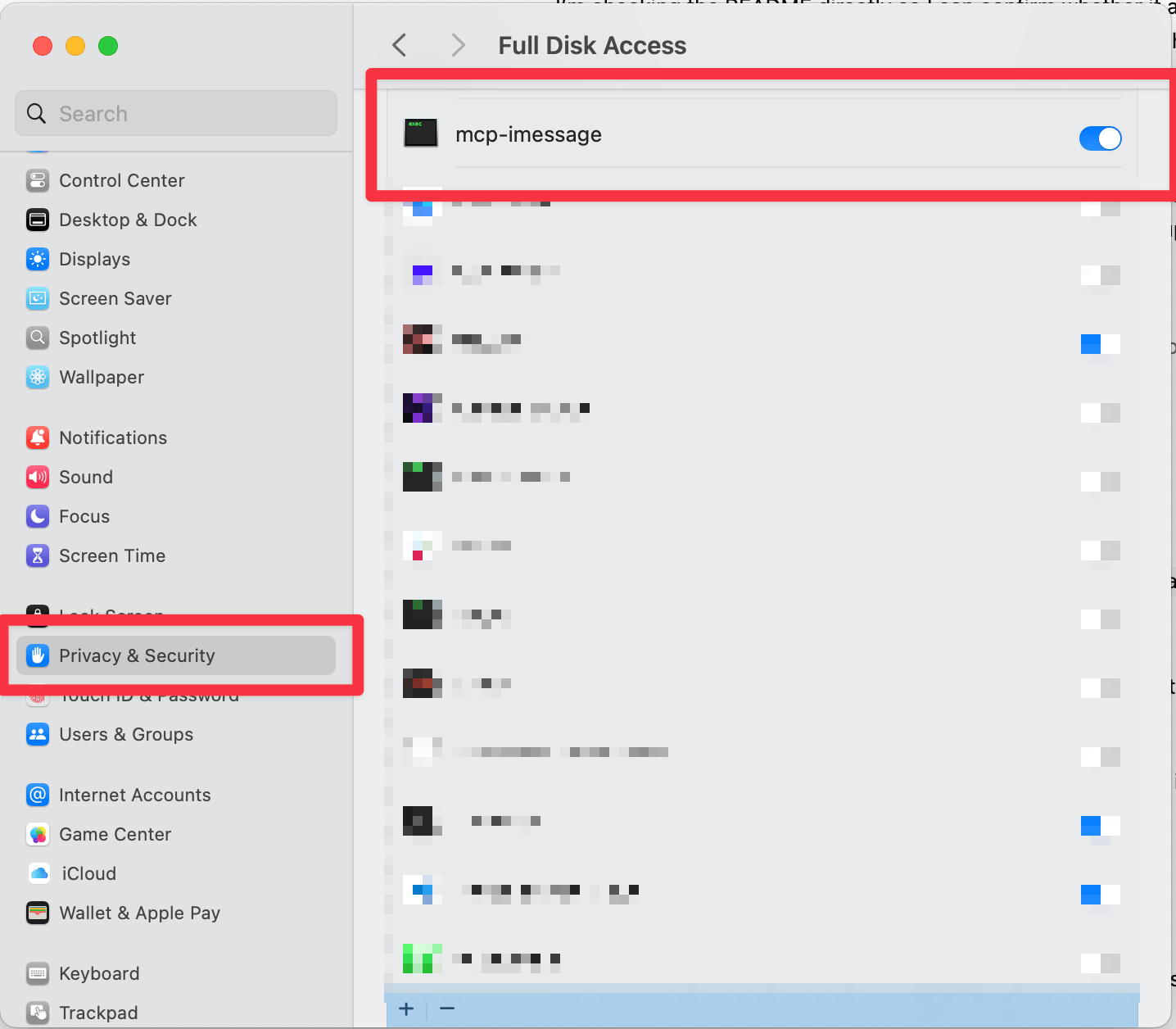
After enabling Full Disk Access, fully restart the host app before testing again.
Sending
messages_send is off by default. Set MCP_IMESSAGE_ENABLE_SEND=1 in the MCP config for the mcp-imessage server entry to enable it.
If you run mcp-imessage directly in a terminal instead of through an MCP client, then you can launch it like this:
MCP_IMESSAGE_ENABLE_SEND=1 /absolute/path/to/mcp-imessage
- Do not put contact names into
messages_sendormessages_draft. - Use
contacts_searchfirst, then pass the phone number in E.164 format like+14155550123. - Group chats should use
chat_identifierfrommessages_threads.
For Agents
If you are helping a user install this in an MCP client:
- Build or install
mcp-imessage. - Add the
mcp-imessagebinary to the client's MCP config. - If the user wants send support, add an
envblock withMCP_IMESSAGE_ENABLE_SEND=1on themcp-imessageserver entry. - Make sure Full Disk Access is granted to the
mcp-imessagebinary itself. - Restart the MCP host after changing config or permissions.
Claude Desktop example:
File:
~/Library/Application Support/Claude/claude_desktop_config.json
{
  "mcpServers": {
    "imessage": {
      "command": "/absolute/path/to/mcp-imessage",
      "env": {
        "MCP_IMESSAGE_ENABLE_SEND": "1"
      }
    }
  }
}
Codex / local agent example:
File:
~/.agents/mcp.json
{
  "mcpServers": {
    "imessage": {
      "command": "/absolute/path/to/mcp-imessage",
      "env": {
        "MCP_IMESSAGE_ENABLE_SEND": "1"
      }
    }
  }
}
Tools
messages_threads
Lists recent conversation threads. For small result sets it also includes recent messages for inline previews.
messages_fetch
Fetches a conversation by contact name, participant number or email, or group chat identifier. Supports pagination with before_timestamp and after_timestamp.
messages_search
Searches both matching conversations and matching message text.
messages_send
Sends text, file attachments, or both. Works with direct recipients and group chats.
messages_draft
Builds a draft composer UI without sending. The UI shows recent messages, keeps the draft editable, and lets the user approve the send inside the conversation view.
contacts_search
Searches Contacts by name, phone, or email.
contacts_me
Returns the local user's contact card from Contacts.app.
Development
cd ui
npm ci
npm run dev
Build everything:
cd ui
npm ci
npm run build

cd ..
cargo check
Skip the automatic UI build
If you already built ui/dist/index.html and want Cargo to skip rebuilding it:
MCP_IMESSAGE_SKIP_UI_BUILD=1 cargo build
Security and privacy
- This project reads local macOS message data directly from the Messages SQLite database.
- Message and Contacts database access are opened in read-only mode.
- Nothing in this repo sends your message history to a remote service by default.
- Sending messages requires AppleScript automation access to Messages.app.
- AppleScript send and search actions pass user input through argv instead of string interpolation.