Argos
A hundred eyes on your databases, and none of them blink: beside Claude Code, and in front of every query it runs.
Potencia tu agente
Instalación del publicador. No es un endpoint de PlugMCP.
Host a copy with our keys and logs.
Aún no hay una versión empaquetada en el registro. Sigue el README del repositorio.
¿URL remota o un comando en tu máquina? En qué se diferencian las dos instalaciones
Ejecutar en PlugMCP
A new server you create. It is not this listing's official endpoint. Use the publisher install when you want their URL and their credentials.
AbrirDel publicador
A hundred eyes on your databases, and none of them blink: beside Claude Code, and in front of every query it runs.
Audited SQL access for Claude Code and any MCP client: PostgreSQL, MySQL, SQLite and SQL Server, read-only by default, with field redaction and SSH tunnels. In Claude Code, /argos opens a pane with your schemas, every query's full result and a read-only editor.
Argos Panoptes (Ἄργος Πανόπτης) is the giant of Greek myth with a hundred eyes, set by Hera to guard Io. Only some of his eyes slept at a time, so he was never fully asleep and nothing passed him unseen. Panoptes means "all-seeing".
TL;DR: Argos lets Claude Code query PostgreSQL, MySQL, SQLite and SQL Server through one
MCP server. Every request passes validation, access controls and redaction, and leaves an audit
record, before it reaches the database. In Claude Code, /argos opens a pane beside your
session: your connections and their schema, every query Claude runs with its full result, and
an editor for your own queries, which are always read-only.
Argos speaks any MCP client, not just Claude Code, and connects to databases you already run, directly or through an SSH tunnel.
Status: pre-release. Argos is not yet published to npm, and the publish step in the release workflow is deliberately dormant. The source is public on GitHub, so install from source (see Installation). Any
npm install -g argos-mcpcommand you find elsewhere will not resolve yet.
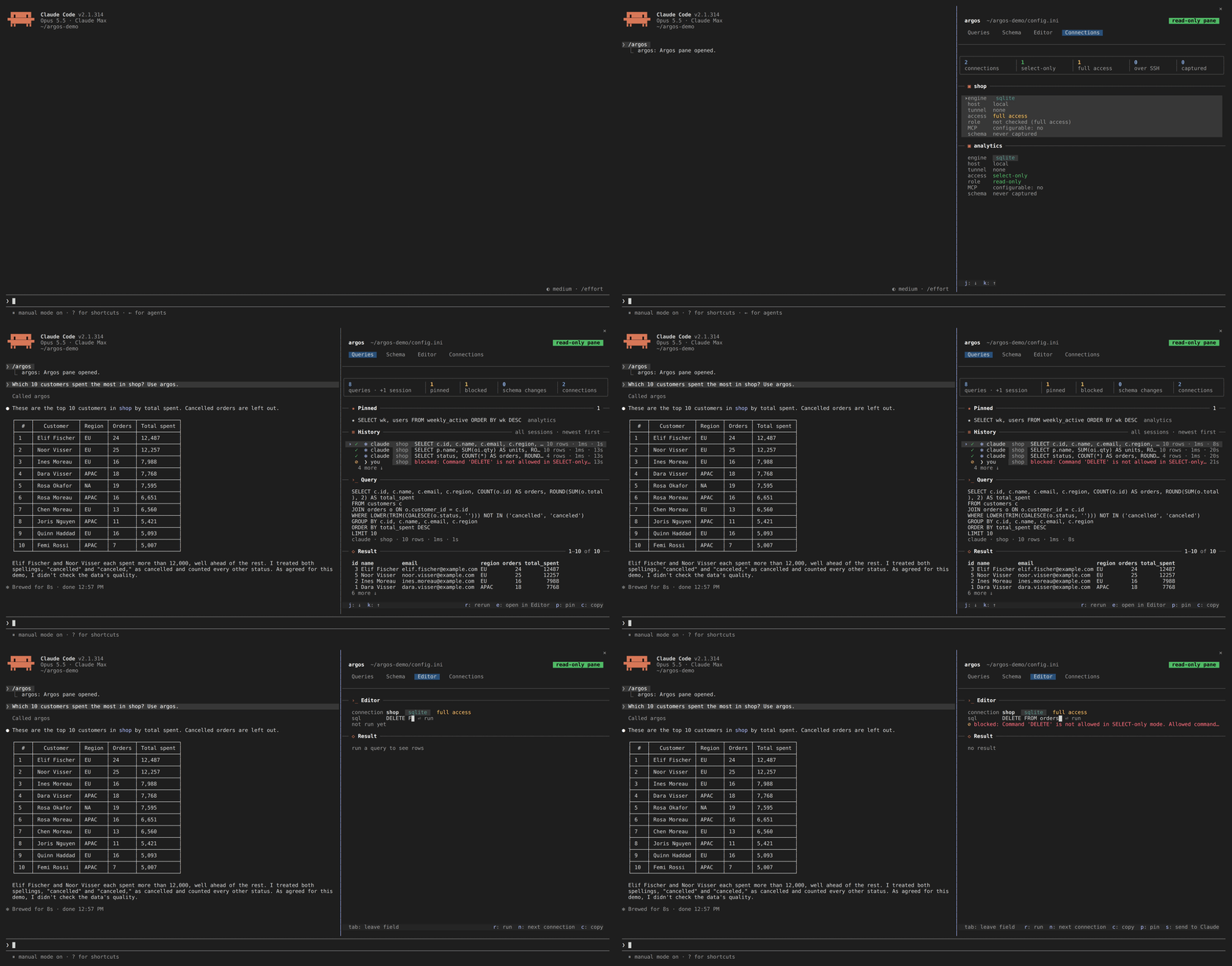
A Claude Code session: /argos opening the pane, a question about the shop database whose
query lands in Queries with its full result, a look at orders in Schema, and the Editor
refusing a DELETE on a connection that allows writes.
/argos opens your databases beside the chat on four tabs: Queries (every
query Claude or you ran, across sessions, with its full result, pins and reruns), Schema
(tables with their keys and relations), Editor (your own queries) and ConnectionsRequirements: Node.js >= 24.15 and the Claude Code CLI.
Connecting to Azure SQL with authentication=azure-cli additionally needs the
Azure CLI on PATH
and a completed az login; nothing else does.
git clone https://github.com/AraneaDev/argos.git
cd argos
npm install
npm run build
npm run setup
Interactive wizard for adding database connections, security settings, and SSH tunnels. It writes a config.ini, by convention at ~/.config/argos/config.ini, though any path works. You can also add databases at runtime with the sql_add_database tool.
claude mcp add argos --scope user -- \
  node "$(pwd)/dist/cli.js" serve --config "$HOME/.config/argos/config.ini"
Scopes:
node dist/cli.js install-plugin --config "$HOME/.config/argos/config.ini"            # preview
node dist/cli.js install-plugin --config "$HOME/.config/argos/config.ini" --execute  # install
Use the same config.ini you registered the server with: the pane reads the history the server
writes beside it. Start a new Claude Code session afterwards.
claude mcp list
You should see argos listed as connected. Its tools appear in Claude Code as mcp__argos__sql_query, mcp__argos__sql_get_schema, and so on, and /argos opens the pane.
claude plugin uninstall argos
claude plugin marketplace remove argos
claude mcp remove argos --scope user
Ask Claude about your data in plain words, and watch the queries land in the pane:
Claude reads the schema first, then queries; each result comes back to it as a short table, and in full to you in the pane.
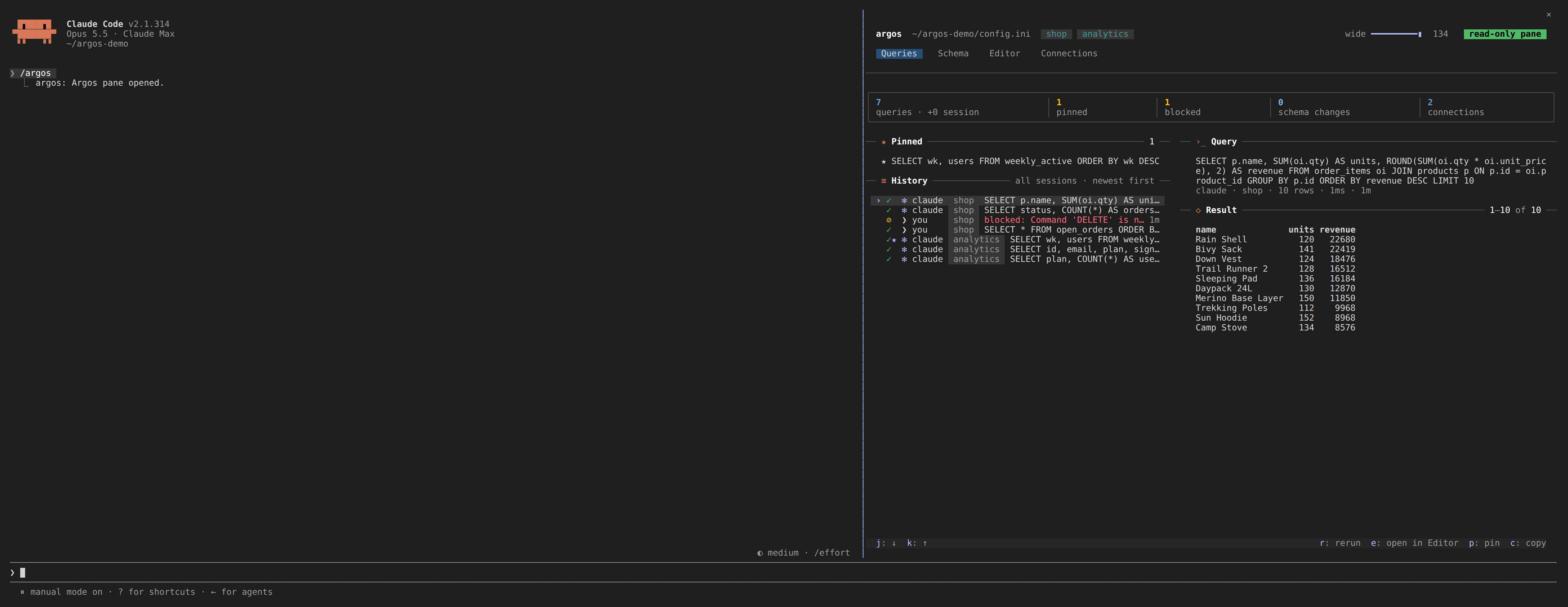
Queries: every query Claude or you ran, newest first and kept across sessions, with the selected
one's SQL and its full result. r reruns it read-only, p pins it, c copies the result as
markdown, CSV or JSON, and s puts one of your own results into your next message to Claude.
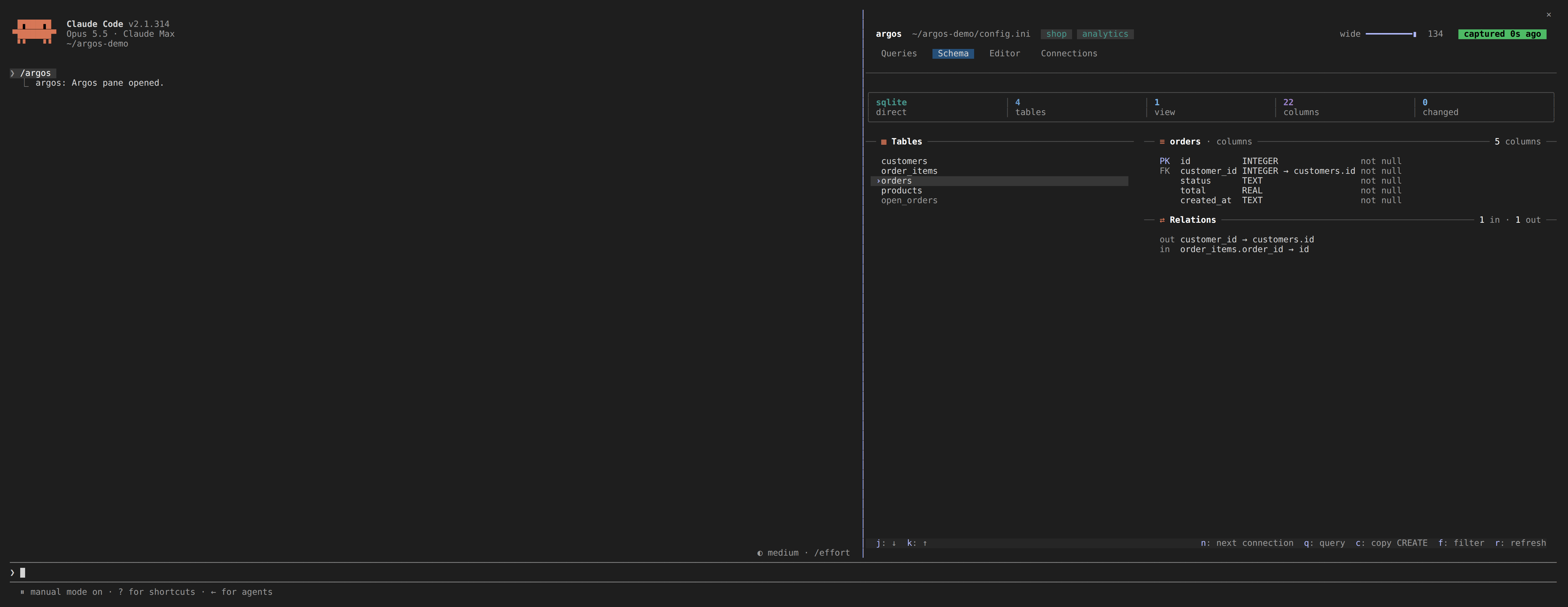
Schema: each connection's tables and views, the open table's columns with their keys, and its relations in and out.
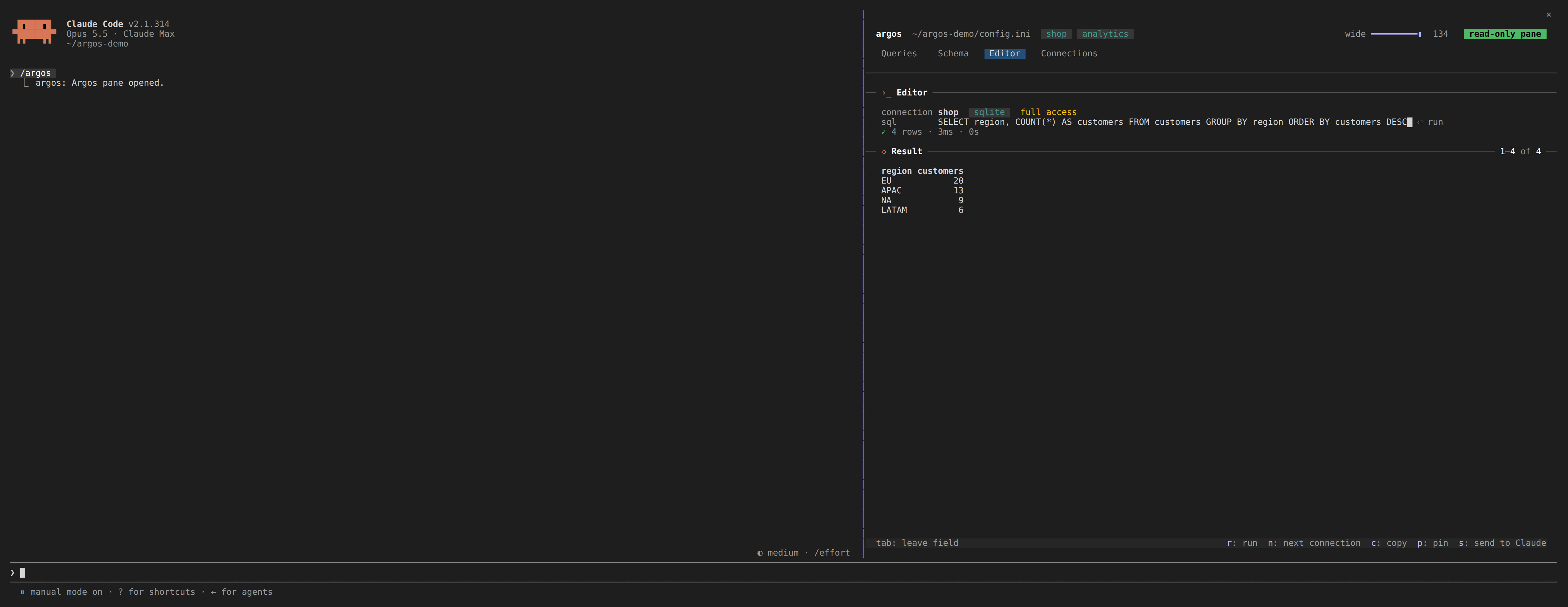
Editor: type SQL against any connection and run it. A write is refused with the reason, even on a connection that allows Claude to write.
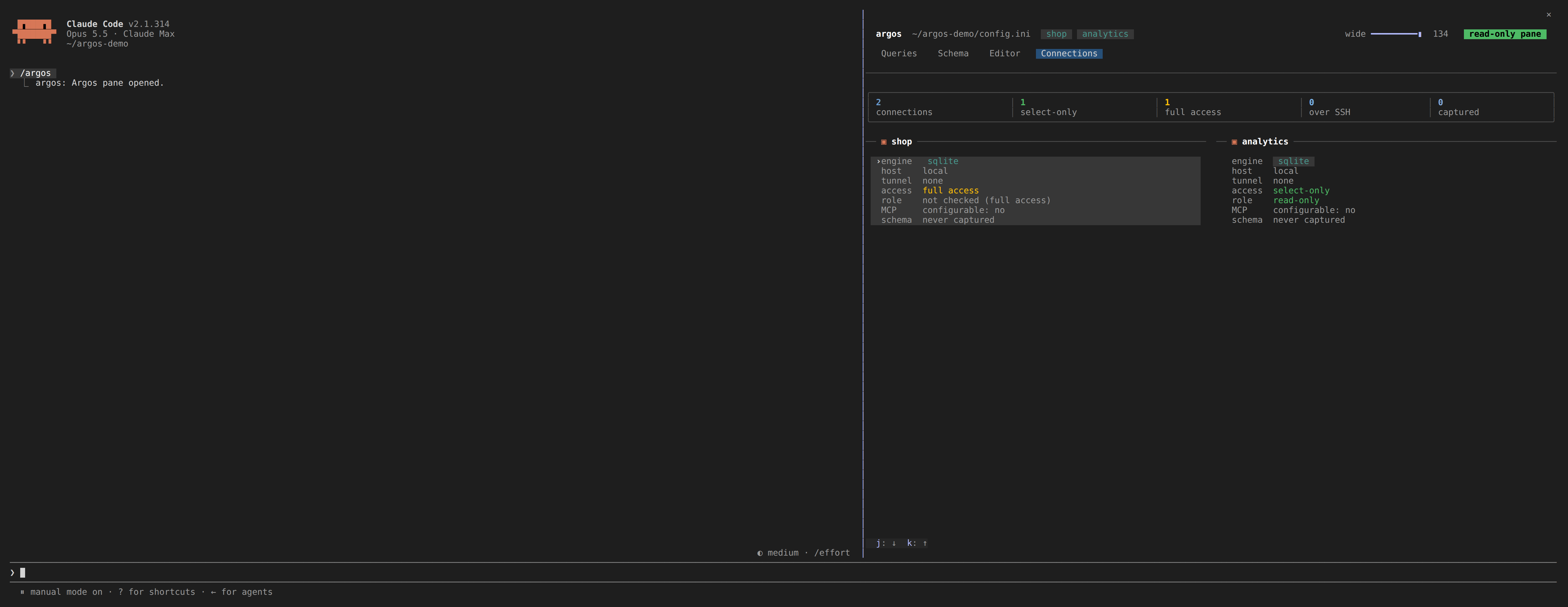
Connections: each database with its engine, host, tunnel, access and schema age.
Every tab, key, setting and limit is in the pane guide.
The pane runs the JSON commands for you; they are there for scripts too. argos is exposed as a
bin entry, so npm link (or a global install) puts it on your PATH.
[database.production]
type=postgresql
host=internal-db.company.local
port=5432
database=production_app
username=readonly_user
password=secure_random_password
ssl=true
select_only=true
timeout=15000

# SSH Tunnel Configuration
ssh_host=bastion.company.com
ssh_port=22
ssh_username=tunnel_user
ssh_private_key=/secure/path/ssh_key
# Required: without a pinned fingerprint the tunnel refuses to connect, rather
# than trusting whatever host key it is offered. Get it from the bastion with
#   ssh-keygen -lf /etc/ssh/ssh_host_ed25519_key.pub
ssh_host_fingerprint=SHA256:47DEQpj8HBSa+/TImW+5JCeuQeRkm5NMpJWZG3hSuFU

[security]
max_joins=5
max_subqueries=3
max_complexity_score=50
The Azure CLI's own sign-in is the credential, so no secret is written to
config.ini at all.
[database.azure_sql]
type=mssql
host=your-server.database.windows.net
port=1433
database=your_database_name
authentication=azure-cli
select_only=true

# Only when the server's tenant is not the CLI's active context, which is the
# usual case for an account with access to several tenants. Must be the GUID.
# azure_tenant_id=00000000-0000-0000-0000-000000000000
Needs az login beforehand, and the signed-in identity mapped as a database
user: CREATE USER [[email protected]] FROM EXTERNAL PROVIDER;. Encryption and
certificate verification are forced on for this mode, because an access token is
a bearer credential and an unverified connection hands it to whoever answers.
See the SQL Server guide for the details, including unattended use.
[database.transactions]
type=postgresql
host=transactions-db.company.com
database=transactions
select_only=true

[database.users]
type=mysql
host=users-db.company.com
database=users
select_only=true

[database.analytics]
type=sqlite
file=./data/analytics.sqlite
select_only=false

[database.local_cache]
type=sqlite
file=./data/cache.sqlite
select_only=false
mcp_configurable=true

[extension]
max_rows=1000
query_timeout=30000
Automatically mask, replace, or partially obscure sensitive fields (emails, phone numbers, SSNs, etc.) in query results before they reach Claude, the pane, or other clients. Redaction is configured per-database in config.ini:
[database.production]
type=postgresql
host=prod-db.company.com
database=app_db
username=readonly_user
password=secure_pass
select_only=true

# Field Redaction
redaction_enabled=true
redaction_rules=*email*:partial_mask,*phone*:full_mask,ssn:replace:[PROTECTED]
redaction_case_sensitive=false
redaction_log_access=true
Redaction types:
Field patterns: exact match (email), wildcard (*email*), or regex (/^user_.+$/).
Argos is not certified against any standard, and no library can be. Compliance is a property of your deployment. What it provides is the controls and the evidence that such a regime asks for:
The pane's history (.argos/ beside your config.ini) holds query text and redacted results
for up to 30 days, so it is git-ignored and owner-only.
Argos supports runtime database management through dedicated MCP tools. This allows you to add, update, and remove database connections without restarting the server.
mcp_configurable=true in your database config to allow MCP-driven updates and removal.sql_set_mcp_configurable tool is a one-way lock: once set to false, the database can no longer be modified or removed via MCP. Unlocking requires a manual edit to the configuration file.sql_get_config tool always redacts passwords and other sensitive fields before returning configuration data.sql_add_database have mcp_configurable=true by default, and are always select_only=true. Granting write access requires editing config.ini by hand, so the model cannot grant it to itself.Query time is your database's, not Argos's. It adds validation and formatting
around a normal client connection. sql_get_metrics reports the latency it
actually observed (min, max, avg, p95), and sql_analyze_performance returns the
execution plan with dialect-specific advice when something is slow.
graph TB
 Claude[Claude Code] --> MCP[MCP Protocol]
 MCP --> Security[Security Layer]
 Security --> Connection[Connection Manager]
 Connection --> Adapters[Database Adapters]

 Adapters --> PostgreSQL[(PostgreSQL)]
 Adapters --> MySQL[(MySQL)]
 Adapters --> SQLite[(SQLite)]
 Adapters --> MSSQL[(SQL Server)]

 Security --> SSH[SSH Tunneling]
 SSH --> Bastion[Bastion Host]
 Bastion --> RemoteDB[(Remote Database)]

 Connection --> History[(.argos history)]
 Pane[Claude Code pane] --> CLI[argos CLI, read-only]
 CLI --> Security
 CLI --> History
The pane cannot reach the MCP server over stdio, so it runs the argos CLI, which reads the same
config.ini and history and goes through the same security, redaction and audit layers.
git clone https://github.com/AraneaDev/argos.git
cd argos
npm install
npm run dev
npm test           # the server and CLI (jest)
npm run test:mod   # the Claude Code pane (vitest)
npm run validate   # everything CI runs
The README and pane guide images come from node tools/capture/shoot.mjs, which drives an
isolated Claude Code session on demo data; see tools/capture/.
The source is layered, and a lower layer may never depend on a higher one:
Nothing in src imports from tests or examples, and the pane (plugin/) imports nothing from
src: it talks to the CLI's JSON.
These rules are not enforced by CI. They are a design constraint, checked by hand or by whatever analysis tool you point at the checkout, so read the table before adding an import that reaches upward. A cycle between layers is the signal that something belongs in a lower one.
The project was renamed from Argos-MCP to Argos. If you set it up before the rename:
Claude Code registration: re-register under the new name so the tools appear as
mcp__argos__*:
claude mcp remove argos-mcp   # whatever name you registered it under
claude mcp add argos --scope user -- \
  node /abs/path/to/argos/dist/cli.js serve --config /abs/path/config.ini
Commands: argos-mcp is now argos serve, and argos-setup is now argos setup.
The old names still work for one release and print a deprecation notice to stderr.
Audit logs are now written to ~/.argos/audit/. Earlier logs stay in
~/.argos-mcp/audit/; move them over if you want one trail.
Server log is now argos.log (was argos-mcp.log).
Repository: AraneaDev/Argos-MCP is now AraneaDev/argos; GitHub redirects the old URL,
but update your remote with git remote set-url origin https://github.com/AraneaDev/argos.git.
Released under the MIT License, free for any use, commercial included, with no warranty.
Built by Tim Schipper and released as open source under Aranea Development.
Audited SQL access for Claude Code and any MCP client: PostgreSQL, MySQL, SQLite and SQL Server, read-only by default, with field redaction and SSH tunnels. In Claude Code, /argos opens a pane with yo
Resumen general
Audited SQL access for Claude Code and any MCP client: PostgreSQL, MySQL, SQLite and SQL Server, read-only by default, with field redaction and SSH tunnels. In Claude Code, /argos opens a pane with your schemas, every query's full result and a read-only editor.
Herramientas
Aún no hay lista de herramientas. Los servidores remotos la reciben tras la primera comprobación de estado.
Preguntas frecuentes
Copia en esta página la configuración stdio para Cursor, Claude Desktop, Claude Code o VS Code. Usa la instalación del publicador, no un proxy de PlugMCP.
Este registro no indica ninguna variable de entorno obligatoria.
Argos se ejecuta localmente por stdio.
Última comprobación: 2026-11-12. Audited SQL access for Claude Code and any MCP client: PostgreSQL, MySQL, SQLite and SQL Server, read-only by default, with field redaction and SSH tunnels. In Claude Code, /argos opens a pane with your schemas, every query's full result and a read-only editor.