amdb turns your codebase into AI context — entirely on your machine.
amdb is a zero-runtime, single-binary code context MCP server with combined graph + vector retrieval. No code leaves the machine and no Node/Python runtime is required. Built for air-gapped environments, CI containers, and regulated industries where cloud-based codebase indexing is prohibited.
Turn your codebase into AI context — entirely on your machine. Single-binary MCP server with AST parsing, call graph, and local embeddings.
Estrellas
26
Herramientas
—
Disponibilidad
—
Install
cargo install amdb
Or download a static binary for Linux/macOS from the Releases page — no toolchain required.
Quickstart
amdb init .    # index the repo: AST parse + local embeddings, incremental
amdb serve     # expose the index as an MCP server over stdio
Done. Prefer a file instead of a server? amdb generate --focus "auth" writes a targeted context file to .amdb/.
Connect your editor
VSCode / Cursor — add .vscode/mcp.json to your project:
The server exposes three tools, all reading from the pre-built local index:
Tool
What it returns
amdb_get_context
Full project overview: files, symbols, and the mermaid dependency graph
amdb_focus
Context narrowed to a query via name match + semantic vector search, expanded by depth dependency hops
amdb_get_symbol
Every definition of a symbol name as JSON: file, kind, line, signature, callers, and callees — each callee carries its resolved file and a resolution value (same-file, global-unique, or unresolved)
If no index exists the tools respond with an error asking you to run amdb init — the server never indexes on its own.
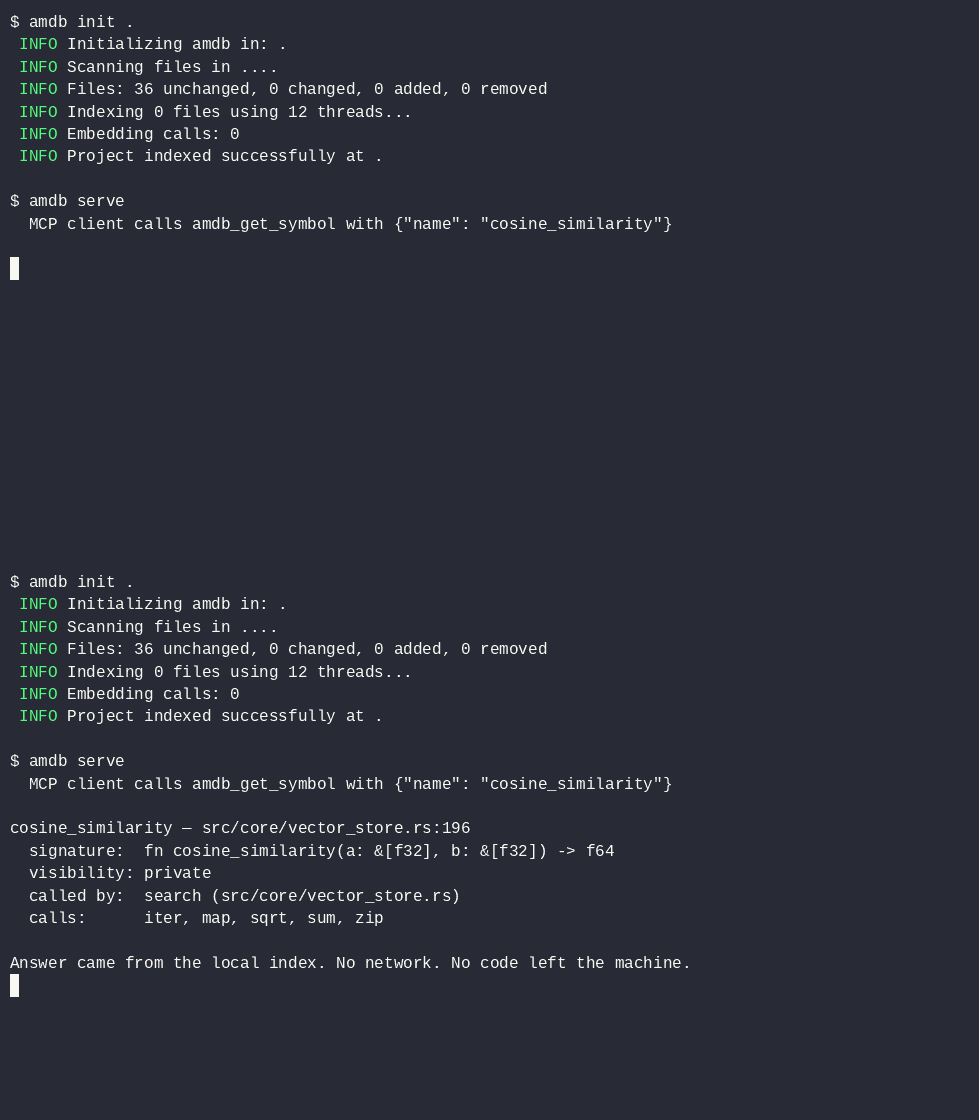
$ amdb init .
 INFO Initializing amdb in: .
 INFO Scanning files in ....
 INFO Files: 35 unchanged, 0 changed, 0 added, 0 removed
 INFO Indexing 0 files using 12 threads...
 INFO Embedding calls: 0
 INFO Project indexed successfully at .

$ amdb serve
  MCP client calls amdb_get_symbol with {"name": "cosine_similarity"}

cosine_similarity — src/core/vector_store.rs:196
  signature:  fn cosine_similarity(a: &[f32], b: &[f32]) -> f64
  visibility: private
  called by:  search (src/core/vector_store.rs)
  calls:      iter, map, sqrt, sum, zip

Answer came from the local index. No network. No code left the machine.
To record the cast on a host with asciinema: asciinema rec -c "AMDB_BIN=./target/release/amdb ./scripts/demo.sh" demo.cast, then agg demo.cast demo.gif.
Benchmarks
Measured by benchmark.py against amdb's own source tree (31 files, 21,887 raw tokens). Full methodology and caveats in benchmark.md.
Metric
Score
Meaning
Precision targeting
100% (28/28 indexed files)
Query = exact file stem; the file's own section comes back. A retrieval-plumbing test, not a semantic-search-quality test
Global efficiency
91.5% reduction
Focus output tokens vs. a full-repo dump
Noise reduction
81.7% compression
Interface tokens vs. raw tokens, top-5 largest files
Graph presence
100% (28/28)
Output contains real --> dependency edges
3 of 31 files are module-declaration files with no extractable symbols; they are not in the index and are excluded from the denominator, not silently counted.
Language support
Symbols and the call graph are extracted for all 16 grammars, but is_public and signature enrichment is AST-accurate for only three languages. The rest fall back to is_public = true and no signature — honest table below, so you know what you get:
Language
Extensions
Symbols + call graph
is_public / signature
Rust
.rs
✅
✅ AST-accurate
Python
.py
✅
✅ AST-accurate
TypeScript
.ts, .tsx
✅
✅ AST-accurate
JavaScript
.js, .jsx, .mjs
✅
fallback (true / none)
C
.c, .h
✅
fallback (true / none)
C++
.cpp, .hpp, .cc, .cxx
✅
fallback (true / none)
C#
.cs
✅
fallback (true / none)
Go
.go
✅
fallback (true / none)
Java
.java
✅
fallback (true / none)
Ruby
.rb
✅
fallback (true / none)
PHP
.php
✅
fallback (true / none)
HTML
.html, .htm
✅
fallback (true / none)
CSS
.css
✅
fallback (true / none)
JSON
.json
✅
fallback (true / none)
Bash
.sh, .bash
✅
fallback (true / none)
How it works
amdb init parses every source file with Tree-sitter, extracts symbols and call edges, and embeds each symbol with a local fastembed model — content-hashed, so unchanged files are skipped entirely on re-runs. Everything lands in two SQLite files: a symbol/relationship store and a vector store. Retrieval combines exact name matching, cosine similarity over the vectors, and call-graph expansion, served over MCP stdio or written to a Markdown context file.
Comparison
Same fixture repo (amdb's own source), same five questions ("where is symbol X defined, and who calls it?"), all numbers actually measured by benchmark.py. We did not run competitor indexing tools, so none appear here; the baselines are a raw full-repo dump and a scripted grep-then-read-matched-files agent protocol.
Strategy
Avg tokens to model
Avg tool calls
Raw full-repo dump
21,887
1
grep + read matched files
4,180
2.4
amdb (--focus, depth 1)
3,972
1
On a 31-file repo, grep is genuinely competitive on tokens — amdb's edge at this scale is one structured call instead of 2–4, with signatures, visibility, and resolver-accurate caller/callee attribution instead of raw text. The token gap widens with repo size: the dump grows linearly, grep grows with match noise, amdb's focus output grows with the size of the relevant interface.
More
Daemon mode — amdb daemon watches the project and incrementally re-indexes on save, keeping the MCP answers fresh.
Focus depth — amdb generate --focus <query> --depth N expands context N call-graph hops from the matched files (default 1).
Configuration — optional amdb.toml in the project root:
The published ghcr.io/betaer-08/amdb:1.0.0 image predates the serve entrypoint — it runs bare amdb, so pass the subcommand explicitly: docker run -i --rm -v "$PWD:/workspace" -w /workspace ghcr.io/betaer-08/amdb:1.0.0 serve. Images published from the next tag serve by default.
Stability
amdb follows semantic versioning. 1.0.0 freezes the contract below; anything listed as covered changes only in a 2.0 release, and contract tests in tests/contract_test.rs fail loudly if it drifts.
Covered by the 1.0 promise:
CLI — subcommands init, daemon, generate, serve; flags --focus/-f, --depth/-d, --verbose/-v; the optional path argument to init and daemon. Exit codes: 0 on success, 1 on unrecoverable error.
MCP tools — exactly amdb_get_context, amdb_focus, amdb_get_symbol with their current input parameters. amdb_get_symbol responses keep every current field with its current type: file, name, kind, line, signature, is_public, callers[] (name, file), callees[] (name, file, resolution ∈ same-file | global-unique | unresolved). New fields and new resolution values may be added in minor releases; existing ones are never renamed, removed, or retyped.
Config — amdb.toml keys db_path and ignore_patterns, and the AMDB_DB_PATH environment override. Unknown keys are ignored.
Database upgrades — the index schema is versioned via PRAGMA user_version. Any database written by amdb ≥ 0.6 opens without error and migrates automatically; the next amdb init rebuilds whatever the migration invalidated. Deleting .database/ is a last-resort fallback, never a required upgrade step.
Generated Markdown anchors — two things in generate output are stable for scripts: each indexed file gets a heading line of exactly ### <relative/path> (forward slashes, relative to the project root), and the dependency graph is a single fenced ```mermaid block containing graph TD; with --> edge lines.
Not covered (may change in any release):
Every other detail of the Markdown layout: bullet and signature formatting, section ordering, mermaid node-id sanitization, header text.
Log and progress text on stdout/stderr.
The SQLite table layout and the vector-store file format (only automatic migration is promised, not the bytes).
The benchmark harness (benchmark.py) and its output format.
Internal Rust APIs — amdb is a binary crate; depending on its modules as a library is unsupported.
Aún no hay lista de herramientas. Los servidores remotos la reciben tras la primera comprobación de estado.
Preguntas frecuentes
Preguntas
¿Cómo instalo Amdb?
Copia en esta página la configuración stdio para Cursor, Claude Desktop, Claude Code o VS Code. Usa la instalación del publicador, no un proxy de PlugMCP.
¿Amdb necesita una clave de API?
Este registro no indica ninguna variable de entorno obligatoria.
¿Qué transporte usa Amdb?
Amdb se ejecuta localmente por stdio.
¿Cuándo se comprobó Amdb por última vez?
Última comprobación: 2026-10-28. Turn your codebase into AI context — entirely on your machine. Single-binary MCP server with AST parsing, call graph, and local embeddings.