PyWry is a cross-platform rendering engine and desktop UI toolkit for Python. One API, three output targets:
Native window — OS webview via PyTauri. Not Qt, not Electron. Use unrestricted HTML/CSS/JS.
Jupyter widget — anywidget + FastAPI + WebSocket, works in JupyterLab, VS Code, and Colab.
PyWry is a cross-platform app factory, rendering engine and UI toolkit for Python that produces native desktop, web, and notebook experiences from a single API.
Estrellas
99
Herramientas
—
Disponibilidad
—
Browser tab — FastAPI server with Redis state backend for horizontal scaling.
Build Once, Render Anywhere: Prototype interactive data apps in a Jupyter Notebook, easily deploy them as web apps, and seamlessly compile them into secure, lightweight standalone desktop executables via pywry[freeze].
from pywry import PyWry
import plotly.express as px

app = PyWry(theme="light")
fig = px.scatter(px.data.iris(), x="sepal_width", y="sepal_length", color="species")
app.show_plotly(fig)
app.block()
Features
Toolbar components — Button, Select, MultiSelect, TextInput, SecretInput, SliderInput, RangeInput, Toggle, Checkbox, RadioGroup, TabGroup, Marquee, Modal, and more. All Pydantic models; position them around the content edges or inside the chart area.
Two-way events — app.emit() and app.on() bridge Python and JavaScript in both directions. Pre-wired Plotly and AgGrid events included.
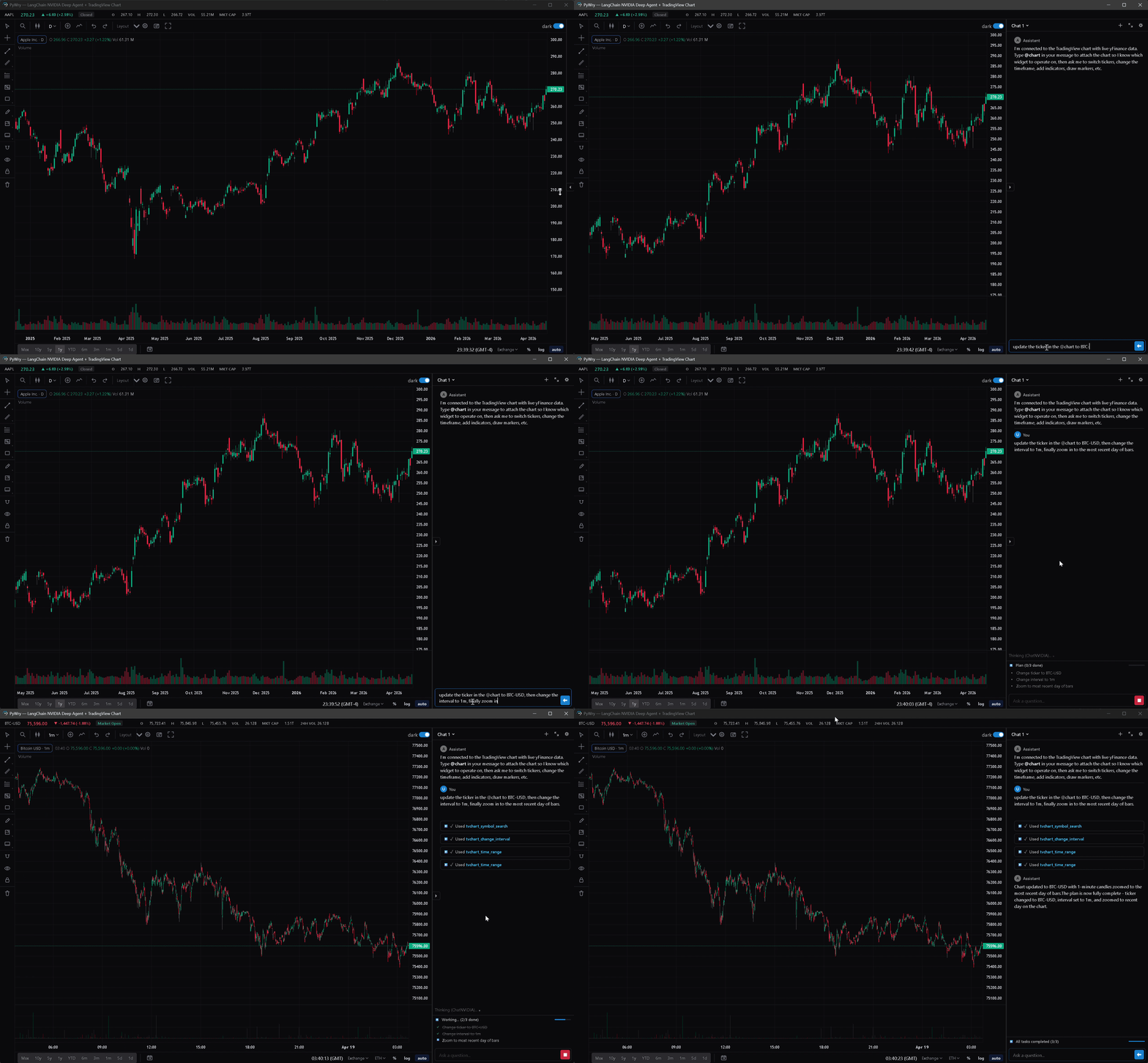
Chat — streaming chat widget with threads, slash commands, artifacts, and pluggable providers: OpenAIProvider, AnthropicProvider, MagenticProvider, CallbackProvider, StdioProvider (ACP subprocess), and DeepagentProvider (LangChain Deep Agents).
TradingView charts — extended Lightweight Charts integration with a full drawing surface (trendlines, fib tools, text annotations, price notes, brushes), pluggable datafeed API, UDF adapter for external quote servers, streaming bar updates, compare overlays, compare-derivative indicators (Spread / Ratio / Sum / Product / Correlation), savable layouts, and a themeable settings panel.
Theming — light / dark / system modes, themeable via --pywry-* CSS variables, hot reload during development.
Security — token auth, CSP headers, SecuritySettings.strict() / .permissive() / .localhost() presets. SecretInput stores values server-side, never in HTML.
State backends — in-memory (default), Redis (multi-worker), or SQLite with SQLCipher encryption at rest.
Standalone executables — PyInstaller hook ships with pywry[freeze]. No .spec edits or --hidden-import flags required.
MCP server — drive widgets, charts, and dashboards from any Model Context Protocol client (Claude Desktop, Claude Code, Cursor, etc.).
Widget-creating tools — create_widget, show_plotly, show_dataframe, show_tvchart, create_chat_widget — return an AppArtifact: a self-contained HTML snapshot delivered as an MCP EmbeddedResource with mimeType: text/html and URI pywry-app://<widget_id>/<revision>. Clients that render HTML resources (Claude Desktop's artifact pane, mcp-ui clients, PyWry's own chat widget) show the app inline.
Each render bumps a per-widget revision. The latest revision keeps a live WebSocket bridge to Python; older revisions freeze at their last known state. Call get_widget_app(widget_id) to re-snapshot after a mutation.
See the MCP docs for tool reference and client setup.
The output in dist/MyApp/ is fully self-contained. Target machines need no Python installation — only the OS webview (WebView2 on Windows 10 1803+, WKWebView on macOS, libwebkit2gtk on Linux).
PyWry is a cross-platform app factory, rendering engine and UI toolkit for Python that produces native desktop, web, and notebook experiences from a single API.
Aún no hay lista de herramientas. Los servidores remotos la reciben tras la primera comprobación de estado.
Preguntas frecuentes
Preguntas
¿Cómo instalo PyWry?
Copia en esta página la configuración stdio para Cursor, Claude Desktop, Claude Code o VS Code. Usa la instalación del publicador, no un proxy de PlugMCP.
¿PyWry necesita una clave de API?
Este registro no indica ninguna variable de entorno obligatoria.
¿Qué transporte usa PyWry?
PyWry se ejecuta localmente por stdio.
¿Cuándo se comprobó PyWry por última vez?
Última comprobación: 2026-10-27. PyWry is a cross-platform app factory, rendering engine and UI toolkit for Python that produces native desktop, web, and notebook experiences from a single API.