
diffler
magit, without Emacs.
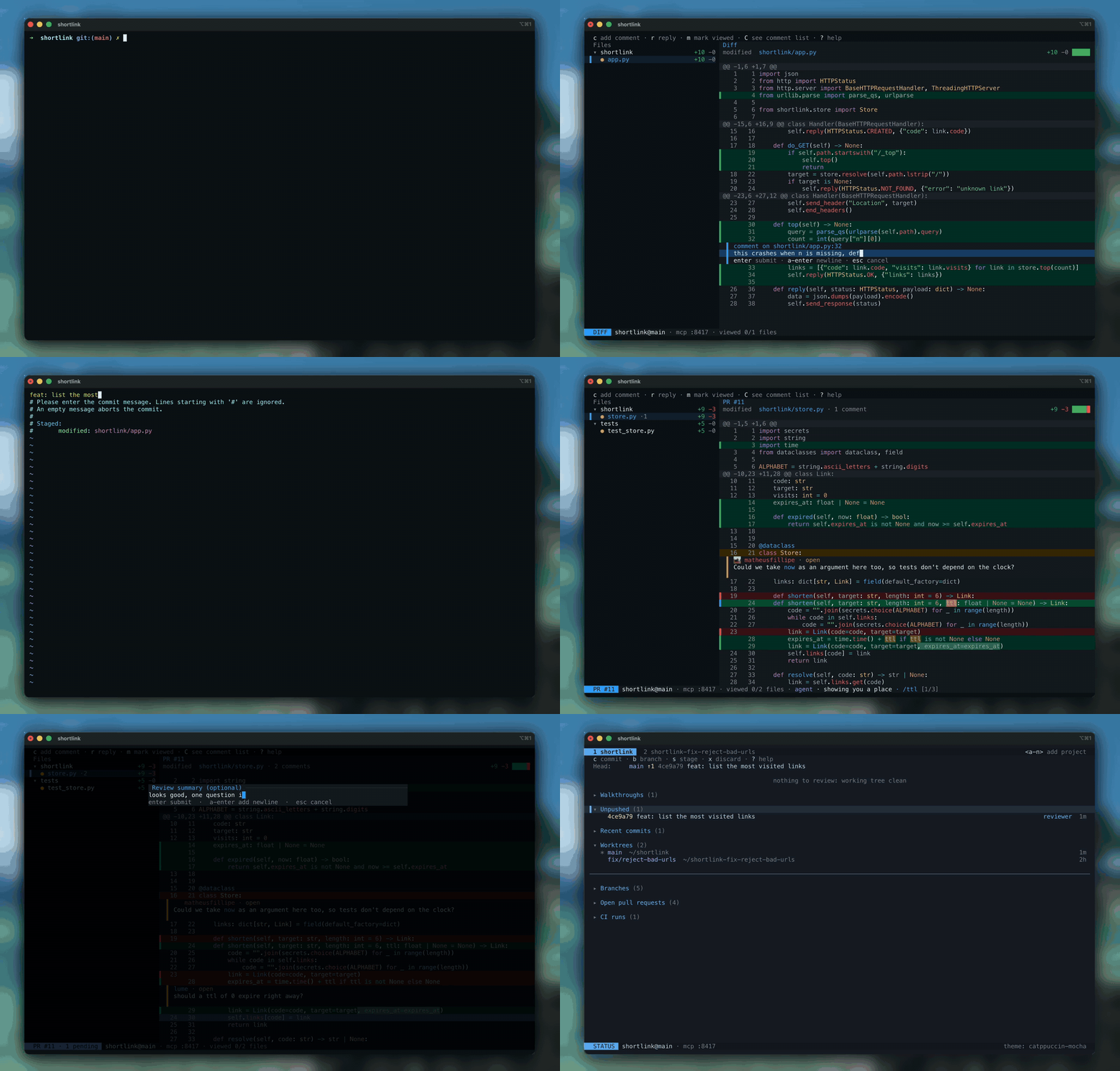
I like magit a lot, and I wanted it as its own program. That's diffler: one binary with Doom Emacs keys for staging, committing, branching and reading diffs. You can review pull requests from GitHub, GitLab or Forgejo without checking them out. And if you work with a coding agent like Claude Code, it can read the comments you leave in the diff and reply right there, while you watch it fix the code.
Features
- Stage, commit, branch, push and pull with magit's keys
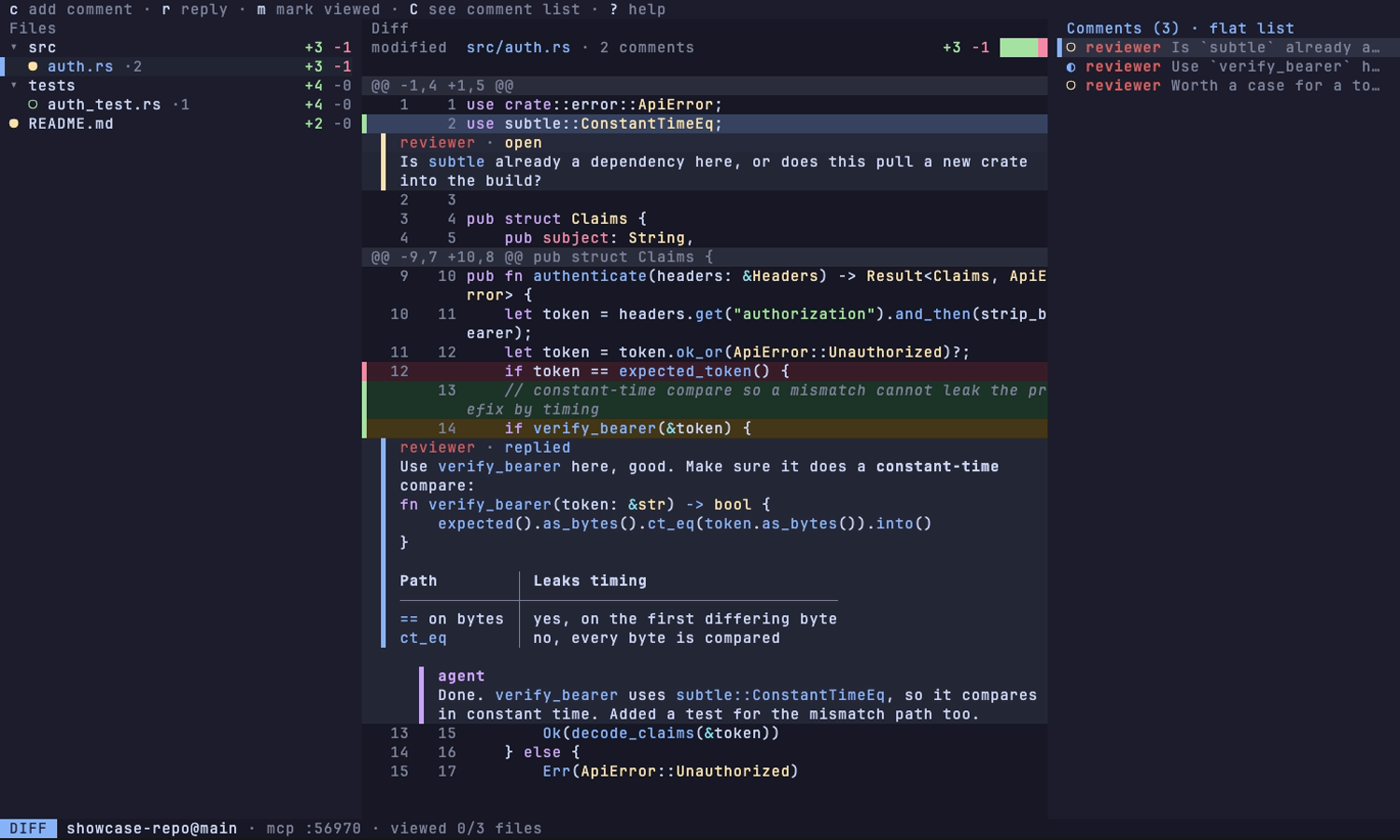
- Comment on lines and ranges, mark files as viewed
- Review pull requests without checking them out
- Let your agent answer your comments and walk you through its changes (optional)
- Open several projects as tabs; your agent sees all of them through one connection
- Open, create and remove git worktrees (jj workspaces), each as its own tab
- Works in git and jj repos
- Shows changed images in the terminal, before and after
Install
cargo install diffler
No compiling, and no Rust toolchain needed.
cargo binstall diffler
Or download it straight from the
releases page: macOS,
Linux and Windows, x86_64 and arm64. Any GitHub-release installer (eget,
ubi, ...) works against it too.
macOS and Linux. The tap is this repository.
brew tap matheusfillipe/diffler https://github.com/matheusfillipe/diffler
brew install diffler
Windows. The bucket is this repository.
scoop bucket add diffler https://github.com/matheusfillipe/diffler
scoop install diffler
diffler-bin on the AUR ships the prebuilt binary, so it installs without
building.
yay -S diffler-bin
The flake serves the prebuilt binary. nix run tries it without installing
anything, nix profile install keeps it.
nix run github:matheusfillipe/diffler
nix profile install github:matheusfillipe/diffler
A wrapper that fetches the prebuilt binary. The package name is scoped, the
command it installs is plain diffler.
npx @mattfillipe/diffler
npm install -g @mattfillipe/diffler
Quick start
diffler                 # open the status screen in the current repo
diffler path/to/repo    # or in another one
Inside diffler, <cr> opens a file's diff, s stages, cc commits, and c
comments a line. For pull requests, b p lists the open ones and <cr>
opens one's page: its description and conversation, where c comments on the
pull request as a whole and R requests a reviewer. <cr> again reviews its
diff, and S submits your line comments as a single review. b P opens a new pull request from the
current branch.
With a coding agent
Connect your agent once:
claude mcp add diffler -- npx -y diffler-mcp
# or, as a plugin (MCP server plus the /df, /dfa and /dfr commands):
claude plugin marketplace add matheusfillipe/diffler && claude plugin install diffler@diffler
# or, over HTTP, reaching the first diffler you started (it takes port 8417):
claude mcp add --transport http diffler http://127.0.0.1:8417/mcp
Once connected, the server's prompts show up as /diffler:review,
/diffler:walkthrough and /diffler:critique. The plugin adds /df, to
answer your comments, /dfa, to walk you through a change, and /dfr, to
review a change and leave comments.
Add the server to opencode.json in the project, or globally in
~/.config/opencode/opencode.json:
{
  "mcp": {
    "diffler": {
      "type": "local",
      "command": ["npx", "-y", "diffler-mcp"],
      "enabled": true
    }
  }
}
And install the /df, /dfa and /dfr commands (opencode has no package
mechanism for commands, so this fetches the ones maintained in this repo):
mkdir -p ~/.config/opencode/commands
for c in df dfa dfr; do curl -fsSLo ~/.config/opencode/commands/$c.md \
  https://raw.githubusercontent.com/matheusfillipe/diffler/main/.opencode/commands/$c.md; done
Run npx -y diffler-mcp as a stdio server. It finds the port of the diffler
running in your repo, since each diffler writes its own to .diffler/mcp.json.
Or point it at http://127.0.0.1:8417/mcp (streamable HTTP), the port the
first diffler you started takes. The server also ships review, walkthrough and
critique prompts that prompt-aware clients surface as commands.
Comment on the agent's changes and press Z to send them. The agent answers
in the thread and you resolve it once you're happy. Ask it for a walkthrough
of its change and open it from the status screen. More in
docs/walkthroughs.md, and the MCP tools are listed in
docs/mcp.md. Don't need it? Set
enabled = false under [mcp] in the config, or run diffler --no-mcp.
How it compares
¹ GitHub, GitLab and Forgejo. ² GitHub, GitLab, Gitea, Bitbucket, Azure DevOps and Gerrit. ³ tuicr exports your comments as markdown for you to paste into the agent.
Keys
Vim motions everywhere (j/k, gg/G, /, <c-d>/<c-u>). ? shows the
full keymap of the screen you're on, and <c-k> fuzzy-finds any action.
Every binding is remappable in docs/config.example.toml. The mouse works, over tmux too: click to select or fold, and right-click (or press and hold) a line, file or comment for what you can do with it.
Configuration
Layered TOML: defaults, then ~/.config/diffler/config.toml, then
<repo>/.diffler/config.toml, then CLI flags. Every option is documented in
docs/config.example.toml. See the merged result and
where each value came from:
diffler config --dump
Themes
Switch live with T, or set ui.theme. See every theme in the
gallery. Add your own as a TOML file in
~/.config/diffler/themes/: docs/themes lists
every key.
Development
just ci     # fmt + clippy + tests
just e2e    # PTY end-to-end suite (needs uv)
Requires Rust 1.90+, just, cargo-nextest. Hooks: prek install.
License
MIT or Apache-2.0, at your option.