mcp-gopls – MCP server for Go (gopls)
A Model Context Protocol (MCP) server that lets AI assistants use Go’s LSP (gopls) for navigation, diagnostics, testing, coverage, and more.
Potencia tu agente
Instalación del publicador. No es un endpoint de PlugMCP.
Host a copy with our keys and logs.
Aún no hay una versión empaquetada en el registro. Sigue el README del repositorio.
¿URL remota o un comando en tu máquina? En qué se diferencian las dos instalaciones
Ejecutar en PlugMCP
A new server you create. It is not this listing's official endpoint. Use the publisher install when you want their URL and their credentials.
AbrirDel publicador
TL;DR: If you use Claude / Cursor / Copilot with Go,
mcp-goplsgives the AI full LSP powers: go-to-definition, references, hover, completion,go test, coverage,go mod tidy,govulncheck, etc.
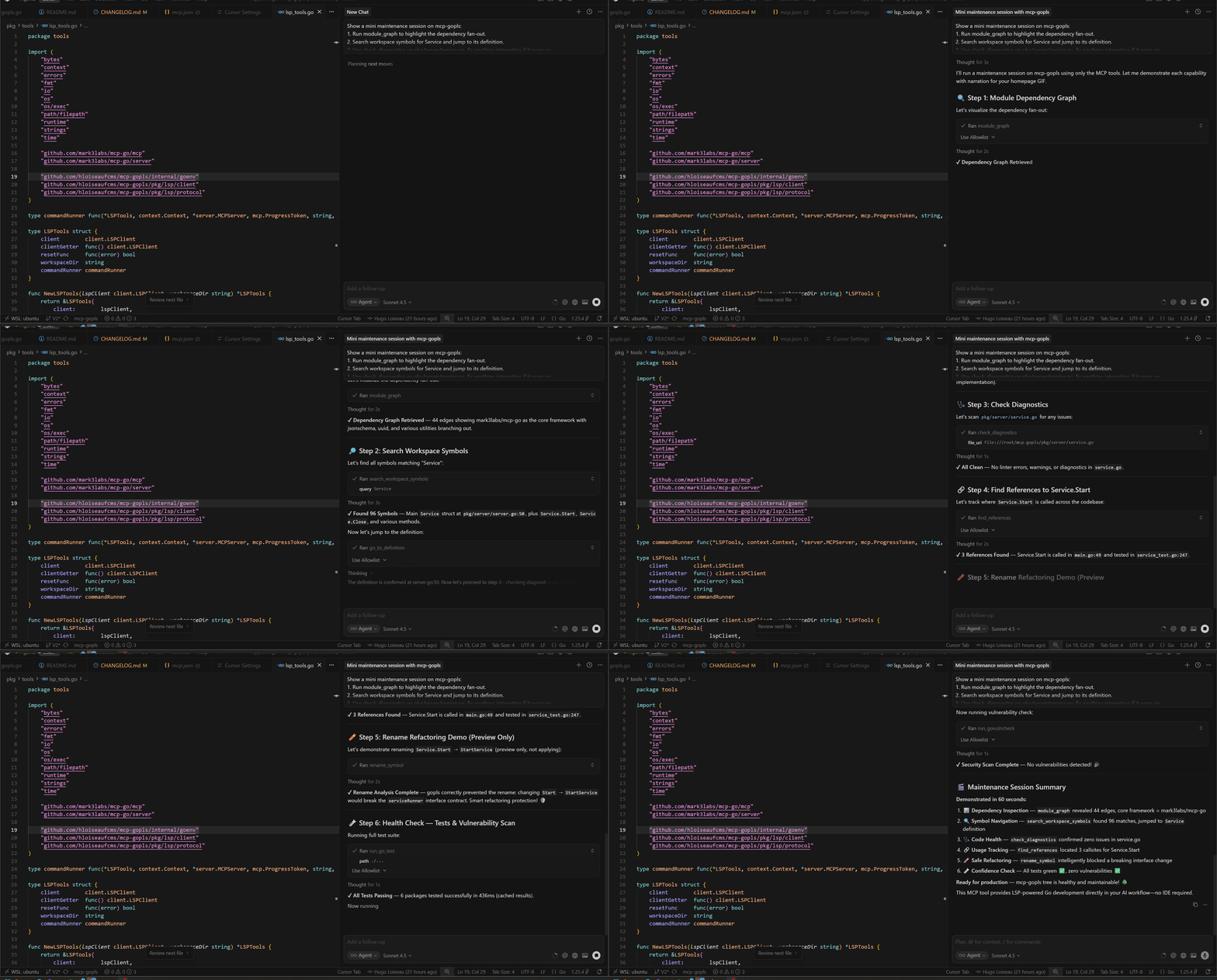
This MCP server helps AI assistants to:
go mod tidy, govulncheck, and module graph commands with structured resultsStatus: Actively developed – used in real projects.
Tested with Go 1.25.x andgopls@latest.
This project uses the mark3labs/mcp-go library to implement the Model Context Protocol. The MCP integration enables seamless communication between AI assistants and Go tools.
The server communicates with gopls, the official language server for Go, via the Language Server Protocol (LSP).
--workspace, --gopls-path, --log-level, --rpc-timeout, and --shutdown-timeout flags + env vars (MCP_GOPLS_*)go test, go mod tidy, govulncheck, go mod graphresource://workspace/overview, resource://workspace/go.mod) and prompts (summarize_diagnostics, refactor_plan)notifications/progress events so clients can surface status updatesmcp-gopls vs built-in gopls MCPAs of gopls v0.20.0, the built-in MCP server exposes these tools:
go_context, go_diagnostics, go_file_context, go_file_diagnostics,
go_file_metadata, go_package_api, go_references, go_rename_symbol,
go_search, go_symbol_references, go_workspace, go_vulncheck.
If you want full LSP-like editing + tooling from MCP (definition, hover, completion, format, rename, code actions, go test, coverage, go mod tidy, module graph), mcp-gopls is strictly richer.
If you mostly want read-only/introspective tools (diagnostics, symbol search, references, package API, workspace/file context, vulncheck) with no extra binary, the built-in gopls MCP is enough.
Note: The built-in
goplsMCP server is still marked experimental and its tool set may change over time. This comparison is accurate as ofgoplsv0.20.x.
.
├── cmd
│   └── mcp-gopls        # Application entry point
├── pkg
│   ├── lsp             # LSP client to communicate with gopls
│   │   ├── client      # LSP client implementation
│   │   └── protocol    # LSP protocol types and features
│   ├── server          # MCP server
│   └── tools           # MCP tools exposing LSP features
go install github.com/hloiseau/mcp-gopls/v2/cmd/mcp-gopls@latest
go install github.com/hloiseau/mcp-gopls/v2/cmd/mcp-gopls@latest
$PATH:mcp-gopls --help
If you prefer to run mcp-gopls in a container (for Docker MCP Gateway or other containerized setups), use the official image.
docker run --rm -i \
  -v /absolute/path/to/your/go/project:/workspace \
  ghcr.io/hloiseau/mcp-gopls:latest \
  --workspace /workspace
Copy docs/docker-mcp.yaml, update the bind mount path, then run from that directory:
docker mcp gateway run
If your MCP catalog tooling requires a toolsUrl, use docs/tools.json as a static tool list.
Note: All clients point to the same command:
mcp-gopls --workspace /absolute/path/to/your/go/project
The configuration format differs slightly per client, but the binary and arguments remain identical.
mcp-gopls entry:{
"mcpServers": {
"mcp-gopls": {
"command": "mcp-gopls",
"args": ["--workspace", "/absolute/path/to/your/go/project"],
"env": {
"MCP_GOPLS_LOG_LEVEL": "info"
}
}
}
}
mcp-gopls.mcp-gopls and make sure it is on your $PATH.claude_desktop_config.json.
~/Library/Application Support/Claude/claude_desktop_config.json~/.config/Claude/claude_desktop_config.json%APPDATA%\Claude\claude_desktop_config.json{
"mcpServers": {
"mcp-gopls": {
"command": "mcp-gopls",
"args": ["--workspace", "/absolute/path/to/your/go/project"],
"env": {
"MCP_GOPLS_LOG_LEVEL": "info"
}
}
}
}
Restart Claude Desktop, open a chat, and ask it to connect to the mcp-gopls tool (Claude will show a “Tools” tab once the server is detected). Typical prompts include “list diagnostics for cmd/api/server.go” or “rename userService to accountService.”
In Cursor open Settings → MCP Servers → Edit JSON (this writes to ~/.cursor/config.json or the project-local override). Add:
{
  "mcpServers": {
    "mcp-gopls": {
      "command": "mcp-gopls",
      "args": ["--workspace", "/absolute/path/to/your/go/project"]
    }
  }
}
Reload Cursor (or run the Developer: Reload Window command) and the server will appear inside the “Tools” drawer. You can now ask Cursor Chat things like “run go test ./pkg/server with coverage” or “show hover info for pkg/tools/tests.go:42.”
GitHub Copilot’s Agent Mode can talk to local MCP servers across VS Code, JetBrains IDEs, Eclipse, and Xcode (docs). To wire mcp-gopls in VS Code:
.vscode/mcp.json in your workspace (or edit the global file shown in the Copilot “Edit config” dialog).{
"servers": {
"mcp-gopls": {
"type": "stdio",
"command": "mcp-gopls",
"args": ["--workspace", "/absolute/path/to/your/go/project"],
"env": {
"MCP_GOPLS_LOG_LEVEL": "warn"
}
}
}
}
run_go_test, run_govulncheck, etc.). JetBrains and other IDEs share the same JSON schema via their Copilot settings panel.For quick smoke tests or demos you can use mark3labs/mcp-inspector:
npx -y @mark3labs/mcp-inspector \
  --command mcp-gopls \
  --args "--workspace" "/absolute/path/to/your/go/project"
The inspector lets you call each tool/resource/prompt manually, which is handy for debugging server configuration before wiring it into an AI assistant.
Long-running tools emit structured notifications/progress events so IDEs can show rich status indicators:
run_go_test, analyze_coverage, run_govulncheck, run_go_mod_tidy) forwards incremental log lines and percentage updates. Cursor displays these as a live log.go_to_definition, find_references, rename_symbol, etc.) fire a quick “started” event so the UI can show a spinner, followed by a completion payload with the final result.run_go_test/<rand>) to avoid “unknown token” errors when multiple tools run concurrently.When integrating new tools, opt into streaming mode only if the underlying LSP/golang command produces meaningful interim output; otherwise stick to the lightweight start/complete flow to minimize noise.
Both prompts are accessible from any MCP-aware client via the “Prompts” catalog.
summarize_diagnosticscheck_diagnostics or run_go_test to turn raw diagnostics into actionable steps.check_diagnostics → copy the returned array into the prompt input field (Cursor’s UI pastes it automatically when you select “Use last result”).refactor_plandiagnostics object containing the raw Go diagnostics (the same payload returned by check_diagnostics).{
"diagnostics": [
{
"uri": "file:///path/to/pkg/tools/workspace.go",
"range": {"start": {"line": 12, "character": 5}, "end": {"line": 12, "character": 25}},
"severity": 1,
"message": "unused variable testHelper"
}
]
}
The prompt responds with a numbered set of refactor steps plus suggested validation commands (go test, analyze_coverage, etc.).
The server supports various configuration options via command-line flags and environment variables:
All flags can be set via environment variables with the MCP_GOPLS_ prefix:
Command-line flags take precedence over environment variables.
go fmt to ensure tabs vs. spaces align with gopls expectations.--workspace flag points to the module root and that go list ./... succeeds.workspace initialized log line or restart mcp-gopls after deleting stale .gopls caches.run_govulncheck missing binary – the tool now falls back to go run golang.org/x/vuln/cmd/govulncheck@latest, but the machine still needs outbound network access. Install the binary manually if the fallback is blocked.Using the server with AI assistants that support MCP:
# Ask the AI to get information about the code
Can you find the definition of the `ServeStdio` function in this project?

# Ask for diagnostics
Are there any errors in my main.go file?

# Ask for information about a symbol
What does the Context.WithTimeout function do in Go?
git clone https://github.com/hloiseau/mcp-gopls.git
cd mcp-gopls
go mod tidy
go test ./...
go build ./cmd/mcp-gopls
Table-driven tests live under pkg/tools and CI runs via .github/workflows/ci.yml.
docs/usage.md – quickstart and tool catalog walkthroughresource://workspace/overview and resource://workspace/go.modsummarize_diagnostics, refactor_plan) help assistants produce consistent outputsPRs and issues are welcome!
go test ./... before opening a PR.All contributions should maintain test coverage and adhere to Go best practices. See the Development section for setup instructions.
go1.25.4)gopls installed (go install golang.org/x/tools/gopls@latest)govulncheck (go install golang.org/x/vuln/cmd/govulncheck@latest)GOTOOLCHAIN=local for its nested gopls process. If you need a different toolchain, set GOTOOLCHAIN in the environment before launching mcp-gopls.This MCP server can be used with any tool that supports the MCP protocol. For Ollama integration:
Apache License 2.0
Model Context Protocol (MCP) server for Go using gopls – LSP-powered analysis, tests, coverage, and tooling.
Herramientas
Aún no hay lista de herramientas. Los servidores remotos la reciben tras la primera comprobación de estado.
Preguntas frecuentes
Copia en esta página la configuración stdio para Cursor, Claude Desktop, Claude Code o VS Code. Usa la instalación del publicador, no un proxy de PlugMCP.
Este registro no indica ninguna variable de entorno obligatoria.
MCP Gopls se ejecuta localmente por stdio.
Última comprobación: 2026-11-05. Model Context Protocol (MCP) server for Go using gopls – LSP-powered analysis, tests, coverage, and tooling.
