tmux-bridge-mcp
English | 简体中文
Potencia tu agente
Instalación del publicador. No es un endpoint de PlugMCP.
Host a copy with our keys and logs.
Aún no hay una versión empaquetada en el registro. Sigue el README del repositorio.
¿URL remota o un comando en tu máquina? En qué se diferencian las dos instalaciones
Ejecutar en PlugMCP
A new server you create. It is not this listing's official endpoint. Use the publisher install when you want their URL and their credentials.
AbrirDel publicador
English | 简体中文
Standalone MCP server for cross-pane AI agent communication via tmux. Lets Claude Code, Gemini CLI, Codex, and Kimi CLI talk to each other through tmux panes.
A standalone MCP server that lets AI agents (Claude Code, Gemini CLI, Codex, Kimi CLI) communicate with each other through tmux panes. It talks directly to tmux -- no external dependencies beyond tmux itself.
tmux is a terminal multiplexer -- it lets you split one terminal window into multiple panes, each running its own process independently. Think of it as "tabs on steroids" for your terminal.
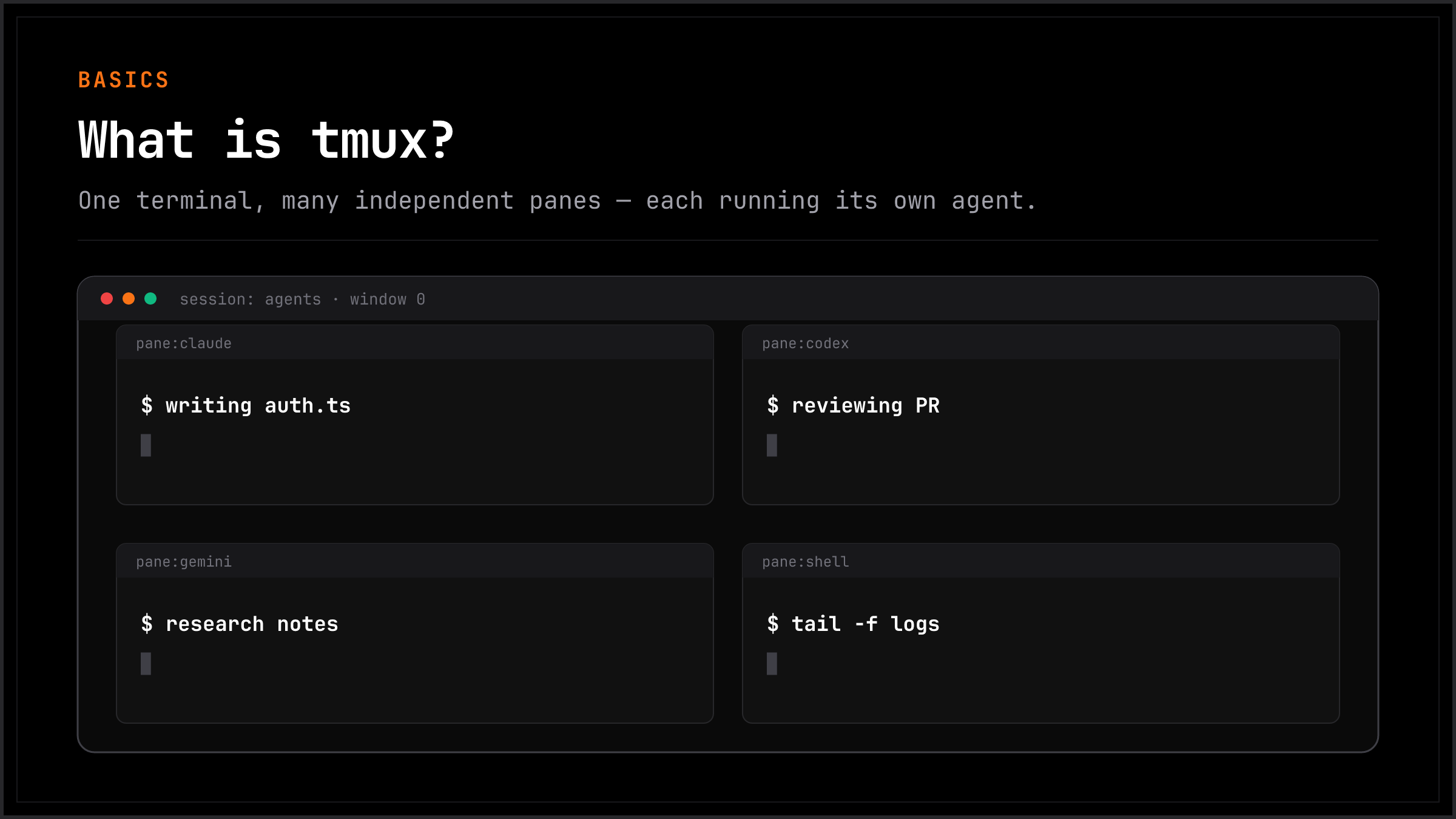
+-------------------------------+
|  Pane 1       |  Pane 2       |
|  Claude Code  |  Codex        |
|  writing code |  reviewing    |
|               |               |
+---------------+---------------+
|  Pane 3       |  Pane 4       |
|  Gemini CLI   |  tail -f logs |
|  researching  |  monitoring   |
+-------------------------------+
Each pane is a full terminal. You can have Claude Code running in one, Codex in another, Gemini in a third -- all visible at the same time, all on the same machine.
The problem: these panes can't talk to each other. An agent in Pane 1 has no idea what's happening in Pane 2.
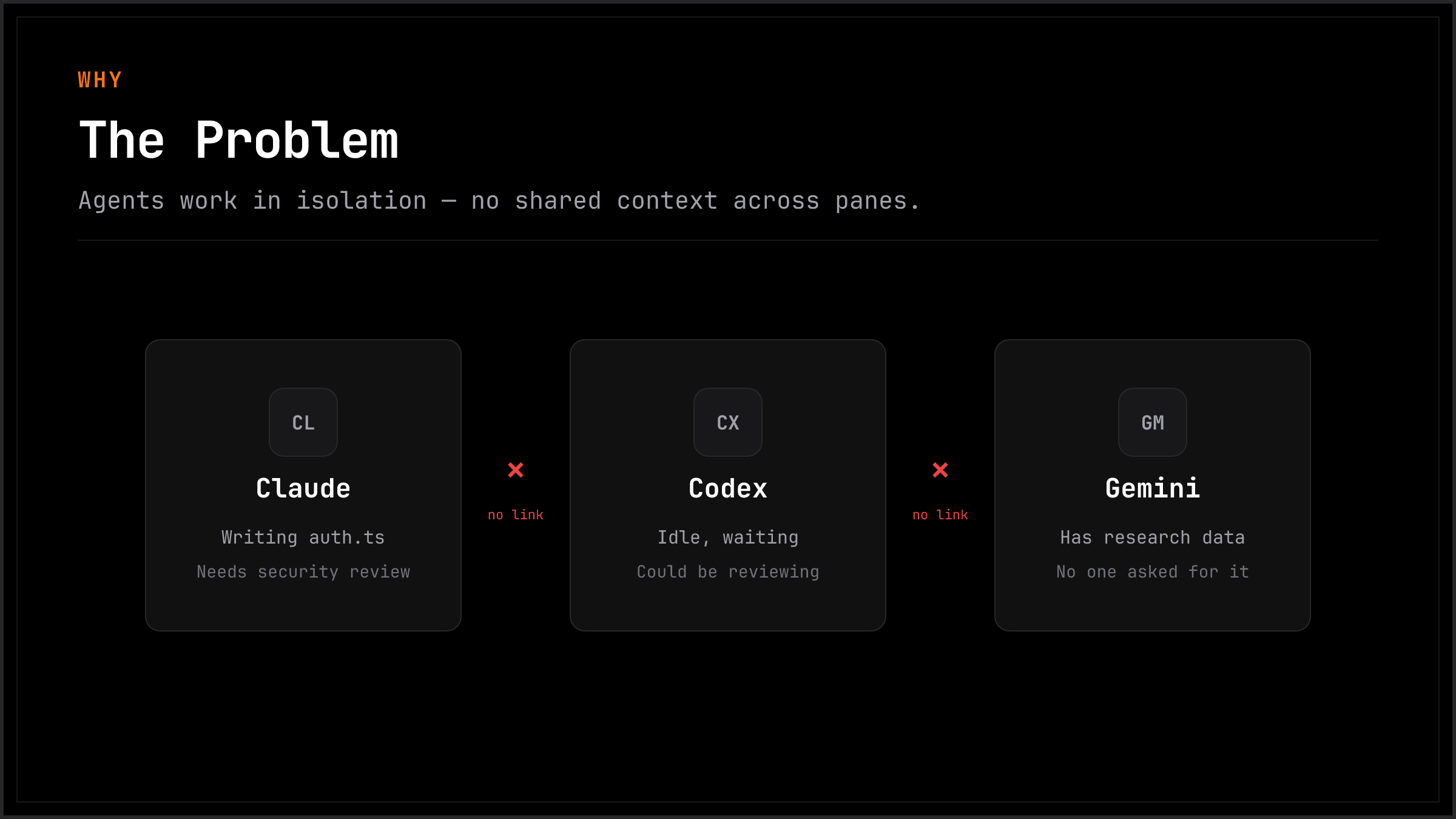
tmux-bridge fixes this. It gives every agent the ability to read, type, and send messages into any other pane.
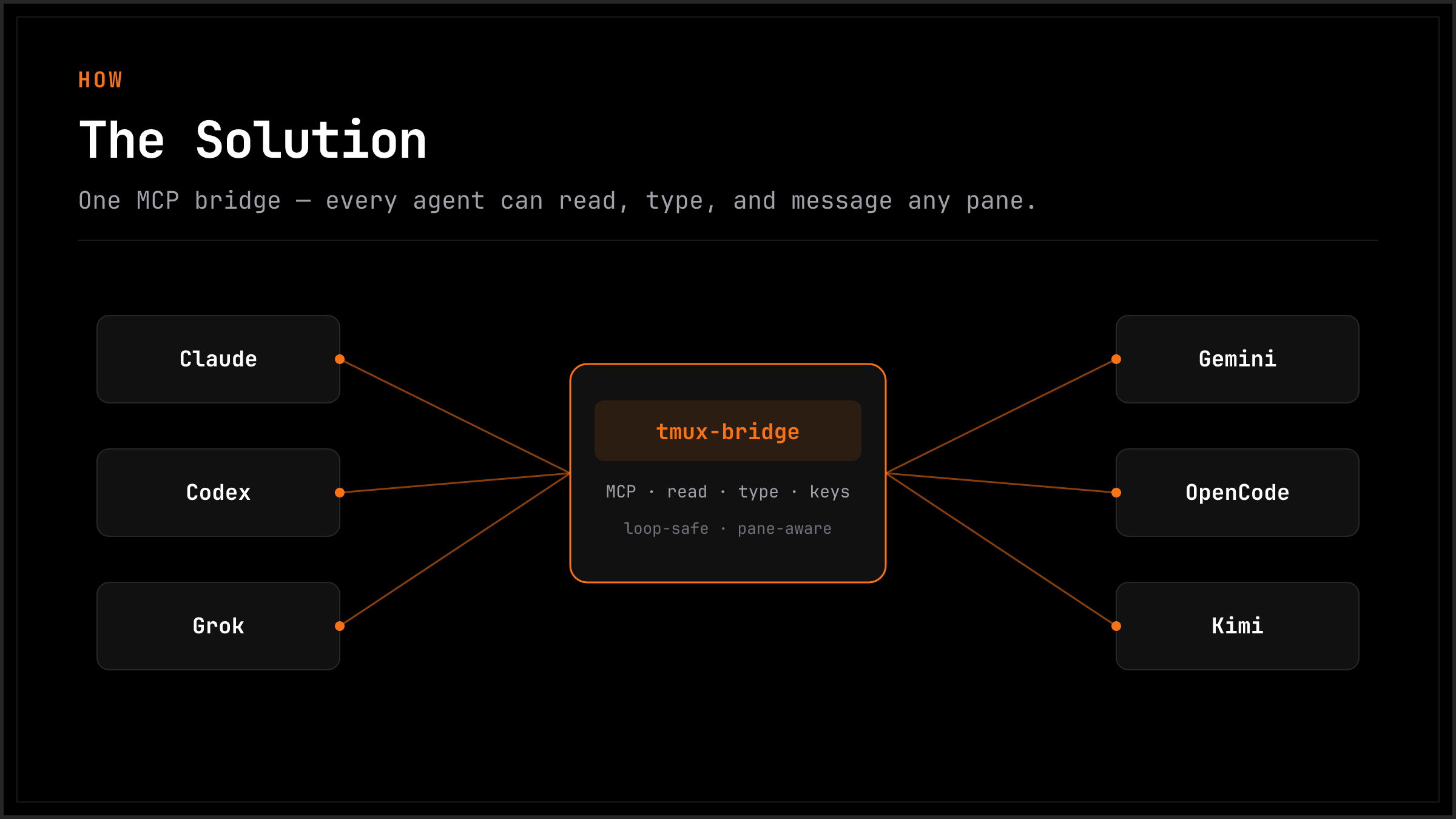
Once installed, your AI agents can:
All of this happens through standard MCP tool calls -- your agent doesn't need to learn any new syntax. If it supports MCP, it already knows how.
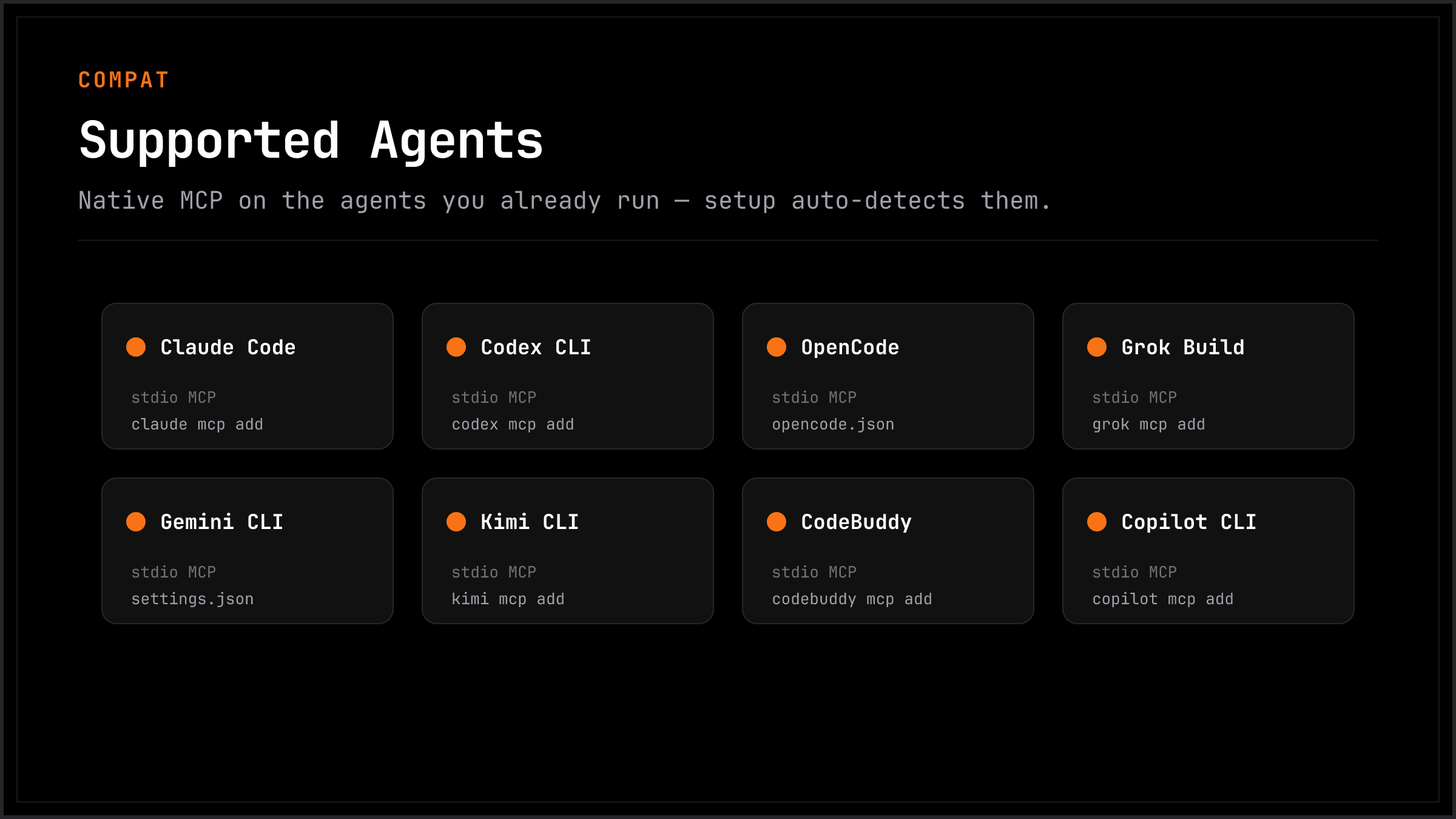
tmux-bridge works with any agent that supports MCP over stdio. If your agent isn't listed, try adding the MCP config -- it will likely just work.
When you run multiple AI agents in separate terminals, they work in isolation. You end up copy-pasting context between them, manually relaying questions and answers, or losing track of what each agent is doing.
tmux-bridge solves this by giving every agent the ability to read, type, and send messages into any other terminal pane -- programmatically, through standard MCP tool calls.
Use cases:
tail -f pane and reacts to errors in real timeWhat you need:
If you already use tmux to run multiple agents side by side, tmux-bridge just makes them aware of each other.
You're running Claude Code in one pane, Codex in another. Claude finishes writing a function and you want Codex to review it. Here's what actually happens:
You are the message bus. Every interaction flows through your clipboard. You're not writing code anymore -- you're routing context between agents. With 3+ agents running, this becomes unmanageable within minutes.
The key insight: you don't need a multi-agent framework. You need your existing agents to see each other. tmux-bridge adds exactly that -- a thin MCP layer over tmux -- and nothing more.
Prerequisites: tmux 3.2+ and Node.js 18+ must be installed.
One command to configure all your agents:
npx tmux-bridge-mcp setup
This auto-detects Claude Code, Codex, OpenCode, CodeBuddy, Copilot CLI, Grok Build, Gemini CLI, and Kimi CLI on your machine, then writes the correct MCP config for each one. Done in seconds.
Verify it works:
npx tmux-bridge-mcp --help
You should see the version and available commands. Restart your AI agent to activate the new tools.
See it in action:
npx tmux-bridge-mcp demo
Opens a 3-pane tmux session and runs a live cross-pane communication demo.
1. Install tmux
brew install tmux    # macOS
apt install tmux     # Linux
2. Add to your agent's MCP config
{
  "mcpServers": {
    "tmux-bridge": {
      "command": "npx",
      "args": ["-y", "tmux-bridge-mcp"]
    }
  }
}
Restart your agent. It now has 9 MCP tools for cross-pane communication.
# If installed globally
npm update -g tmux-bridge-mcp

# If using npx (auto-updates, but to force latest)
npx tmux-bridge-mcp@latest

# Check your current version
npx tmux-bridge-mcp --version
After updating, restart your agents to pick up the new version. If you use npx in your MCP config, it caches the package — run npx --yes tmux-bridge-mcp@latest once to pull the latest, then your agents will use it on next startup.
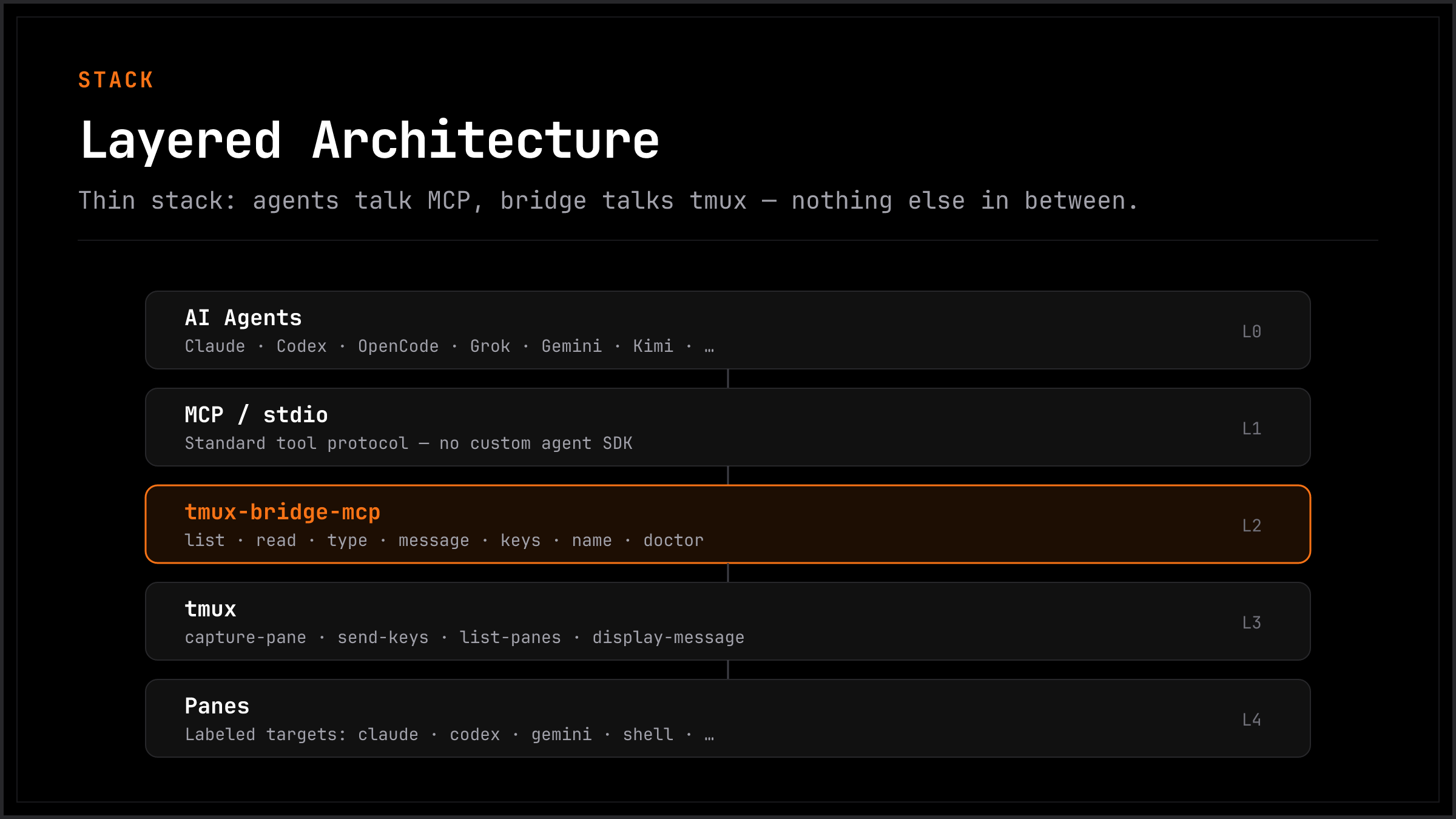
tmux-bridge runs as an MCP server over stdio. It calls tmux directly (capture-pane, send-keys, list-panes, etc.) -- no intermediate CLI layer.
MCP path (Gemini, Claude Code, Codex, any MCP client):
+--------------+  MCP/stdio  +---------------+  tmux API  +--------------+
|  MCP Agent   |<----------->|  tmux-bridge  |<---------->|  tmux panes  |
+--------------+             |  MCP server   |            +--------------+
                             +---------------+

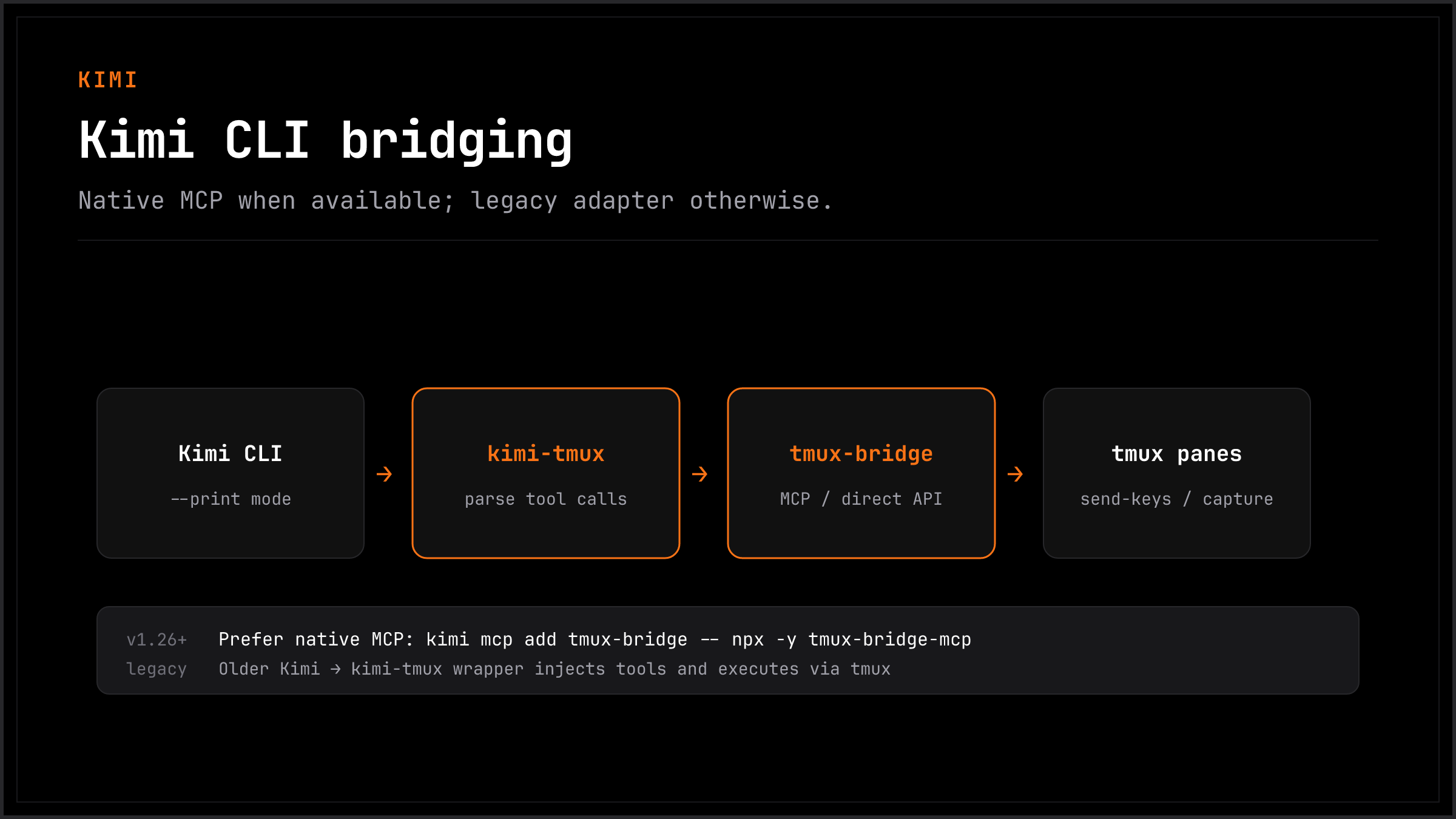
CLI path (Kimi):
+--------------+  --print    +---------------+  tmux API  +--------------+
|  Kimi CLI    |<----------->|  kimi-tmux    |<---------->|  tmux panes  |
+--------------+  tool parse |  adapter      |            +--------------+
                             +---------------+
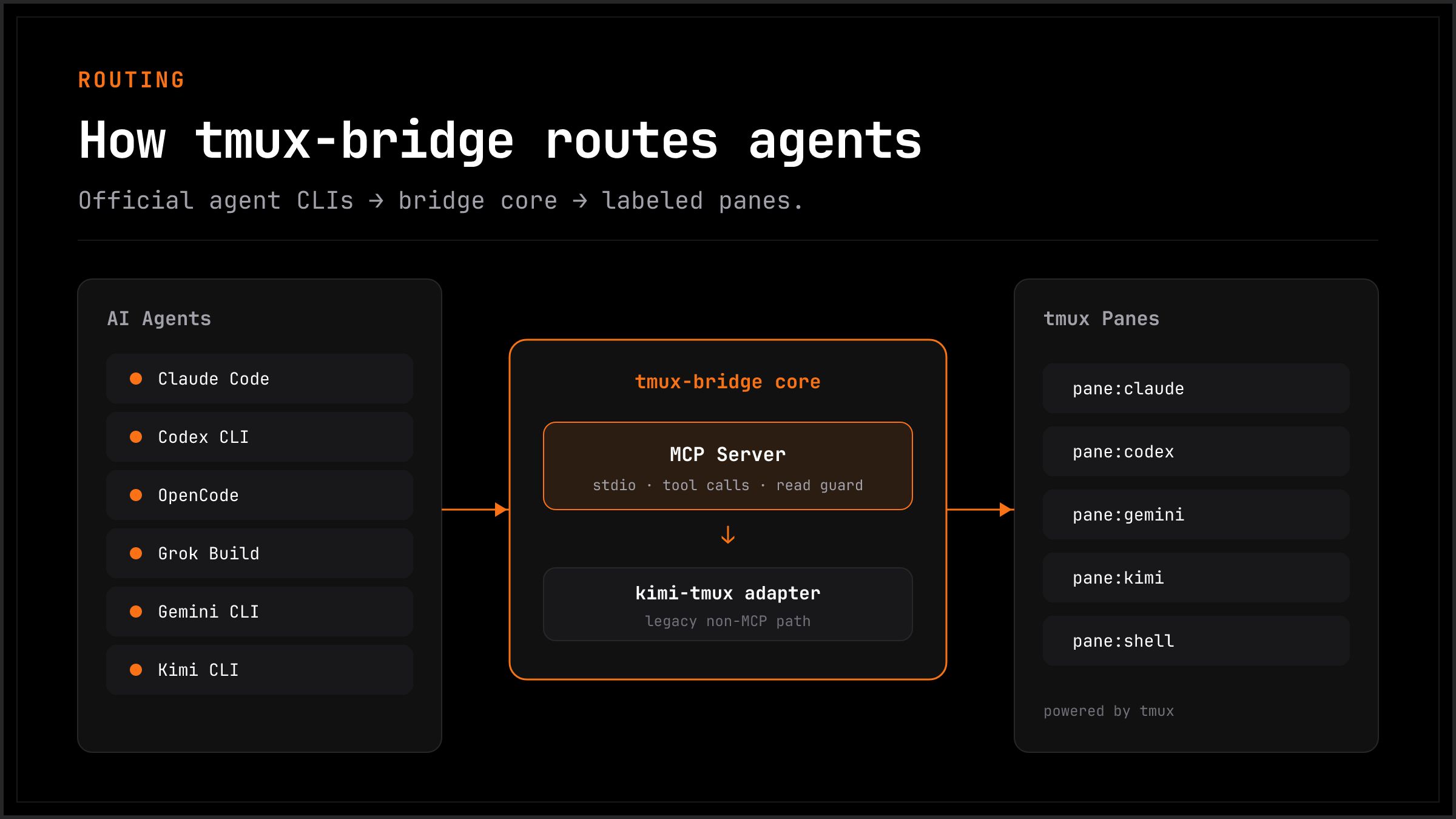
All cross-pane interactions follow the read-act-read workflow:
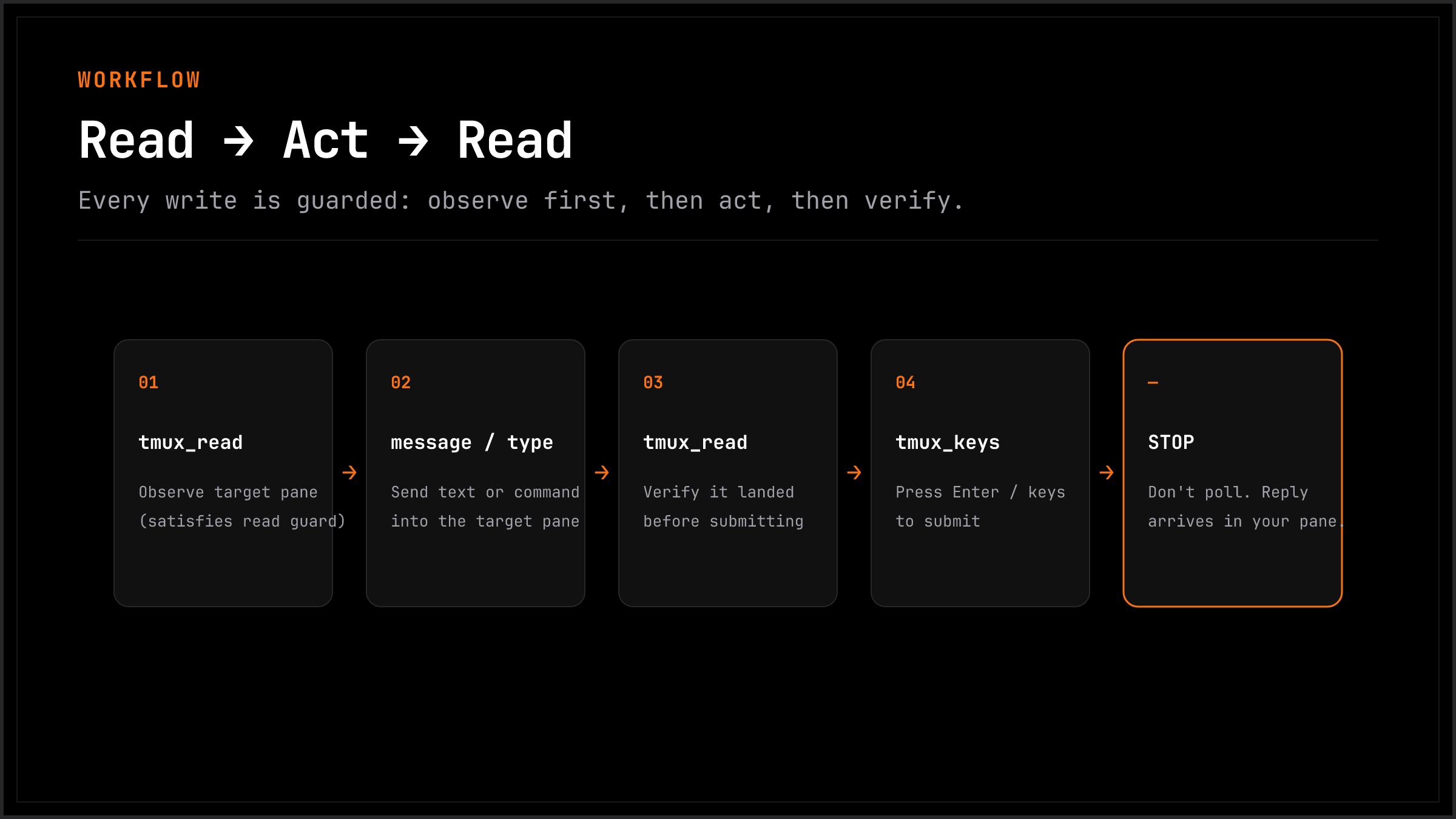
The read guard is enforced at the MCP layer: tmux_type, tmux_message, and tmux_keys will fail unless you call tmux_read on the target pane first.
Add to ~/.gemini/settings.json:
{
  "mcpServers": {
    "tmux-bridge": {
      "command": "npx",
      "args": ["tmux-bridge-mcp"]
    }
  }
}
Add to your project's .mcp.json or global MCP config:
{
  "mcpServers": {
    "tmux-bridge": {
      "command": "npx",
      "args": ["tmux-bridge-mcp"]
    }
  }
}
Add to your MCP config following the Codex MCP setup docs:
{
  "mcpServers": {
    "tmux-bridge": {
      "command": "npx",
      "args": ["tmux-bridge-mcp"]
    }
  }
}
opencode mcp add is interactive. tmux-bridge-mcp setup writes directly to
~/.config/opencode/opencode.json (or .jsonc):
{
  "mcp": {
    "tmux-bridge": {
      "type": "local",
      "command": ["npx", "-y", "tmux-bridge-mcp"],
      "enabled": true
    }
  }
}
codebuddy mcp add -s user tmux-bridge -- npx -y tmux-bridge-mcp
Fallback config path: ~/.codebuddy/.mcp.json (standard mcpServers JSON).
copilot mcp add tmux-bridge -- npx -y tmux-bridge-mcp
Fallback config path: ~/.copilot/mcp-config.json:
{
  "mcpServers": {
    "tmux-bridge": {
      "type": "local",
      "command": "npx",
      "args": ["-y", "tmux-bridge-mcp"],
      "tools": ["*"]
    }
  }
}
grok mcp add -s user tmux-bridge -- npx -y tmux-bridge-mcp
Fallback TOML in ~/.grok/config.toml:
[mcp_servers.tmux-bridge]
command = "npx"
args = [
    "-y",
    "tmux-bridge-mcp",
]
enabled = true
# Check your Kimi version
kimi --version
# v1.26+ → use native MCP (recommended)
# older  → use kimi-tmux wrapper
Native MCP (recommended, v1.26+):
kimi mcp add tmux-bridge -- npx tmux-bridge-mcp
Once added, Kimi uses all tmux-bridge tools directly -- no adapter needed.
Legacy wrapper (older versions):
For Kimi CLI versions without native MCP, kimi-tmux bridges the gap by injecting the system instruction as a prompt, running Kimi in --print mode, parsing tool-call blocks from output, and executing them via tmux.
kimi-tmux "list all tmux panes"
kimi-tmux "ask the agent in codex pane to review src/auth.ts"
kimi-tmux "read what claude is working on"
kimi-tmux --rounds 3 "send a message to gemini and wait for the result"
Targets can be a pane ID (%0), session:window.pane (main:0.1), or a label (claude).
tmux_list()
tmux_read(target="claude", lines=20)
tmux_message(target="claude", text="Please review src/auth.ts for security issues")
tmux_read(target="claude", lines=5)
tmux_keys(target="claude", keys=["Enter"])
kimi-tmux "tell the claude pane to run the test suite"
kimi-tmux "ask gemini to summarize the test results in claude's pane"
+-----------------------------------------------------------+
| tmux session                                              |
|                                                           |
| +------------+ +------------+ +----------+ +-----------+  |
| | Claude Code | |   Codex    | | Gemini   | |   Kimi    | |
| |  (MCP)     | |  (MCP)     | |  (MCP)   | |(kimi-tmux)| |
| |            | |            | |          | |           |  |
| | label:     | | label:     | | label:   | | label:    |  |
| | claude     | | codex      | | gemini   | | kimi      |  |
| +-----+------+ +-----+------+ +----+-----+ +-----+-----+ |
|       +---------------+-----------+--------------+        |
|           tmux-bridge (direct tmux IPC, no deps)          |
+-----------------------------------------------------------+
tmux-bridge is designed for local development on a single machine. It assumes all connected MCP agents are trusted:
tmux_read before tmux_type/tmux_keys) is a sequencing aid to prevent blind typing. It is not a security boundary.tmux_name are not authenticated — any agent can label or relabel any pane.Do not use tmux-bridge in multi-tenant environments or expose the tmux socket over a network. It is built for the common case: one developer running multiple AI agents side by side on their own machine.
For agents that support custom system prompts, use system-instruction/smux-skill.md. It teaches the read-act-read workflow and documents all available MCP tools.
👉 When to use smux: You want a complete tmux setup (keybindings, mouse support, status bar) and your agents support the skills system or you're comfortable injecting system prompts.
👉 When to use tmux-bridge-mcp: You want a drop-in MCP server that works with any MCP-compatible agent out of the box, without touching your tmux configuration.
/tmb) vs Claude Code Native (subagent + /codex + /gemini)Verdict
tmux-bridge's real advantage comes down to one thing: persistent context. If you need an agent that remembers the last 30 turns of conversation and keeps following up on the same task, a tmux pane can do that -- a subagent cannot.
But for most tasks, native is better:
Practical guidance:
/codex / /geminiMIT
Standalone MCP server for cross-pane AI agent communication via tmux. Lets Claude Code, Gemini CLI, Codex, and Kimi CLI talk to each other through tmux panes.
Herramientas
Aún no hay lista de herramientas. Los servidores remotos la reciben tras la primera comprobación de estado.
Preguntas frecuentes
Copia en esta página la configuración stdio para Cursor, Claude Desktop, Claude Code o VS Code. Usa la instalación del publicador, no un proxy de PlugMCP.
Este registro no indica ninguna variable de entorno obligatoria.
Tmux Bridge se ejecuta localmente por stdio.
Última comprobación: 2026-10-28. Standalone MCP server for cross-pane AI agent communication via tmux. Lets Claude Code, Gemini CLI, Codex, and Kimi CLI talk to each other through tmux panes.
