catt-mcp
MCP server for casting YouTube videos and media to Chromecast/DLNA devices via catt.
Potencia tu agente
El comando propio del publicador. No es un endpoint de PlugMCP.
Host a copy with our keys and logs.
uvx catt-mcp==0.3.0Claude Code no tiene enlace de instalación para un comando local. Copia el comando de abajo y ejecútalo en una terminal.
CATT_DEVICE=<value> TV_HOST=<value> ADB_PATH=<value> claude mcp add io.github.amineutron-catt-mcp -- uvx catt-mcp==0.3.0Ejecútalo en una terminal.
{ "mcpServers": { "io.github.amineutron-catt-mcp": { "command": "uvx", "args": [ "catt-mcp==0.3.0" ], "env": { "CATT_DEVICE": "<value>", "TV_HOST": "<value>", "ADB_PATH": "<value>" } } }}claude_desktop_config.json
¿URL remota o un comando en tu máquina? En qué se diferencian las dos instalaciones
Ejecutar en PlugMCP
A new server you create. It is not this listing's official endpoint. Use the publisher install when you want their URL and their credentials.
AbrirDel publicador
MCP server for casting YouTube videos and media to Chromecast/DLNA devices via catt.
Cast YouTube videos and media to a Chromecast or DLNA device with catt, and control playback.
Exposes 15 tools covering YouTube casting, playback control, dual-screen sync, and device discovery.
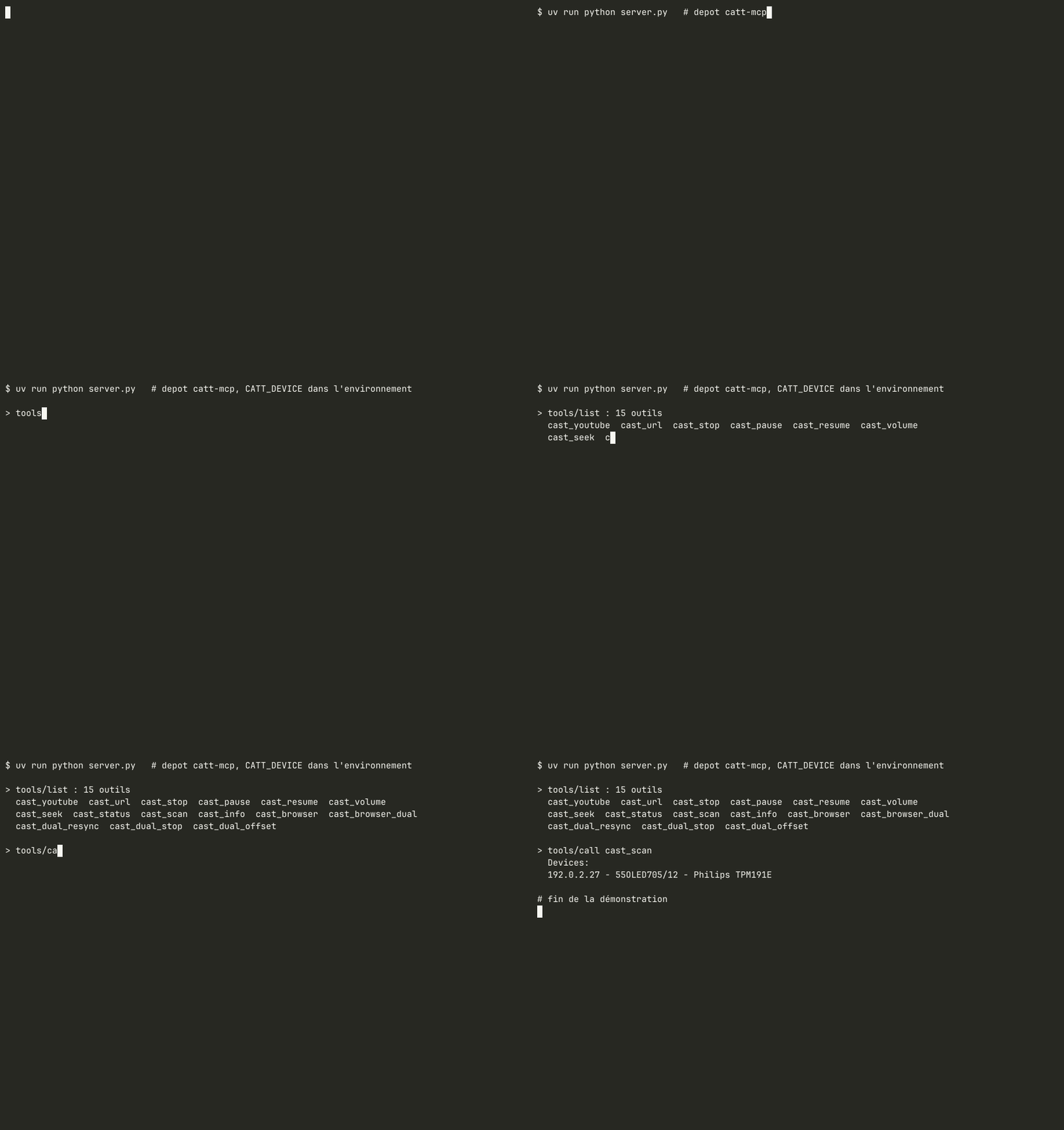
Recorded on the real network with docs/demo/record.sh: a minimal MCP client (docs/demo/mcp_demo.py) starts the server over stdio with CATT_DEVICE in the environment, lists the tools and calls cast_scan (read-only). Private IP addresses are replaced with documentation addresses.
_extract_video_id (URL watch?v=, youtu.be/, shorts/ or a bare 11-character ID, anything else rejected before it reaches catt/ADB) is deliberately duplicated in pylips-mcp (youtube_video, TV app with Premium account). Both servers stay installable on their own; each one tests its copy with the same table of cases (tests/test_youtube_id.py). Decision recorded on 2026-09-20.
cast_browser, cast_browser_dual, cast_dual_resync, cast_dual_stop and
cast_dual_offset drive Firefox from the running desktop session. They are
advertised only when the required binaries are present:
hyprctl in PATHplayerctl for MPRIS playback controllz4 (Python) to read Firefox's session cacheWithout them the server starts normally and simply does not expose these five tools, instead of failing when they are called.
uvx catt-mcp # depuis PyPI ; avant publication : uvx --from git+https://github.com/amineutron/catt-mcp catt-mcp
Configuration Claude Desktop / Claude Code (mcpServers) :
{ "catt": { "command": "uvx", "args": ["catt-mcp"], "env": { "CATT_DEVICE": "Living Room TV" } } }
pip install mcp catt yt-dlp
catt scan
Note the device name (e.g. 55OLED705/12, Living Room TV).
Copy config.example.yaml to config.yaml:
catt:
  device: "55OLED705/12"   # Name from catt scan
catt-mcp                      # installed (pip, uvx) ; `catt-mcp --help` lists the settings
python -m catt_mcp            # same thing, from any environment where the package is installed
python server.py              # from a clone, without installing (thin launcher, code in catt_mcp/)
Or with environment variable:
CATT_DEVICE="55OLED705/12" catt-mcp
The code lives in the catt_mcp package (catt_mcp/server.py, catt_mcp/sync_watcher.py),
so it can be installed next to other MCP servers without module name clashes.
The dual-screen tools (dual_cast, dual_resync, dual_offset) drive the TV through
ADB and need its IP address. Set it with TV_HOST (or tv.host in config.yaml),
for example TV_HOST="192.0.2.10"; the built-in default is only a placeholder.
{
  "mcpServers": {
    "catt": {
      "command": "python3",
      "args": ["/path/to/catt-mcp/server.py"],
      "env": {
        "CATT_DEVICE": "55OLED705/12"
      }
    }
  }
}
MIT
Cast YouTube videos and media to a Chromecast or DLNA device with catt, and control playback.
{ "mcpServers": { "io.github.amineutron-catt-mcp": { "command": "uvx", "args": [ "catt-mcp==0.3.0" ], "env": { "CATT_DEVICE": "<value>", "TV_HOST": "<value>", "ADB_PATH": "<value>" } } }}Herramientas
Aún no hay lista de herramientas. Los servidores remotos la reciben tras la primera comprobación de estado.
Preguntas frecuentes
Copia en esta página la configuración stdio para Cursor, Claude Desktop, Claude Code o VS Code. Usa la instalación del publicador, no un proxy de PlugMCP.
El publicador indica estas variables de entorno: CATT_DEVICE, TV_HOST, ADB_PATH.
Chromecast / DLNA Casting (catt) se ejecuta localmente por stdio.
Última comprobación: 2026-11-09. Cast YouTube videos and media to a Chromecast or DLNA device with catt, and control playback.
