paprika-3-mcp
A Model Context Protocol (MCP) server that exposes your Paprika 3 recipes as LLM-readable resources — and lets an LLM like Claude create or update recipes in your Paprika app.
Potencia tu agente
Instalación del publicador. No es un endpoint de PlugMCP.
Host a copy with our keys and logs.
Aún no hay una versión empaquetada en el registro. Sigue el README del repositorio.
¿URL remota o un comando en tu máquina? En qué se diferencian las dos instalaciones
Ejecutar en PlugMCP
A new server you create. It is not this listing's official endpoint. Use the publisher install when you want their URL and their credentials.
AbrirDel publicador
A Model Context Protocol (MCP) server that exposes your Paprika 3 recipes as LLM-readable resources — and lets an LLM like Claude create or update recipes in your Paprika app.
MCP Server for creating/editing recipes in Paprika 3 with natural language
See anything missing? Open an issue on this repo to request a feature!
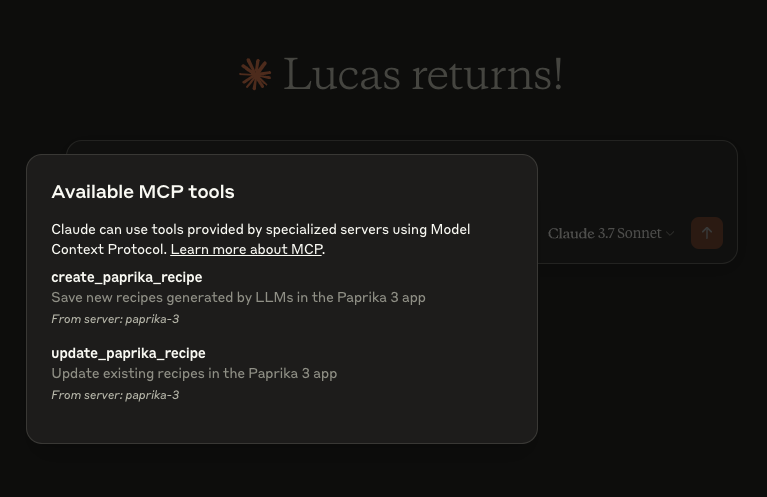
create_paprika_recipeupdate_paprika_recipeYou can download a prebuilt binary from the Releases page.
If you're on macOS, the easiest way to install is with Homebrew:
brew tap soggycactus/tap
brew install paprika-3-mcp
Go to the latest release.
Download the appropriate archive for your operating system and architecture:
paprika-3-mcp_<version>_linux_amd64.zip for Linuxpaprika-3-mcp_<version>_windows_amd64.zip for WindowsExtract the zip archive:
unzip paprika-3-mcp_<version>_<os>_<arch>.zip
.zip file and select Extract All, or use a tool like 7-Zip.Move the binary to a directory in your system's $PATH:
Linux:
sudo mv paprika-3-mcp /usr/local/bin/
Windows:
paprika-3-mcp.exe to any folder in your PATH (e.g., %USERPROFILE%\bin)You can verify the server is installed by checking:
paprika-3-mcp --version
You should see:
paprika-3-mcp version v0.1.0
If you haven't setup MCP before, first read more about how to install Claude Desktop client & configure an MCP server.
To add paprika-3-mcp to Claude, all you need to do is create another entry in the mcpServers section of your claude_desktop_config.json file:
{
  "mcpServers": {
    "paprika-3": {
      "command": "paprika-3-mcp",
      "args": [
        "--username",
        "<your paprika 3 username (usually email)>",
        "--password",
        "<your paprika 3 password>"
      ]
    }
  }
}
Restart Claude and you should see the MCP server tools after clicking on the hammerhead icon:
This project is open source under the MIT License © 2025 Lucas Stephens.
The MCP server writes structured logs using Go’s slog with rotation via lumberjack. Log files are automatically created based on your operating system:
💡 Logs are rotated automatically at 100MB, with only 5 backup files kept. Logs are also wiped after 10 days.
MCP Server for creating/editing recipes in Paprika 3 with natural language
Herramientas
Aún no hay lista de herramientas. Los servidores remotos la reciben tras la primera comprobación de estado.
Preguntas frecuentes
Copia en esta página la configuración stdio para Cursor, Claude Desktop, Claude Code o VS Code. Usa la instalación del publicador, no un proxy de PlugMCP.
Este registro no indica ninguna variable de entorno obligatoria.
Paprika 3 se ejecuta localmente por stdio.
Última comprobación: 2026-10-28. MCP Server for creating/editing recipes in Paprika 3 with natural language
