Transform your N8N workflows into MCP servers instantly
A comprehensive platform that converts N8N workflows into Model Context Protocol (MCP) servers, enabling seamless integration with AI assistants like Claude, Cursor, and other MCP-compatible platforms. Build powerful automation tools using N8N's visual workflow editor and deploy them as callable AI functions.
Convert N8N agent / workflow into MCP servers, you can use it in Claude / Cursor / Super Chain
Estrellas
132
Herramientas
—
Disponibilidad
—
✨ How to use
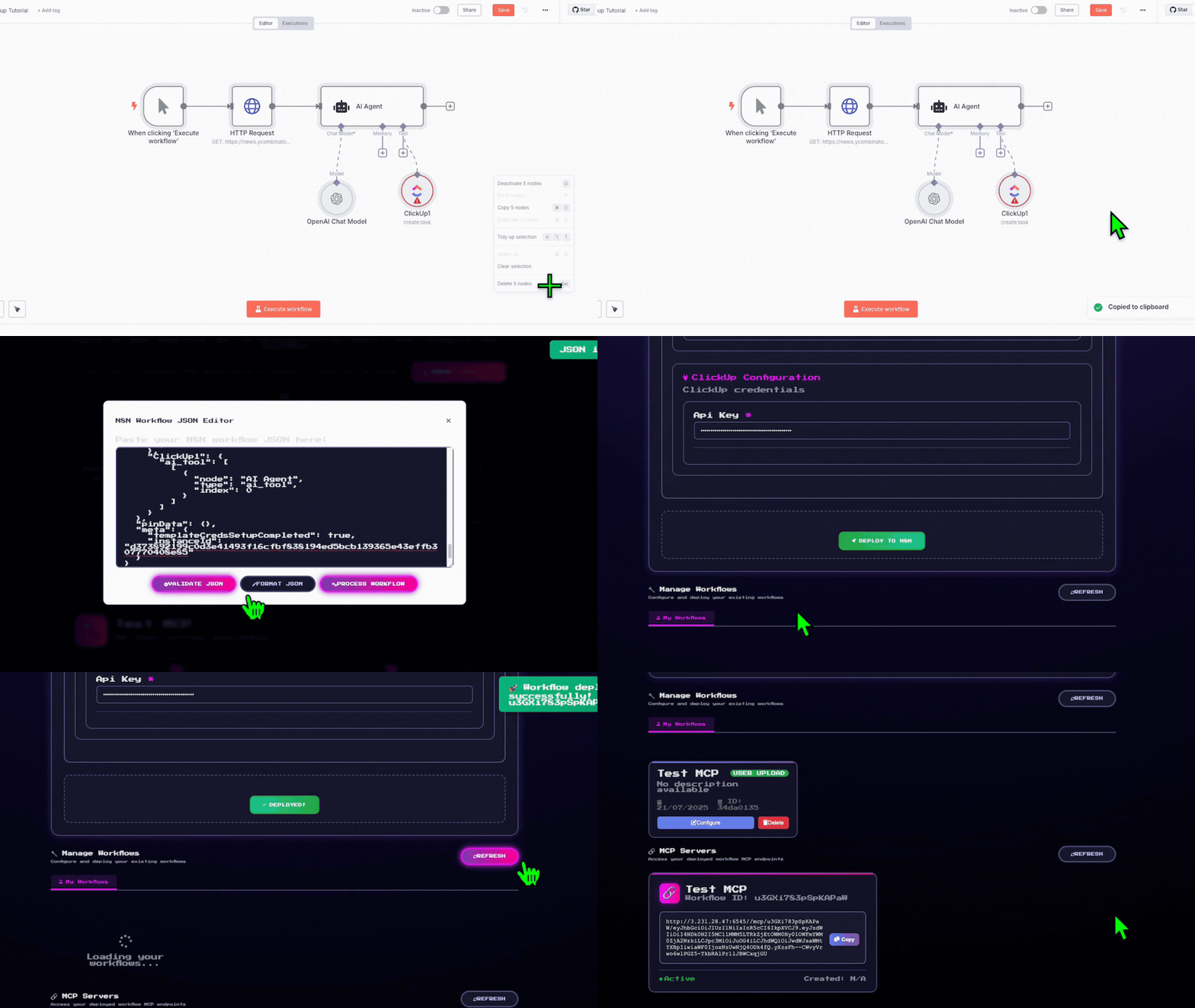
Copy the N8N template link/JSON from any workflow
Map your credentials through our intuitive interface
Deploy with one click!
Your N8N workflow gets deployed and creates a local hosted MCP server. Just paste the server URL into Claude, Cursor, Super Chain, or any MCP-compatible platform!
🎯 Key Features
🤖 MCP Server Creation
Convert your N8N workflows into MCP servers that AI assistants can use as custom tools
🔄 Dual Architecture
Agent Marketplace: Web-based workflow management and deployment platform
MCP Router: High-performance MCP server creation and routing system
🛠️ Comprehensive Workflow Management
Browse and deploy pre-built workflow templates
Upload and manage your custom N8N workflows
Real-time credential configuration and testing
One-click deployment to your N8N instance
🏗️ Architecture
graph TB
    subgraph "AI Assistant Layer"
        A[Claude/Cursor/Super Chain]
    end

    subgraph "N8N 2 MCP"
        B[Agent Marketplace<br/>Flask Web App]
        C[MCP Router<br/>FastAPI Service]
        D[Workflow Parser<br/>Analysis Engine]
    end

    subgraph "Infrastructure"
        E[Supabase Database]
        F[N8N Instance]
        G[Credential Manager]
    end

    A -->|MCP Protocol| C
    C -->|Dynamic MCP| F
    B -->|Workflow Management| E
    B -->|Deploy & Configure| F
    C -->|User Config| E
    B -->|Parse & Analyze| D
    D -->|Extract Requirements| G
    G -->|Secure Handling| F
📦 Installation
Prerequisites
Python 3.11+
N8N Instance (cloud.n8n.io or self-hosted)
Supabase Account (for data storage)
Playwright (required for N8N authentication)
Docker (optional, for containerized deployment)
⚠️ Important: Playwright installation is required for N8N workflow execution. The system will use dummy credentials if Playwright is not properly installed, limiting functionality.
Quick Start
Option 1: Docker Compose (Recommended)
Clone the repository
git clone https://github.com/Super-Chain/N8N2MCP.git
cd N8N2MCP
Configure environment
cp env.example .env
# Edit .env with your actual configuration values
Import Template: Enter an N8N template URL from n8n.io
Configure Credentials: Fill in required API keys and service credentials
Deploy Workflow: Click deploy to create the workflow in your N8N instance
MCP Server Created: Automatically generates an MCP server endpoint
Method 2: Upload Custom Workflows
Upload JSON: Upload your N8N workflow JSON file / Copy and paste your JSON workflow
Review Analysis: Check detected nodes and required credentials
Configure & Deploy: Fill credentials and deploy to N8N
Access MCP Server: Use the generated MCP endpoint in AI tools
Using MCP Servers
# Example MCP server URL format:
http://localhost:6545/mcp/{workflow_id}/{api_key}

# Test MCP server:
curl http://localhost:6545/list  # List all registered MCP servers
🎨 Use Cases
🔍 Data Processing & Analysis
Transform CSV/Excel files using N8N's data manipulation nodes
Connect to databases and APIs for real-time data analysis
Generate reports and visualizations from AI conversations
🌐 API Integration Hub
Connect AI assistants to external services (Slack, Google, etc.)
Create custom API endpoints for proprietary systems
Build unified interfaces for multiple SaaS platforms
📧 Communication & Notifications
Send emails, Slack messages, or Discord notifications
Create automated reporting systems
Build alert systems triggered by AI interactions
🔄 Workflow Automation
Trigger complex business processes from AI conversations
Create approval workflows and task management systems
Create Supabase Project: Set up a new project at supabase.com
Run SQL in Supabase SQL Editor:
-- Main workflow storage table
CREATE TABLE IF NOT EXISTS public.user_workflows (
    id UUID DEFAULT gen_random_uuid() PRIMARY KEY,
    user_id TEXT NOT NULL,
    template_id TEXT NOT NULL,
    template_url TEXT NOT NULL,
    workflow_name TEXT NOT NULL,
    workflow_json JSONB NOT NULL,
    workflow_description TEXT,
    n8n_workflow_id TEXT,
    source TEXT DEFAULT 'user_upload',
    credentials_required JSONB DEFAULT '[]'::jsonb,
    mcp_link TEXT,
    status TEXT DEFAULT 'pending',
    created_at TIMESTAMP WITH TIME ZONE DEFAULT NOW(),
    updated_at TIMESTAMP WITH TIME ZONE DEFAULT NOW()
);

-- MCP server configurations
CREATE TABLE IF NOT EXISTS public.mcp_configs (
    id UUID DEFAULT gen_random_uuid() PRIMARY KEY,
    workflow_id TEXT NOT NULL,
    user_apikey TEXT NOT NULL,
    code TEXT NOT NULL,
    created_at TIMESTAMP WITH TIME ZONE DEFAULT NOW(),
    updated_at TIMESTAMP WITH TIME ZONE DEFAULT NOW(),
    UNIQUE(workflow_id, user_apikey)
);

-- Enable Row Level Security (recommended)
ALTER TABLE user_workflows ENABLE ROW LEVEL SECURITY;
ALTER TABLE mcp_configs ENABLE ROW LEVEL SECURITY;
🚀 Running the System
Unified Startup (Recommended)
python main.py
This automatically starts both services with:
✅ Environment validation
✅ Database setup verification
✅ Graceful shutdown handling
✅ Centralized logging
Individual Services
Agent Marketplace (Port 5000)
cd agent_marketplace
python app.py
MCP Router (Port 6545)
cd mcp_router
python mcp_router.py
Verification
# Test Agent Marketplace
curl http://localhost:5000/api/health

# Test MCP Router
curl http://localhost:6545/list

# View all endpoints
curl http://localhost:5000/api/health | grep endpoints
🔧 Troubleshooting
Common Issues
Port Already in Use
# Kill processes on ports 5000 and 6545
fuser -k 5000/tcp 6545/tcp
# Or restart with main.py which handles this automatically
python main.py
Aún no hay lista de herramientas. Los servidores remotos la reciben tras la primera comprobación de estado.
Preguntas frecuentes
Preguntas
¿Cómo instalo N8N2MCP?
Copia en esta página la configuración stdio para Cursor, Claude Desktop, Claude Code o VS Code. Usa la instalación del publicador, no un proxy de PlugMCP.
¿N8N2MCP necesita una clave de API?
Este registro no indica ninguna variable de entorno obligatoria.
¿Qué transporte usa N8N2MCP?
N8N2MCP se ejecuta localmente por stdio.
¿Cuándo se comprobó N8N2MCP por última vez?
Última comprobación: 2026-11-05. Convert N8N agent / workflow into MCP servers, you can use it in Claude / Cursor / Super Chain