A free, professional, open-source financial analysis and quantitative trading MCP server. It lets you deploy a local financial MCP service with one command, using a departmental architecture that simulates a real financial firm's operations. It supports traditional indicators, price action analysis, economic calendar, fundamentals, and news integration—providing seamless interaction with LLMs and algorithmic trading.
A comprehensive, free MCP server designed specifically for financial analysis and quantitative trading. This specialized platform offers one-click local deployment with a sophisticated department-based architecture that mirrors real financial company operations.
—
💬 Community & Support
Join our community for discussions, support, and updates!
✨ Features
🚀 One-click deployment: Quickly spin up a local financial MCP service
🏢 Departmental architecture: Simulates real-world financial company departments
📊 Comprehensive analysis: Traditional technical indicators + price action analysis
📅 Real-time data: Economic calendar, fundamentals,broker/securities information ,and news integration
🤖 AI integration: Interfaces optimized for LLMs
⚡ High performance: Real-time streaming OHLC data processing
🔧 Extensible: Support for custom MCP services
MCP can call the broker to query account information, place orders, and cancel orders.
🪩 Support local RPC/PubSub service.you can cross process/software/code languages communication.
from finance_trading_ai_agents_mcp import mcp_run
from examples.env_example import get_example_env

if __name__ == "__main__":
    get_example_env()
    from examples.addition_custom_mcp_examples.addition_custom_mcp_example import
        AdditionCustomMcpExample

    AdditionCustomMcpExample()
    mcp_run()
    # or
    # mcp_run(addition_custom_mcp_py_file="./addition_custom_mcp_example.py")
Advanced usage
Real-time WebSocket Data Integration with MCP Server
from aitrados_api.universal_interface.callback_manage import CallbackManage
from finance_trading_ai_agents_mcp import mcp_run
from examples.env_example import get_example_env

"""
Real-time WebSocket Data Integration with MCP Server

This script demonstrates how to run an MCP (Model Context Protocol) server while simultaneously
receiving real-time WebSocket data streams, achieving data reusability across your project.

Key Benefits:

🔄 **Data Reusability**:
   - The same real-time data feed serves both MCP clients (like Claude Desktop) and your custom application logic
   - Eliminates duplicate API calls and reduces bandwidth usage
   - Centralizes data management in one location

⚡ **Real-time Integration**:
   - Multi-timeframe OHLC data: Real-time price feeds for trading analysis
   - Event data: Market events, earnings, splits, etc.
   - News data: Financial news updates as they happen
   - Authentication: Connection status and auth events
   - General messages: System notifications and other data

🏗️ **Architecture Advantages**:
   - MCP server handles AI/LLM requests with structured financial data
   - Custom callbacks process the same data for your trading algorithms
   - WebSocket connection is shared, ensuring data consistency
   - Thread-safe data management with proper synchronization

📊 **Use Cases**:
   - AI-powered trading assistants with real-time market data
   - Automated trading systems with LLM decision support
   - Real-time portfolio monitoring with AI analysis
   - Market research tools combining AI insights with live data
   - Risk management systems with instant alert capabilities

🎯 **Practical Example**:
   When Claude Desktop requests "Show me AAPL's current price", the MCP server provides real-time data.
   Simultaneously, your custom callback can execute trading logic based on the same price update.
   This eliminates the need for separate data feeds and ensures perfect synchronization.

⚙️ **Callback System**:
   Each callback type handles specific data streams:
   - multi_timeframe_callback: OHLC candlestick data for technical analysis
   - event_handle_callback: Corporate actions and market events
   - news_handle_callback: Breaking financial news
   - auth_handle_callback: Connection and authentication status
   - general_handle_callback: System messages and notifications
   - show_subscribe_handle_callback: Subscription management events

This dual-purpose architecture maximizes the value of your real-time data subscription while
providing both AI capabilities and custom application logic in a single, efficient system.
"""

def multi_timeframe_callback(*args, **kwargs):
    print("Multi-timeframe data received:", args, kwargs)

def event_handle_callback(client, *args, **kwargs):
    print("Event data received:", args, kwargs)

def news_handle_callback(client, *args, **kwargs):
    print("News data received:", args, kwargs)

def auth_handle_callback(client, *args, **kwargs):
    print("Auth message received:", args, kwargs)

def general_handle_callback(client, *args, **kwargs):
    print("General message received:", args, kwargs)

def show_subscribe_handle_callback(client, *args, **kwargs):
    print("Subscribe handle message received:", args, kwargs)

def ohlc_chart_flow_streaming_callback(*args, **kwargs):
    print("OHLC chart flow streaming data received:", args, kwargs)

def ohlc_handle_callback(client, *args, **kwargs):
    print("OHLC handle message received:", args, kwargs)

def error_handle_callback(client, *args, **kwargs):
    print("Error handle message received:", args, kwargs)

if __name__ == "__main__":
    get_example_env()
    # Register all custom callbacks
    CallbackManage.add_custom_multi_timeframe_callback(multi_timeframe_callback)
    CallbackManage.add_custom_event_handle_msg(event_handle_callback)
    CallbackManage.add_custom_news_handle_msg(news_handle_callback)
    CallbackManage.add_custom_auth_handle_msg(auth_handle_callback)
    CallbackManage.add_custom_handle_msg(general_handle_callback)
    CallbackManage.add_custom_show_subscribe_handle_msg(show_subscribe_handle_callback)

    CallbackManage.add_custom_ohlc_chart_flow_streaming_callback(ohlc_chart_flow_streaming_callback)
    CallbackManage.add_custom_ohlc_handle_msg(ohlc_handle_callback)
    CallbackManage.add_custom_error_msgs(error_handle_callback)

    mcp_run()
Command Line Interface (CLI)
# auto finding .env file
python -m finance-trading-ai-agents-mcp #or finance-trading-ai-agents-mcp

#Specify .env file path
finance-trading-ai-agents-mcp --env-file .env

# --env-config
--env-config '{"DEBUG":"1","AITRADOS_SECRET_KEY":"YOUR_SECRET_KEY","OHLC_LIMIT_FOR_LLM":"20","RENAME_COLUMN_NAME_MAPPING_FOR_LLM":"interval:timeframe,","OHLC_COLUMN_NAMES_FOR_LLM":"timeframe,close_datetime,open,high,low,close,volume","LIVE_STREAMING_OHLC_LIMIT":"150","ENABLE_RPC_PUBSUB_SERVICE":"1"}'

# Show help
finance-trading-ai-agents-mcp --help

# Start the service
finance-trading-ai-agents-mcp --env-config '{"DEBUG":"1","AITRADOS_SECRET_KEY":"YOUR_SECRET_KEY"}'

# Run with custom MCP server and custom MCP functions from Python file
python -m finance_trading_ai_agents_mcp -c examples/addition_custom_mcp_examples/addition_custom_mcp_example.py --env-config '{"DEBUG":"1","AITRADOS_SECRET_KEY":"YOUR_SECRET_KEY"}'

# Specify port
python -m finance_trading_ai_agents_mcp -p 9000 --env-config '{"DEBUG":"1","AITRADOS_SECRET_KEY":"YOUR_SECRET_KEY"}'
Traditional Indicator Service: Calculations for traditional technical indicators
News Service: Fetching and analyzing financial news
Live Streaming Operations: Real-time OHLC data stream processing
API Instance: RESTful API
MCP Manager: Service management and coordination
📊 Functional Modules
Technical Indicator Analysis
Moving Averages (SMA, EMA, WMA)
Relative Strength Index (RSI)
Bollinger Bands
MACD
Stochastic Oscillator
More traditional indicators...
Price Action Analysis
Support and resistance identification
Chart pattern recognition
Trend analysis
Volume analysis
Fundamental Analysis
Financial data acquisition
Economic indicator analysis
Company fundamentals evaluation
News and Sentiment Analysis
Real-time financial news
Sentiment analysis
Event-driven analysis
🛠️ Configuration
Environment variables
Create a .env file:
##debug
DEBUG=true

##Free Register at AiTrados website https://www.aitrados.com/ to get your API secret key (Free).
AITRADOS_SECRET_KEY=YOUR_SECRET_KEY

##Enable RPC/PubSub Service.you can cross process/software/code language communication.easily call api /websocks/other service
## see https://docs.aitrados.com/en/docs/api/trade_middleware/overview/
ENABLE_RPC_PUBSUB_SERVICE=0

##LIVE_STREAMING_OHLC_LIMIT:Real-time OHLC data stream length,default 150
##Prevent the strategy result from not being obtained due to insufficient ohlc length. For example, the value of MA200 can only be calculated when the length of ohlc is greater than 200.
LIVE_STREAMING_OHLC_LIMIT=149

#MCP LLM Setting

##OHLC_LIMIT_FOR_LLM :Due to the window context size limitations of the Large Language Model (LLM), please set a reasonable number of OHLC rows. This setting will only affect the output to the LLM and will not influence strategy calculations
##If it is a multi-period chart analysis, the OHLC_LIMIT_FOR_LLM adjustment is smaller
OHLC_LIMIT_FOR_LLM=30
##You can modify the ohlc column names to suit your trading system. Mapping example:name1:myname1,name2:myname2
RENAME_COLUMN_NAME_MAPPING_FOR_LLM=interval:timeframe,
##OHLC_COLUMN_NAMES_FOR_LLM:Filter out redundant column names for LLM input. The column names should be separated by commas.
OHLC_COLUMN_NAMES_FOR_LLM=timeframe,close_datetime,open,high,low,close,volume
📚 Documentation & Examples
API Docs
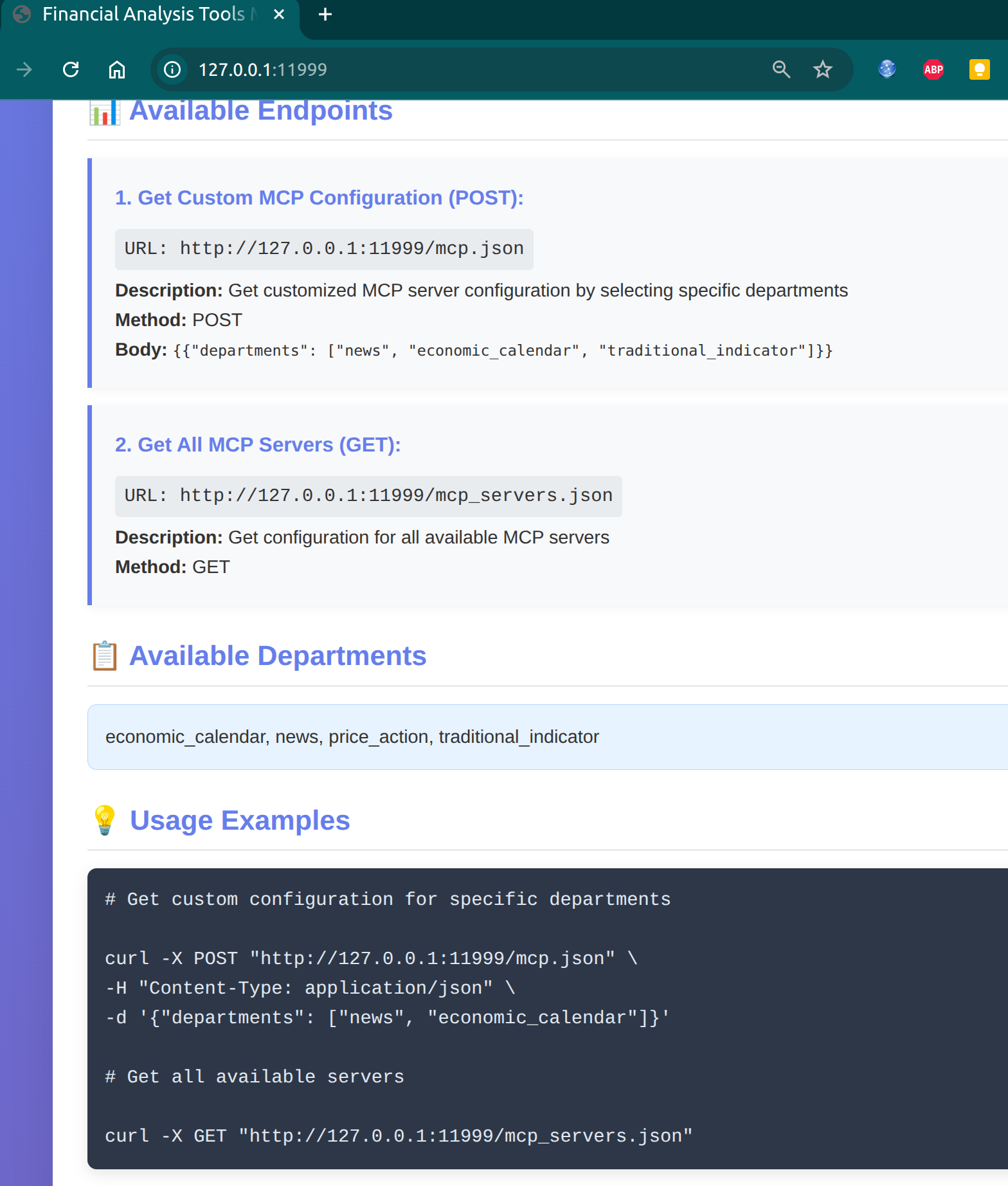
After starting the service, visit: http://127.0.0.1:11999/
Examples
See the examples/ directory for more examples:
examples/basic_usage.py - Basic usage
examples/advanced_analysis.py - Advanced analysis
examples/custom_indicators.py - Custom indicators
🤝 Contributing
We welcome all forms of contribution!
Fork the repo
Create a feature branch (git checkout -b feature/AmazingFeature)
Commit your changes (git commit -m 'Add some AmazingFeature')
Push to the branch (git push origin feature/AmazingFeature)
Open a Pull Request
Development setup
git clone https://github.com/aitrados/finance-trading-ai-agents-mcp.git
cd finance-trading-ai-agents-mcp
pip install -e ".[dev]"
📄 License
This project is licensed under the MIT License - see the LICENSE file for details.
Thanks to all developers and users who have contributed to this project.
⭐ If this project helps you, please consider giving it a star!
F
Finance Trading Ai Agents
aitrados·63 étoiles·
A comprehensive, free MCP server designed specifically for financial analysis and quantitative trading. This specialized platform offers one-click local deployment with a sophisticated department-base
A comprehensive, free MCP server designed specifically for financial analysis and quantitative trading. This specialized platform offers one-click local deployment with a sophisticated department-based architecture that mirrors real financial company operations.
Outils
Outils
Pas encore de liste d'outils. Les serveurs distants en obtiennent une après le premier contrôle d'état.
FAQ
Questions
Comment installer Finance Trading Ai Agents ?
Copiez sur cette page la configuration stdio pour Cursor, Claude Desktop, Claude Code ou VS Code. Elle utilise l'installation de l'éditeur, pas un proxy PlugMCP.
Finance Trading Ai Agents nécessite-t-il une clé API ?
Aucune variable d'environnement requise n'est indiquée sur cette fiche.
Quel transport Finance Trading Ai Agents utilise-t-il ?
Finance Trading Ai Agents s'exécute en local via stdio.
Quand Finance Trading Ai Agents a-t-il été vérifié pour la dernière fois ?
Dernière vérification : 2026-10-27. A comprehensive, free MCP server designed specifically for financial analysis and quantitative trading. This specialized platform offers one-click local deployment with a sophisticated department-based architecture that mirrors real financial company operations.