Axon.MCP.Server
Model Context Protocol (MCP) Server for AI IDEs - Cursor, AntiGravity & Claude
Transform your codebase into an intelligent knowledge base for AI-powered development with Cursor IDE, Google AntiGravity, and MCP-enabled assistants
Alimenter votre agent
Installation de l'éditeur. Ce n'est pas un endpoint PlugMCP.
Host a copy with our keys and logs.
Pas encore de version packagée dans le registre. Suivez le README du dépôt.
URL distante ou commande sur votre machine ? Ce qui distingue les deux installations
Exécuter sur PlugMCP
A new server you create. It is not this listing's official endpoint. Use the publisher install when you want their URL and their credentials.
LancerDe l'éditeur
Model Context Protocol (MCP) Server for AI IDEs - Cursor, AntiGravity & Claude
Transform your codebase into an intelligent knowledge base for AI-powered development with Cursor IDE, Google AntiGravity, and MCP-enabled assistants
Transform your codebase into an intelligent knowledge base for AI-powered development with Cursor IDE, Google AntiGravity, and MCP-enabled assistants
Modern codebases are complex labyrinths—thousands of files, intricate dependencies, and evolving architectures. AI assistants like ChatGPT and Claude are brilliant... but they're flying blind. Without deep understanding of your codebase's structure, relationships, and patterns, they can only see the trees, never the forest.
Axon.MCP.Server transforms your entire codebase into an intelligent, queryable knowledge base using the Model Context Protocol (MCP). Think of it as giving your AI assistant X-ray vision into your code—understanding not just syntax, but semantics, architecture, and relationships.
Axon MCP Server seamlessly integrates with leading AI-powered IDEs to supercharge your development workflow
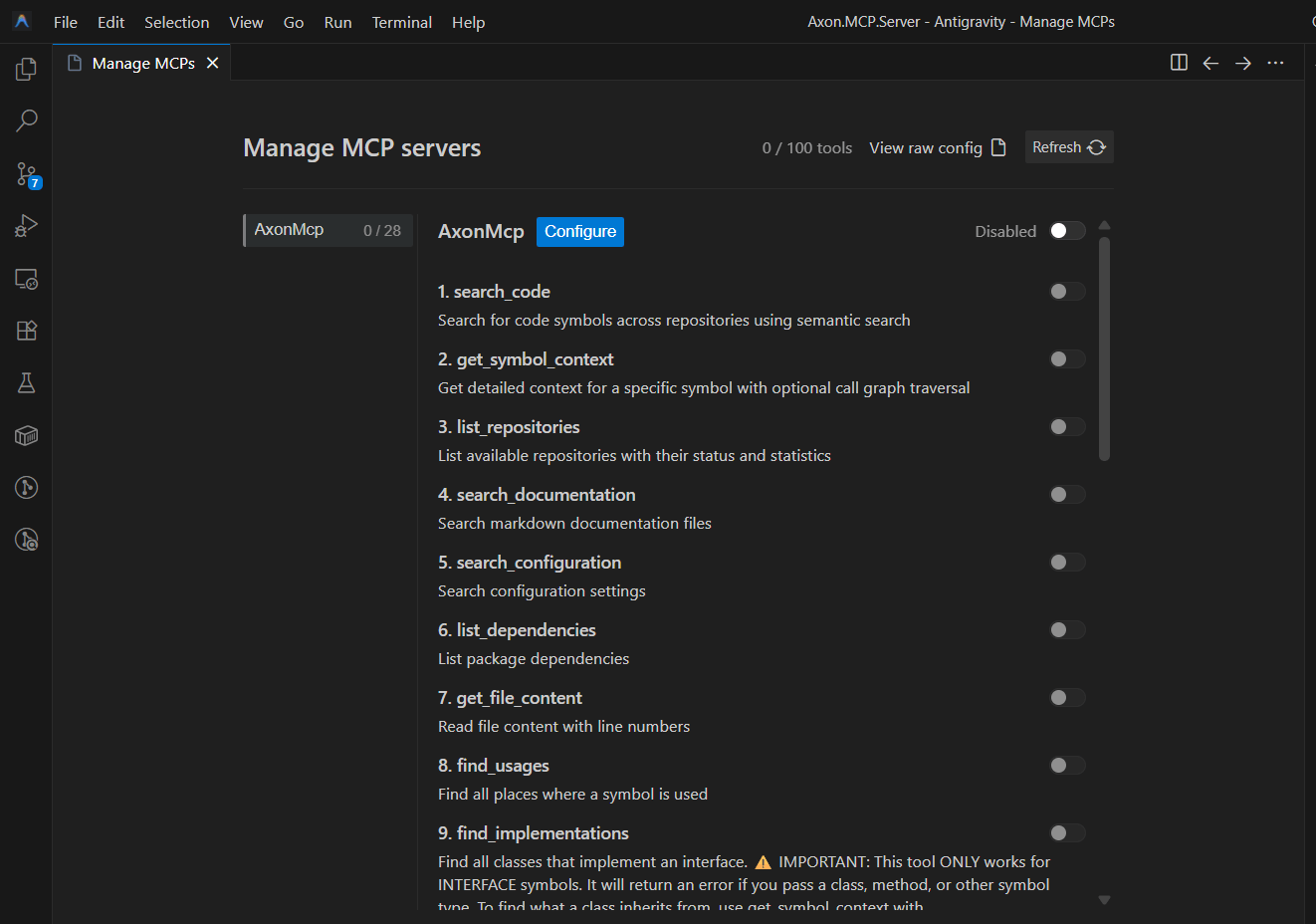 Axon MCP providing deep code context to Google AntiGravity for intelligent code assistance
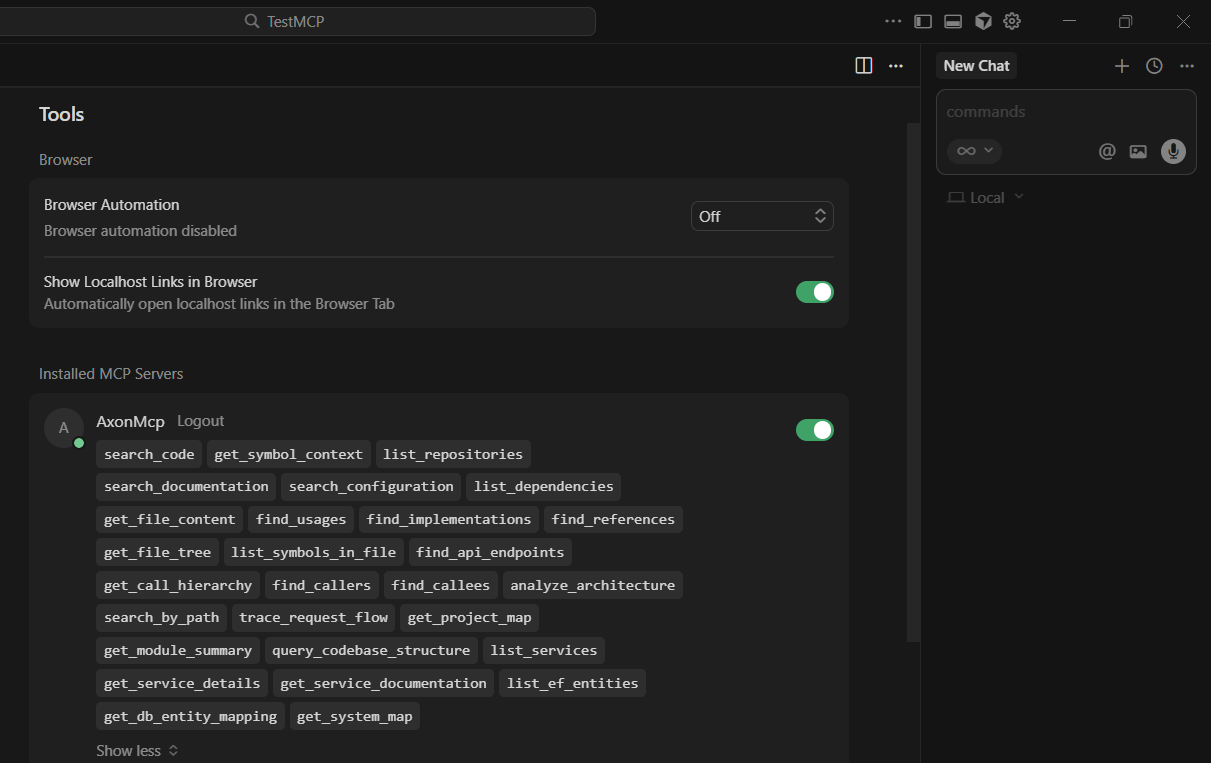 Real-time code intelligence powered by Axon's semantic understanding in Cursor
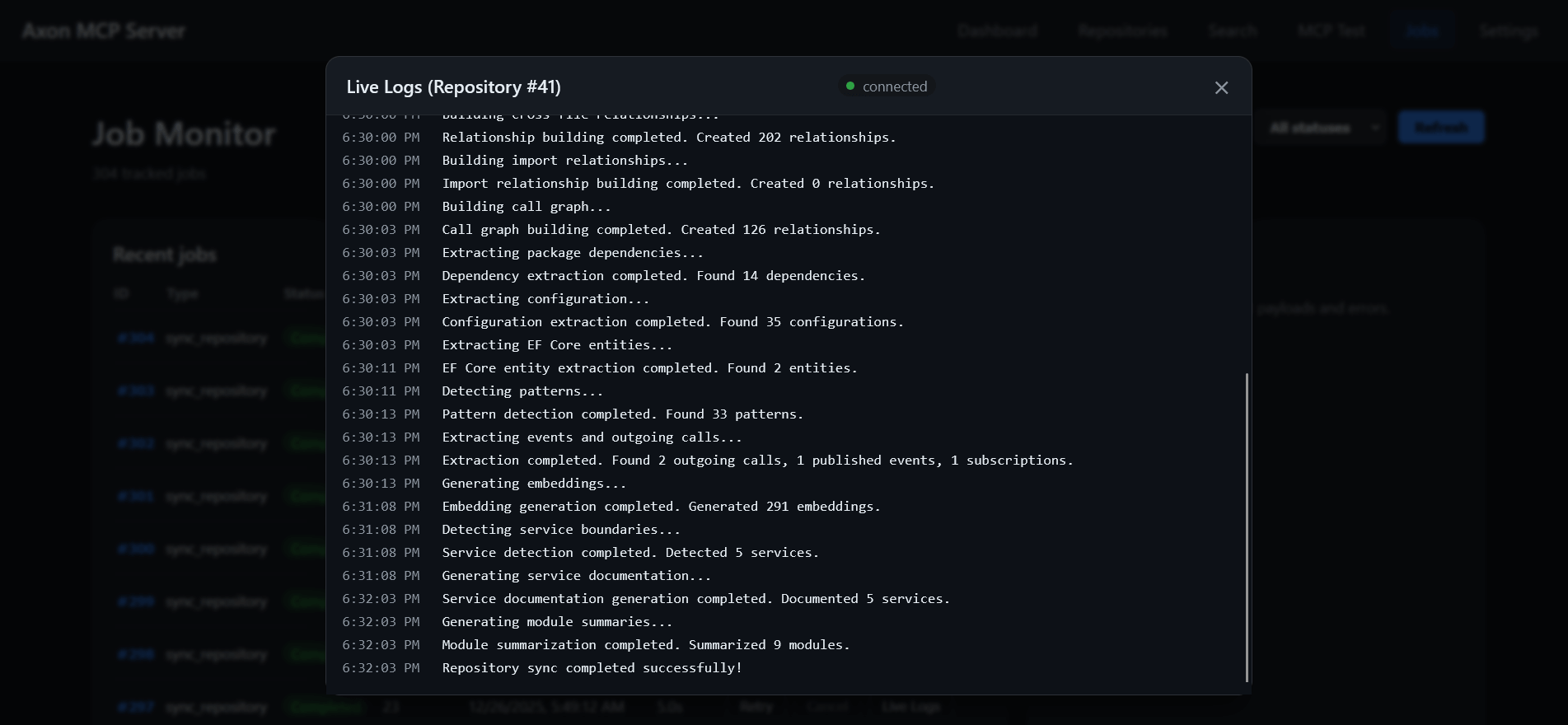 Real-time monitoring of code analysis and synchronization
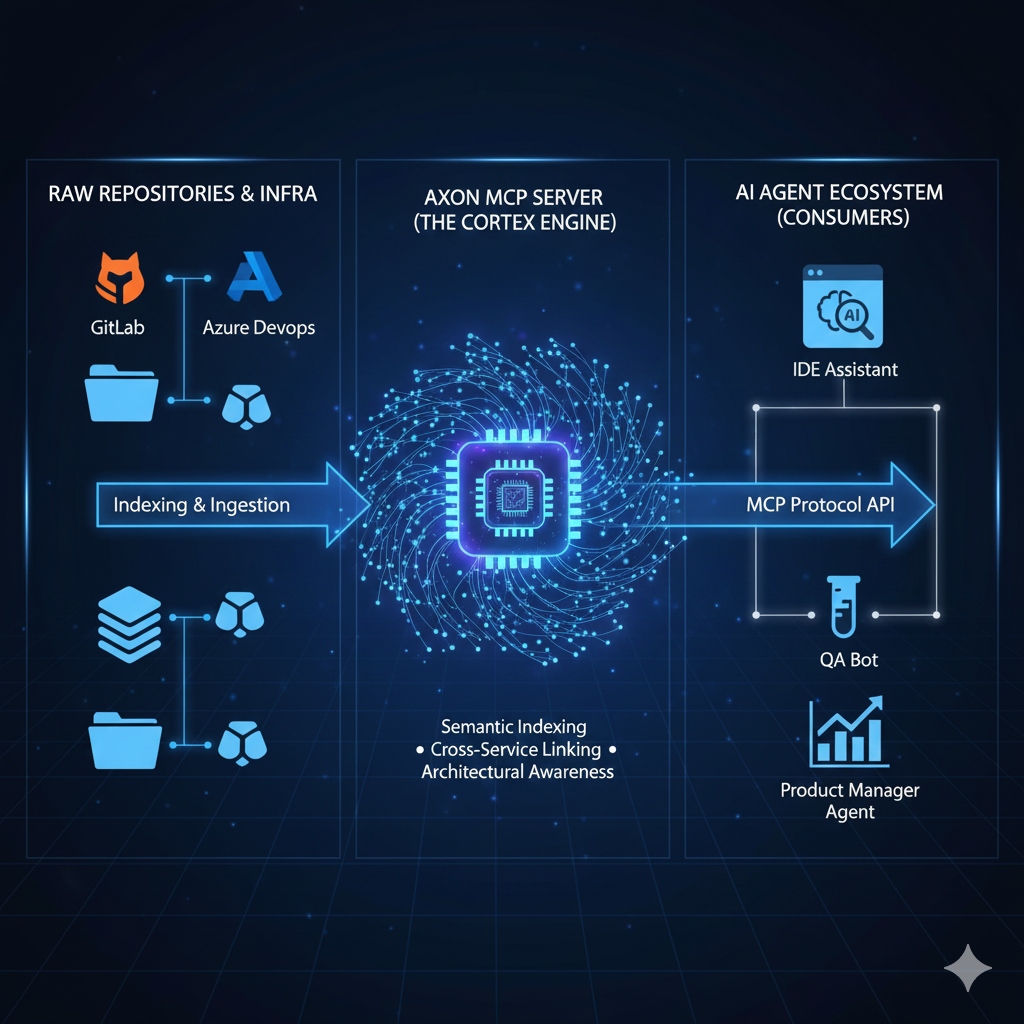 Auto-generated service dependency diagrams
┌─────────────────────────────────────────────────────────────┐
│  Client Layer: AI Assistants, IDEs, React UI, REST Clients │
└─────────────────────────────────────────────────────────────┘
                            │
            ┌───────────────┼───────────────┐
            │               │               │
┌───────────▼────┐  ┌──────▼──────┐  ┌────▼──────┐
│  MCP Server    │  │  REST API   │  │  React UI │
│    :8001       │  │    :8080    │  │    :80    │
└───────┬────────┘  └──────┬──────┘  └───────────┘
        │                  │
        │         ┌────────┼────────┐
        │         │        │        │
        │    ┌────▼───┐ ┌─▼────┐ ┌─▼─────────┐
        │    │ Worker │ │ Beat │ │ Enrichment│
        │    │ (Sync) │ │ Sched│ │  Worker   │
        │    └────┬───┘ └──────┘ └─────┬─────┘
        │         │                     │
    ┌───▼─────────▼─────────────────────▼──────┐
    │  Analysis: Tree-sitter + Roslyn + EF     │
    └───────────────────┬──────────────────────┘
                        │
        ┌───────────────┼───────────────┐
        │               │               │
┌───────▼──────┐  ┌────▼────┐  ┌──────▼────────┐
│ PostgreSQL   │  │  Redis  │  │ Prometheus +  │
│ + pgvector   │  │ Cache   │  │   Grafana     │
└──────────────┘  └─────────┘  └───────────────┘
Backend: FastAPI, Celery, SQLAlchemy 2.0 (async), Python 3.11+
Parsing: Tree-sitter (multi-lang), Roslyn (C# semantic analysis)
Database: PostgreSQL 15 + pgvector, Redis
AI/ML: OpenAI/OpenRouter (LLM), sentence-transformers (embeddings)
Frontend: React + TypeScript, Vite
Infrastructure: Docker Compose, Prometheus, Grafana
The server exposes 12 powerful tools to AI assistants via the Model Context Protocol:
structlog for easy parsingThe system maintains a rich relational model:
Total Tables: 14 with optimized indexes, cascading deletes, unique constraints
Get up and running in 5 minutes with Docker Compose.
# Clone the repository
git clone https://github.com/ali-kamali/Axon.MCP.Server.git
cd axon.mcp.server

# Copy environment template
cp .env.example .env
Edit .env with your credentials:
# Source control (choose one)
GITLAB_TOKEN=glpat-xxxxxxxxxxxxxxxxxxxx
# OR
AZUREDEVOPS_PASSWORD=your-azure-devops-pat

# Security (generate strong keys)
ADMIN_API_KEY=$(python -c "import secrets; print(secrets.token_urlsafe(32))")
ADMIN_PASSWORD=your-secure-password

# Optional: AI enrichment (for LLM-generated code summaries)
OPENROUTER_API_KEY=sk-or-v1-xxxxxxxxxxxxxxxx
# Start all services (PostgreSQL, Redis, API, Workers, UI, Monitoring)
make docker-up

# Run database migrations
make migrate

# Verify health
curl http://localhost:8080/api/v1/health
# ✅ Expected: {"status":"ok"}
Next Steps:
💡 Pro Tip: Check out the Development Guide for local development setup and testing.
The main purpose of Axon MCP Server is to provide deep code intelligence to AI-powered IDEs:
# Install dependencies
make dev-install

# Run tests
make test

# Start API (dev mode with hot reload)
make api-dev

# Start MCP server
make mcp-dev

# Start UI
make ui-dev

# Lint and format
make lint
make format
This project is actively maintained and continuously evolving. Here's what's on our horizon:
💡 Have a feature idea? Open an issue on our GitLab repository!
Axon.MCP.Server is dual-licensed to ensure sustainability and rapid development.
This project is free software under the GNU Affero General Public License v3.0 (AGPLv3).
Want to integrate Axon into a proprietary/closed-source product?
📩 Contact us to acquire a commercial license.
We believe in open source and sustainability. The AGPLv3 ensures the community benefits from improvements, while commercial licenses fund continued development, comprehensive testing, and enterprise features that benefit everyone.
We welcome contributions from the community! Whether it's bug fixes, new features, or documentation improvements, your help makes this project better.
Since this project is dual-licensed, we must ensure we have the legal right to distribute contributions.
Before merging any PR, we ask contributors to reply to a comment saying:
"I hereby assign copyright of this contribution to the project maintainers and agree to the terms of the Contributor License Agreement."
git checkout -b feature/amazing-feature)git commit -m 'Add amazing feature')git push origin feature/amazing-feature)Need help or want to discuss features?
docs/ directory#axon-mcp-server (internal Slack)Built with ❤️ by the Axon DevOps Team
Empowering developers with AI-driven code intelligence
Transform your codebase into an intelligent knowledge base for AI-powered development with Cursor IDE, Google AntiGravity, and MCP-enabled assistants
Outils
Pas encore de liste d'outils. Les serveurs distants en obtiennent une après le premier contrôle d'état.
FAQ
Copiez sur cette page la configuration stdio pour Cursor, Claude Desktop, Claude Code ou VS Code. Elle utilise l'installation de l'éditeur, pas un proxy PlugMCP.
Aucune variable d'environnement requise n'est indiquée sur cette fiche.
Axon.MCP.Server s'exécute en local via stdio.
Dernière vérification : 2026-10-26. Transform your codebase into an intelligent knowledge base for AI-powered development with Cursor IDE, Google AntiGravity, and MCP-enabled assistants