
Sample: MCP in Action, an AI-Powered E-Commerce Fraud Investigation Agent
This is a sample for education and demonstration. It is not intended for production use. Deploy it in a sandbox AWS account, in us-west-2 only, and tear it down when you are finished. See SECURITY.md.
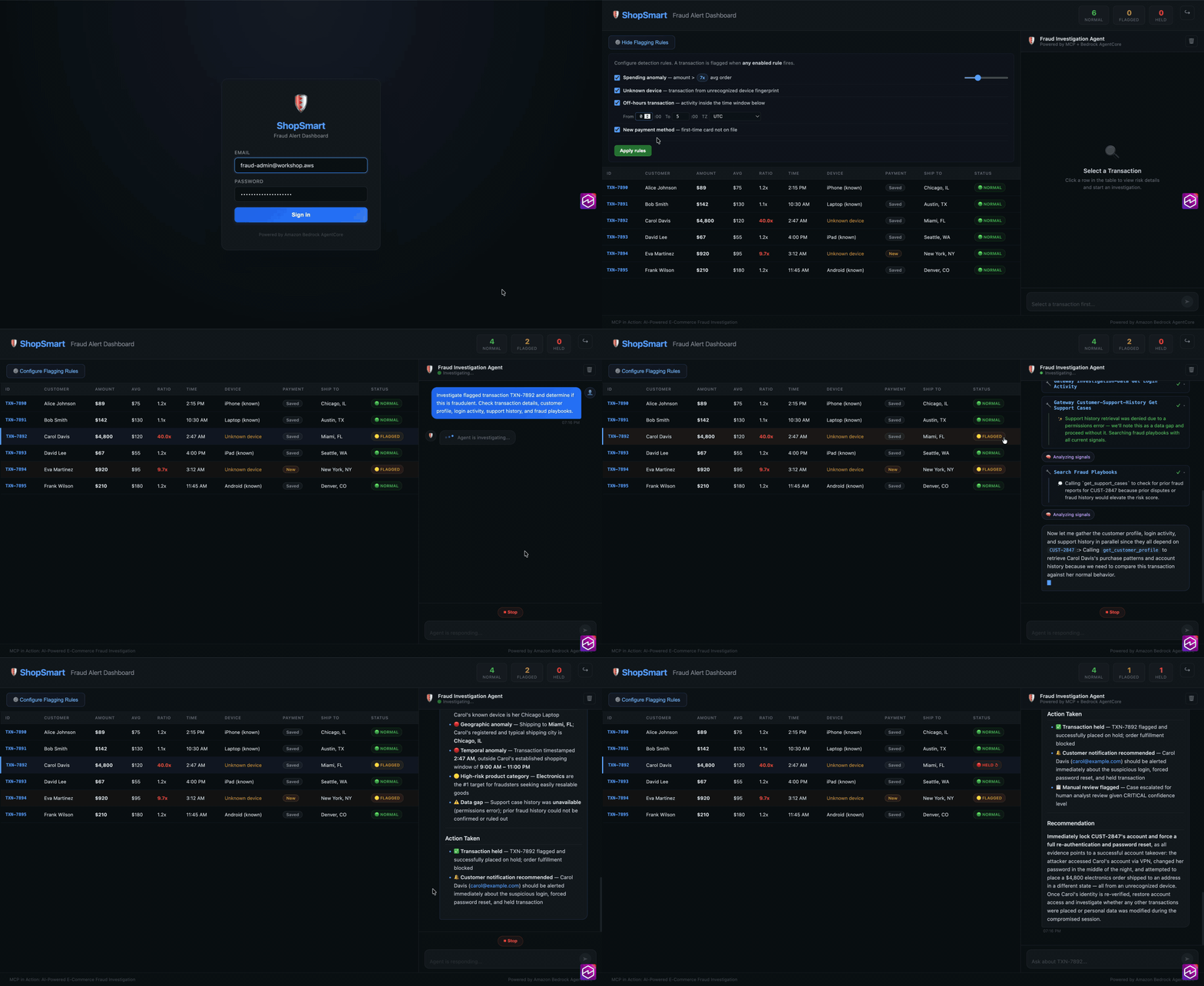
An end-to-end sample that shows the Model Context Protocol (MCP) doing real work. A Strands SDK agent runs on Amazon Bedrock AgentCore, connects to an AgentCore Gateway over MCP, and investigates a suspected e-commerce fraud case by pulling from simulated data sources: transaction history, customer profiles, login activity, prior support cases, and a knowledge base of fraud playbooks. A React dashboard (hosted on AWS Amplify) streams the agent's reasoning back to you token by token as it works the case.
The whole thing deploys from one script and is ready to use out of the box. The
seed data and the built dashboard ship prebuilt in assets/seed-bundle.zip, so
you do not have to build anything to try it. The source for the agent, the
dashboard, and the seed data is also in assets/ so you can read exactly how it
works and rebuild the bundle yourself.
Demo
The story
Fraud analysts do not lack data, they lack time. A single "is this charge legitimate?" question means opening five tools: the transaction ledger, the customer's profile and history, recent login and device activity, the support case trail, and the internal playbooks that say what "suspicious" actually means for your business. Stitching that together by hand, per case, is slow.
This sample hands that job to an agent. You give it a customer ID or a transaction, and it decides which sources to consult, queries them through MCP tools, checks the behavior against the fraud playbooks, and returns a reasoned verdict with the evidence it used. You watch it think in real time in the dashboard. Nothing here is a black box: every tool the agent can call maps to a concrete AWS integration you can inspect in the template.
Architecture
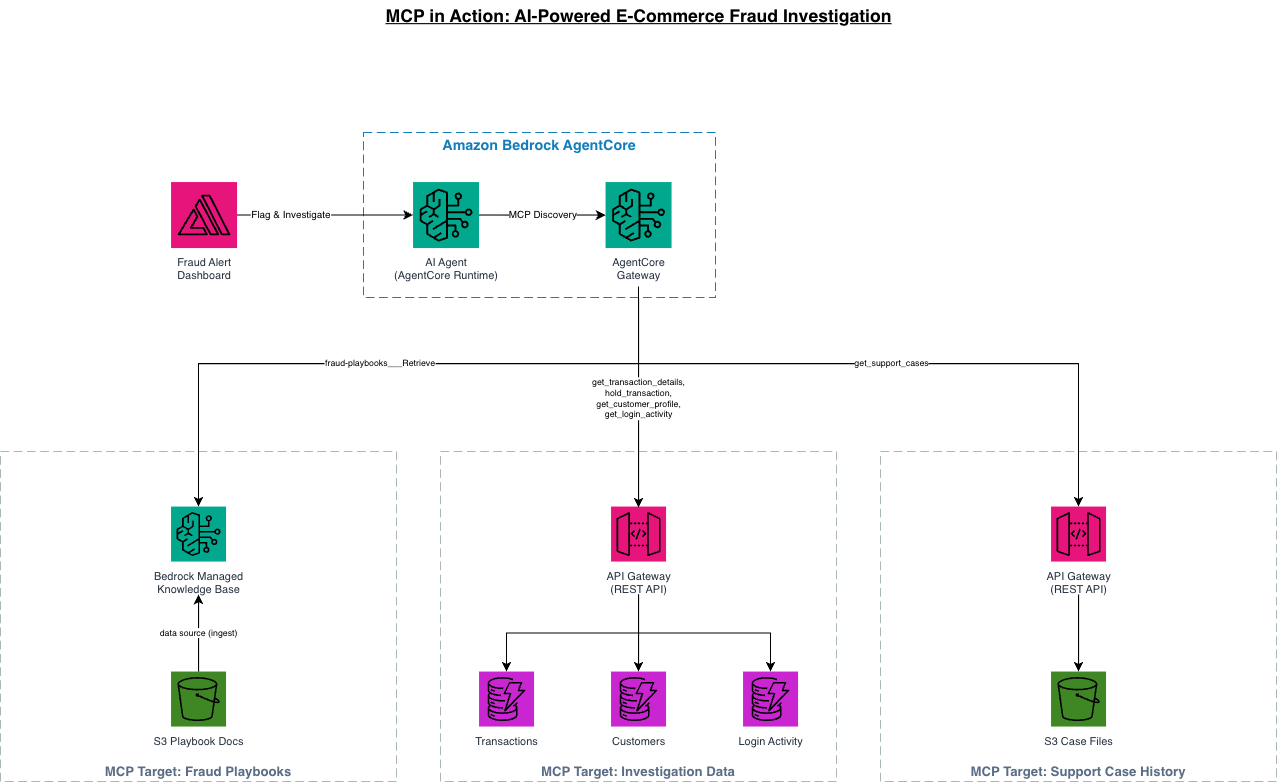
Flow: you sign in to the Amplify dashboard with a Cognito user. The dashboard calls the AgentCore Runtime directly over an authenticated, server-sent-events (SSE) stream, so the agent's output renders live. The Strands agent in the Runtime connects to an AgentCore Gateway that exposes three MCP targets. Two of those targets are API Gateway REST APIs wired straight to data with no Lambda in the path: one does a direct DynamoDB integration for structured records (transactions, customer profiles, login activity), the other does a direct S3 integration for support-case files. The third target is a Bedrock Managed Knowledge Base built from the fraud playbooks, so the agent can retrieve policy guidance in natural language. There is zero Lambda in the runtime request path.
How it works
The agent, its Dockerfile, and its dependencies are in assets/agent/. The
dashboard source is in assets/dashboard/. The seed data (the DynamoDB records,
the support cases, and the playbook text) is in assets/seed-data/.
Prerequisites
- Credentials for a sandbox AWS account, and you must deploy in us-west-2 (the template enforces this with a stack rule and will refuse other regions).
- AWS CLI v2, configured for that account.
- Amazon Bedrock model access granted in us-west-2 for both:
- Anthropic Claude Sonnet 4.6 (
us.anthropic.claude-sonnet-4-6) - Amazon Titan Text Embeddings v2 (
amazon.titan-embed-text-v2:0) - Request access in the Bedrock console under Model access if you have not already. Deployment will fail at the knowledge-base or agent step without it.
- Anthropic Claude Sonnet 4.6 (
- Node.js 18+ and npm, only if you want to rebuild the seed bundle from
source with
scripts/build-bundle.sh. You do not need Node.js just to deploy, the prebuilt bundle is already in the repo.
Deploy (one command, about 15 to 20 minutes)
Run from the repository root. The script creates (or reuses) an S3 bucket in
us-west-2, uploads assets/seed-bundle.zip to it, and deploys the
CloudFormation template. Deployment takes 15 to 20 minutes because it builds an
ARM container image in CodeBuild, stands up the AgentCore Runtime, ingests the
knowledge base, and publishes the Amplify app.
chmod +x scripts/*.sh
./scripts/deploy.sh
When it finishes it prints three outputs:
- FraudDashboardURL: open this in your browser.
- WorkshopUsername: the login email (
[email protected]by default). - WorkshopPasswordSecret: the Secrets Manager secret that holds the
generated password. Read it with:
aws secretsmanager get-secret-value \
  --secret-id <the-secret-name-from-the-output> \
  --region us-west-2 \
  --query SecretString --output text
The bucket name and region can be overridden with environment variables:
REGION=us-west-2 BUCKET=my-fraud-assets-bucket ./scripts/deploy.sh
Using it
- Open FraudDashboardURL and sign in with the username and the password you read from Secrets Manager.
- Start an investigation from the dashboard (for example, ask it to review a flagged customer or transaction from the seed data).
- Watch the agent stream its reasoning: it decides which MCP tools to call, pulls transactions, profiles, and login activity, reads the relevant support cases, checks the fraud playbooks, and returns a verdict with the evidence.
The assets/agent/fraud-agent-lab.ipynb notebook walks through the same agent
step by step if you want to drive it directly rather than through the dashboard.
Rebuild the seed bundle (optional)
The repo already contains a prebuilt assets/seed-bundle.zip. If you change the
dashboard, the seed data, or the notebook, regenerate the bundle:
./scripts/build-bundle.sh
This runs npm ci and npm run build in assets/dashboard/, zips the build
output, and assembles the seed data, the dashboard build, and the notebook into
a fresh assets/seed-bundle.zip. Then run ./scripts/deploy.sh again.
Repository structure
.
├── cloudformation/
│   └── mcp-fraud-lab.yaml        # the full stack (single template)
├── assets/
│   ├── agent/                    # Strands agent source, Dockerfile, notebook
│   ├── dashboard/                # React dashboard source
│   ├── seed-data/                # transactions, profiles, logins, cases, playbooks
│   └── seed-bundle.zip           # prebuilt bundle the stack self-loads on deploy
├── scripts/
│   ├── deploy.sh                 # create bucket, upload bundle, deploy stack
│   ├── build-bundle.sh           # rebuild seed-bundle.zip from source
│   └── teardown.sh               # delete the stack and clean up
├── docs/
│   └── architecture.png
├── README.md
├── SECURITY.md
├── CONTRIBUTING.md
├── CODE_OF_CONDUCT.md
├── THIRD-PARTY-LICENSES
└── LICENSE
Cost
This stack runs paid resources: AgentCore Runtime, a Bedrock Managed Knowledge Base (with an OpenSearch Serverless collection behind it), DynamoDB, S3, API Gateway, Cognito, Amplify, a KMS key, and Bedrock model invocations while you use the agent. Treat it as a short-lived demo, not something to leave running. Costs stop when you tear it down.
Cleanup
./scripts/teardown.sh
This deletes the CloudFormation stack and waits for completion. Pass
DELETE_BUCKET=true to also empty and delete the assets bucket the deploy
script created.
Security
This is a demonstration sample. It is not hardened for production and should only run in a disposable sandbox account. See SECURITY.md for the security notes and how to report a genuine issue.
License
This sample is licensed under the MIT-0 License. See LICENSE. Third-party dependency attributions are in THIRD-PARTY-LICENSES.