Cobro (cobro-mcp)
한국어: README.ko.md
Meet Cobro: Your Co-Agent, Your Browser.
Alimenter votre agent
La commande propre à l'éditeur. Ce n'est pas un endpoint PlugMCP.
Host a copy with our keys and logs.
npx -y [email protected]Claude Code n'a pas de lien d'installation pour une commande locale. Copiez la commande ci-dessous et exécutez-la dans un terminal.
claude mcp add cobro-mcp -- npx -y cobro-mcp@0.10.3À exécuter dans un terminal.
{ "mcpServers": { "cobro-mcp": { "command": "npx", "args": [ "-y", "[email protected]" ] } }}claude_desktop_config.json
URL distante ou commande sur votre machine ? Ce qui distingue les deux installations
Exécuter sur PlugMCP
A new server you create. It is not this listing's official endpoint. Use the publisher install when you want their URL and their credentials.
LancerDe l'éditeur
cobro-mcp)한국어: README.ko.md
Meet Cobro: Your Co-Agent, Your Browser.
Co-browse for coding agents: pick elements in the browser, write a note, Send — the context lands in the agent's chat. MCP server with 6 tools.
Stop describing the screen to your agent. Point at it.
Cobro = co-browse. The human and the agent watch the same screen together.
Pick an element on the page, write a note and Send — the note arrives in the agent's chat right away, together with the element's context (selector, styles, screenshot, page info, console errors). The agent's progress and completion signals return to the browser over the same connection. MCP server + local WebSocket + page overlay. The target project's source is never touched (the only thing created is a .cobro/ folder).
Cobro is an MCP server. Register it once with your host (the thing that runs MCP servers, e.g. Claude Code, Codex, Cursor). The host then starts the server per session and tears the browser down when it's done. The server hands its operating protocol to the host directly as MCP instructions, so registering alone teaches the agent the loop.
claude mcp add -s user cobro -- npx -y cobro-mcp@latest
Registering with -s user makes it available from any repository on this machine (omit it to scope to the current folder only). State (.cobro/) is created per repository, while the browser profile (~/.cobro/profile/) is shared, so you only log in once. A global install (npm i -g cobro-mcp, then -- cobro-mcp) also works. Other hosts register the same run command as a stdio MCP server.
Run from source: git clone https://github.com/boonblade/cobro-mcp.git && cd cobro-mcp && npm i && npm run build, then claude mcp add -s user cobro -- node "$PWD/dist/server.js". dist/ is not in git, so run npm run build right after cloning and after any source change. Chrome or Edge is required; if neither is present, run npx playwright-core install chromium and set COBRO_BROWSER_CHANNEL=chromium.
Claude Code tip: wait moves to the background after 2 minutes by default. Setting "env": { "CLAUDE_CODE_MCP_AUTO_BACKGROUND_MS": "5000" } in ~/.claude/settings.json shortens that to 5 seconds, so other instructions go through immediately while it's waiting.
Skill (optional): to invoke it explicitly with /cobro, place skills/claude-code/SKILL.md at ~/.claude/skills/cobro/SKILL.md.
Start your dev server as usual (say http://localhost:5173).
Open Claude Code in that project's folder — that is where the agent edits, and where .cobro/ gets created.
Tell the agent:
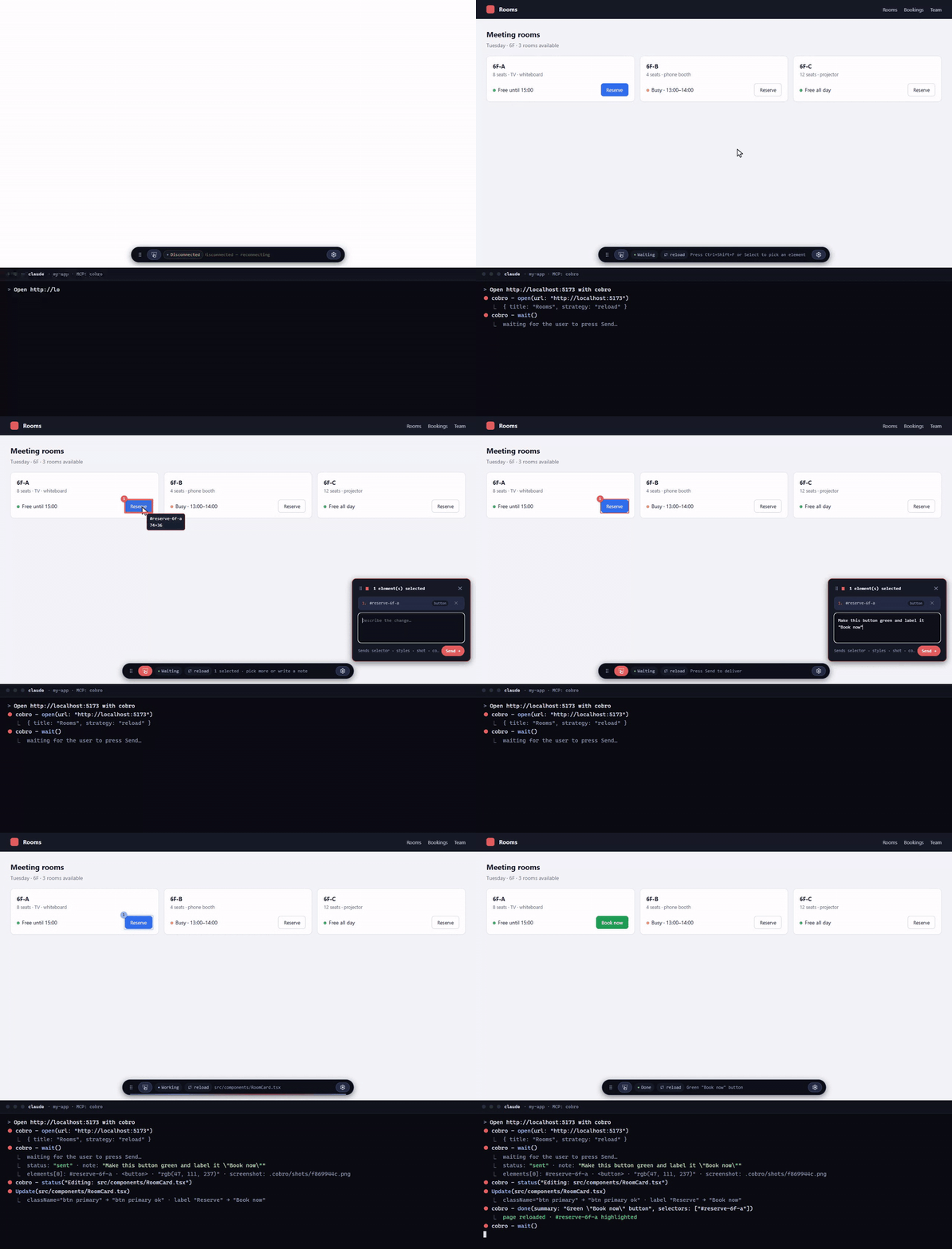
Open http://localhost:5173 with cobro
A Chrome window opens with a small toolbar at the bottom. The agent is now waiting for you.
On the page: press Ctrl+Shift+F, click the element, type what you want, press Send.
Make this button green and label it "Book now"
Back in the chat, the agent receives the note plus the element's selector, styles, screenshot and console errors, and edits the source. The page shows Working: Editing src/components/RoomCard.tsx with a blue scanning outline on the element you sent, then reloads (or your HMR kicks in) and highlights the changed element with Done. Send the next request the same way.
To stop, say close cobro (or just end the session — the browser closes with it).
The whole loop is the GIF at the top. No copy-paste, no "check my annotations" — Send is the message.
Ctrl+Shift+F to toggle pick mode (Esc to exit) → click an element (drag picks the topmost elements fully inside the band) → write a note → Send. Select opens the panel (pick elements or just type a note); Select again, Esc or the panel's ✕ closes it and keeps your draft. Each picked element gets a numbered marker; with several, write "1: …, 2: …". Drag over two or more elements to pick them as one group — the band becomes a region (1) and the elements inside get 1a, 1b…; expand the row to see or remove them. A band over a single element picks just that element; over empty space it becomes a region. Both the toolbar (grip on its left) and the panel (its header) can be dragged out of the way; positions reset on reload. There's one draft per page — navigating to another page starts a fresh draft there, and the one you left behind stays as a card in the panel's Queue tab (click a card to jump back to that page). Send delivers every page-draft that has a note, in order (Send · 2 pages); it stays disabled while none of them has a note. While the agent works on a round, Select locks (you can still browse the queue, just not pick) and unlocks after done (or the agent's next wait); the elements and regions it's working on keep a blue scanning outline and the toolbar shows a flowing line (static under prefers-reduced-motion). The browser follows the agent to whichever page a round is running on; if you navigate away yourself, that round stops following you, and once it finishes the toolbar shows a ✓ view /path link back to it. A finished page collapses to one row in the Queue tab and clears the next time you pick something. The toolbar itself is Select, a status chip (e.g. Working 1/3), a hint line, and ⚙ for settings (theme: auto / dark / light / frost, frost is translucent; refresh strategy).open(url) → wait() → if there are several batches, in array order: status("Editing: …", batchId) → edit → done(summary, selectors, changedFiles, batchId); with just one, batchId can be omitted → wait(). The browser moves to that batch's page on every status/done(batchId). Call close() to end the session.There are exactly six fixed tools. If you need more observation or control, pair Cobro with another MCP.
If wait returns pending, call it again (not an error). If browserGone: true, the user closed the browser — start over from open.
wait returns one JSON object. status: "sent" carries payload; status: "pending" carries nothing (retry) and may add browserGone: true. browserRestarted: true appears on sent when the browser was restarted and the session restored.
{
  "status": "sent",
  "payload": {
    "origin": "human",
    "sentAt": "2026-09-10T09:12:31.204Z",
    "page": { "url": "http://127.0.0.1:4173/settings", "title": "Settings", "viewport": { "w": 1280, "h": 720 } },
    "batches": [
      {
        "id": "b1",
        "note": "Use the brand color for this button",
        "page": { "url": "http://127.0.0.1:4173/", "title": "Vite App" },
        "elements": [
          {
            "selector": "#app > header > button.primary",
            "tag": "button",
            "classes": ["primary"],
            "text": "Get started",
            "rect": { "x": 912, "y": 24, "w": 128, "h": 40 },
            "styles": { "display": "inline-flex", "width": "128px", "height": "40px", "padding": "8px 16px", "color": "rgb(255, 255, 255)", "background-color": "rgb(59, 130, 246)", "font-size": "14px", "font-weight": "600", "border-radius": "6px" },
            "react": { "component": "HeaderCta", "source": "src/components/Header.tsx:42" },
            "ref": "1a"
          }
        ],
        "regions": [{ "ref": "1", "rect": { "x": 300, "y": 160, "w": 94, "h": 85 }, "within": "#app > main > div.grid" }],
        "screenshot": "/path/to/project/.cobro/shots/b1.png"
      },
      {
        "id": "b2",
        "note": "Make the Save button full width on mobile",
        "page": { "url": "http://127.0.0.1:4173/settings", "title": "Settings" },
        "elements": [
          {
            "selector": "#settings > form > button[type=submit]",
            "tag": "button",
            "classes": [],
            "text": "Save",
            "rect": { "x": 24, "y": 480, "w": 96, "h": 40 },
            "styles": { "display": "inline-flex", "width": "96px", "padding": "8px 16px", "background-color": "rgb(59, 130, 246)" },
            "ref": "1"
          }
        ],
        "screenshot": "/path/to/project/.cobro/shots/b2.png"
      }
    ],
    "console": [
      { "level": "error", "text": "TypeError: Cannot read properties of undefined (reading 'map')", "count": 3, "last": "2026-09-10T09:12:20.100Z" }
    ],
    "refreshStrategy": "none"
  }
}
Invalid values fall back to the default (one stderr line). Put { "refreshStrategy": "none" | "reload" | "event" } in the state folder's .cobro/config.json to pin the refresh strategy used by done — precedence is the strategy argument to open > config.json > auto-detection (HMR present → none, otherwise reload). Add .cobro/ to the target project's .gitignore.
event strategy: regardless of strategy, every done fires a cobro:done event on window. If the app wants to refresh itself, pin event and listen for it.
window.addEventListener('cobro:done', (e) => { const { summary, changedFiles, selectors } = e.detail; /* app refreshes itself */ });
127.0.0.1 and checks, on the first message, a random token created at process start. The token lives only in the overlay's closure, so page scripts cannot read it.origin: "human" and overwrites any value the page tries to send for it. No strategy executes JS supplied by the target project..cobro/. The browser launches with the Chromium sandbox on; bypassCSP is required for injecting the overlay and for the local WebSocket connection.source (file:line) is recovered from the dev server's source maps (React 19) or from _debugSource (React ≤ 18); production builds without maps report the component only. For component libraries: the location is the JSX call site in your code, not the library's internals.source is the SFC path only (no line). When a library component sits inside another library component's slot in the same SFC (e.g. an el-tag inside an el-card), component may name the outer one; the file is still right.col) can still be matched to a neighbour, and an element whose text changed after you picked it is reported as missing on Send.open again before it receives that Send (the Send is kept, not lost).<dialog> modal is open, the overlay is covered (library modals are unaffected).done is best-effort (it replays after a reload).Ctrl+Shift+F cannot be changed. The WebKit build differs from real Safari in fonts and scrollbars.open fails with "profile in use" (point COBRO_PROFILE_DIR elsewhere to work around it).See CHANGELOG.md for what changed in each version.
Releases are published by GitHub Actions through npm Trusted Publishing (no tokens, no manual 2FA): update CHANGELOG.md, run npm version x.y.z --no-git-tag-version, commit, tag vx.y.z, push the tag. The workflow (.github/workflows/publish.yml) checks that the tag matches package.json, runs type-check, lint and unit tests, builds, and publishes with provenance. End-to-end tests stay a local gate before tagging.
Apache License 2.0 · notices in NOTICE. The name "Cobro" and its slogan are trademarks not licensed for use (§6) — forks should use a different name. Contributions require a DCO (git commit -s).
Co-browse for coding agents: pick elements in the browser, write a note, Send — the context lands in the agent's chat. MCP server with 6 tools.
{ "mcpServers": { "cobro-mcp": { "command": "npx", "args": [ "-y", "[email protected]" ] } }}Outils
Pas encore de liste d'outils. Les serveurs distants en obtiennent une après le premier contrôle d'état.
FAQ
Copiez sur cette page la configuration stdio pour Cursor, Claude Desktop, Claude Code ou VS Code. Elle utilise l'installation de l'éditeur, pas un proxy PlugMCP.
Aucune variable d'environnement requise n'est indiquée sur cette fiche.
Cobro s'exécute en local via stdio.
Dernière vérification : 2026-10-28. Co-browse for coding agents: pick elements in the browser, write a note, Send — the context lands in the agent's chat. MCP server with 6 tools.
