Figma MCP Bridge

Alimenter votre agent
La commande propre à l'éditeur. Ce n'est pas un endpoint PlugMCP.
Host a copy with our keys and logs.
npx -y @gethopp/[email protected]Claude Code n'a pas de lien d'installation pour une commande locale. Copiez la commande ci-dessous et exécutez-la dans un terminal.
claude mcp add gethopp-figma-mcp-bridge -- npx -y @gethopp/figma-mcp-bridge@0.0.27À exécuter dans un terminal.
{ "mcpServers": { "gethopp-figma-mcp-bridge": { "command": "npx", "args": [ "-y", "@gethopp/[email protected]" ] } }}claude_desktop_config.json
URL distante ou commande sur votre machine ? Ce qui distingue les deux installations
Exécuter sur PlugMCP
A new server you create. It is not this listing's official endpoint. Use the publisher install when you want their URL and their credentials.
LancerDe l'éditeur
Figma Plugin & MCP server to bypass API limits
[!NOTE]
Requires the Figma desktop app (macOS/Windows). The browser version of Figma does not support importing development plugins.
While other amazing Figma MCP servers like Figma-Context-MCP exist, one issues is the API limiting for free users.
The limit for free accounts is 6 requests per month, yes per month.
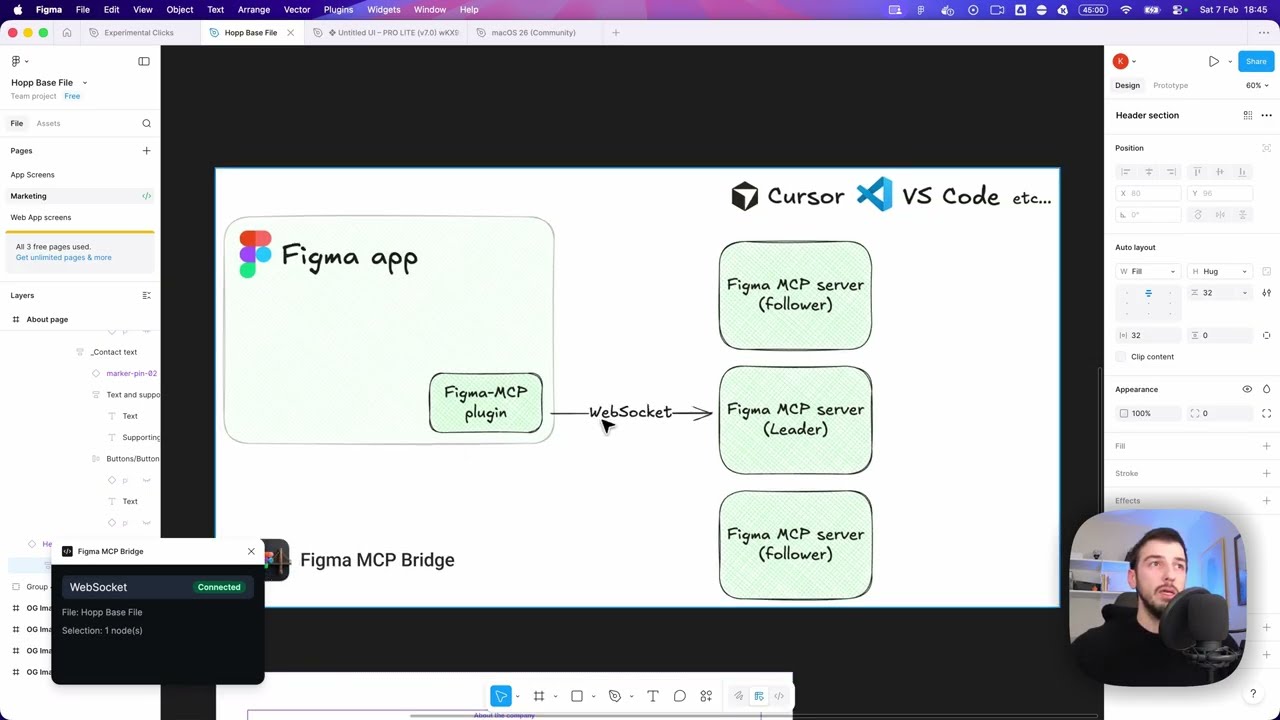
Figma MCP Bridge is a solution to this problem. It is a plugin + MCP server that streams live Figma document data to AI tools without hitting Figma API rate limits, so its Figma MCP for the rest of us ✊
It supports multiple Figma files connected simultaneously; open the plugin in each file and your AI agent can query any of them by fileKey. Single-file setups work exactly as before with no changes required.
It also includes a small, opt-in set of write tools for safe agent-driven edits — see Editing Notes below.
Add the following to your AI tool's MCP configuration (e.g. Cursor, Windsurf, Claude Desktop):
{
  "figma-bridge": {
    "command": "npx",
    "args": ["-y", "@gethopp/figma-mcp-bridge"]
  }
}
That's it — no binaries to download or install.
Download the plugin from the latest release page, then in Figma go to Plugins > Development > Import plugin from manifest and select the manifest.json file from the plugin/ folder. The same plugin runs in Figma design files, Dev Mode (read-only), and FigJam boards.
Open a Figma file, run the plugin, and start prompting your AI tool. The MCP server will automatically connect to the plugin.
To work across multiple files, just open the plugin in each Figma file. The bridge keeps all connections active and your AI agent can target any of them by fileKey.
If you want to know more about how it works, read the How it works section.
All tools accept an optional fileKey parameter when multiple Figma files are connected. Use list_files to discover connected files and their keys.
includePrototype: true on get_node to include the same interactions.conditions from outermost to innermost (null marks an else branch).AFTER_TIMEOUT values are in seconds (for example, 0.8 for 800 ms).set_text_content, set_text_properties, set_node_properties, set_solid_fill, create_text, create_shape, create_shape_with_text, create_sticky, create_connector, create_section, duplicate_nodes, duplicate_with_offset, fit_to_content, distribute_horizontally, distribute_vertically, align_to_grid, place_below, place_right_of, delete_nodes, ...) are available. Auto-layout and motion/animation tools return a clear error in FigJam.set_text_content / set_text_properties edit a TEXT node's content directly, or the text sublayer of a FigJam STICKY / SHAPE_WITH_TEXT node. Alignment and auto-resize are TEXT-node-only — they return a clear error on stickies and shapes (x/y/width/height still apply to the containing node).set_node_properties accepts either nodeId or a nodeIds array to apply the same property changes to several nodes in one call.set_auto_layout targets frames; SECTION nodes have no auto-layout in Figma's API and return an explicit error.fit_to_content works on SECTION nodes only (Figma's API exposes no equivalent for other containers): it shifts children so their bounding box starts at padding and resizes the section to bbox + 2×padding.delete_nodes is intentionally gated behind confirm: true.Inter Regular unless a font is provided.create_image reads local paths relative to the MCP server working directory unless you pass an absolute path.create_svg accepts raw <svg> markup or a local SVG path inside the MCP server working directory. SVG payloads are limited to 2 MiB.import_html_layers takes a JSON file produced by html-figma's browser htmlToFigma(). The path resolves relative to the MCP server working directory and must stay inside it, even when absolute. Everything lands inside one wrapper frame, and the response reports layerCount against expectedLayerCount so partial imports are visible.create_page returns the new page's ID — pass it as parentId to create_frame / create_text / create_shape / create_image to author content on that page without switching the editor.With the current write surface, an agent can build a basic slide deck in a new empty Figma file: create slide frames, style titles and body copy, lay out rectangles/ellipses/lines for cards and dividers, duplicate slide templates, reparent content into the right frame, and adjust common geometry/visual properties — including solid/gradient paints, shadows and blurs, stroke geometry, and auto-layout configuration.
The current version is intentionally limited — no components/instances, no variables/styles authoring, no per-segment text styling, and no vector boolean operations yet.
This repo uses Bun as its package manager and script runner throughout. Install it first if you don't have it.
git clone [email protected]:gethopp/figma-mcp-bridge.git
Install the root dependencies once. This runs Husky's prepare script, which installs the Git pre-commit hook that formats staged files with Prettier.
cd figma-mcp-bridge && bun install
cd server && bun install && bun run build
cd plugin && bun install && bun run build
For local development, add the following to your AI tool's MCP config:
{
  "figma-bridge": {
    "command": "node",
    "args": ["/path/to/figma-mcp-bridge/server/dist/index.js"]
  }
}
The repo is formatted with Prettier (config in .prettierrc). A Husky pre-commit hook runs lint-staged, which formats only your staged files, so commits stay formatted automatically. You can also run it manually:
bun run format        # format the whole repo
bun run format:check  # verify formatting without writing (useful in CI)
Figma-MCP-Bridge/
├── plugin/   # Figma plugin (TypeScript/React)
└── server/   # MCP server (TypeScript/Node.js)
    └── src/
        ├── index.ts      # Entry point
        ├── bridge.ts     # WebSocket bridge to Figma plugin
        ├── leader.ts     # Leader: HTTP server + bridge
        ├── follower.ts   # Follower: proxies to leader via HTTP
        ├── node.ts       # Dynamic leader/follower role switching
        ├── election.ts   # Leader election & health monitoring
        ├── tools.ts      # MCP tool definitions
        └── types.ts      # Shared types
There are two main components to the Figma MCP Bridge:
The Figma plugin is the user interface for the Figma MCP Bridge. You run this inside the Figma file you want to use the MCP server for, and its responsible for getting you all the information you need.
The MCP server is the core of the Figma MCP Bridge. It maintains a registry of WebSocket connections keyed by fileKey, so multiple Figma files can be connected simultaneously. The server is responsible for:
fileKey┌─────────────────────────────────────────────────────────────────────────────┐
│ FIGMA (Desktop app) │
│ ┌───────────────────────────────────────────────────────────────────────┐ │
│ │ Figma Plugin │ │
│ │ (TypeScript/React) │ │
│ └───────────────────────────────────────────────────────────────────────┘ │
└─────────────────────────────────────────────────────────────────────────────┘
│
│ WebSocket
│ (ws://localhost:1994/ws)
▼
┌─────────────────────────────────────────────────────────────────────────────┐
│ PRIMARY MCP SERVER │
│ (Leader on :1994) │
│ ┌─────────────────────────────────────────────────────────────────────┐ │
│ │ Bridge Endpoints: │ │
│ │ • Manages WebSocket conn • /ws (plugin) │ │
│ │ • Forwards requests to plugin • /ping (health) │ │
│ │ • Routes responses back • /rpc (followers) │ │
│ └─────────────────────────────────────────────────────────────────────┘ │
└─────────────────────────────────────────────────────────────────────────────┘
▲ ▲
│ HTTP /rpc │ HTTP /rpc
│ POST requests │ POST requests
│ │
┌─────────────────┴───────────┐ ┌─────────────┴───────────────┐
│ FOLLOWER MCP SERVER 1 │ │ FOLLOWER MCP SERVER 2 │
│ │ │ │
│ • Pings leader /ping │ │ • Pings leader /ping │
│ • Forwards tool calls │ │ • Forwards tool calls │
│ via HTTP /rpc │ │ via HTTP /rpc │
│ • If leader dies → │ │ • If leader dies → │
│ attempts takeover │ │ attempts takeover │
└─────────────────────────────┘ └─────────────────────────────┘
▲ ▲
│ │
│ MCP Protocol │ MCP Protocol
│ (stdio) │ (stdio)
▼ ▼
┌─────────────────────────────┐ ┌─────────────────────────────┐
│ AI Tool / IDE 1 │ │ AI Tool / IDE 2 │
│ (e.g., Cursor) │ │ (e.g., Cursor) │
└─────────────────────────────┘ └─────────────────────────────┘
Figma Plugin & MCP server to bypass API limits
{ "mcpServers": { "gethopp-figma-mcp-bridge": { "command": "npx", "args": [ "-y", "@gethopp/[email protected]" ] } }}Outils
Pas encore de liste d'outils. Les serveurs distants en obtiennent une après le premier contrôle d'état.
FAQ
Copiez sur cette page la configuration stdio pour Cursor, Claude Desktop, Claude Code ou VS Code. Elle utilise l'installation de l'éditeur, pas un proxy PlugMCP.
Aucune variable d'environnement requise n'est indiquée sur cette fiche.
Figma MCP Bridge s'exécute en local via stdio.
Dernière vérification : 2026-11-14. Figma Plugin & MCP server to bypass API limits

