
Alimenter votre agent
La commande propre à l'éditeur. Ce n'est pas un endpoint PlugMCP.
Host a copy with our keys and logs.
npx -y [email protected]Claude Code n'a pas de lien d'installation pour une commande locale. Copiez la commande ci-dessous et exécutez-la dans un terminal.
claude mcp add io.github.had0yun-gopeak -- npx -y gopeak@2.0.1À exécuter dans un terminal.
{ "mcpServers": { "io.github.had0yun-gopeak": { "command": "npx", "args": [ "-y", "[email protected]" ] } }}claude_desktop_config.json
URL distante ou commande sur votre machine ? Ce qui distingue les deux installations
Exécuter sur PlugMCP
A new server you create. It is not this listing's official endpoint. Use the publisher install when you want their URL and their credentials.
Lancer
GoPeak is an MCP server for Godot that lets AI assistants run, inspect, modify, and debug real projects end-to-end.
English is the canonical source of truth. Localized READMEs are concise overviews and may lag behind
README.md.
Discord community chat is temporarily unavailable while the invite link is refreshed. Please use GitHub Discussions in the meantime: https://github.com/HaD0Yun/Gopeak-godot-mcp/discussions
npx -y gopeak
or install globally:
npm install -g gopeak
gopeak
Optional shell hooks for update notifications are now opt-in:
gopeak setup
gopeak setuponly modifies supported bash/zsh rc files when you run it explicitly.npm installno longer installs shell hooks automatically.
{
  "mcpServers": {
    "godot": {
      "command": "npx",
      "args": ["-y", "gopeak"],
      "env": {
        "GODOT_PATH": "/path/to/godot",
        "GOPEAK_TOOL_PROFILE": "compact"
      }
    }
  }
}
GOPEAK_TOOL_PROFILE=compactis the default. It exposes a trusted core surface with dynamic tool groups that activate on demand — keeping token usage low while making experimental or environment-dependent capabilities explicit.
/your/projects and show project info."scenes/Player.tscn with CharacterBody2D root and add a movement script."tool.catalog and matching groups auto-activate, or manually activate with tool.groups.GoPeak supports three exposure profiles:
compact (default): trusted core tools plus dynamic tool groups activated on demand.full: exposes the full legacy tool list for compatibility and audit work.legacy: same exposed behavior as full for older configurations.Configure with either:
GOPEAK_TOOL_PROFILEMCP_TOOL_PROFILE (fallback alias)In compact mode, additional tools are organized into dynamic groups that activate automatically when needed. Maturity labels are intentionally conservative until each group has Godot 4 fixture evidence:
How it works:
Auto-activation via catalog: Search with tool.catalog and matching groups activate automatically.
"Use
tool.catalogwith queryanimationand show relevant tools."
Manual activation: Directly activate a group with tool.groups.
"Use
tool.groupsto activate thedapgroup for debugging."
Deactivation: Remove groups when done to reduce context.
"Use
tool.groupsto reset all active groups."
The server sends notifications/tools/list_changed so MCP clients (Claude Code, Claude Desktop) automatically refresh the tool list.
If your MCP client caches tools aggressively and does not refresh after activation, reconnect the client or call the newly activated tool directly once to force a fresh tools/list round-trip.
Bridge-backed scene tools (add_node, set_node_properties) now coerce common vector payloads such as { "x": 100, "y": 200 } and [100, 200] for typed properties like position and scale. Tagged values are still the safest cross-tool form:
{
  "position": { "type": "Vector2", "x": 100, "y": 200 },
  "scale": { "type": "Vector2", "x": 2, "y": 2 }
}
The internal headless serializer uses _type, but MCP callers should prefer type when they need an explicit cross-tool Godot value tag.
GoPeak uses cursor-based pagination for tools/list — even in full profile, tools are delivered in pages (default 33) instead of dumping the entire legacy definition set at once. Your AI client fetches the next page only when it needs more.
Set page size with GOPEAK_TOOLS_PAGE_SIZE:
{
  "env": {
    "GOPEAK_TOOLS_PAGE_SIZE": "25"
  }
}
npx -y gopeak
npm install -g gopeak
gopeak
Optional shell hooks for update notifications remain available via:
gopeak setup
git clone https://github.com/HaD0Yun/Gopeak-godot-mcp.git
cd godot-mcp
npm install
npm run build
node build/index.js
GoPeak also exposes two CLI bin names:
gopeakgodot-mcpGitHub Actions runs on push/PR and executes:
npm run buildnpx tsc --noEmitnpm run smokeRun the same checks locally before opening a PR:
npm run ci
npm run test:dynamic-groups
npm run test:integration
Use the built-in bump script to keep package.json and server.json in sync:
node scripts/bump-version.mjs patch
node scripts/bump-version.mjs minor --dry-run
Full release checklist: docs/release-process.md.
Install in your Godot project folder:
curl -sL https://raw.githubusercontent.com/HaD0Yun/Gopeak-godot-mcp/main/install-addon.sh | bash
PowerShell:
iwr https://raw.githubusercontent.com/HaD0Yun/Gopeak-godot-mcp/main/install-addon.ps1 -UseBasicParsing | iex
Then enable plugins in Project Settings → Plugins (especially godot_mcp_editor for bridge-backed scene/resource tools).
These capabilities are grouped by workflow value. Optional-runtime/LSP/DAP/network groups require their setup gates before use; audit-required groups should be promoted only after fixture evidence.
Visualize your entire project architecture with visualizer.map (map_project legacy). Scripts are grouped by folder structure into color-coded categories.
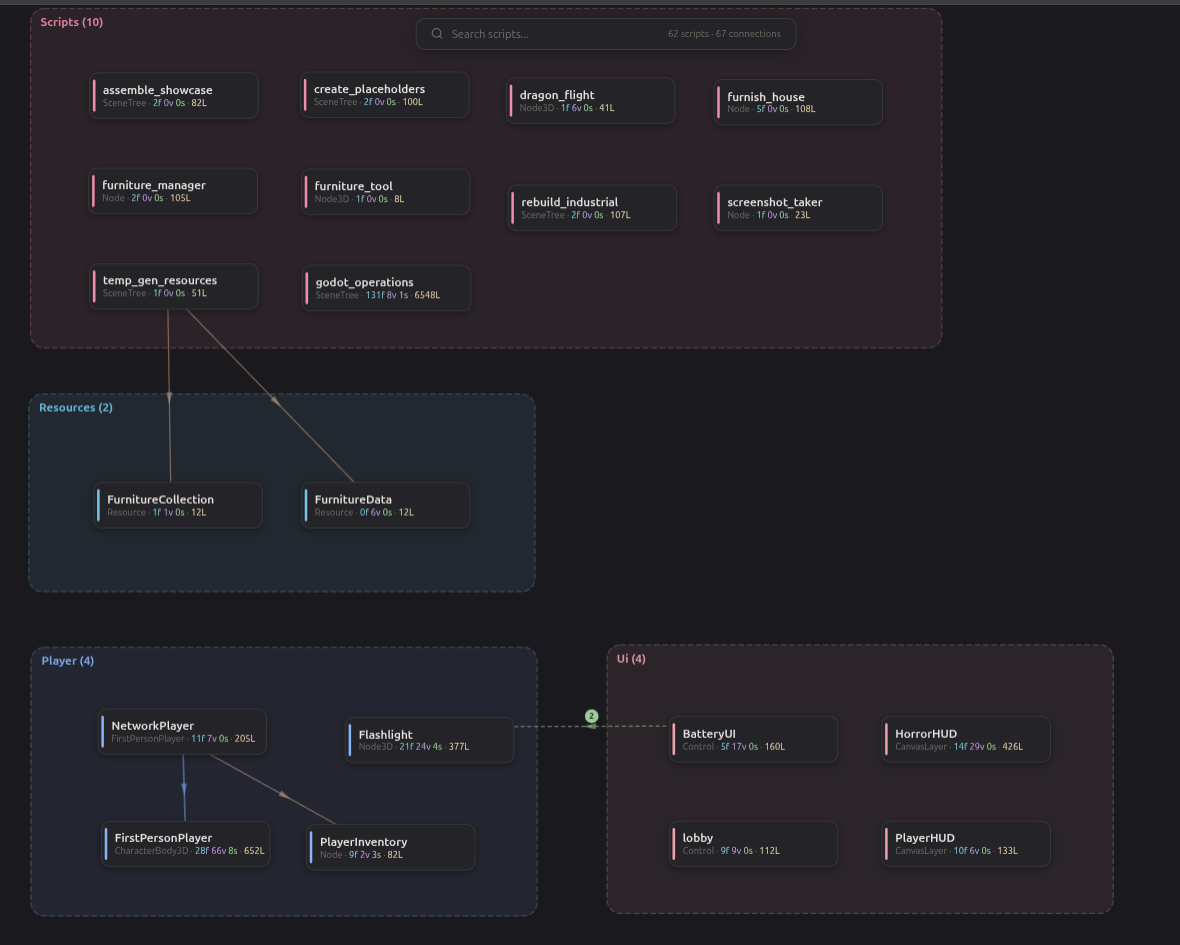
scripts/player.gd:42, continue execution, and show stack trace when hit."ui_accept, move mouse to (400, 300), click, then capture a screenshot."tool.catalog with query tilemap and list the most relevant tools."dap tool group for breakpoint debugging with tool.groups."tool.catalog query import and run the best one for texture settings."tool.groups to reduce context."GoPeak treats compact as the safe default and full/legacy as compatibility profiles. Any future hide, remove, rename, or API-contract change must include:
compact, full, legacy, or opt-in group);tools/list exposure and alias behavior;Current compatibility stance: legacy tool names and compact aliases remain supported. Dynamic groups with optional external requirements (runtime, testing, lsp, dap, asset_store) should be documented as opt-in/setup-gated rather than marketed as always-available core behavior.
GODOT_BRIDGE_PORT, default 6505)77776005 + 6006 + 7777GODOT_PATHproject.godot existstool.catalog to search and auto-activate matching groups, or use tool.groups to activate a specific groupget_editor_status says disconnected while the Godot editor shows connected → check whether another gopeak/MCP server instance already owns bridge port 6505; the status payload now reports the startup error and suggests stopping duplicate serversMIT — see LICENSE.
GoPeak — The most comprehensive MCP server for Godot Engine. 95+ tools, LSP, DAP, screenshots.
{ "mcpServers": { "io.github.had0yun-gopeak": { "command": "npx", "args": [ "-y", "[email protected]" ] } }}Outils
Pas encore de liste d'outils. Les serveurs distants en obtiennent une après le premier contrôle d'état.
FAQ
Copiez sur cette page la configuration stdio pour Cursor, Claude Desktop, Claude Code ou VS Code. Elle utilise l'installation de l'éditeur, pas un proxy PlugMCP.
Aucune variable d'environnement requise n'est indiquée sur cette fiche.
Gopeak s'exécute en local via stdio.
Dernière vérification : 2026-11-09. GoPeak — The most comprehensive MCP server for Godot Engine. 95+ tools, LSP, DAP, screenshots.
