@isoldex/sentinel
AI-powered browser automation for TypeScript. Describe what you want in plain English, Sentinel figures out the selectors, clicks, and extracts data.
Alimenter votre agent
La commande propre à l'éditeur. Ce n'est pas un endpoint PlugMCP.
Host a copy with our keys and logs.
npx -y @isoldex/[email protected]Claude Code n'a pas de lien d'installation pour une commande locale. Copiez la commande ci-dessous et exécutez-la dans un terminal.
claude mcp add isoldex-sentinel -- npx -y @isoldex/sentinel@4.2.1À exécuter dans un terminal.
{ "mcpServers": { "isoldex-sentinel": { "command": "npx", "args": [ "-y", "@isoldex/[email protected]" ] } }}claude_desktop_config.json
URL distante ou commande sur votre machine ? Ce qui distingue les deux installations
Exécuter sur PlugMCP
A new server you create. It is not this listing's official endpoint. Use the publisher install when you want their URL and their credentials.
Lancer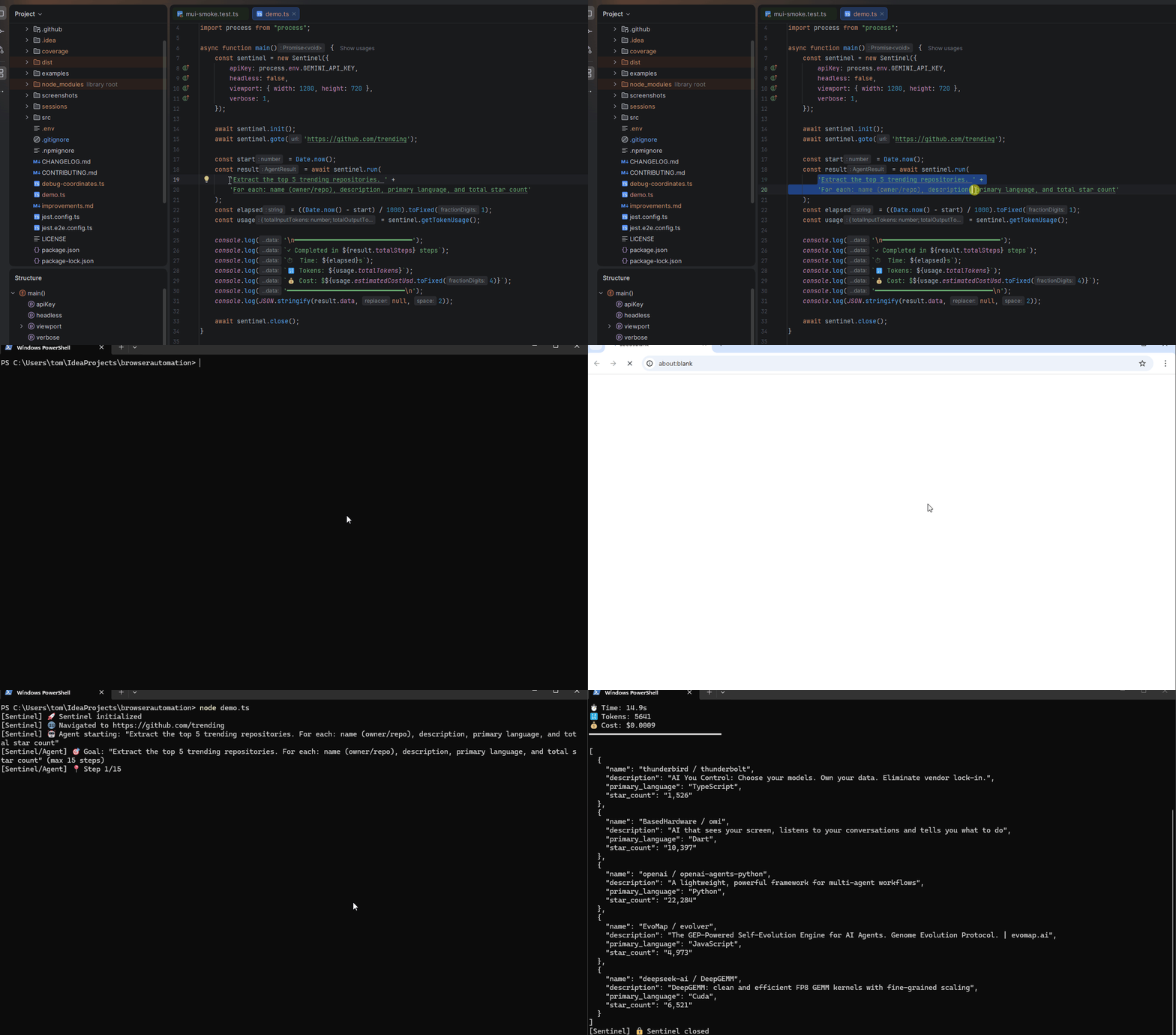
npm install @isoldex/sentinel playwright
npx playwright install chromium
Gemini works out of the box. The other providers load their SDK on demand — install the one you use:
npm install @anthropic-ai/sdk   # ClaudeProvider
npm install openai              # OpenAIProvider
# OllamaProvider needs no package, just a running Ollama instance
Using the Playwright test fixture (@isoldex/sentinel/test) additionally requires @playwright/test.
import { Sentinel } from '@isoldex/sentinel';

const sentinel = new Sentinel({ apiKey: process.env.GEMINI_API_KEY! });
await sentinel.init();
await sentinel.goto('https://github.com/trending');

const result = await sentinel.run(
  'Extract the top 5 trending repositories with name, description, and star count'
);

console.log(result.data);
await sentinel.close();
A more complex multi-step task — search, filter by brand, sort by rating, extract structured data:
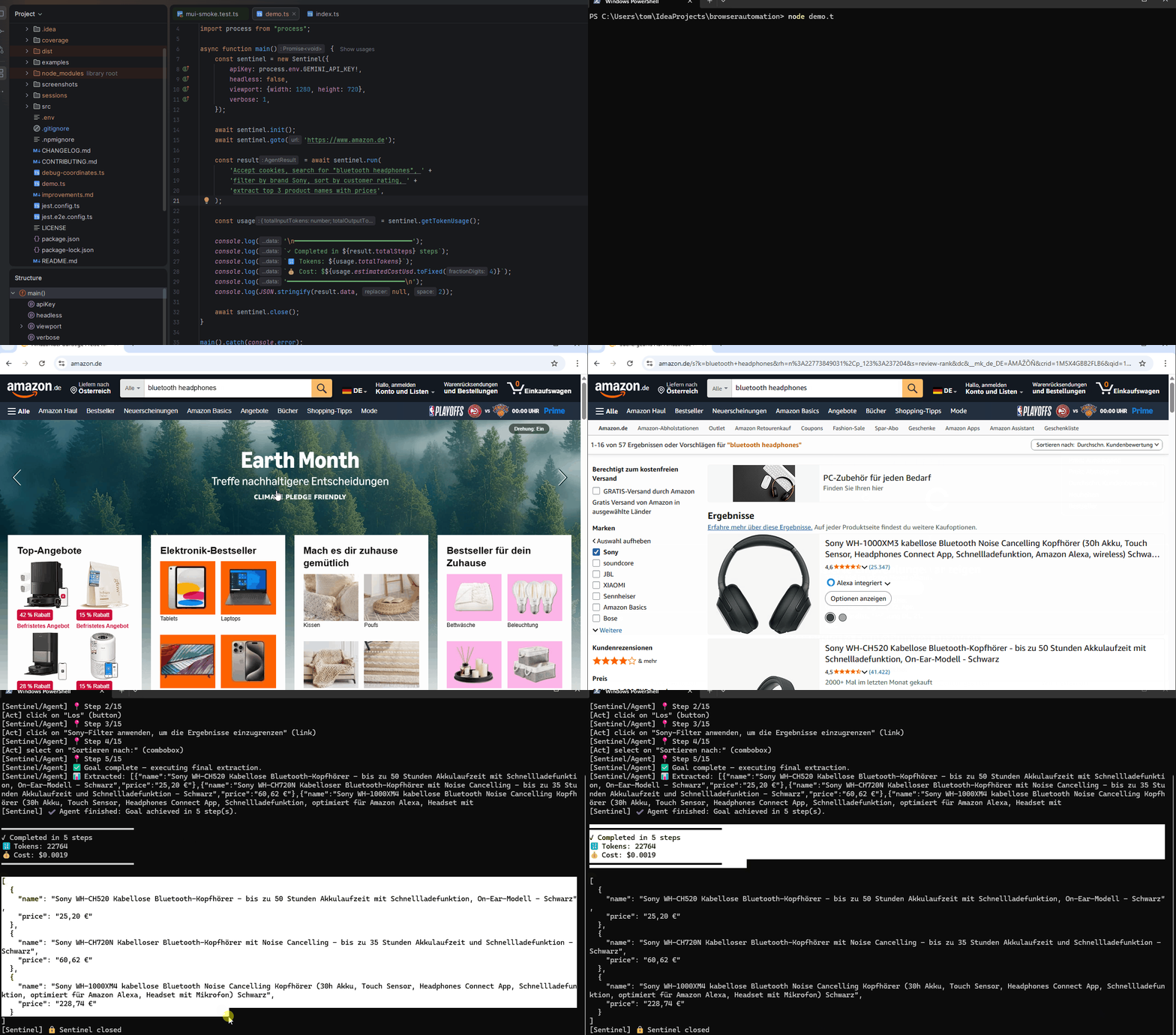
Running the same task with the same model (Gemini 3 Flash), Sentinel completed in 5 steps / under 20s / 23k tokens / $0.0019. Stagehand timed out at 300s+ with one decision call alone consuming 210k tokens.
Full benchmark methodology and raw data: isoldex.ai/benchmark
act() — natural language actions (click, fill, select, scroll)extract() — structured data extraction with Zod schemasrun() — autonomous multi-step agent with goal-driven planningfillForm() — declarative form filling with one JSON objectintercept() — capture API responses instead of scraping DOMnpx sentinel run "goal" --url https://...run() and fillForm() both accept maxSteps, timeoutMs, and an AbortSignal
via their options. Cancellation and time budgets are checked between steps and
after planning, before the next browser action starts.
Either a Gemini apiKey or a custom provider — the type system enforces one of them, and providers carry their own credentials:
new Sentinel({ apiKey: process.env.GEMINI_API_KEY! });
new Sentinel({
  provider: new OpenAIProvider({ apiKey: process.env.OPENAI_API_KEY!, model: 'gpt-4o' }),
});
new Sentinel({ provider: new OllamaProvider({ model: 'llama3.2' }) }); // no key at all
Use variables for anything secret. The placeholder is resolved for the browser but never for a cache, so a file-backed cache stores %password% rather than the value:
await sentinel.act('Fill %password% into the password field', {
  variables: { password: process.env.APP_PASSWORD! },
});
runStream() stops the agent as soon as you stop consuming it — a break, an exception, or an SSE client disconnecting. Pass signal to cancel from elsewhere (e.g. request.signal):
for await (const event of sentinel.runStream(goal, { signal })) {
  if (isEnough(event)) break; // agent halts; no further tokens are spent
}
Defaults to 127.0.0.1:3333 with no authentication, which is safe only because it is loopback-only: requests are rejected unless Host and any Origin are loopback. Exposing it further requires a token, and the server refuses to start without one.
All requests share one browser session, so tool calls are serialised. HTTP mode decouples the client from the process; it is not a way to serve concurrent users.
MIT
AI-powered browser automation with Gemini – fast, cheap Stagehand alternative
{ "mcpServers": { "isoldex-sentinel": { "command": "npx", "args": [ "-y", "@isoldex/[email protected]" ] } }}Outils
Pas encore de liste d'outils. Les serveurs distants en obtiennent une après le premier contrôle d'état.
FAQ
Copiez sur cette page la configuration stdio pour Cursor, Claude Desktop, Claude Code ou VS Code. Elle utilise l'installation de l'éditeur, pas un proxy PlugMCP.
Aucune variable d'environnement requise n'est indiquée sur cette fiche.
@isoldex/sentinel s'exécute en local via stdio.
Dernière vérification : 2026-11-16. AI-powered browser automation with Gemini – fast, cheap Stagehand alternative