AginxBrowser
English | 中文
The Browser for AI Agents. See the live web. Read it. Act on it. Remember it.
Alimenter votre agent
L'URL propre à l'éditeur. Ce n'est pas un endpoint PlugMCP.
Host a copy with our keys and logs.
https://browser.aginx.net/mcpLe bouton Claude ci-dessus ouvre Claude avec le nom et l'URL préremplis. Il vous reste à confirmer sur place.
claude mcp add --transport http net.aginx-aginxbrowser https://browser.aginx.net/mcpRun in a terminal.
{ "mcpServers": { "net.aginx-aginxbrowser": { "command": "npx", "args": [ "-y", "mcp-remote", "https://browser.aginx.net/mcp" ] } }}claude_desktop_config.json
URL distante ou commande sur votre machine ? Ce qui distingue les deux installations
Exécuter sur PlugMCP
A new server you create. It is not this listing's official endpoint. Use the publisher install when you want their URL and their credentials.
LancerDe l'éditeur
English | 中文
The Browser for AI Agents. See the live web. Read it. Act on it. Remember it.
Stealth web browser for agents: search, fetch, click, download and type in persistent MCP sessions.
A browser built for agents from the first line of code — not a human browser bolted onto automation. See the world, read it, search it, act on it, and keep what you read: one Rust binary with built-in V8, no Chromium required.
Humans have Chrome. Agents have AginxBrowser.
One binary, zero dependencies, instant service. The HTTP API is the whole interface — agents plug in and go.
Historical clip from the v0.5.3 release assets (current product is v0.6.0). The star that got our attention: Pierre Tachoire, co-founder of Lightpanda — the headless browser our bench measures against — starred the repo. 90 seconds on why that mattered to us.
Real pages rendered by AginxBrowser's diting engine (no Chromium) — Wikipedia, this repo, Rust. Screenshot it yourself →
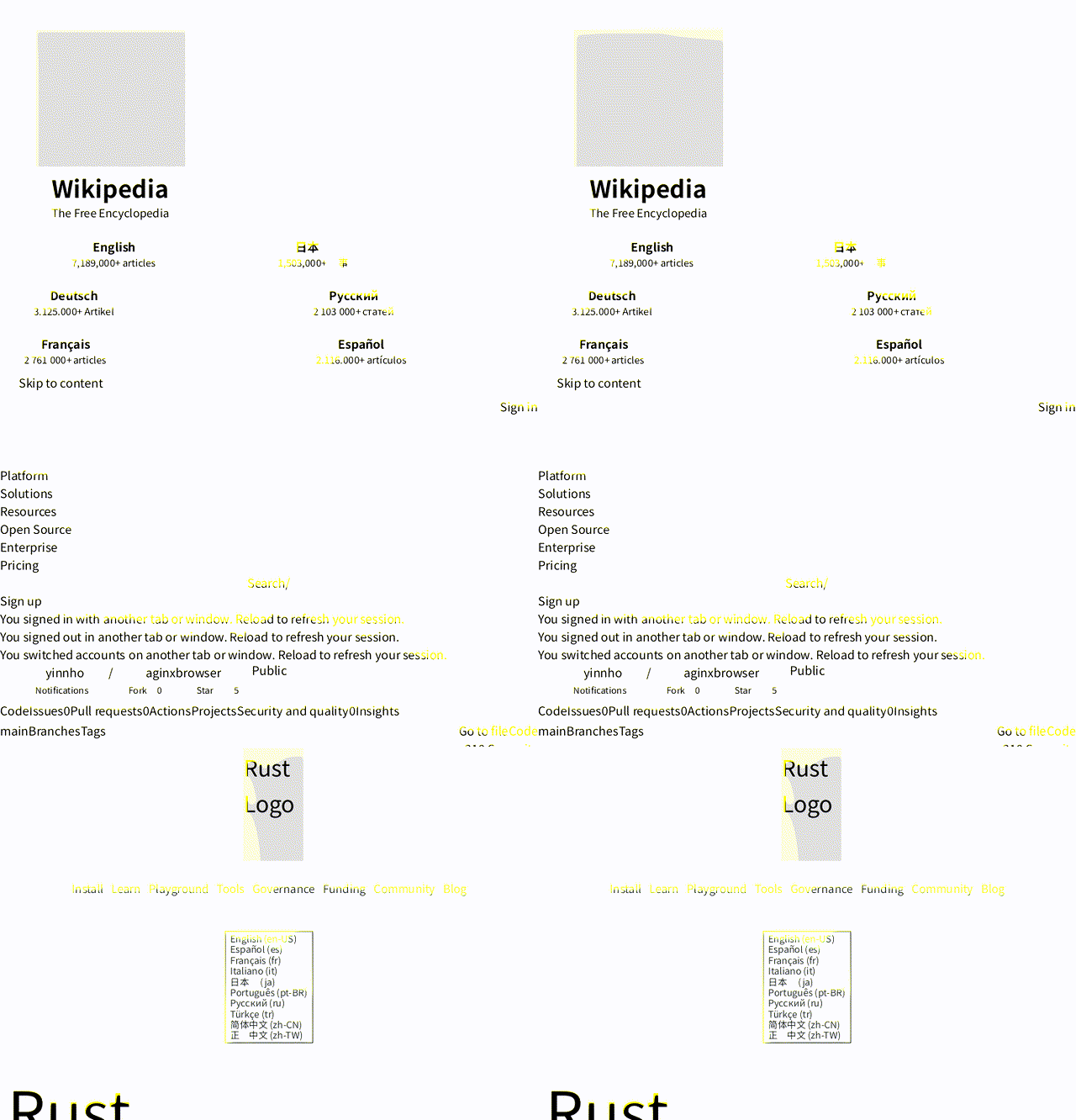
Measured against headless Chrome on the same 20 pages, same network (bench, 2026-08-28): 7.6× faster to agent-usable text (p50 532 ms vs 4 053 ms), ~10× less memory (227 MB for the whole process vs ~2.1 GB per Chrome page), and 0 hard failures where Chrome's --dump-dom produced no DOM on 5 of 40 loads. Re-run on v0.5.21 (2026-09-29) on a degraded-network day held the ratio — 5.4× p50, 468 MB whole-run vs 1.75 GB per page — both raw TSVs are committed (those runs are historical; the current release is v0.6.0). An agent's total cost is browser efficiency × model efficiency — this is the browser half.
Existing "browser automation" was built for humans or for one-shot scraping — not for agents:
Same-tier engines, not the tools in the table above. Cells are capabilities, not speed.
An agent needs five things from a browser: see, read, find, act, remember. One binary covers them all — systemd-friendly, zero dependencies.
Core advantage: no Chromium. AginxBrowser inlines a full browser engine (V8 + Rust HTTP stack + the diting CSS/layout/paint rendering engine, with the Blitz/Stylo/Taffy lineage as its reference implementation). From v0.6.0 the JS event loop lives in the owned diting_runtime crate (deno_core retired). No Puppeteer, no Chrome, no Docker. One Rust binary under systemd is your agent browsing infrastructure.
Most new "agent browsers" are stateless, fingerprint-less one-shot renderers — fine for public pages, dead on arrival against Cloudflare or login flows. AginxBrowser goes the opposite way:
chrome145, firefox133 — not just a UA string), switchable per request. The fleet User-Agent and the default TLS shape are one coherent pair: Chrome/145 over the chrome145 preset — UA and ClientHello agree by construction (deliberately 145: some edges route UA majors non-monotonically and wreq-util presets stop at 149; 145 is the only production-routed major a real preset backs). Cloudflare Turnstile challenges wait automatically for cf_clearance. Fingerprint-less engines eat 403s — we get through.docs/stealth-tls-comparison.md · 中文 · receipts bench/stealth-tls-20261019//fetch shortset, session snapshot) vs curl/Chrome; Lightpanda/Obscura not run — docs/scoreboard.md · 中文 · receipts bench/scoreboard-20261019/session_create(cookies=...) ↔ session_cookies), surviving pagination and multi-step flows; persistent: true even survives idle eviction and server restarts — the same session id comes back logged in. One-shot engines throw state away.Reference point: Cloudflare's Kitesurf explicitly ships neither real TLS-fingerprint negotiation nor persistent auth sessions — anti-bot and login territory is exactly where AginxBrowser plays.
Apache-2.0 open source, single binary — self-host today, no cloud lock-in.
Agents act on what a browser tells them, so the response reports what actually happened — not just "got a 200":
tier — which path served the page: plain HTTP (~100 ms) or the V8-rendered browser tier. An agent can see why a fetch was fast or slow.redirected_from — the full redirect trail. redirected_from[0] is the URL you asked for, url is where the content actually came from — requested paired with effective, every hop visible.content_hash + changed_since_prev — every fetch is hashed; consecutive samples of the same URL can be diffed. A rate-limited origin serving the same frozen 200 body for days reads as changed_since_prev: false — the cheapest drift detector there is.captcha_event — when a challenge page was detected (and solved, if a solver is configured), the response says so instead of handing over a challenge page as if it were content.The local cache builds on the same idea: search hits come back with [§ heading] section prefixes so an agent knows where on the page a hit landed, and ranking fuses keyword relevance with freshness.
tier field)/search. Search → read in one stepcategories=images hits Baidu/Bing image indexes and returns direct binary image_url links (downloadable straight to jpg/png) plus source_url provenancestate/click/input/scroll/eval) — agents browse like humans do, and session_export turns what an agent figured out into a runnable curl replay script (zero model tokens on re-run) — or, with format=json, into a flow document (flow_run replays it server-side with {{var}} substitution, wait/expect gates and saved outputs; installed flows live in workflow/<name>/flow.json, dropped in without a rebuild). Session tools also cover the acting part: session_viewport simulates device viewports (media queries respond), session_wait blocks on a selector or predicate with a timeout, session_screenshot renders the live state, session_console replays the page's console ring, and session_storage exports/restores cookies plus localStorage for login hand-offsession_network(filter=media) extracts the m3u8/mp4/dash URLs a page's player actually requested at runtime — links found only in page HTML are often decoys, so the request log is the source of truth. GET /session/{id}/har exports the same traffic as HAR 1.2 (retained bodies included)~/.aginxbrowser/cache.db — a re-fetch inside the TTL answers from what the agent already read instead of re-paying network time, with CJK substring matching, [§ heading] section-aware snippets, per-URL content hashes for drift detection, and per-session scoping for shared deploymentsjs_extract pulls window.__INITIAL_STATE__ and other structured data out of SPAsPOST /render_markdown turns markdown into a deterministic, self-contained HTML artifact — the document layer, so agents never write HTML by hand. Prose rides a plain offline shell (no fonts, no scripts); fenced archify blocks carry typed zero-coordinate diagram JSON (sequence / workflow / architecture / dataflow / lifecycle families) and render to inline SVG via the layout engine. Same input, same bytes — the receipt carries the sha256 so determinism is verifiable. theme (light/dark) and preset (classic / signal-flow / blueprint / editorial) bake colors at generation time; quality: "showcase" is the delivery gate, grading route crossings, label clearance and rhythm without touching the artifact bytes. Guided-view tabs plus window.agxViewer (focus / ego / route / reach) make the artifact interactive. Mermaid sources are the agent's job to translate into archify JSON, not the engine's. Diagram vocabulary adapted from archify (MIT)/screenshot endpoint (opt-in --features screenshot) paints the JS-rendered DOM with the diting rendering engine — pure CPU, no Chromium — to PNG. Vision input for agents/video renders a page's animation timelines to MP4 — the page's scripts register GSAP-style timelines in window.__timelines (duration() + pause(t)), each frame seeks to t=i/fps and paints the viewport, and the frames pipe into ffmpeg (H.264, yuv420p). Deterministic by construction: no wall clock in the pixel values, same render twice = same MP4. Needs ffmpeg on PATH/pdf cuts a rendered page into pages and packages them — print mode paginates at top-level block boundaries (default A4 @96dpi, no half-cut text where a break can land on a block edge), slides mode makes one page per CSS-selector match sized to the element (an HTML deck with one .slide per page exports as a real deck). Image-based PDF: per-page JPEG via DCTDecode, hand-rolled PDF 1.4 writer, zero new dependencies. PPTX packages the same pages as one slide per page; DOCX as one page-sized section per page — both hand-rolled OOXML (stored-ZIP writer, fixed timestamps), byte-deterministic, zero new dependencieschrome145; fleet UA Chrome/145), switchable per request/v1/scrape endpoint — existing Firecrawl clients migrate by changing the base URLAginxBrowser exists for real-time retrieval: an agent arrives with a question, reads a handful of pages, leaves with the answer. It is not a crawling tool — and the product is shaped so it can't quietly become one:
AGINXBROWSER_HONOR_ROBOTS=1.AGINXBROWSER_DOMAIN_RATE_PER_MIN / AGINXBROWSER_SESSION_PAGE_LIMIT (0 disables on your own instance). Generous for an agent grinding through docs or a console; fatal to the page-after-page crawl pattern, including subdomain rotation (one registrable domain, one budget).Not demos — real jobs agent browsers are doing today:
Computer-use agents come in two layers. GUI-layer stacks (Cua, desktop CUA agents) drive a whole machine: screenshots of a display in, X11 mouse/keyboard events out, a VM or container per session. Engine-layer browsers skip the desktop — the page itself is the machine. AginxBrowser is the engine layer:
One-command full install (SKILL.md trigger surface + verification):
# Download -> inspect the contents -> run only after review (never blind-run network scripts)
curl -fsSL https://raw.githubusercontent.com/yinnho/aginxbrowser/main/skill.sh -o skill.sh
less skill.sh
bash skill.sh
Install the skill trigger surface via skills.sh:
npx skills add yinnho/aginxbrowser
Or just hand this block to your AI agent — it sets itself up:
Set up aginxbrowser as your web access layer:
1. Install v0.6.0 locally and verify it is healthy:
   # Preferred — current release binary (install.sh picks the platform):
   curl -fsSL https://browser.aginx.net/install.sh -o install.sh && less install.sh && bash install.sh
   # Optional Homebrew (tap tracks v0.6.0; still verify with `aginxbrowser --version`):
   #   brew trust yinnho/aginxbrowser && brew install yinnho/aginxbrowser/aginxbrowser
   aginxbrowser doctor   # then start: aginxbrowser (listens on 0.0.0.0:8089)
   curl http://127.0.0.1:8089/health
2. From now on, route web tasks through http://127.0.0.1:8089 instead of raw curl:
   - read a page / scrape a URL  -> POST /fetch {"url":...}        (markdown output, Cloudflare bypassed by default)
   - search the web              -> POST /search {"q":...,"fetch_top":3}
   - see a page                  -> POST /screenshot {"url":...}
   - login / form / click-through-> POST /session/create -> /session/{id}/state -> /input /click -> /close
Self-hosting:
# Prebuilt binary for current release v0.6.0 (platform detect + sha256 + mirror fallback)
# macOS / Linux / Windows (git-bash). Assets: https://github.com/yinnho/aginxbrowser/releases/tag/v0.6.0
# Cautious: download -> inspect -> run (never blind-run network scripts)
curl -fsSL https://browser.aginx.net/install.sh -o install.sh
less install.sh && bash install.sh
# Or straight in, if you trust the repo:
#   curl -fsSL https://browser.aginx.net/install.sh | sh
# GitHub slow/blocked? AGINXBROWSER_GH_PROXY=https://ghfast.top/ bash install.sh
aginxbrowser doctor   # features + fonts + egress self-check

# Optional: Homebrew (7+ needs the trust line first). Tap is at v0.6.0 —
# still verify with `aginxbrowser --version` after install / upgrade.
# brew trust yinnho/aginxbrowser
# brew install yinnho/aginxbrowser/aginxbrowser
# brew upgrade aginxbrowser

# Or build from source (--features stealth,screenshot or you lose both)
cargo build --release --features stealth,screenshot

# Start the service
./target/release/aginxbrowser
# → Listening on 0.0.0.0:8089

# Verify
curl http://127.0.0.1:8089/health
# → {"status":"ok","engine":"diting"}

# Fetch a page
curl -sS -X POST http://127.0.0.1:8089/fetch \
  -H "Content-Type: application/json" \
  -d '{"url":"https://example.com"}'

# Search (snippets only by default; fetch_top grabs page bodies for the top N)
curl -sS -X POST http://127.0.0.1:8089/search \
  -H "Content-Type: application/json" \
  -d '{"q":"macbook price","max_results":5,"fetch_top":2,"max_chars_per":2000}'

# Create an interactive session
curl -sS -X POST http://127.0.0.1:8089/session/create \
  -H "Content-Type: application/json" \
  -d '{"url":"https://example.com"}'
# → {"session_id":"s_1","url":"https://example.com/"}
Every capability is plain HTTP — no SDK required. There is no /openapi.json (the routes are few enough to list here); full request/response fields for each route are in docs/API.md.
Every capability is one POST away — no SDK, no protocol adapter.
aginxbrowser/
├── ARCHITECTURE.md       # Layering legislation (authoritative)
├── Cargo.toml            # Workspace root (members = crates/diting{,_ops,_runtime})
├── crates/
│   ├── diting/           # Engine crate: DOM/CSS/layout/paint/JS/net/Page
│   │   ├── build.rs      # V8 snapshot generation
│   │   ├── js/           # bootstrap.js + companion scripts
│   │   └── src/          # diting_{dom,css,net,js,layout,fonts,browser}
│   ├── diting_ops/       # #[diting_op] glue generator (engine companion)
│   └── diting_runtime/   # Owned JS event loop / op settlement
├── README.md
├── docs/
│   └── API.md            # Full API reference (HTTP)
├── bench/                # Benchmark harness + results (vs headless Chrome)
│   ├── README.md         #   methodology + numbers
│   ├── pages.txt         #   fixed 20-page set
│   ├── run.py            #   harness
│   ├── summarize.py      #   TSV → results table
│   └── results/          #   raw run data
└── src/
    ├── main.rs              # HTTP/CLI assembly (thin face)
    ├── routers/             # HTTP handlers: acquisition/sessions/outputs/render
    ├── server/              # Acquire façade by job: browser/fetch/outputs/search
    ├── session/             # Interactive sessions (manager/interact/state/…)
    ├── flow/                # Flow interpreter + install
    ├── search/              # Metasearch orchestration + per-engine adapters
    ├── store/               # Local fetch/search cache (SQLite FTS5)
    ├── docgen/              # Document layer: markdown → HTML + SVG diagrams
    ├── screenshot.rs        # Eye-side HTML→PNG (keep monolithic)
    ├── render.rs            # Tiered rendering (HTTP direct → diting)
    ├── download.rs          # Streaming file download (sha256, resume)
    ├── robots.rs            # RFC 9309 robots.txt checker (opt-in gate)
    ├── rate.rs              # Per-domain + per-session budgets
    ├── captcha.rs           # CAPTCHA detection & auto-solve
    ├── firecrawl_compat.rs  # Firecrawl-compatible /v1/scrape endpoint
    ├── video.rs             # Timeline video pump (__timelines → ffmpeg → MP4)
    ├── pages.rs             # Page pump (print/slides → PDF/PNG)
    ├── ooxml.rs             # OOXML containers (PPTX/DOCX)
    ├── doctor_cli.rs        # `aginxbrowser doctor` self-check
    ├── browser.rs           # Product Page adapter: Browser, BrowserBuilder
    ├── page.rs              # Product Page/Element wrapper over diting
    ├── config.rs            # BrowserConfig
    ├── cookie.rs            # Cookie helpers
    └── error.rs             # Error types
# Standard build (no stealth; TLS fingerprint features inactive)
cargo build --release

# With stealth (requires go + cmake + C++ toolchain; enables TLS fingerprint spoofing)
cargo build --release --features stealth

# With screenshot rendering (enables /screenshot; adds the rendering stack, +30-40MB)
cargo build --release --features screenshot

# Full featured (recommended for production)
cargo build --release --features stealth,screenshot
Requirements: Rust 1.78+; the V8 static library downloads automatically on first build. The stealth feature additionally needs go, cmake, and a C++ compiler. The screenshot feature ships with a bundled CJK font subset (GB2312 + common symbols) — no system fonts required for correct Chinese rendering.
If your network can't reach the rusty_v8 CDN (build hangs with zero progress after "downloading v8"), pre-fill ~/.cache/rusty_v8 with the librusty_v8.a.gz for your version (fetch it from any reachable mirror/host and gunzip into place) and the build script skips the download. The v8 pin/upgrade playbook (snapshot re-bake, generated fingerprint-surface scripts, acceptance checklist) lives at docs/rusty-v8-pin-playbook.md.
Full API reference → docs/API.md
Agent / multi-engine (HTTP snapshot + shim) → docs/agent-browser-engine.md · shim scripts/aginx-agent (HTTP only — the MCP/CDP faces are retired)
Security audit notes → docs/skills-sh-audit.md — why skills.sh shows "Critical Risk", and which real product feature each warning corresponds to
Covers:
/fetch, /search, /screenshot, /video, /pdf, /download, /render_markdown, /v1/scrape, /flow/run, /doctor, the session endpoints)AginxBrowser is pure attach-alongside infrastructure — like a real browser, it runs as an independent service that anything can call, without embedding host code or polluting host config. Deploy one instance per machine (under systemd) and every app needing "render + scrape" capability shares it.
The attach point is HTTP — /fetch, /search, /screenshot, /download, /render_markdown for any language with an HTTP client.
Integration: read the environment variable AGINXBROWSER_URL=http://127.0.0.1:8089. Unset → behavior unchanged; set → risk-controlled sites automatically route through AginxBrowser for rendering, falling back gracefully on failure.
/screenshot requires cargo build --release --features screenshot (adds the diting rendering stack). The default (and only) render engine in that build is diting — our own CSS+layout+paint stack, zero Blitz/Stylo code. The pinned-rev Blitz reference pipeline is a separate opt-in, --features blitz-reference, for comparison renders and the dual-engine cross-check tests. Complex-site CSS is approximate on both (not pixel-perfect like Chromium)/screenshot with selector returns element page coordinates (selector_rects, CSS px); selector alone crops directly to that element. Inline elements (<a>text</a>) get a rect too on the default diting engine — a union of their flattened inline content, strut-expanded to the element's own line-height like Chrome reports for replaced-only inlines (<a><img></a> → line-box height, not the image height). Empty inlines still have no rect — pick a block ancestor theresrc/href resolve to absolute URLs so Next.js/webpack hydrate and clicks trigger handlers). Heavy-fingerprint auth pages (WorkOS/Cloudflare) probing navigator.plugins, WebGL canvas etc. may still break until stealth fingerprint coverage completesAGINXBROWSER_PROXY__zse_ckIf AginxBrowser saved you a headless-Chrome fleet or a scraping headache, a star is how other agents (and their humans) find the project.
Apache-2.0.
Stealth web browser for agents: search, fetch, click, download and type in persistent MCP sessions.
{ "mcpServers": { "net.aginx-aginxbrowser": { "url": "https://browser.aginx.net/mcp", "headers": {} } }}Outils
Pas encore de liste d'outils. Les serveurs distants en obtiennent une après le premier contrôle d'état.
FAQ
Copiez sur cette page la configuration http pour Cursor, Claude Desktop, Claude Code ou VS Code. Elle utilise l'installation de l'éditeur, pas un proxy PlugMCP.
Aucune variable d'environnement requise n'est indiquée sur cette fiche.
Aginx Browser est accessible via HTTP.
Dernière vérification : 2026-11-10. Stealth web browser for agents: search, fetch, click, download and type in persistent MCP sessions.