An Apollo.io MCP server and CLI for Claude Desktop, MCP clients, and terminal workflows. Use Apollo sales intelligence data for B2B prospecting, account research, contact enrichment, company enrichment, job-posting research, and company news discovery.
Model Context Protocol (MCP) server for Apollo.io API integration
2026-11-17
Étoiles
—
Outils
—
Disponibilité
—
The friendliest path is the Claude Desktop extension bundle (.mcpb). The terminal install is here when you need it.
If this project helps your Apollo.io or MCP workflow, please star it on GitHub.
Create an Apollo API key in Apollo under Settings > Integrations > API.
Download the newest apollo-io-mcp-v*.mcpb from GitHub Releases.
Open the .mcpb file with Claude Desktop.
Paste your Apollo API key when Claude asks for it.
Restart Claude Desktop if prompted.
Try prompts like:
"Find VP Sales leaders in California at SaaS companies."
"Search for cybersecurity companies in Austin with 51-200 employees."
"Enrich the company profile for apollo.io."
"Find recent funding news for fintech companies."
People search is best for building prospect lists. If you are looking for one known person, use enrichment with an email, LinkedIn URL, or name plus company.
Terminal Install
Use this if you are comfortable running one command and want the installer to update Claude Desktop's config for you.
npx @thevgergroup/apollo-io-mcp@latest setup
Useful follow-up commands:
# Check Claude Desktop config, runtime versions, and update status
npx @thevgergroup/apollo-io-mcp@latest doctor

# Remove the server from Claude Desktop config
npx @thevgergroup/apollo-io-mcp@latest remove

# Print install and tool-selection guidance for agents
npx @thevgergroup/apollo-io-mcp@latest skills
The setup command preserves your other MCP servers and writes an apollo entry that runs the latest npm package through npx.
Claude Desktop Examples
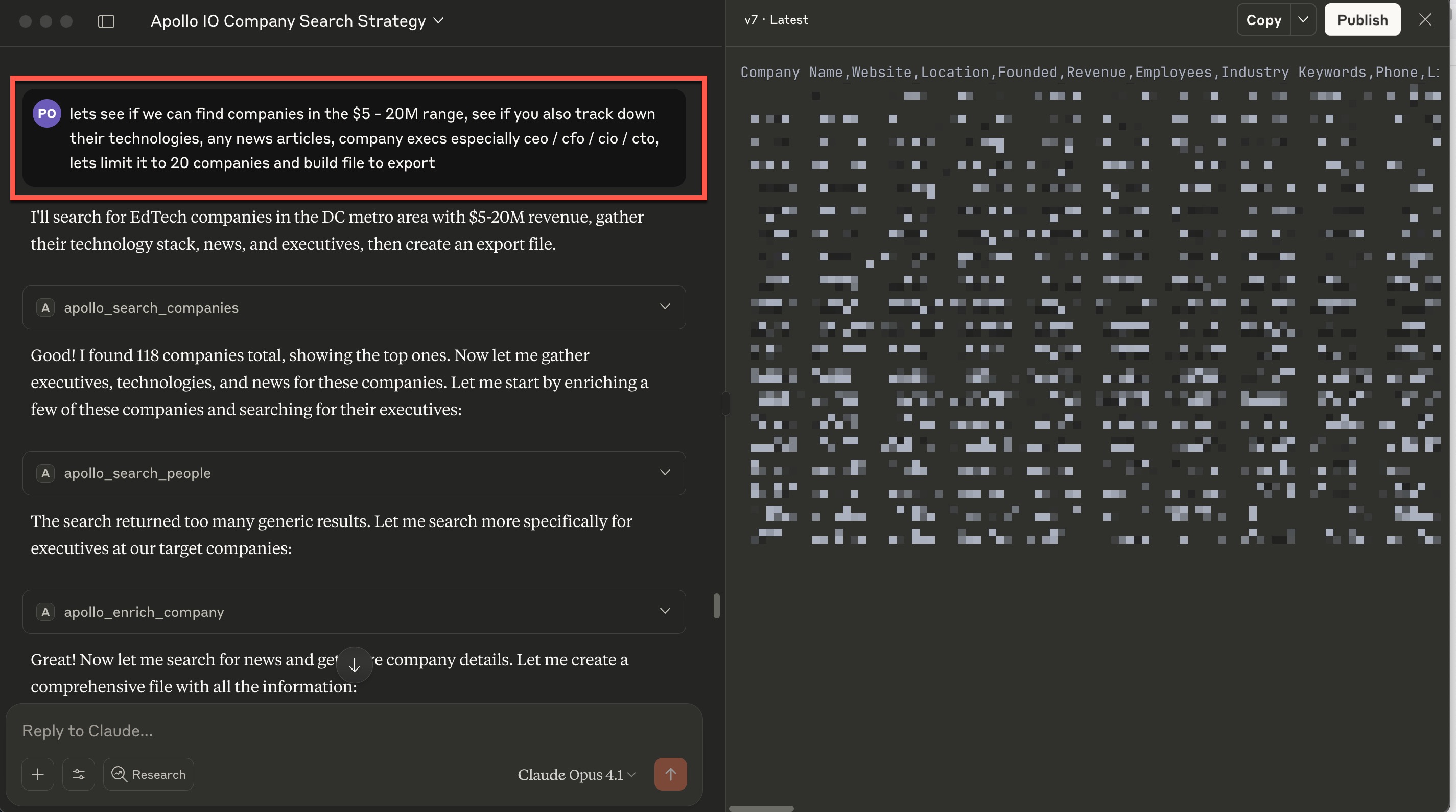
Claude can use the Apollo tools together: search companies, find executives, enrich companies, check news, and shape the results into a useful working file.
Good prompts to try:
"Find 20 EdTech companies in the DC metro area with $5-20M revenue. Track down their technologies, recent news, and CEO, CTO, CIO, or CFO contacts. Build an export file."
"Search for software companies in California with 50-200 employees, then summarize the strongest account-fit signals."
"Find C-level executives in healthcare companies in Boston. Prioritize operations, technology, and revenue leaders."
"Find VP Sales leaders in California at SaaS companies using Salesforce."
"Enrich the company data for google.com."
"Find recent funding news for fintech companies and list the companies worth researching next."
For one-off known contacts, ask for enrichment instead of search:
doctor checks your Claude Desktop config, Node.js and npm versions, the installed package version, the latest npm version, and whether an Apollo API key is configured.
For .mcpb installs, download the newest apollo-io-mcp-v*.mcpb from GitHub Releases and open it with Claude Desktop. Each release uses the same version for npm, GitHub tag, and MCPB bundle.
Local Release Check
Before cutting a release, you can validate the package, tests, release metadata, and MCPB bundle locally:
npm test
npm run build:mcpb
npm run check:release
npm audit --omit=dev --audit-level=moderate
npm run build:mcpb writes release/apollo-io-mcp-v<version>.mcpb and validates it with @anthropic-ai/mcpb.
Troubleshooting
APOLLO_API_KEY errors: re-run setup or check your Claude Desktop MCP config.
Empty people results: use titles and location filters first, then add company, industry, or technology filters.
Trying to find one known person: use apollo_enrich_person, not people search.
API access denied: check Apollo API key permissions and plan access.
Rate limits or credit issues: check Apollo API usage and credit limits.
Claude does not see the tools: restart Claude Desktop, then run npx @thevgergroup/apollo-io-mcp@latest doctor.
For Developers
Detailed source setup, MCP Inspector usage, tool schemas, filter references, testing, and release notes now live in docs/development/developer-guide.md.
The VGER Group designs and builds AI systems, data platforms, production software, and cloud architecture for teams that need working systems, not just strategy decks. This Apollo.io MCP server is part of our open source work: practical tools we needed, built well, and released publicly.
Pas encore de liste d'outils. Les serveurs distants en obtiennent une après le premier contrôle d'état.
FAQ
Questions
Comment installer @thevgergroup/apollo Io ?
Copiez sur cette page la configuration stdio pour Cursor, Claude Desktop, Claude Code ou VS Code. Elle utilise l'installation de l'éditeur, pas un proxy PlugMCP.
@thevgergroup/apollo Io nécessite-t-il une clé API ?
Aucune variable d'environnement requise n'est indiquée sur cette fiche.
Quel transport @thevgergroup/apollo Io utilise-t-il ?
@thevgergroup/apollo Io s'exécute en local via stdio.
Quand @thevgergroup/apollo Io a-t-il été vérifié pour la dernière fois ?
Dernière vérification : 2026-11-17. Model Context Protocol (MCP) server for Apollo.io API integration