ShellyAdmin
English | Deutsch
Power your agent
पब्लिशर का इंस्टॉल। PlugMCP एंडपॉइंट नहीं।
Host a copy with our keys and logs.
रजिस्ट्री में अभी कोई पैकेज्ड रिलीज़ नहीं है। रिपॉज़िटरी का README देखें.
रिमोट URL या आपकी मशीन पर कमांड? दोनों इंस्टॉल में क्या अंतर है
PlugMCP पर चलाएँ
A new server you create. It is not this listing's official endpoint. Use the publisher install when you want their URL and their credentials.
लॉन्चपब्लिशर से
English | Deutsch
Self-hosted web app to discover, inventory, firmware-check, and provision Shelly Gen2+ devices on a trusted LAN. Single Go binary + Svelte UI, Docker-ready, with an opt-in MCP server.
ShellyAdmin is a self-hosted web app for discovering, inventorying, checking, and managing Shelly Gen2+ devices on a trusted local network.
The Shelly cloud requires opting each device into a third-party service. Home Assistant's Shelly integration covers control, automation, and a per-entity view but not fleet-wide firmware management, compliance auditing, bulk provisioning, or an audit log of operator actions. ShellyAdmin sits next to those tools as the fleet ops console: scan a subnet, enroll devices into an inventory, push templated config to many at once, check/install firmware in bulk, and verify each device matches a compliance rule set — with every action audited.
It is designed as a single-container deployment with:
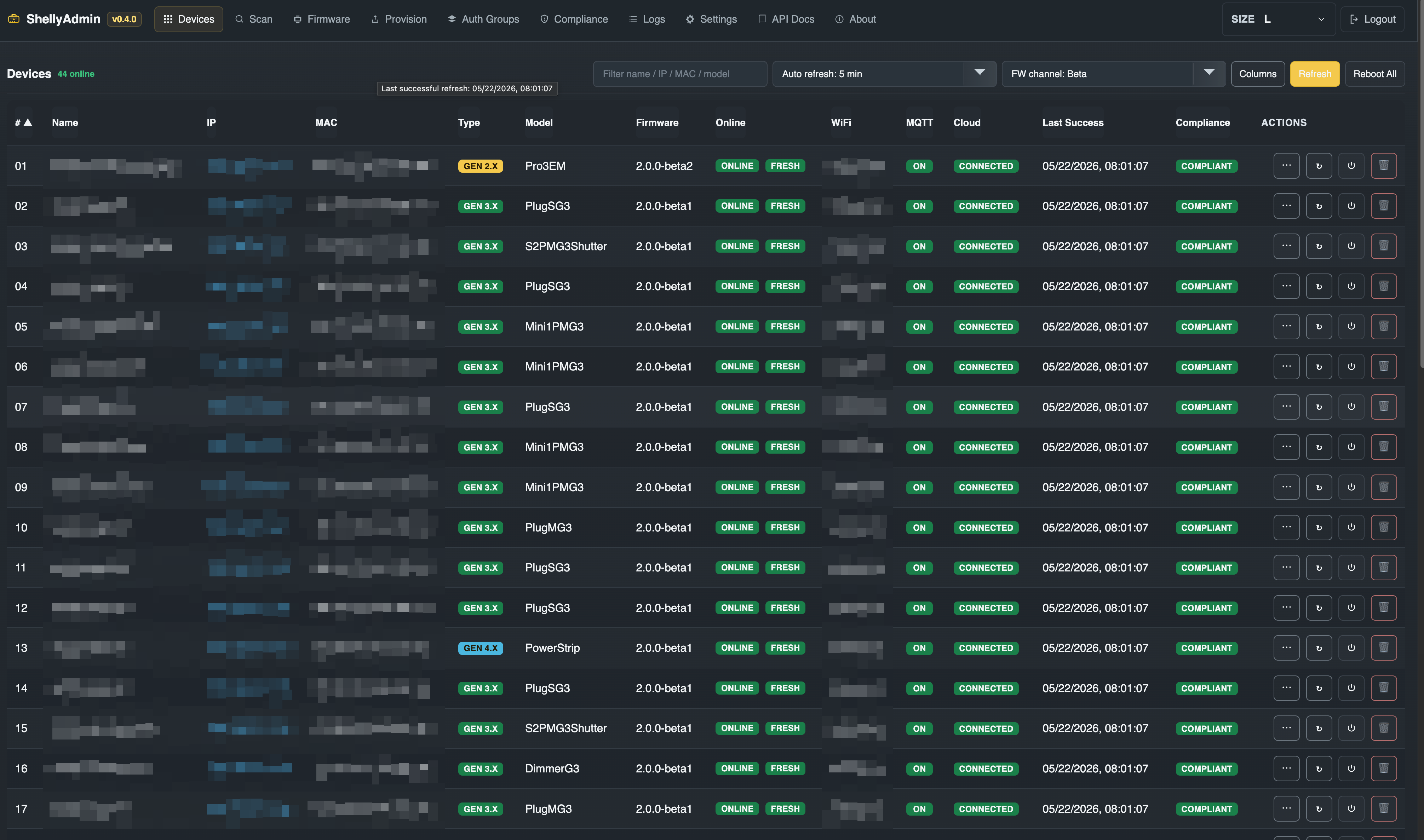
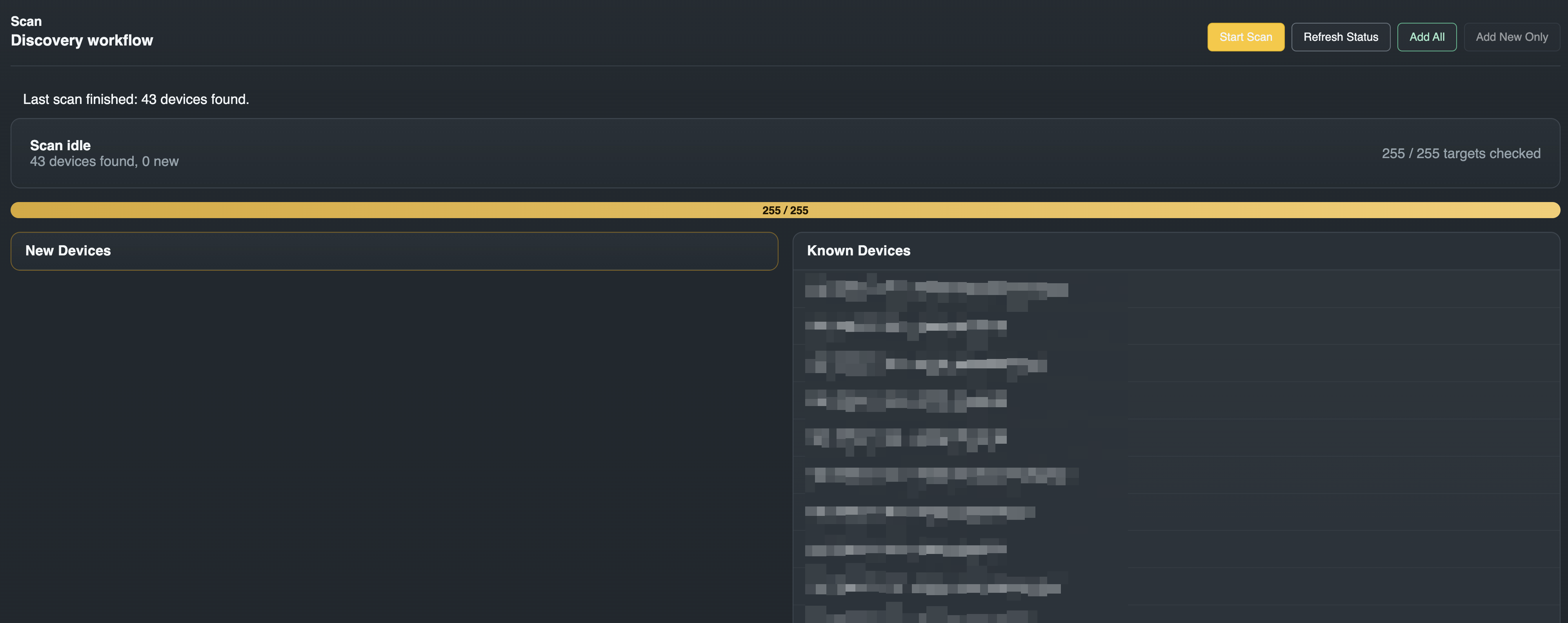
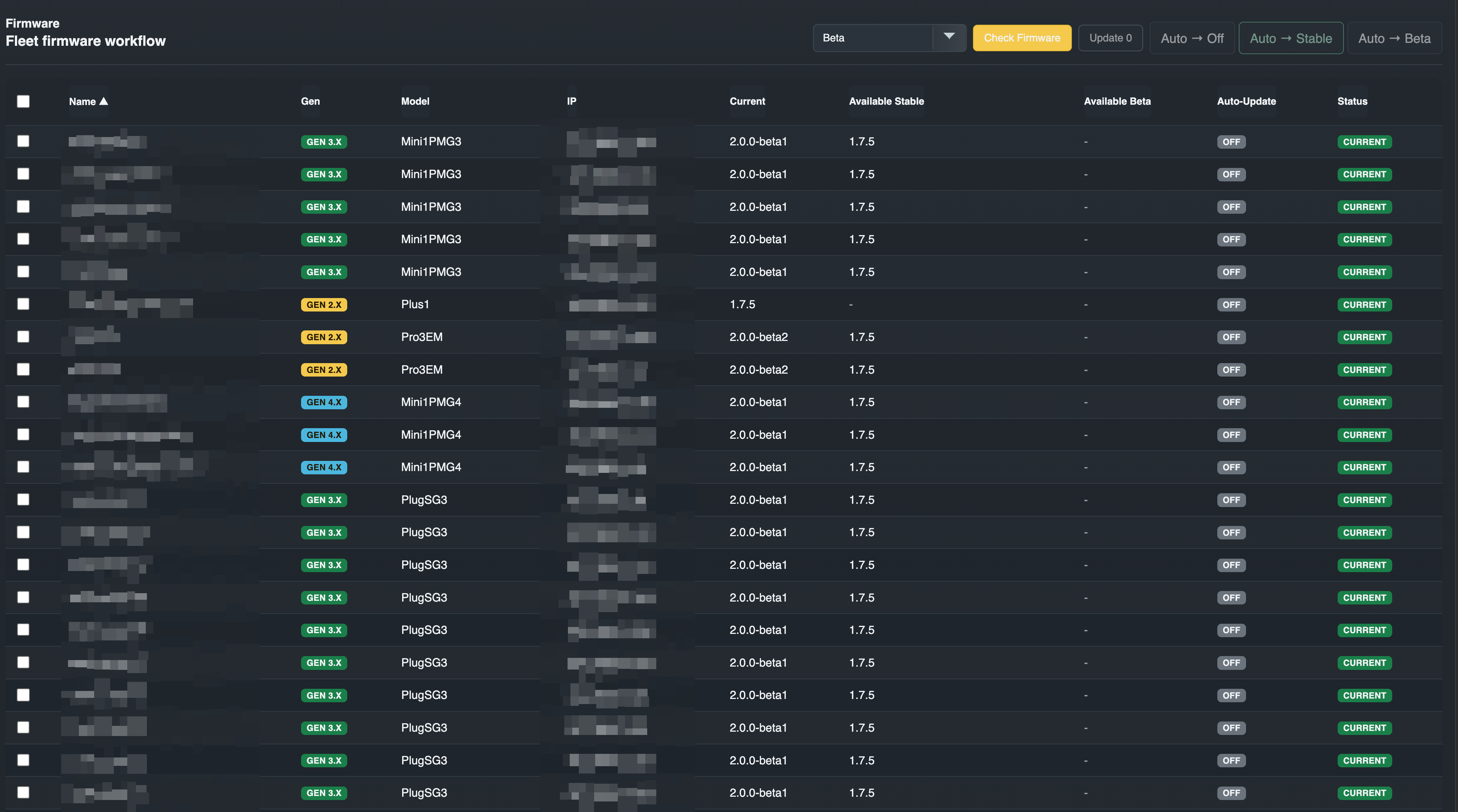
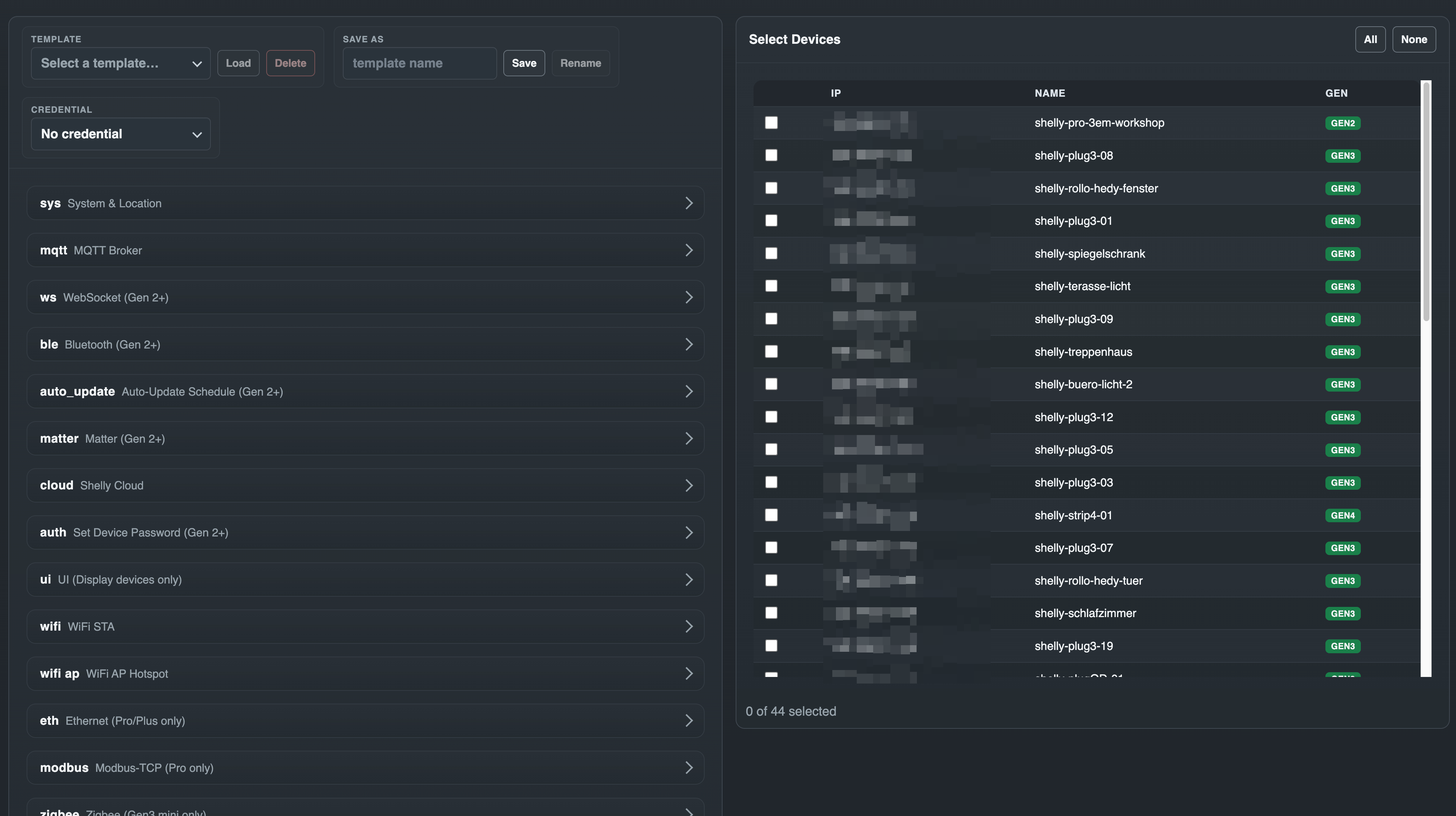
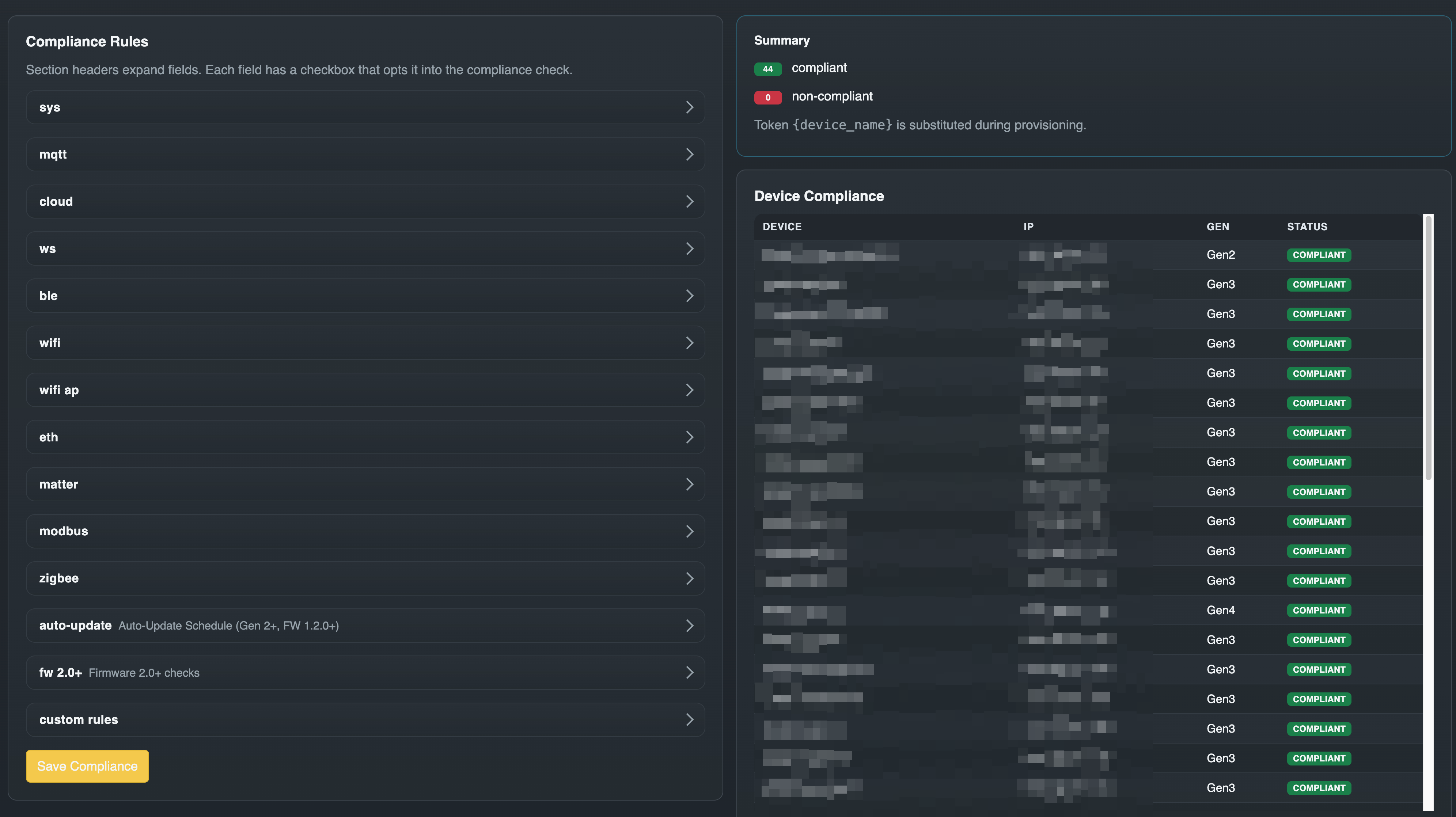
Under active development. The current release is the one listed on the Releases page — this file deliberately does not repeat the number, because it has gone stale here four times. The UI/API baseline is unchanged since v0.4.0; releases since then have carried fixes, dependency and CI work. Since v1.0.0 the project follows semver, and the HTTP API at /api/* is stable: routes may gain optional parameters and optional response fields, breaking changes are reserved for a future /api/v2/* (ADR-0018).
Intended posture:
The target architecture is documented in docs/ARCHITECTURE.md.
Open defects and accepted limitations, so they are found here rather than in
the field. Details and measurements live in CLAUDE.md.
shelly-hz2): its median answer is 30 ms, but under the burst
of a sweep its TCP handshake occasionally takes several seconds (up to
~11 s captured) — past the default 2 s scan_timeout. Raising
scan_timeout in Settings covers most of that tail; an occasional miss
remains. Before confirming a scan, check that every known device is in the
pending list — confirming treats a missing device as a failed refresh.premature end of data, at random progress percentages. It is not
ShellyAdmin's polling and not the CDN. Devices that failed repeatedly were
traced to packet loss behind a wirelessly meshed access point; the occasional
one-off abort elsewhere is still unexplained. Retrying usually works, and
Shelly's own phased rollout updates devices regardless..local names through the system resolver, and the
runtime image is Alpine/musl without nss-mdns. Subnet scanning is the
supported discovery path.gin's BSON binding. Accepted, not fixed: no code path reaches it — the
tree imports gin/binding nowhere and contains no c.Bind* call, every
handler decodes through a size-limited JSON decoder — and gin ships no
build tag to drop it.Fastest Docker run for a trusted LAN test setup:
docker run -d \
  --name shellyadmin \
  -p 8080:8080 \
  -v shellyadmin-data:/data \
  -e SHELLYADMIN_SECRET="$(openssl rand -hex 32)" \
  -e SHELLYADMIN_ENCRYPTION_KEY="$(openssl rand -base64 32)" \
  -e COOKIE_SECURE=false \
  ghcr.io/buliwyf42/shellyadmin:latest
Then open http://localhost:8080 and create the admin account on the first-run setup screen. Forgot the password later? docker exec shellyadmin shellyctl reset-auth --force returns the instance to setup mode.
SHELLYADMIN_ENCRYPTION_KEY is required since v0.3.0 — the container won't start without it. Generate it once and reuse the same value on every recreate; swapping in a new key without rotation orphans all stored credentials. To rotate to a new key deliberately, use shellyctl rotate-key (v0.5.3) — see docs/SECURITY.md.
COOKIE_SECURE=false is only safe on plain HTTP over a trusted LAN. Set COOKIE_SECURE=true (and front the container with TLS) for any other deployment.
To skip the setup screen on a fresh instance, generate a hash and pass it as SHELLYADMIN_PASS_HASH:
HASH="$(docker run --rm ghcr.io/buliwyf42/shellyadmin:latest hash-password 'change-this-admin-password')"

docker run -d \
  --name shellyadmin \
  -p 8080:8080 \
  -v shellyadmin-data:/data \
  -e SHELLYADMIN_SECRET="$(openssl rand -hex 32)" \
  -e SHELLYADMIN_ENCRYPTION_KEY="$(openssl rand -base64 32)" \
  -e SHELLYADMIN_PASS_HASH="$HASH" \
  -e COOKIE_SECURE=false \
  ghcr.io/buliwyf42/shellyadmin:latest
The hash is imported into the database once at boot, then ignored. To rotate the password after that, use Settings → Operator Account in the UI.
For a Compose-based deployment, see docker/docker-compose.yml:
docker compose -f docker/docker-compose.yml up -d
See docs/DEPLOYMENT.md for the full deployment guide, including hardening flags, MCP exposure, and pre-deploy DB snapshots.
Schedule.*, the same mechanism the device's own web UI usesWifi.SetConfig surface: primary STA, secondary STA (STA1), roaming (RSSI threshold, interval), static IPv4 per STAauto_update section (off / stable / beta) — synthesised onto the device as a Schedule.* jobdelete_all toggle, delete-by-id, new-webhook entries (cid/event/name/enable/URLs)slat sub-object for venetian-blind tiltZigbee.SendCommand / Zigbee.ReadAttr / Zigbee.WriteAttr, generates a gen2_rpc template sectionrestart_required badge per device in results; "Reboot restart-required devices" buttonusername, password/ha1, tags){device_name} token matching)See docs/roadmap.md for the current roadmap. Headline items:
shellyctl write commands (read-only CLI shipped in v0.3.6)v1.0.0cmd/shellyctl Application entrypoint (server + CLI subcommands)
internal/api HTTP routing and handlers
internal/services Workflow orchestration
internal/core Shelly protocol logic (scanner, firmware, provisioner)
internal/mcp Read-only MCP server (HTTP + stdio transports)
internal/db SQLite persistence and migrations
internal/models Shared data models
web Svelte frontend
docker Container files
docs Architecture, deployment, and ADR documentation
Requirements:
go.mod floor)CI and the Docker build pin newer toolchains than these floors. The versions live in docker/Dockerfile and .github/workflows/test.yml, which the Toolchain sync check keeps in step — read them there rather than from prose.
In two terminals:
# Terminal 1 — backend on :8080
make dev-backend

# Terminal 2 — frontend dev server on :5173 (proxies /api and /health)
cd web
npm install
npm run dev
Open http://localhost:5173 and log in with admin / dev-secret.
To run the Go binary with embedded frontend assets instead of the Vite dev server:
make frontend   # build + sync the SPA into cmd/shellyctl/dist
make backend
./bin/shellyctl
For the full development reference (tests, lint, bundle-size budget, deployment workflow, release process), see docs/DEVELOPMENT.md.
ShellyAdmin runs as a single container. Tagged releases publish a multi-arch image to GHCR via .github/workflows/publish-image.yml:
ghcr.io/buliwyf42/shellyadmin:vX.Y.Z (immutable)ghcr.io/buliwyf42/shellyadmin:latest (mover)The reference Compose file at docker/docker-compose.yml pulls :latest by default. To build locally instead of pulling:
docker compose -f docker/docker-compose.yml up -d --build
See docs/DEPLOYMENT.md for the full deployment guide.
ShellyAdmin can expose a read-only Model Context Protocol server so LLM-driven agents (Claude Desktop, Claude Code, custom MCP clients) can introspect the fleet — list devices, check scan/firmware status, read compliance, inspect logs — without scraping the SPA. State-changing operations (refresh, scan, firmware update, provision, settings writes) are deliberately not exposed in v1; see docs/adr/0011-mcp-read-only-server.md.
The listener is off by default and can be enabled either by setting SHELLYADMIN_MCP_TOKEN (env var; takes precedence — useful for headless / CI / Compose-managed deploys) or by toggling MCP Server → Enable on the Settings page and entering a token there (since v0.1.20; encrypted at rest). When both are set, the env var wins and the Settings UI shows a "managed by environment variable" notice. Clients can authenticate either via the standard Authorization: Bearer <token> header or by putting the token as the first URL path segment (e.g. http://host:8081/<token>/) — convenient for clients like mcp-remote where a header arg is awkward.
Example Claude Desktop config (mcp.json) — header form:
{
  "mcpServers": {
    "shellyadmin": {
      "url": "http://your-shellyadmin-host:8081/",
      "headers": { "Authorization": "Bearer your-token-here" }
    }
  }
}
Same client routed through mcp-remote (which doesn't natively expose a header field) using the URL-path form:
{
  "mcpServers": {
    "shellyadmin": {
      "command": "npx",
      "args": [
        "-y",
        "mcp-remote",
        "http://your-shellyadmin-host:8081/your-token-here",
        "--allow-http"
      ]
    }
  }
}
When MCP is enabled, every tool call writes to the same audit log the SPA shows on the Logs page (prefixed with mcp , filterable by request id).
This project is intended for trusted LAN use, not direct internet exposure. See SECURITY.md for the reporting flow and supported-versions policy; docs/SECURITY.md carries the deeper threat model and deployment expectations.
Found a vulnerability? Open a private security advisory.
Documented in:
The project is still being shaped, so architecture changes should align with the documented design goals before implementation. See CONTRIBUTING.md for the development and PR workflow, and CODE_OF_CONDUCT.md for community expectations.
MIT © 2026 buliwyf42
Self-hosted web app to discover, inventory, firmware-check, and provision Shelly Gen2+ devices on a trusted LAN. Single Go binary + Svelte UI, Docker-ready, with an opt-in MCP server.
टूल
अभी टूल सूची नहीं है। रिमोट सर्वर को पहले हेल्थ चेक के बाद सूची मिलती है।
FAQ
इस पेज पर Cursor, Claude Desktop, Claude Code या VS Code के लिए stdio कॉन्फ़िग कॉपी करें। यह पब्लिशर का इंस्टॉल इस्तेमाल करता है, PlugMCP प्रॉक्सी नहीं।
इस रिकॉर्ड में कोई ज़रूरी एनवायरनमेंट वेरिएबल दर्ज नहीं है।
Shellyadmin stdio पर लोकल चलता है।
पिछली जाँच 2026-10-28 को हुई। Self-hosted web app to discover, inventory, firmware-check, and provision Shelly Gen2+ devices on a trusted LAN. Single Go binary + Svelte UI, Docker-ready, with an opt-in MCP server.
