MCP-OpenStack-Ops
MCP OpenStack Operations Server: A comprehensive MCP (Model Context Protocol) server providing OpenStack project management and monitoring capabilities with built-in safety controls and single-project scope.
Power your agent
पब्लिशर का इंस्टॉल। PlugMCP एंडपॉइंट नहीं।
Host a copy with our keys and logs.
रजिस्ट्री में अभी कोई पैकेज्ड रिलीज़ नहीं है। रिपॉज़िटरी का README देखें.
रिमोट URL या आपकी मशीन पर कमांड? दोनों इंस्टॉल में क्या अंतर है
PlugMCP पर चलाएँ
A new server you create. It is not this listing's official endpoint. Use the publisher install when you want their URL and their credentials.
लॉन्चपब्लिशर से
MCP OpenStack Operations Server: A comprehensive MCP (Model Context Protocol) server providing OpenStack project management and monitoring capabilities with built-in safety controls and single-project scope.
100+ OpenStack tools for AI agents via MCP: compute, network, storage, identity, Heat, Octavia load balancing and Gnocchi telemetry. Read-only and project-scoped by default. Works with Claude Desktop (.mcpb), Open WebUI and any MCP client. Available on PyPI and Docker Hub.
OS_PROJECT_NAME, validating resource ownership so actions stay inside a single tenant.set_*) tooling only registers when ALLOW_MODIFY_OPERATIONS=true, keeping default deployments read-only and auditable.get_service_status, get_resource_monitoring, get_usage_statistics, and quota tools surface service availability, utilization, and capacity for the active project.get_instance tool consolidates name, ID, status, and free-form search paths with pagination plus summary/detailed modes.stdio/streamable-http transports support proxy/bastion and multi-project setups.⚠️ Compatibility Notice: This MCP server is developed and optimized for OpenStack Epoxy (2025.1) as the primary target environment. However, it is compatible with most modern OpenStack releases (Dalmatian, Caracal, Bobcat, etc.) as the majority of APIs remain consistent across versions. Only a few specific API endpoints may require adaptation for full compatibility with older releases.
🚧 Coming Soon: Dynamic multi-version OpenStack API compatibility is actively under development and will be available in upcoming releases, providing seamless support for all major OpenStack deployments automatically.
Officially Supported Releases:
For older OpenStack releases (Wallaby, Caracal, Bobcat, etc.), you may need to customize the OpenStackSDK version to match your environment. The SDK version must be changed in BOTH files:
Step 1: Modify Dockerfile.MCP-Server
RUN pip install \
        'uv>=0.8.5' \
        'mcpo>=0.0.17' \
        'fastmcp>=2.12.3' \
        'aiohttp>=3.12.0' \
        'openstacksdk==3.1.1' \  # ← Change to your required version (e.g., 3.1.1 for Wallaby)
        'python-dotenv>=1.0.0'
Step 2: Modify pyproject.toml
dependencies = [
    "fastmcp>=2.12.3",
    "openstacksdk==3.1.1",  # ← Must match Dockerfile version
    "python-dotenv>=1.1.1",
    # ... other dependencies
]
Step 3: Rebuild Docker Image
docker-compose build --no-cache mcp-server
docker-compose up -d
OpenStackSDK Version Reference:
⚠️ Important: Both
Dockerfile.MCP-Serverandpyproject.tomlmust have the same version to avoid dependency conflicts during container runtime.
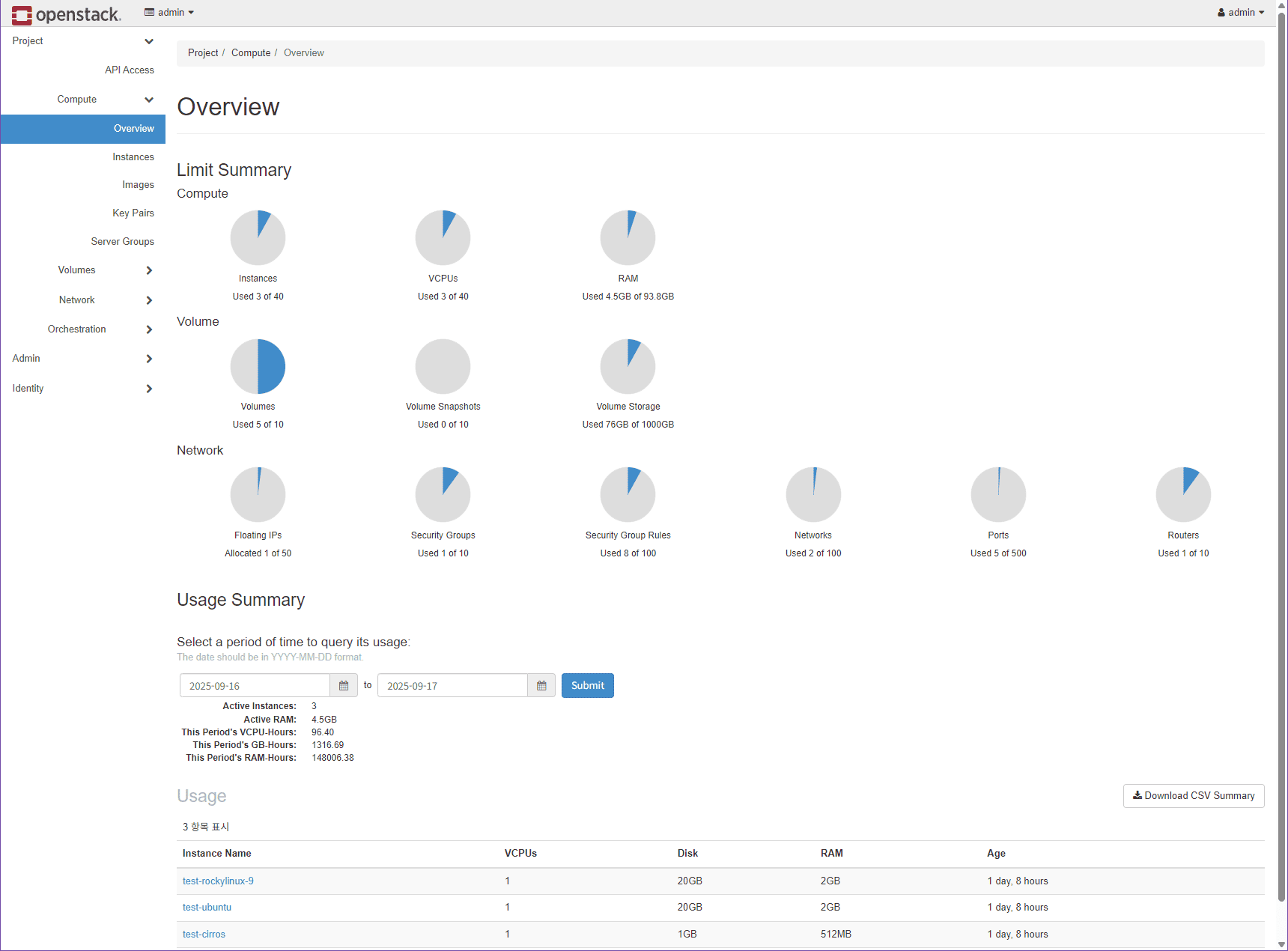
OpenStack Dashboard (Epoxy 2025.1)
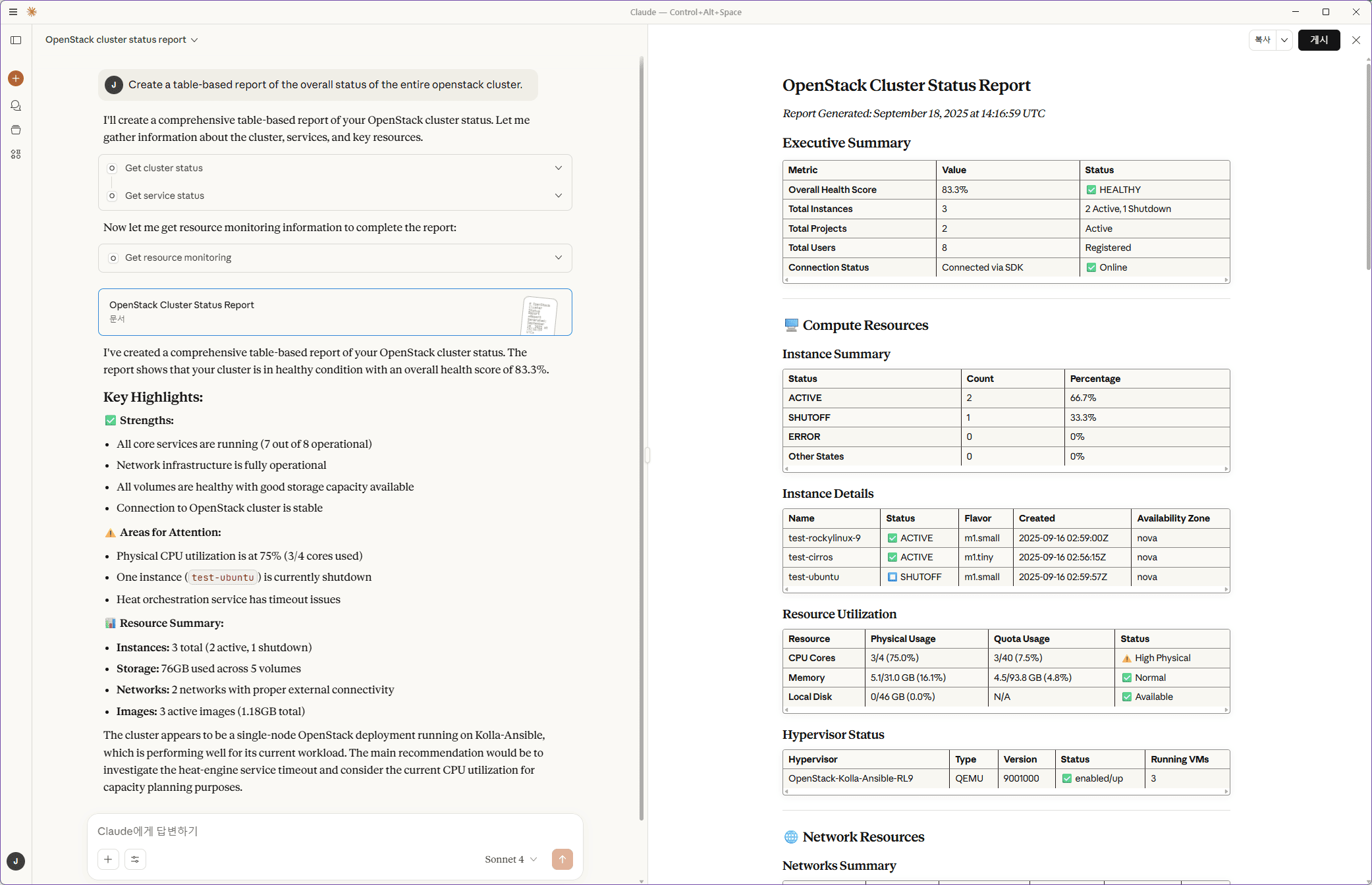
MCP Query Example - Cluster Status
Revolutionary approach to resource management enabling one-step operations:
# Traditional approach (multiple steps):
1. search_instances("test") → get list
2. set_instance("vm1", "stop") → stop individually
3. set_instance("vm2", "stop") → stop individually

# NEW enhanced approach (single step):
set_instance(action="stop", name_contains="test")  # ✨ Stops ALL instances containing "test"
Supported Tools with Enhanced Capabilities:
set_instance: Bulk lifecycle management with filtering (name_contains, status, flavor_contains, image_contains)set_volume: Bulk volume operations with filtering (name_contains, status, size filtering)set_image: Bulk image management with filtering (name_contains, status)set_networks: Bulk network operations with filtering (name_contains, status)set_keypair: Bulk keypair management with filtering (name_contains)set_snapshot: Bulk snapshot operations with filtering (name_contains, status)Input Format Flexibility:
# Single resource
resource_names="vm1"

# Multiple resources (comma-separated)
resource_names="vm1,vm2,vm3"

# JSON array format
resource_names='["vm1", "vm2", "vm3"]'

# Filter-based (automatic target identification)
name_contains="test", status="ACTIVE"
Every operation now provides immediate feedback with visual indicators:
✅ Bulk Instance Management - Action: stop
📊 Total instances: 3
✅ Successes: 2
❌ Failures: 1

Post-Action Status:
🟢 test-vm-1: SHUTOFF
🟢 test-vm-2: SHUTOFF
🔴 test-vm-3: ERROR
New consolidated get_instance tool replaces multiple separate tools:
get_instance_details, get_instance_info, get_instance_status, get_instance_network_infoget_instance(instance_names="vm1,vm2") - Single tool, comprehensive informationDetailed Mapping by Category
💡 Need an OpenStack Cluster for Testing?
Check out this comprehensive guide: Tutorial: Install OpenStack Multinode Cluster /w Kolla-Ansible (Epoxy/Dalmatian)
Perfect for setting up a test environment to explore MCP-OpenStack-Ops capabilities.
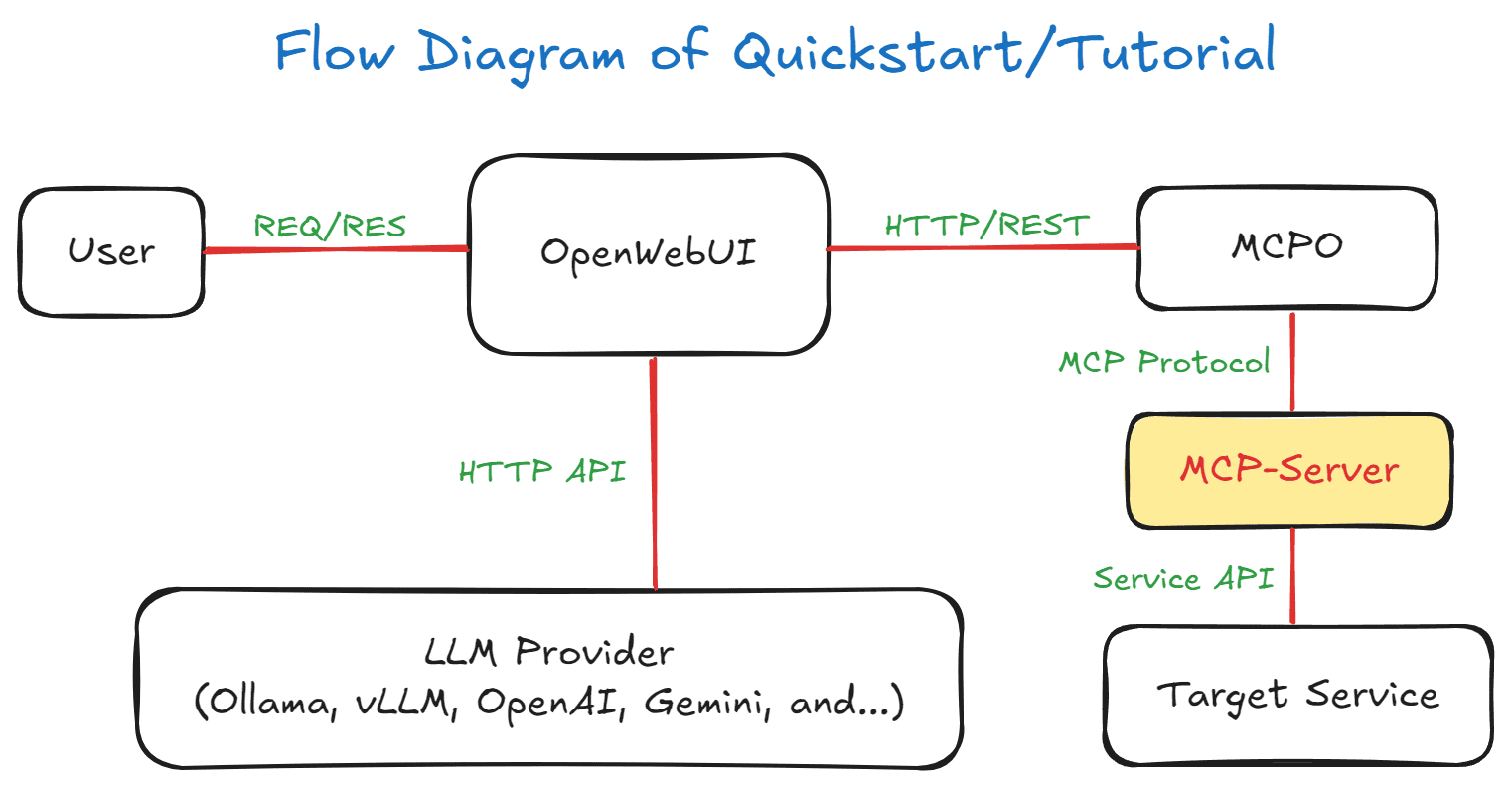
# Clone and navigate to project
cd MCP-OpenStack-Ops

# Install dependencies
uv sync

# Configure environment
cp .env.example .env
# Edit .env with your OpenStack credentials
Environment Configuration
Configure your .env file with OpenStack credentials:
# OpenStack Authentication (required)
OS_AUTH_HOST=your-openstack-host
OS_AUTH_PORT=5000
OS_AUTH_PROTOCOL=http  # Use 'https' for production with SSL/TLS
# OS_CACERT=/etc/ssl/certs/openstack-ca.pem  # Required for HTTPS (optional for HTTP)
OS_IDENTITY_API_VERSION=3
OS_USERNAME=your-username
OS_PASSWORD=your-password
OS_PROJECT_NAME=your-project
OS_PROJECT_DOMAIN_NAME=default
OS_USER_DOMAIN_NAME=default
OS_REGION_NAME=RegionOne

# OpenStack Service Ports (customizable)
OS_COMPUTE_PORT=8774
OS_NETWORK_PORT=9696
OS_VOLUME_PORT=8776
OS_IMAGE_PORT=9292
OS_PLACEMENT_PORT=8780
OS_HEAT_STACK_PORT=8004
OS_HEAT_STACK_CFN_PORT=8000

# MCP Server Configuration (optional)
MCP_LOG_LEVEL=INFO
ALLOW_MODIFY_OPERATIONS=false
FASTMCP_TYPE=stdio
FASTMCP_HOST=127.0.0.1
FASTMCP_PORT=8080
HTTPS Configuration for Production Environments
For secure OpenStack deployments with SSL/TLS:
# Enable HTTPS protocol
OS_AUTH_PROTOCOL=https
OS_AUTH_HOST=your-secure-openstack-host
OS_AUTH_PORT=13000  # Your HTTPS Keystone port

# SSL Certificate Configuration
# Option 1: Use custom CA certificate (recommended for production)
OS_CACERT=/etc/ssl/certs/openstack-ca.pem

# Option 2: Skip CA certificate (SSL verification disabled - insecure)
# Just omit OS_CACERT - the server will warn you about insecure connection

# Docker: Mount CA certificate into container
# Add to docker-compose.yml volumes:
#   - /path/to/your/ca-cert.pem:/etc/ssl/certs/openstack-ca.pem:ro
Protocol Configuration Notes:
OS_AUTH_PROTOCOL=http: Use for local development or HTTP-only OpenStack deploymentsOS_AUTH_PROTOCOL=https: Use for production environments with SSL/TLS enabledhttps is set without OS_CACERT, SSL verification is disabled (insecure but functional)OS_CACERT with your CA certificate path# Start all services
docker-compose up -d
# Check logs
docker-compose logs mcp-server
docker-compose logs mcpo-proxy
Container Architecture:
📌 Note: Web-UI configuration instructions are based on OpenWebUI v0.6.22. Menu locations and settings may differ in newer versions.
Service URLs - Docker Internal:
localhost:8080 (HTTP transport)localhost:8000 (OpenStack API proxy)localhost:3000 (Web interface)Service URLs - Docker External:
host.docker.internal:18005 (HTTP transport)host.docker.internal:8005 (OpenStack API proxy)host.docker.internal:3005 (Web interface)Add to your Claude Desktop configuration:
{
  "mcpServers": {
    "mcp-openstack-ops": {
      "command": "uvx",
      "args": ["--python", "3.12", "mcp-openstack-ops"],
      "env": {
        "OS_AUTH_HOST": "your-openstack-host",
        "OS_AUTH_PORT": "5000",
        "OS_PROJECT_NAME": "your-project",
        "OS_USERNAME": "your-username",
        "OS_PASSWORD": "your-password",
        "OS_USER_DOMAIN_NAME": "Default",
        "OS_PROJECT_DOMAIN_NAME": "Default",
        "OS_REGION_NAME": "RegionOne",
        "OS_IDENTITY_API_VERSION": "3",
        "OS_INTERFACE": "internal",
        "OS_COMPUTE_PORT": "8774",
        "OS_NETWORK_PORT": "9696",
        "OS_VOLUME_PORT": "8776",
        "OS_IMAGE_PORT": "9292",
        "OS_PLACEMENT_PORT": "8780",
        "OS_HEAT_STACK_PORT": "8004",
        "OS_HEAT_STACK_CFN_PORT": "18888",
        "ALLOW_MODIFY_OPERATIONS": "false",
        "MCP_LOG_LEVEL": "INFO"
      }
    }
  }
}
uv run python -m mcp_openstack_ops --help

Options:
  --log-level {DEBUG,INFO,WARNING,ERROR,CRITICAL}
                        Logging level
  --type {stdio,streamable-http}
                        Transport type (default: stdio)
  --host HOST          Host address for HTTP transport (default: 127.0.0.1)
  --port PORT          Port number for HTTP transport (default: 8080)
  --auth-enable        Enable Bearer token authentication for streamable-http mode
  --secret-key SECRET  Secret key for Bearer token authentication
MCP-OpenStack-Ops operates within a strictly defined project scope determined by the OS_PROJECT_NAME environment variable. This provides complete tenant isolation and data privacy in multi-tenant OpenStack environments.
Key Security Features:
Filtered Resources by Project:
Project Isolation Security Test
To verify that project isolation is working correctly, run the included security test:
# Run project isolation security test
python test_project_isolation.py
Expected Test Results:
🔒 OpenStack Project Isolation Security Test
==================================================
📋 Testing project isolation for: your-project

1️⃣ Testing Connection and Project ID...
✅ Connection successful
✅ Current project ID: abc123-def456-ghi789
✅ Project name 'your-project' matches project ID

2️⃣ Testing Resource Ownership Validation...
✅ Found 5 compute instances
   Instance web-server-01: ✅ Owned
   Instance db-server-01: ✅ Owned
✅ Found 3/8 owned networks
✅ Found 10/10 owned volumes

3️⃣ Testing Service-Level Project Filtering...
✅ Compute service returned 5 instances
✅ Network service returned 3 networks
✅ Storage service returned 10 volumes

4️⃣ Testing Secure Resource Lookup...
ℹ️  Network 'admin' not found or not accessible in current project
ℹ️  Instance 'demo' not found or not accessible in current project

🎯 Project Isolation Test Results
========================================
✅ All security tests passed!
✅ Project 'your-project' isolation verified
✅ Cross-project access prevention confirmed

🔒 Your OpenStack MCP Server is properly secured!
Security Features Validated:
For managing multiple OpenStack projects, deploy multiple MCP server instances with different OS_PROJECT_NAME values:
Example: Managing 3 Projects
# Project 1: Production Environment
OS_PROJECT_NAME=production
# ... other config
python -m mcp_openstack_ops --type stdio

# Project 2: Development Environment
OS_PROJECT_NAME=development
# ... other config
python -m mcp_openstack_ops --type streamable-http --port 8001

# Project 3: Testing Environment
OS_PROJECT_NAME=testing
# ... other config
python -m mcp_openstack_ops --type streamable-http --port 8002
Claude Desktop Multi-Project Configuration Example:
{
  "mcpServers": {
    "openstack-production": {
      "command": "python",
      "args": ["-m", "mcp_openstack_ops", "--type", "stdio"],
      "env": {
        "OS_PROJECT_NAME": "production",
        "OS_USERNAME": "admin",
        "OS_PASSWORD": "your-password",
        "OS_AUTH_HOST": "192.168.35.2"
      }
    },
    "openstack-development": {
      "command": "python",
      "args": ["-m", "mcp_openstack_ops", "--type", "stdio"],
      "env": {
        "OS_PROJECT_NAME": "development",
        "OS_USERNAME": "admin",
        "OS_PASSWORD": "your-password",
        "OS_AUTH_HOST": "192.168.35.2"
      }
    },
    "openstack-testing": {
      "command": "python",
      "args": ["-m", "mcp_openstack_ops", "--type", "stdio"],
      "env": {
        "OS_PROJECT_NAME": "testing",
        "OS_USERNAME": "admin",
        "OS_PASSWORD": "your-password",
        "OS_AUTH_HOST": "192.168.35.2"
      }
    }
  }
}
This allows Claude to access each project independently with complete isolation between environments.
📁 Ready-to-use Configuration File:
A complete multi-project configuration example is available at mcp-config.json.multi-project:
ALLOW_MODIFY_OPERATIONS=false)ALLOW_MODIFY_OPERATIONS=true)MCP_LOG_LEVEL=DEBUG)# Copy and customize the multi-project configuration
cp mcp-config.json.multi-project ~/.config/claude-desktop/mcp_servers.json
# Edit with your OpenStack credentials
By default, all operations that can modify or delete OpenStack resources are disabled for safety:
# Default setting - Only read-only operations allowed
ALLOW_MODIFY_OPERATIONS=false
Protected Operations (when ALLOW_MODIFY_OPERATIONS=false):
Always Available (Read-Only Operations):
⚠️ To Enable Modify Operations:
# Enable all operations (USE WITH CAUTION)
ALLOW_MODIFY_OPERATIONS=true
Tool Registration Behavior:
ALLOW_MODIFY_OPERATIONS=false: Only read-only tools are registered with the MCP serverALLOW_MODIFY_OPERATIONS=true: All tools (read-only + modify operations) are registeredBest Practices:
ALLOW_MODIFY_OPERATIONS=false in production environmentsALLOW_MODIFY_OPERATIONS settingFor comprehensive examples of how to interact with this MCP server, including natural language queries and their corresponding tool mappings, see:
This section includes:
The MCP server is optimized for large OpenStack environments with thousands of instances:
Pagination Features:
Search Optimization:
Connection Management:
Usage Examples:
# Safe large environment browsing
get_instance_details(limit=50, offset=0)     # First 50 instances
get_instance_details(limit=50, offset=50)    # Next 50 instances

# Emergency override for small environments
get_instance_details(include_all=True)       # All instances (use with caution)

# Optimized search for large datasets
search_instances("web", "name", limit=20)    # Search with reasonable limit
Edit src/mcp_openstack_ops/mcp_main.py to add new MCP tools:
@mcp.tool()
async def my_openstack_tool(param: str) -> str:
    """
    Brief description of the tool's purpose.

    Functions:
    - List specific functions this tool performs
    - Describe the operations it enables
    - Mention when to use this tool

    Use when user requests [specific scenarios].

    Args:
        param: Description of the parameter

    Returns:
        Description of return value format.
    """
    try:
        logger.info(f"Tool called with param: {param}")
        # Implementation using functions.py helpers
        result = my_helper_function(param)

        response = {
            "timestamp": datetime.now().isoformat(),
            "result": result
        }

        return json.dumps(response, indent=2, ensure_ascii=False)

    except Exception as e:
        error_msg = f"Error: Failed to execute tool - {str(e)}"
        logger.error(error_msg)
        return error_msg
Add utility functions to src/mcp_openstack_ops/functions.py:
def my_helper_function(param: str) -> dict:
    """Helper function for OpenStack operations"""
    try:
        conn = get_openstack_connection()

        # OpenStack SDK operations
        result = conn.some_service.some_operation(param)

        logger.info(f"Operation completed successfully")
        return {"success": True, "data": result}

    except Exception as e:
        logger.error(f"Helper function error: {e}")
        raise
# Test with MCP Inspector (recommended)
./scripts/run-mcp-inspector-local.sh

# Test with debug logging
MCP_LOG_LEVEL=DEBUG uv run python -m mcp_openstack_ops

# Validate OpenStack connection
uv run python -c "from src.mcp_openstack_ops.functions import get_openstack_connection; print(get_openstack_connection())"
For streamable-http mode, this MCP server supports Bearer token authentication to secure remote access. This is especially important when running the server in production environments.
Enable Authentication:
# In .env file
REMOTE_AUTH_ENABLE=true
REMOTE_SECRET_KEY=my-test-secret-key-12345
Or via CLI:
uv run python -m mcp_openstack_ops --type streamable-http --auth-enable --secret-key your-secure-secret-key-here
🔒 Default Policy:
REMOTE_AUTH_ENABLEdefaults tofalseif undefined, empty, or null. This ensures the server starts even without explicit authentication configuration.
When authentication is enabled, MCP clients must include the Bearer token in the Authorization header:
{
  "mcpServers": {
    "mcp-openstack-ops": {
      "type": "streamable-http",
      "url": "http://your-server:8000/mcp",
      "headers": {
        "Authorization": "Bearer your-secure-secret-key-here"
      }
    }
  }
}
When authentication fails, the server returns:
100% Project Isolation Guarantee:
test_project_isolation.py for comprehensive security validationTechnical Implementation:
get_current_project_id(), validate_resource_ownership(), find_resource_by_name_or_id() functionsEnhanced Security & Tenant Isolation:
current_project_idResolved Zero-Image Count Problems:
Fixed Instance Resource Display:
Comprehensive Project Scoping Documentation:
mcp-config.json.multi-project for quick setup.env.example with project scoping guidanceThis MCP server is designed for easy extensibility. Follow these steps to add your own custom tools:
Add reusable data functions to src/mcp_openstack_ops/functions.py:
async def get_your_custom_data(target_resource: str = None) -> List[Dict[str, Any]]:
    """Your custom data retrieval function."""
    # Example implementation - adapt to your OpenStack service
    conn = get_openstack_connection()
    results = []

    try:
        # Example: Custom query using OpenStack SDK
        resources = conn.your_service.list_resources(
            filters={'name': target_resource} if target_resource else {}
        )

        for resource in resources:
            results.append({
                'name': resource.name,
                'id': resource.id,
                'status': resource.status,
                'created_at': resource.created_at,
                # Add your custom fields
            })

    except Exception as e:
        logger.error(f"Failed to get custom data: {e}")
        return []

    return results
Create a new file src/mcp_openstack_ops/tools/get_your_custom_analysis.py:
"""Tool implementation for get_your_custom_analysis."""

import json
from datetime import datetime
from typing import Optional
from ..functions import get_your_custom_data  # Import your helper function
from ..mcp_main import (
    logger,
    mcp,
)

@mcp.tool()
async def get_your_custom_analysis(limit: int = 50, target_name: Optional[str] = None) -> str:
    """
    [Tool Purpose]: Brief description of what your tool does

    [Exact Functionality]:
    - Feature 1: Data aggregation and analysis
    - Feature 2: Resource monitoring and insights
    - Feature 3: Performance metrics and reporting

    [Required Use Cases]:
    - When user asks "your specific analysis request"
    - Your business-specific monitoring needs

    Args:
        limit: Maximum results (1-100)
        target_name: Target resource/service name

    Returns:
        Formatted analysis results
    """
    try:
        limit = max(1, min(limit, 100))  # Always validate input

        logger.info(f"Getting custom analysis, limit: {limit}, target: {target_name}")

        results = await get_your_custom_data(target_resource=target_name)

        if not results:
            return f"No custom analysis data found" + (f" for '{target_name}'" if target_name else "")

        # Apply limit
        results = results[:limit]

        # Format results as table
        table_data = []
        for item in results:
            table_data.append({
                'Name': item.get('name', 'N/A'),
                'ID': item.get('id', 'N/A'),
                'Status': item.get('status', 'N/A'),
                'Created': item.get('created_at', 'N/A'),
            })

        # Return formatted JSON
        return json.dumps({
            'title': f'Custom Analysis (Top {len(results)})',
            'data': table_data,
            'total_count': len(results),
            'timestamp': datetime.now().isoformat()
        }, indent=2)

    except Exception as e:
        logger.error(f"Failed to get custom analysis: {e}")
        return f"Error: {str(e)}"
If your tool performs modify operations, use the @conditional_tool decorator instead:
"""Tool implementation for set_your_custom_resource."""

from ..mcp_main import (
    conditional_tool,  # Use this instead of @mcp.tool()
    handle_operation_result,
    logger,
)
from ..functions import set_your_custom_resource

@conditional_tool  # Only registers when ALLOW_MODIFY_OPERATIONS=true
async def set_your_custom_resource(resource_name: str, action: str) -> str:
    """
    Manage your custom OpenStack resources.

    Use when user requests custom resource management.
    """
    try:
        result = set_your_custom_resource(resource_name, action)

        return handle_operation_result(
            result=result,
            operation_name="Custom Resource Management",
            details={
                'Resource': resource_name,
                'Action': action
            }
        )

    except Exception as e:
        logger.error(f"Custom resource operation failed: {e}")
        return f"Error: {str(e)}"
Add your tool description to src/mcp_openstack_ops/prompt_template.md for better natural language recognition:
### **Your Custom Analysis Tool**

### X. **get_your_custom_analysis**
**Purpose**: Brief description of what your tool does
**Usage**: "Show me your custom analysis" or "Get custom analysis for resource_name"
**Features**: Data aggregation, resource monitoring, performance metrics
**Optional**: `target_name` parameter for specific resource analysis
# Local testing
./scripts/run-mcp-inspector-local.sh

# Or with Docker
docker-compose up -d
docker-compose logs -f mcp-server

# Test with natural language:
# "Show me your custom analysis"
# "Get custom analysis for target_name"
The MCP server uses automatic tool discovery. When you create a new file in src/mcp_openstack_ops/tools/, it's automatically registered through the register_all_tools() function in tools/__init__.py. No manual import registration needed!
@mcp.tool() - always available@conditional_tool - only available when ALLOW_MODIFY_OPERATIONS=trueget_openstack_connection() for OpenStack API accessOS_PROJECT_NAMEThat's it! Your custom tool is ready to use with natural language queries.
This project is licensed under the MIT License - see the LICENSE file for details.
git checkout -b feature/amazing-feature)git commit -m 'Add some amazing feature')git push origin feature/amazing-feature)100+ OpenStack tools for AI agents via MCP: compute, network, storage, identity, Heat, Octavia load balancing and Gnocchi telemetry. Read-only and project-scoped by default. Works with Claude Desktop
ओवरव्यू
100+ OpenStack tools for AI agents via MCP: compute, network, storage, identity, Heat, Octavia load balancing and Gnocchi telemetry. Read-only and project-scoped by default. Works with Claude Desktop (.mcpb), Open WebUI and any MCP client. Available on PyPI and Docker Hub.
टूल
अभी टूल सूची नहीं है। रिमोट सर्वर को पहले हेल्थ चेक के बाद सूची मिलती है।
FAQ
इस पेज पर Cursor, Claude Desktop, Claude Code या VS Code के लिए stdio कॉन्फ़िग कॉपी करें। यह पब्लिशर का इंस्टॉल इस्तेमाल करता है, PlugMCP प्रॉक्सी नहीं।
इस रिकॉर्ड में कोई ज़रूरी एनवायरनमेंट वेरिएबल दर्ज नहीं है।
MCP OpenStack Ops stdio पर लोकल चलता है।
पिछली जाँच 2026-11-13 को हुई। 100+ OpenStack tools for AI agents via MCP: compute, network, storage, identity, Heat, Octavia load balancing and Gnocchi telemetry. Read-only and project-scoped by default. Works with Claude Desktop (.mcpb), Open WebUI and any MCP client. Available on PyPI and Docker Hub.