Usage statistics default to on. Runtime/Dev print a startup notice; browser integrations show a console notice. Set CESIUM_TELEMETRY_DISABLED=1 (Node), or globalThis.CESIUM_MCP_TELEMETRY_DISABLED=true before browser initialization. Fields, destination and opt-out.
[!IMPORTANT]
📣 作者正在求职 · 北京
Cesium MCP Runtime Server — AI Agent 通过 MCP 协议操控浏览器 Cesium
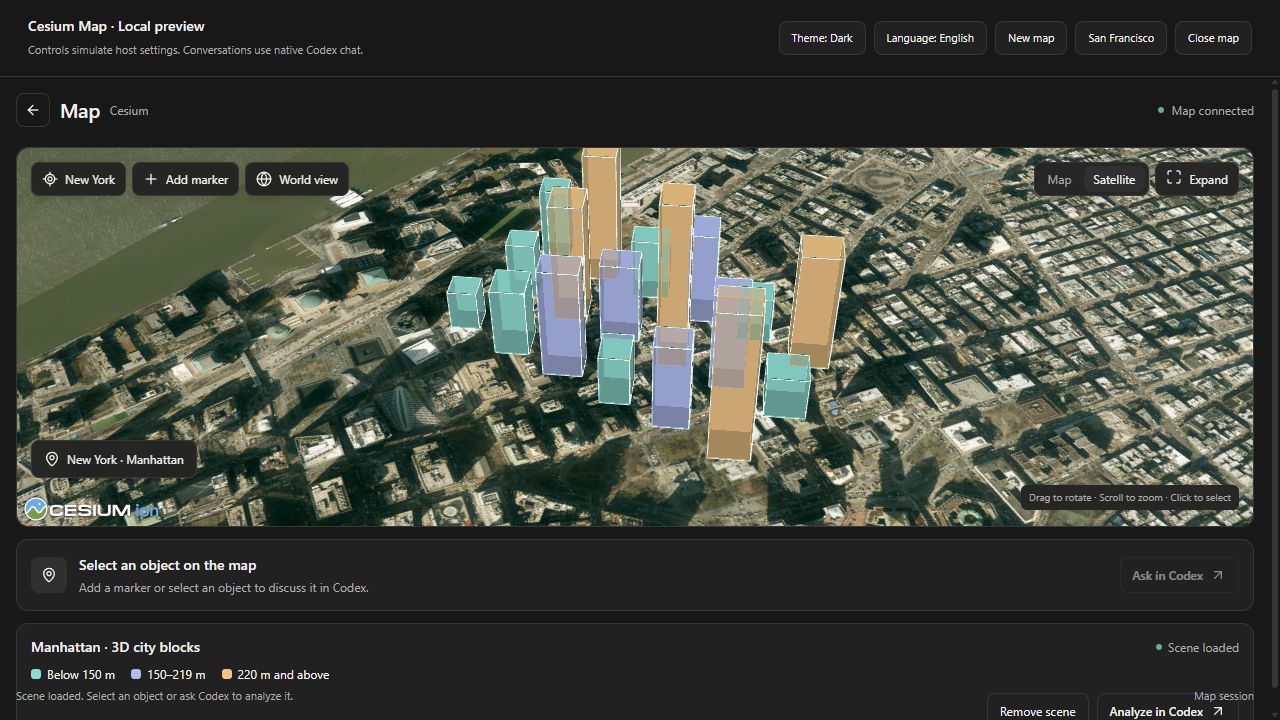
Restart Codex and ask “Open a map of Manhattan.” Uses native host chat, with no local map server or separate model API key. Requires a compatible MCP Apps host. This is a community beta, separate from the OpenAI public directory.
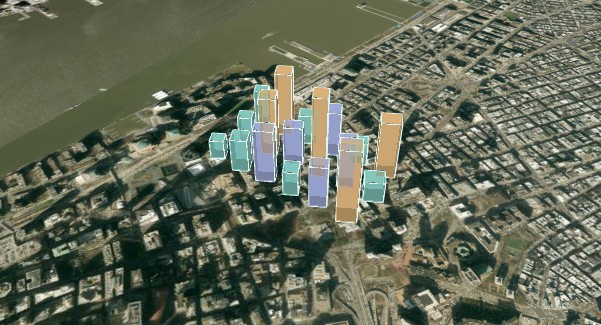
“Open the New York 3D city blocks scene, change the selected building height to 180 metres, then read it back.”
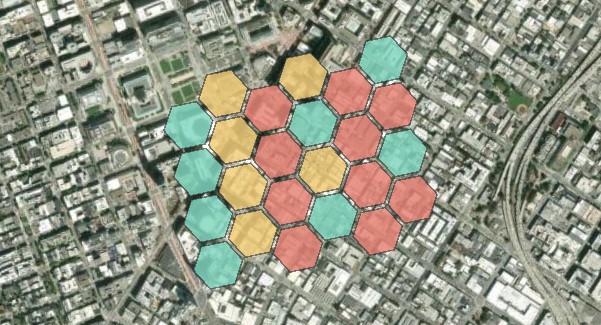
“Explain the selected hexagon in the San Francisco city activity scene.”
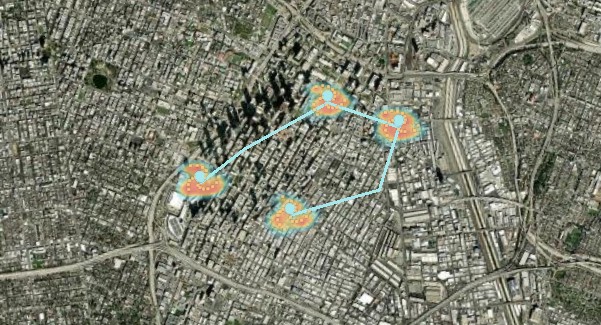
“Show the Los Angeles hotspots scene, then zoom in on the route.”
Select a scene in the map, click an object and choose Ask in Codex to continue with its map context. The host controls chat placement and map expansion.
Map previews
Actual running screenshot: the development preview is connected to the hosted HTTPS MCP service. The native conversation UI is provided by Codex; it is not pictured here.
San Francisco · City activity
New York · 3D city blocks
Los Angeles · Hotspots
Inspect feature values and change classification colors
Select buildings, edit extrusion heights and read back properties
Combine a heatmap, markers and connecting routes
These covers come from rendered map scenes. Buildings, activity values and heatmap points are demonstration data, not surveyed heights or official statistics. Basemap imagery: Esri and its imagery contributors.
Which one? Personal project or quick try → browser-agent. Let a compatible browser agent discover page-local Cesium tools → WebMCP. Existing web app embedding an AI assistant → bridge + your own function calling. Calling from Claude Desktop / Cursor / Dify → MCP runtime.
Architecture
flowchart LR
  subgraph clients ["AI Drivers (pick one)"]
    BA["Browser Agent\n(in the same page)"]
    WM["WebMCP Agent\n(browser-provided)"]
    FC["Your web app\nfunction calling"]
    MCP["Claude / Cursor / Dify\nvia MCP runtime"]
  end

  CONTRACTS["cesium-mcp-contracts\ntool definitions"]
  WEBMCP["cesium-mcp-webmcp\nnative adapter"]

  subgraph core ["cesium-mcp-bridge (browser)"]
    B["60+ tools\nprotocol-agnostic dispatcher"]
    C["CesiumJS Viewer"]
  end

  CONTRACTS -.-> BA
  CONTRACTS -.-> WEBMCP
  BA -- "in-page call" --> B
  WM -- "document.modelContext" --> WEBMCP
  WEBMCP --> B
  FC -- "in-page call" --> B
  MCP -- "WebSocket / JSON-RPC" --> B
  B --> C

  style clients fill:#1e293b,stroke:#528bff,color:#e2e8f0
  style core fill:#1e293b,stroke:#12B76A,color:#e2e8f0
The bridge remains the execution core, while contracts and protocol adapters stay separate. Pick whichever driver matches your scenario — they all reach the same Cesium command layer. On WebMCP-capable browsers, cesium-mcp-webmcp can expose 61 browser-safe commands in 12 selectable toolsets through document.modelContext without adding an MCP transport or backend server.
Relationship to the CesiumGS AI ecosystem
CesiumGS's newer AI work is split between cesiumjs-ai-starter-app, a deployable application template, and cesiumjs-skills, development-time guidance for coding agents. The earlier cesium-ai-integrations repository contains the first-generation experiments and community contributions that helped explore this space.
cesium-mcp is an independent runtime and integration toolkit, not a continuation of the earlier WebSocket-only reference architecture. Its reusable Bridge and shared contracts work unchanged across browser-only function calling, native WebMCP, standard MCP over stdio/HTTP, and embedded desktop shells. A local WebSocket bridge is used only when an external MCP host needs to reach a live browser Viewer; it is not required for the hosted demo or page-local integrations.
The project author was an early contributor to CesiumGS/cesium-ai-integrations, contributing the Imagery server, Terrain server, and unified MCP Gateway. Those experiments informed this project's multi-protocol architecture, while the implementation, release lifecycle, and roadmap remain independent.
Quick Start
MCP Apps map panel
Open an interactive Cesium map inside a compatible MCP Apps host with openCesiumMap. The panel uses existing MCP tools, publishes camera/layer/selection context, and can send a selected object to the conversation. OpenAI global/thread entrypoint metadata is included; availability depends on the host.
Try the local preview with npm run app:preview -w packages/cesium-mcp-runtime after npm ci and npm run build, then open http://127.0.0.1:19311/. See the MCP Apps guide for host configuration and verification boundaries.
Path 0 — Try in 30 seconds (browser agent, recommended)
Open the live demo and ask—the hosted model is ready without a browser API key:
The browser-agent example automatically registers all 61 browser-safe page tools plus 3 page-local resource tools when document.modelContext is available. Its built-in chat uses automatic toolset routing while keeping resource handles available for large GeoJSON/CZML inputs, and still offers explicit core, single-toolset, and all-tools modes:
npm run build -w packages/cesium-mcp-bridge
npm run build -w packages/cesium-mcp-webmcp
npx serve . -l 4173
Open http://localhost:4173/examples/browser-agent/, click Start, then inspect or execute the tools in DevTools → Application → WebMCP. Enable #enable-webmcp-testing and #devtools-webmcp-support in chrome://flags for local testing.
Application developers install the adapter separately. End users only open the integrated website; they do not install npm packages or run an MCP server.
npm install cesium-mcp-webmcp
import { registerCesiumViewerWebMcp } from 'cesium-mcp-webmcp/viewer'

const registration = await registerCesiumViewerWebMcp(viewer, {
  toolsets: 'all',
  excludeTools: ['geocode'], // add your own browser geocoder to expose this tool
})

// Later, if the page is unmounted:
registration.unregister()
Path 2 — Embed in your own web app (function calling)
npm install cesium-mcp-bridge
import { CesiumBridge } from 'cesium-mcp-bridge';

const bridge = new CesiumBridge(viewer);
// Then: send the bridge's tool schema to any LLM that supports function/tool calling,
// route the model's tool calls to bridge.execute(name, params).
Path 3 — Use from Claude Desktop / Cursor / Dify (MCP)
Ordinary MCP users need only the Runtime package. It includes the browser Bridge bundle and a built-in Viewer at http://localhost:9100/; install cesium-mcp-bridge separately only when integrating a custom page.
The stable release serves existing MCP 2025-11-25 clients and the new
2026-07-28 protocol from the same stdio/HTTP entry. It uses the stable
TypeScript SDK v2 and passes the official server-stateless conformance
scenario (28/28).
Tools are organized into 12 toolsets. Default mode enables 4 core toolsets (30 tools). Set CESIUM_TOOLSETS=all for everything, or let the AI discover and activate toolsets dynamically at runtime.
Canonical contracts: Tool descriptions default to English; set CESIUM_LOCALE=zh-CN for Chinese. Titles, behavior annotations, localized descriptions, defaults, input validation, MCP output schemas, and structured results all come from the shared JSON Schemas in cesium-mcp-contracts. Text content remains available for older clients.
git clone https://github.com/gaopengbin/cesium-mcp.git
cd cesium-mcp
npm install
npm run build
npm test
npm run test:contracts
npm run test:schema-compat
npm run test:routing
npm run test:model-tools
npm run eval:model-tools
npm run test:e2e:packed
test:contracts is the focused parity gate for MCP Runtime metadata, WebMCP registration, Function Calling definitions, provider Schema portability, and the 60-tool Bridge Executor Registry. Run test:schema-compat directly for actionable OpenAI, Azure, VS Code MCP, and WebMCP Schema diagnostics.
test:routing evaluates bilingual and multi-intent Browser Agent requests across all 12 toolsets, checking required-tool recall and the 20-tool automatic-routing budget.
test:model-tools verifies the provider-neutral multi-turn scoring harness. eval:model-tools performs a no-network routing preflight by default; add an explicit provider and --live to measure real tool choice, argument validity, and required-tool completion. See Model Tool Evaluation.
test:e2e:packed builds npm tarballs, installs them in a clean temporary project, opens the real Cesium Viewer, and verifies a Runtime-WebSocket-Bridge command round trip.
Version Policy
Version format: {CesiumMajor}.{CesiumMinor}.{MCPPatch}
Segment
Meaning
Example
1.145
Tracks CesiumJS version — built & tested against Cesium ~1.145.0
1.145.0 → Cesium 1.145
.x
MCP patch — independent iterations for new tools, bug fixes, docs
1.145.0 → 1.145.1
Official CesiumJS releases are reviewed before the compatibility baseline is bumped; the project does not automatically claim support for a newer release without Bridge verification.
अभी टूल सूची नहीं है। रिमोट सर्वर को पहले हेल्थ चेक के बाद सूची मिलती है।
FAQ
सवाल
Cesium MCP Runtime कैसे इंस्टॉल करें?
इस पेज पर Cursor, Claude Desktop, Claude Code या VS Code के लिए stdio कॉन्फ़िग कॉपी करें। यह पब्लिशर का इंस्टॉल इस्तेमाल करता है, PlugMCP प्रॉक्सी नहीं।
क्या Cesium MCP Runtime के लिए API key चाहिए?
इस रिकॉर्ड में कोई ज़रूरी एनवायरनमेंट वेरिएबल दर्ज नहीं है।
Cesium MCP Runtime कौन सा ट्रांसपोर्ट इस्तेमाल करता है?
Cesium MCP Runtime stdio पर लोकल चलता है।
Cesium MCP Runtime की पिछली जाँच कब हुई थी?
पिछली जाँच 2026-10-28 को हुई। Cesium MCP Runtime Server — AI Agent 通过 MCP 协议操控浏览器 Cesium