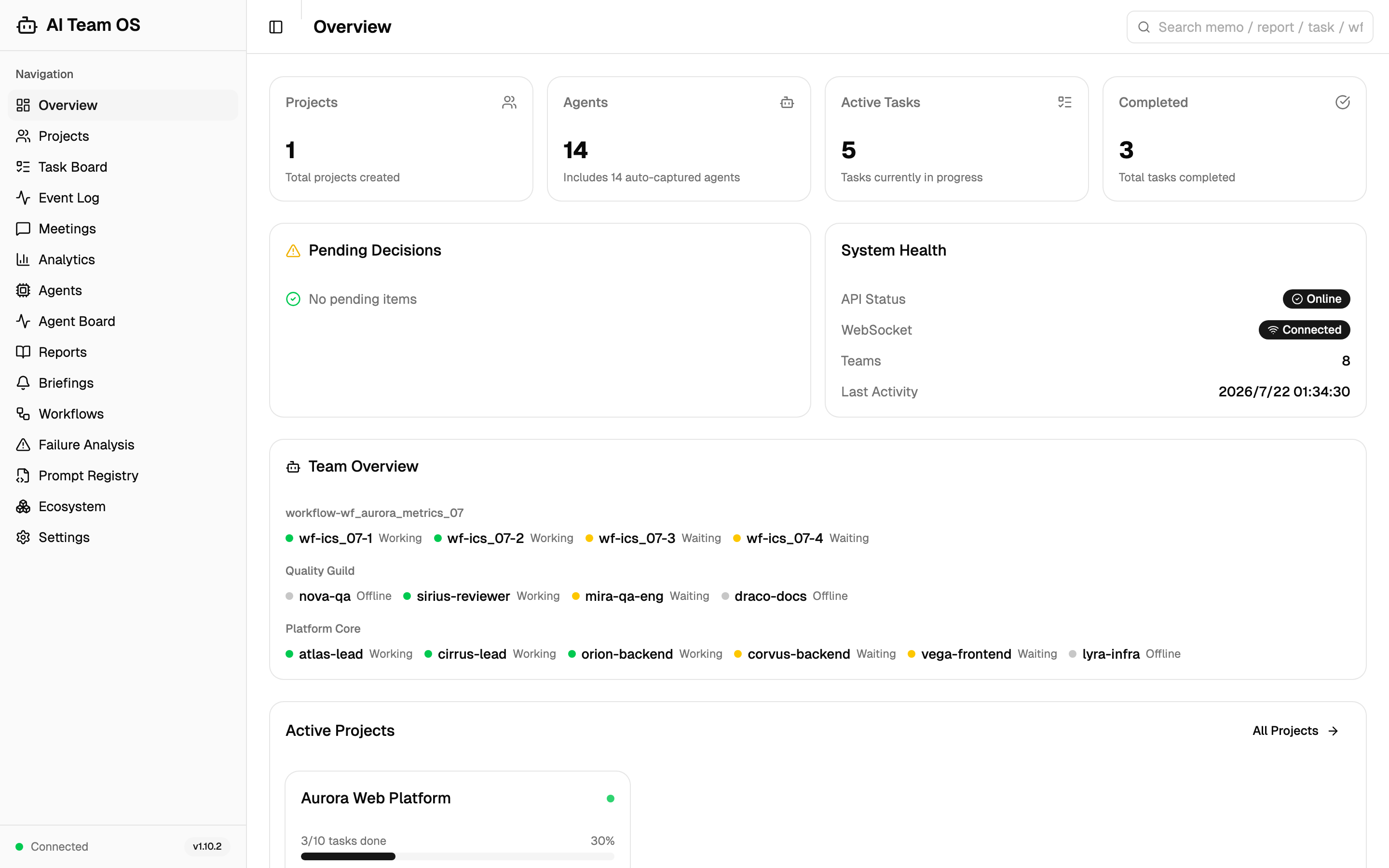
Every active team on one screen, as the hooks recorded it: Claude Code teams, a Codex session whose members keep their native names, and the fan-out agents of a running workflow. The banner and the Pending card show what currently waits on you.
Power your agent
पब्लिशर का इंस्टॉल। PlugMCP एंडपॉइंट नहीं।
Host a copy with our keys and logs.
रजिस्ट्री में अभी कोई पैकेज्ड रिलीज़ नहीं है। रिपॉज़िटरी का README देखें.
रिमोट URL या आपकी मशीन पर कमांड? दोनों इंस्टॉल में क्या अंतर है
PlugMCP पर चलाएँ
A new server you create. It is not this listing's official endpoint. Use the publisher install when you want their URL and their credentials.
लॉन्चपब्लिशर से
Multi-agent team operating system for Claude Code. 108 MCP tools, 40+ agent templates, 10 lifecycle hooks, 7 pipeline workflows. Persistent teams, structured meetings, task wall, real-time React dashboard. No LangChain/AutoGen — pure CC native integration.
AI Team OS is a shared operating layer for Claude Code and Codex. Keep tasks, project memory, reports and team messages in one place, and follow work across sessions in one Dashboard. Each host keeps its native agent tools; the OS provides the durable record that makes their work understandable and reusable.
🤝 Codex is supported. Use Codex or Claude Code on its own, or connect both to the same OS task wall, project memory, reports, channels and Dashboard. Codex uses its own MCP and hook configuration; native agent tools, host settings and hook trust remain separate. See the installation and capability sections below for the per-host setup and boundaries.
⚡ v1.15.2 - A task wall you can manage, and receipts for external Codex runs. Tasks get real parent and child links, dependencies that unlock downstream work when they complete, explicit waits, clearable fields, revision checks and atomic batch creation. The opt-in
aiteam codex-execkeeps minimum usage receipts forcodex execruns, including--ephemeralruns that leave no rollout.aiteam attribution repairlets every install correct usage rows stored before the upgrade, and the Codex usage backfill now runs on freshly installed databases. Some task-update semantics changed (an empty string now clears a field); after updating, restart the API and every open Claude Code and Codex session; see the changelog.Full version history: CHANGELOG.md
118 MCP tools · 241 REST endpoints · 24 dashboard pages · 25 agent templates · 42 ecosystem research tools · 27 machine-checked invariants
A session can end without taking the team's context with it. Tasks, memos, decisions and reports remain available to the next authorized session, whether it runs in Claude Code or Codex.
Parallel agents are useful only when you can tell who owns the work, what actually happened and where to resume. AI Team OS keeps those answers outside any single chat:
The OS records and exposes the work. Your chosen host runs the agents, and you decide what they are authorized to do.
You set the scope. Each root session has its own Leader. A Claude Leader and a Codex Leader can contribute to the same project without pretending to be the same process or sharing host configuration.
Claude Code's installed hooks can supply startup briefings and direction-layer context automatically. Codex can read the same records through MCP, with its own adapter handling supported observations. The OS does not replace either host's scheduler, permissions or agent lifecycle.
Shared project records and channels connect sessions while execution stays native to each host:
Claude Leader and Codex Leader explicitly. Native Codex children join the parent team instead of becoming extra Leaders.busy evidence drives the current roster; waiting, closed and stale records remain available as history. Unknown source or model information stays unknown.channel_send, channel_read and channel_wait for explicit communication. A pending wait can return new messages; it does not restart an ended Codex turn.Keep team preferences and task evidence available across sessions, without relying on a single chat's remaining context.
supersedes and auditable invalidation rather than deletion. Writes are scanned for invisible characters, instruction-override patterns and credential shapes. Claude Code's SessionStart and SubagentStart hooks inject this context; Codex retrieves the shared records through its configured tools.task_memos ledger): task-level execution memos promoted to a dedicated table (row IDs / invalidation axis / quality score / scope_path), recalled on demand via pure-Python BM25 Chinese retrieval; 123 legacy memos backfilled with zero loss.memory_reconcile): zero-LLM BM25 candidate clustering, then merge / invalidate / score / distill on agent confirmation — "the agent computes, the tool persists", with no background resident process introduced.Surfaces: MCP memory_add / memory_list / memory_invalidate / memory_search / memory_reconcile_candidates / memory_reconcile_apply.
Choose the MCP surface for each client instead of loading every capability into every session.
AITEAM_TOOLSETS group switch: 17 capability-domain toolsets; a startup env var decides which modules register. default core profile = task/team/memory/infra/reports/notices (30 tools, hard cap <=50), with incremental default,ecosystem - fits non-CC clients that cap tool counts.AITEAM_READONLY read-only profile: an orthogonal overlay that strips every write tool by explicit allowlist and keeps only read tools — ideal for audit / observer sessions.disallowedTools entries for destructive OS tools (delete project, delete team, restart API). Claude Code 2.1.281 enforces them for both project- and user-level definitions (verified 2026-09-25); older versions may treat them as declarations only. Codex uses its own native permission controls rather than interpreting CC template fields.The OS does not intercept CC's built-in ultracode/Workflow — it becomes its persistent governance layer. Every Workflow run is automatically tracked into the OS, with no manual team setup:
workflow-<wf_id>) the moment it starts/workflows: a live feed of run cards, a phase swimlane timeline, and per-agent telemetry — tokens / duration / status / tool-call counts, advancing live via incremental journal tailing while a run executesaudit:sourceA) instead of idsworkflow_list (browse runs), workflow_get (full archive + per-agent rows), workflow_reconcile (repair from on-disk snapshots after the OS was offline)A project-isolated knowledge base that accumulates research findings over time. Each repo progresses through 4 stages (a progressive funnel, since v1.5.0), with token-efficient triggers and append-only history:
ai-engineer summary (core function / positioning / advantages). 8-class failure handling with self-learning hooks (3+ same-class fails surface through self_learning_pending; the queue exposes recorder/searcher injection points you can wire to your own lesson store)backend-architect agents to read architecture key filesdebate_start (NOT a built-in debate engine — reuses meeting system)mark_as_reference adds tag for future quick recall; start_integration triggers existing task_create for actual implementationis_active=False); stars climbing back auto-promotes + re-queues Stage 0/ecosystem: list with stage badges + research timeline + project filter dropdown + candidate-filter page (/ecosystem/research) + per-project settings tab — the single largest tool family in the OSEverything the OS records — task memos, reports, tasks — becomes recallable knowledge:
[[memory]]) out of memos and reports into an append-only knowledge_links table — the graph is a derived view, rebuildable from source text at any time/api/search fuses three arms via RRF — BM25 full-text (Chinese bigram native), knowledge-graph fanout (an ID query pulls in everything linked to it), and exact ID-prefix / title matchunified_search / link_query / link_trace — recall past work by natural language ("how was the attribution fix done"), a wf_ id, or a commit hashWhy zero-LLM retrieval? ID extraction and search run locally without a model call, and the graph can be rebuilt from source text. Reading retrieved results into an agent's context still consumes that host's normal context budget.
Governance ledger and panoramic visualization — everything leaves a trace:
The task wall gives a running Leader a durable plan:
Continued execution depends on the host session and the automation you enable. Persistent records do not imply an always-running model.
The OS separates recorded facts from inferred or missing information:
Inspect models observed in Claude Code transcripts and choose Claude Code's startup default. This setting does not control Codex's model selection.
~/.claude/settings.json under triple write protection — touches only the model key, keeps a .bak-aiteam backup, writes atomically, refuses corrupted filesSurfaces: REST /api/models/{available,default} · MCP model_config_get / model_config_set · the Model Governance card in Dashboard Settings.
Coordinate native agents and peer Leaders without flattening their identities:
team: / project: / global channels with @mention supportadditionalContext, not plain hook stdout.channel_wait holds a call open and identifies initial replay, event-triggered read or final timeout read in delivery_source. It is separate from acknowledgement and from Claude Code's optional session watcher; it does not wake an idle Codex session after a turn ends.debate_start / debate_code_reviewTrace the observations and records behind the Dashboard:
OS checks complement each host's native approvals and isolation controls. Install and review the applicable host hooks rather than assuming one host's rules protect the other:
InputGuardrailMiddlewarePOST /api/teams/{id}/watchdog/check plus the background patrol — flags BUSY-timeout agents, long-pending tasks and unblockable dependenciesverify_completion checks task status and memo existence; artifact review and relevant tests still establish whether the requested result is correctfind_skill(level=2, category="integration")find_skill 3-layer progressive discovery: quick recommend → category browse → full detail, reducing tool-call overheadThe OS does not require its own hosted model service:
failure_analysis, diagnose_task_failure and prompt_effectiveness stay callable but are frozen and no longer developed.find_skill 3-layer discovery (skills + integration recipes) · Prompt Registry: see the full tool table below. The scheduler and the loop state machine were retired in favour of CC-native Cron* and on-demand tools (CC-is-not-always-on principle); the wake_agent schedule kind survives for the fleet wake subsystem.The shared HTTP MCP connection reuses the OS API and supplies each connection’s working directory through a short-lived helper. The complete Codex installer configures on-demand API startup; a manually configured read-only helper still requires an already running compatible API. Reload the host connection after configuration changes. Project isolation is preserved, while automatic Codex session identity remains unknown. Claude’s stdio configuration is unchanged.
The window's Reset calculation start button explicitly replaces its statistics anchor with the latest saved observation. It preserves usage history and monitor settings, does not trigger a capture, and survives API restarts. A later allowance reset starts a new cycle normally.
An independent, versioned OpenAI price catalog supports per-request estimates through aiteam pricing and /api/pricing. It includes verified public rates, exact aliases, cache read/write prices and context/service-tier rules. Supplement a catalog and recompute the same inputs without retaining missing prices as zero. Results include price provenance, a content hash and request coverage; they are not subscription charges. See the pricing guide and price sources.
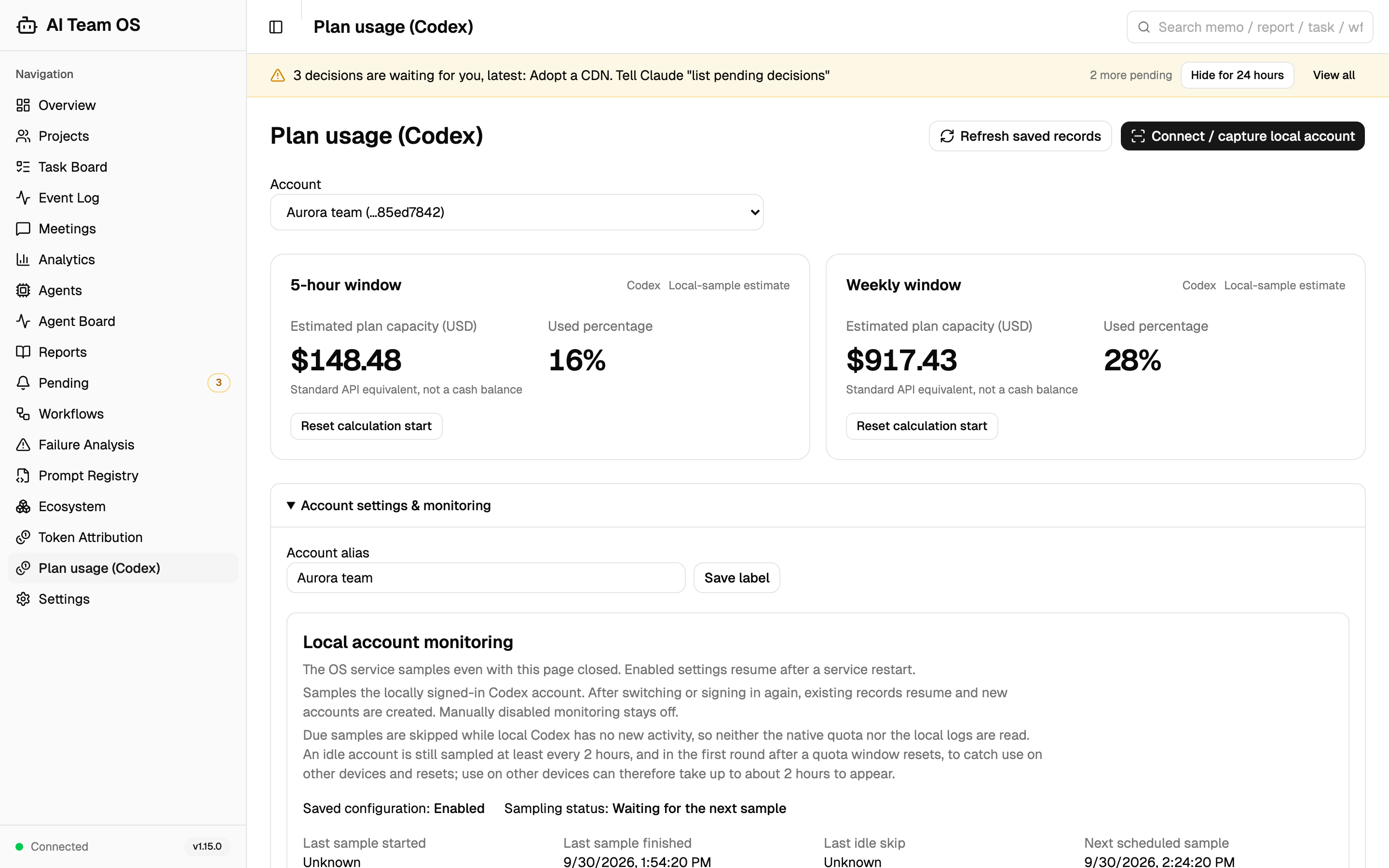
The independent /usage/accounts Dashboard page shows the native percentage used and estimated plan capacity in USD, labeled Local-sample estimate. Identified responses use their actual model, input, cache read/write and output usage at verified Standard API rates; when native service_tier is recorded, logged Fast/priority tiers use the catalog Fast rate (2× Standard). Long-context bands use each request's full input, including cache, never the session total. Known dollar contributions are accumulated from the cycle anchor and compared with the same cycle's allowance change. Account attribution and request-price provenance remain separate from the prediction assumption described below. This is an API-equivalent local workload sample, not a subscription charge, cash balance, complete cross-device ledger or official fixed capacity. No request-log import or billing access is required. Existing Token attribution and Claude configuration remain unchanged. See the account guide.
Prediction starts by default after the local Codex account is verified. Users can choose a 30-second to 30-minute interval or explicitly pause prediction; saved choices survive API restarts. The estimate always compares the earliest observation in the current allowance cycle with the latest one: known API-equivalent dollars divided by the increase in percentage points, multiplied by 100. Only a rollback in the account usage percentage, which confirms that the allowance was reset, moves this anchor; a standalone resets_at timestamp change does not. Missing contributions count as zero for this prediction, while the original records retain their unknown or incomplete state. A 1% increase is enough; Spark usage remains separate. This is not an AI-session heartbeat and never launches a model turn.
Usage recording is independent of prediction. An API-lifetime recorder incrementally saves available native usage events, including missing-model and unknown-provider observations, with persistent file cursors. Pausing prediction or closing the page does not stop recording. Complete lines and cursors are committed together; partial tails and late records can be read later. Existing logs can be backfilled after restart, but deleted, never-recorded history and unobserved quota readings cannot be reconstructed. The recorder stores usage fields, not conversation text or credentials; retaining an event does not automatically attribute it to the current account. See the account usage guide.
AI Team OS manages its own development — and since v1.7.0, it can prove it with its own telemetry:
Claude Code and Codex sessions use the same task records and channels to exchange implementation and review evidence. Their native execution histories stay distinct; the OS provides the common project record.
/workflows and replay how the system built its own features, swimlane by swimlane.scripts/check_invariants.sh was distilled from a real accident in this repo's history.The same task wall, reports and observations used in development are available for your projects.
Claude Code native agents -> CC MCP / hook adapter    \
                                                      > Shared OS API -> SQLite
Codex native agents       -> Codex MCP / hook adapter /       |
                                                             +-> Dashboard
The database holds project-scoped tasks, memory, reports, channels and observations. Each host owns its scripts, registration, trust and native agent controls; sharing the OS backend does not merge those settings.
Layer 5: Web Dashboard    — React 19 + TypeScript + Shadcn UI (24 pages)
Layer 4: CLI + REST API   — Typer + FastAPI
Layer 3: Team Orchestrator — LangGraph StateGraph (optional extra — CLI graph execution only)
Layer 2: Memory Manager   — SQLite-backed store + pure-Python BM25 retrieval
Layer 1: Storage          — SQLite (WAL journaling) · PostgreSQL support on the roadmap
Claude Code's plugin and Codex's adapter feed the same OS through separate installation and trust surfaces. The Codex adapter lives in plugin/harness/codex/; its observation entry and matching helper modules must be installed together. The following event map describes the Claude Code adapter only.
SessionStart     → auto_install.py, session_bootstrap.py, send_event.py
                   - Auto-install deps + inject Leader briefing / core rules / team state
                 → session_bootstrap.py resume-tick (resume/fork only)
                   - A stamp that differs on every start, so Claude Code keeps the notice line
SubagentStart    → inject_subagent_context.py, send_event.py   - Inject sub-Agent OS rules (2-Action etc.)
SubagentStop     → send_event.py                 - Record sub-Agent lifecycle event
PreToolUse       → workflow_reminder.py, send_event.py
                   - Workflow tracking reminders + event forwarding
PostToolUse      → deep_review_link.py, send_event.py
PostToolUseFailure → send_event.py               - Close the activity of a failed or interrupted tool call (status error)
TaskCompleted    → send_event.py                 - Record a CC task completion (observation only)
TaskCreated      → send_event.py                 - Record a CC task creation (observation only)
TeammateIdle     → send_event.py                 - CC's own teammate-idle signal, recorded alongside the OS liveness track (observation only, changes no status)
UserPromptSubmit → context_tracker.py            - Track context usage
                 → channel_unread.py             - Unread channel badge
                 → turn_end_guard.py             - Mark the user as present (user-prompt mode)
SessionEnd       → send_event.py                 - Record session end event
Stop             → send_event.py                 - Record stop event
                 → turn_end_guard.py             - Keep the turn going while work runs with no watcher armed
PermissionDenied → permission_denied_recovery.py - Permission-denied self-recovery
PreCompact       → pre_compact_save.py           - Freeze the OS-side battle state (in-flight agents / open tasks / pending decisions) into a checkpoint
PostCompact      → send_event.py                 - Confirm the compaction actually happened (a triggered compaction can still be cancelled)
WorktreeRemove   → send_event.py                 - An isolated worktree is gone
For Claude Code's AI-assisted installation, tell Claude Code:
"Read https://github.com/CronusL-1141/AI-company/blob/master/INSTALL.md and follow the instructions to install AI Team OS"
Claude Code can read the install guide and walk through its plugin setup. Codex users should follow the separate manual path below; the Claude installer is not a Codex installer.
Important: Install AI Team OS to your system Python, not inside a project virtual environment. If installed in a venv, AI Team OS will only work in that specific project. Run
deactivatefirst if a venv is currently active, then install.
pip install uv)Pick one of Option A or Option B, not both. Each installs the same MCP server; running both loads it twice in every session. The source installer detects an enabled plugin and skips global MCP registration unless you pass
--force-mcp.
# Install uv (Python package runner, required for MCP server)
pip install uv

# Add marketplace + install plugin
claude plugin marketplace add CronusL-1141/AI-company
claude plugin install ai-team-os

# Restart Claude Code after installation; the first launch configures dependencies

# Update to latest version anytime: refresh the marketplace first
# (plugin update alone reports the installed version as the latest)
claude plugin marketplace update ai-team-os
claude plugin update ai-team-os@ai-team-os
Note: Claude Code's first launch configures dependencies; duration depends on the local environment. Verify the loaded MCP tools and installed hooks rather than relying on startup time.
Pick one of Option A or Option B, not both. If the plugin is already enabled,
install.pyprints a skip line for global MCP registration; use--force-mcponly when you intend to run two copies.
# Step 1: Clone the repository
git clone https://github.com/CronusL-1141/AI-company.git
cd AI-company

# Step 2: Run the Claude Code installer (MCP + CC hooks + CC templates + API)
python3 install.py

# Step 3: Restart Claude Code — everything activates automatically
# API server starts automatically when MCP loads. No manual startup needed.
# Verify: run /mcp in CC and check that ai-team-os tools are mounted
Dependencies:
greenlet(needed by SQLAlchemy async on Apple Silicon) is bundled by default.LangGraphis an optional extra — only the CLI graph-execution path needs it:pip install 'ai-team-os[langgraph]'.
Codex uses the shared OS backend with its own adapter. The on-demand runtime is validated on macOS; it requires POSIX and has not been validated on Windows. Keep the source checkout and system Python available.
Clone this repository and install dependencies with your system interpreter: python3 -m pip install -e .. Follow the interpreter's package-management policy; do not run the Claude installer to configure Codex.
Choose the existing local API address, or an available local port for a new service. Install the MCP connection, header helper and complete Hook adapter together:
python3 scripts/codex_adapter.py install --api-url http://127.0.0.1:8000
python3 scripts/codex_adapter.py status
Replace 8000 with your chosen port. The installer backs up changed files, preserves unrelated settings and hooks, and rolls back failed writes. It respects CODEX_HOME. Opening a new Codex connection starts the API on demand; closing the terminal does not stop it. No login service or scheduled restart is installed.
Reload Codex and review its first-time Hook trust prompts in the CLI/TUI or Desktop Hook settings. MCP connectivity and Hook approval are separate checks.
After updating the repository and dependencies, run python3 scripts/codex_adapter.py update, then status. Source updates do not replace code already loaded by a running API. Follow the reported restart requirement: coordinate use of the shared service, stop only the runtime-owned API, then reconnect Codex. Externally managed APIs must be restarted by their owner. Unknown source state is not proof that an update is active.
Verify a real MCP tool call and the installed Hook observation in the API and Dashboard. File copies and tool discovery alone do not prove the complete observation chain. Script-body changes normally preserve trust; changed registrations may require approval again.
If you already use a stdio MCP connection and only want to update its Hook adapter, run python3 scripts/codex_adapter.py update --hooks-only. This preserves the MCP configuration byte for byte; switching transports requires a separate explicit migration.
Claude Code settings, startup briefings, templates and execution controls remain separate. This release does not enable HTTP/2 or change an existing Dashboard port.
# Use the actual running API port; 8000 is the usual default.
curl http://localhost:8000/api/health
# Expected: {"status": "ok"}
To remove only this host integration, preview first and then apply:
python3 scripts/codex_adapter.py uninstall
python3 scripts/codex_adapter.py uninstall --apply
This removes owned Codex adapter files and registrations, and restores MCP fields still matching the installer’s values. User edits and unrelated integrations are preserved. The shared API, database, session history, credentials and Claude installation remain intact.
In either host, run context_resolve for the current project, read a task memo, and check the same project in the Dashboard. For observation changes, compare a real native tool call and its completion with the persisted activity record, then verify a native member's name, parent team and state. Check the running API, Dashboard assets and installed hook files separately.
After configuring the selected host, make the shared records part of the working protocol:
"Resolve this project in AI Team OS, read its task wall and relevant memos, and record progress and decisions there. Use your own native agent tools for authorized work."
Claude Code's installed /os-help command can introduce its workflow. In Codex, use native tool discovery or your separately configured OS help skill; a Claude slash command is not automatically a Codex command.
The MCP server can expose the full tool inventory or a smaller set for each client. Two environment variables are read at server startup; configuration changes take effect on the next start, not in an already running server.
AITEAM_TOOLSETS - pick which capability-domain groups register:
all - the full registered inventory (backward compatible)default - core groups only (task,team,memory,infra,reports,notices = 30 tools, hard-capped at <=50)default for incremental loading, e.g. AITEAM_TOOLSETS=default,ecosystemAITEAM_READONLY=1 - orthogonal overlay that strips every write tool (create/update/delete/apply/send/... plus os_restart_api) after registration, keeping only read tools. Handy for audit/observer sessions.
The 17 groups (default groups marked *):
# Example: lean core + ecosystem, read-only
AITEAM_TOOLSETS=default,ecosystem AITEAM_READONLY=1 python3 -m aiteam.mcp.server
# Claude Code plugin:
claude plugin uninstall ai-team-os

# Preview the Claude Code source uninstaller before deciding what to remove:
python scripts/uninstall.py --dry-run
python scripts/uninstall.py   # keeps ~/.claude/data/ai-team-os (aiteam.db); add --purge-data to delete it too
For Codex, remove only its own MCP/hook registrations and independently copied adapter files. Before removing shared OS data or passing --purge-data to the source uninstaller, inspect the plan, back up the records and confirm no other host still uses the backend. Removing one host's integration is not permission to delete the shared database.
cd dashboard
npm install
npm run dev
# Visit http://localhost:5174
These screenshots show the v1.15.0 Dashboard running on a seeded demo database (scripts/demo_seed.py): a fictional product team working with Claude Code and Codex sessions. Names, numbers and times are sample data, not measurements from a real project. The captions explain what each view shows.
Every active team on one screen, as the hooks recorded it: Claude Code teams, a Codex session whose members keep their native names, and the fan-out agents of a running workflow. The banner and the Pending card show what currently waits on you.
The task wall opens with the same digest that session briefings read: open work by horizon, stale and blocked counts, recent activity, the top five and what is stuck. Below it, the short-, mid- and long-term columns list running work by latest activity and the backlog by score.
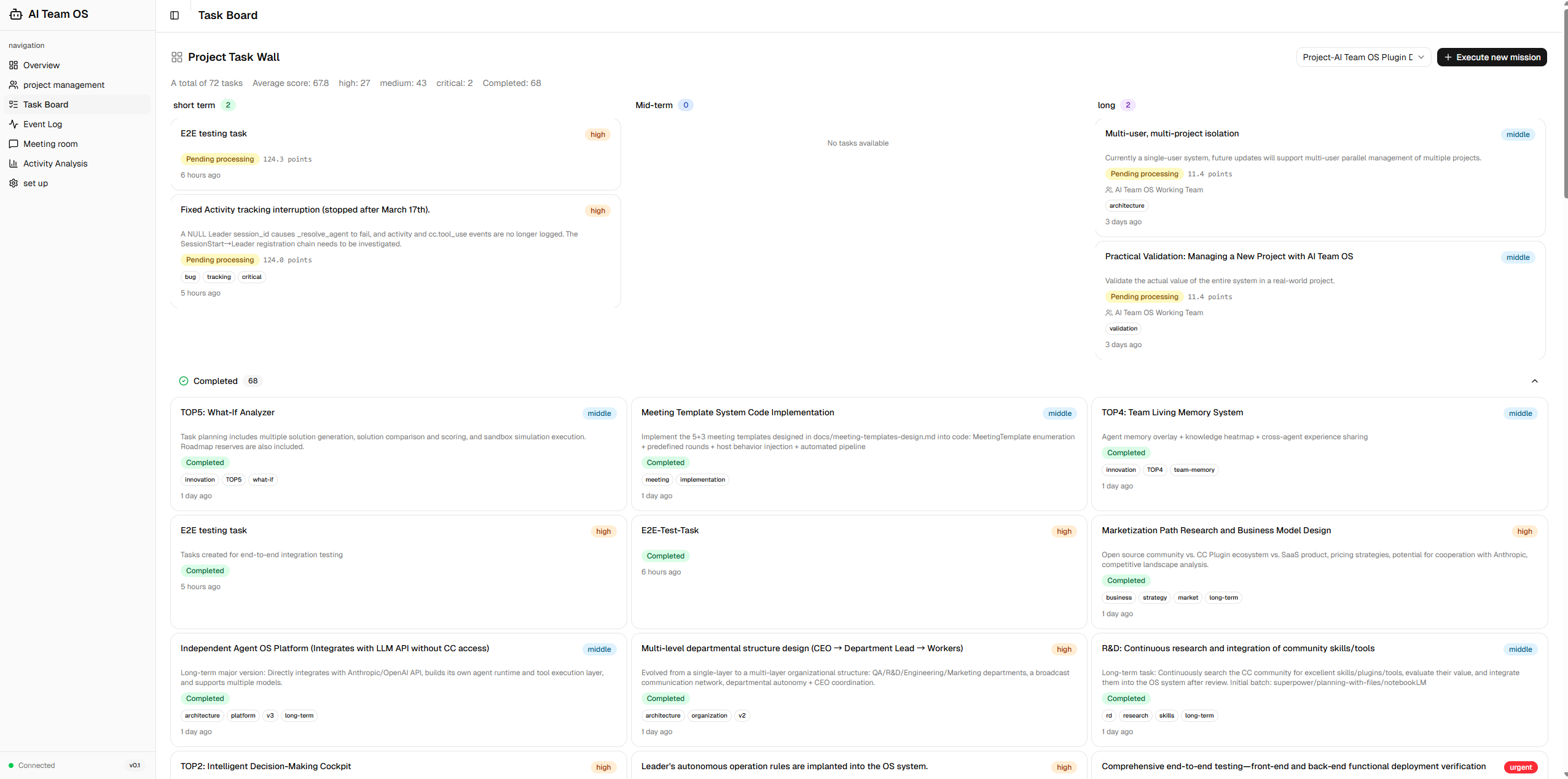
The search box in the header finds tasks, memos, reports and workflow IDs locally, without a model call.
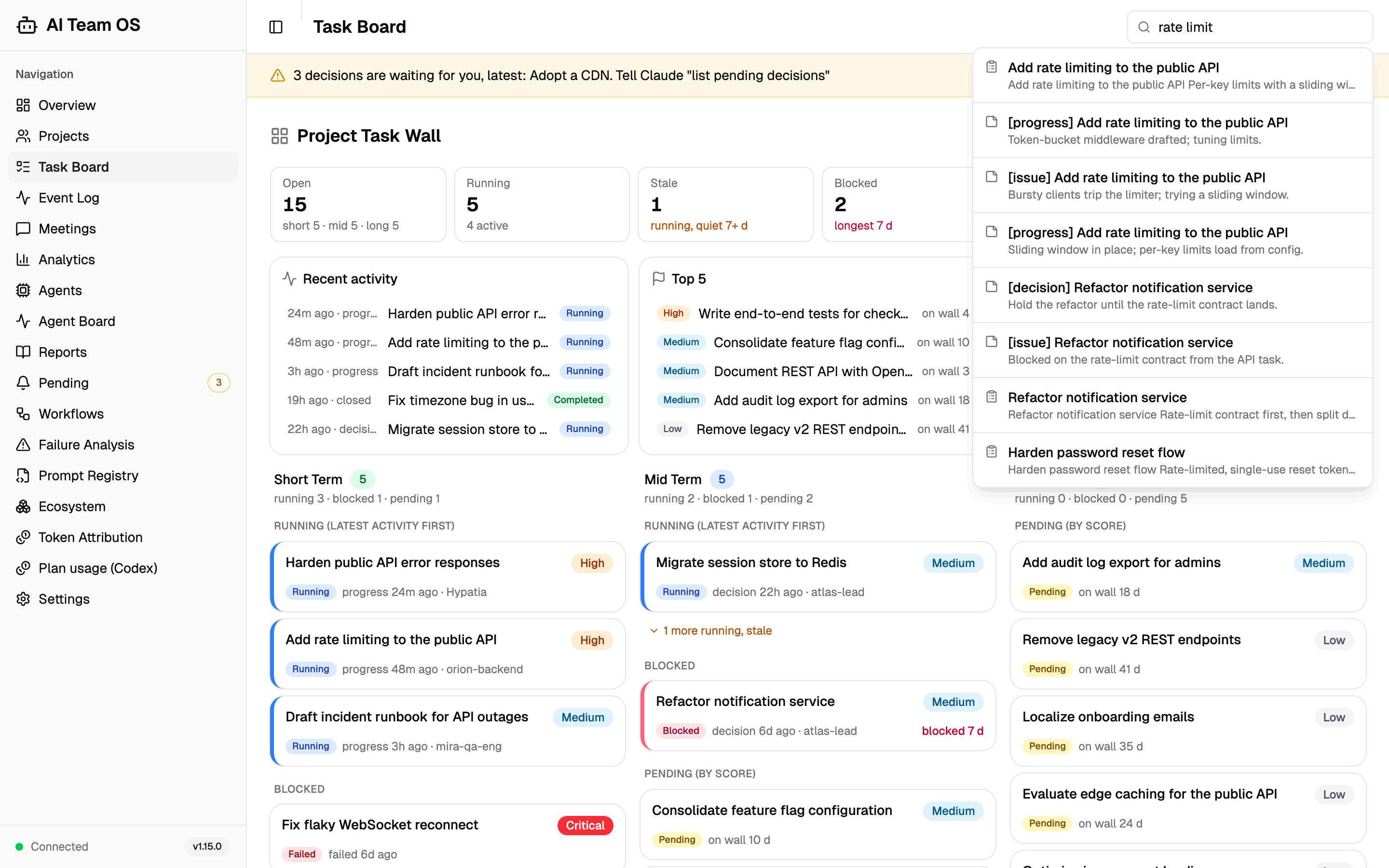
One bilingual ledger holds what OS tells you at session start, on your next message or when a turn ends: waiting decisions, mentions addressed to the Claude or Codex Leader, and a Codex-only hook trust finding snoozed for a day. Blocks and branch switches that were shown on the spot stay below as a read-only record.
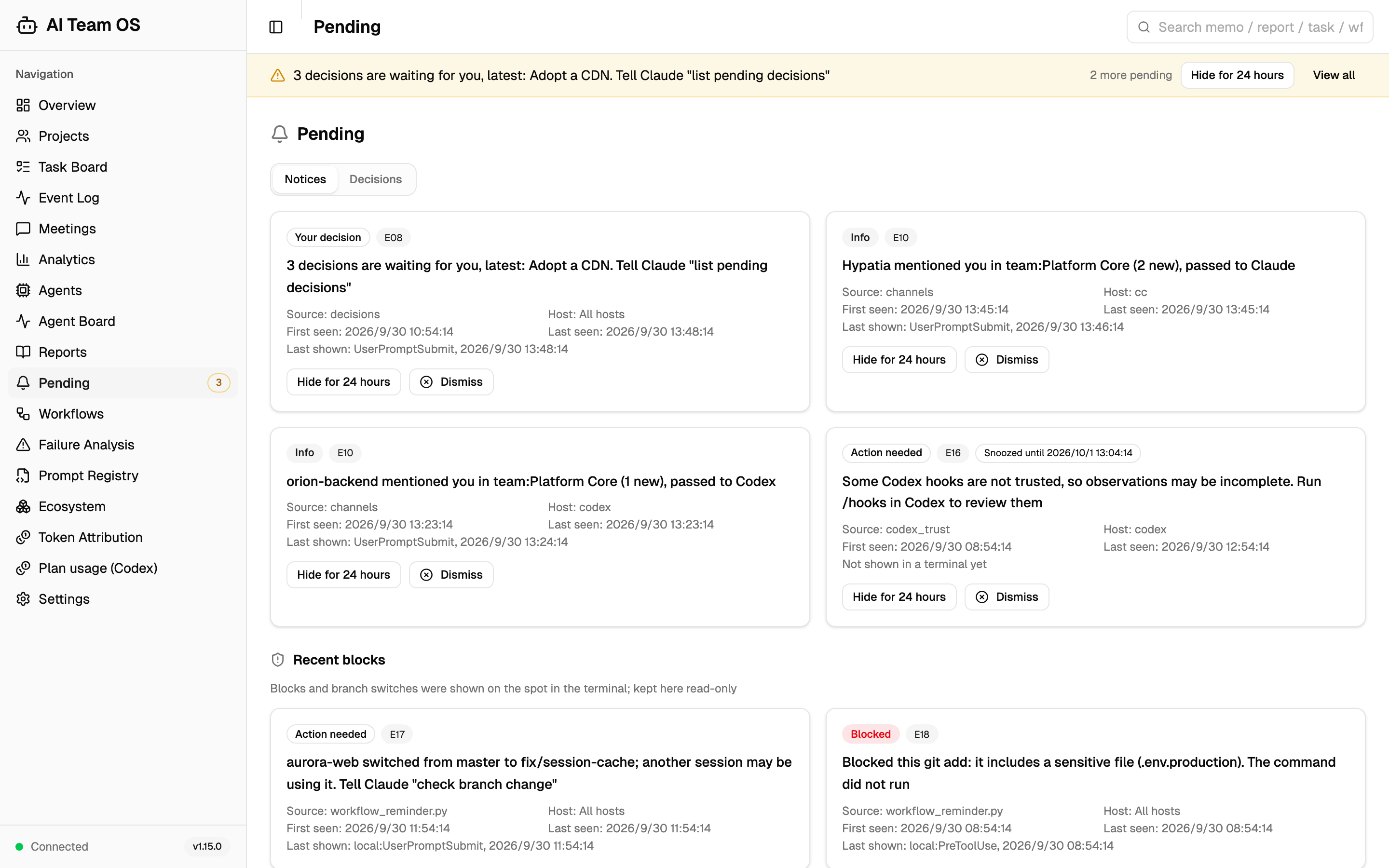
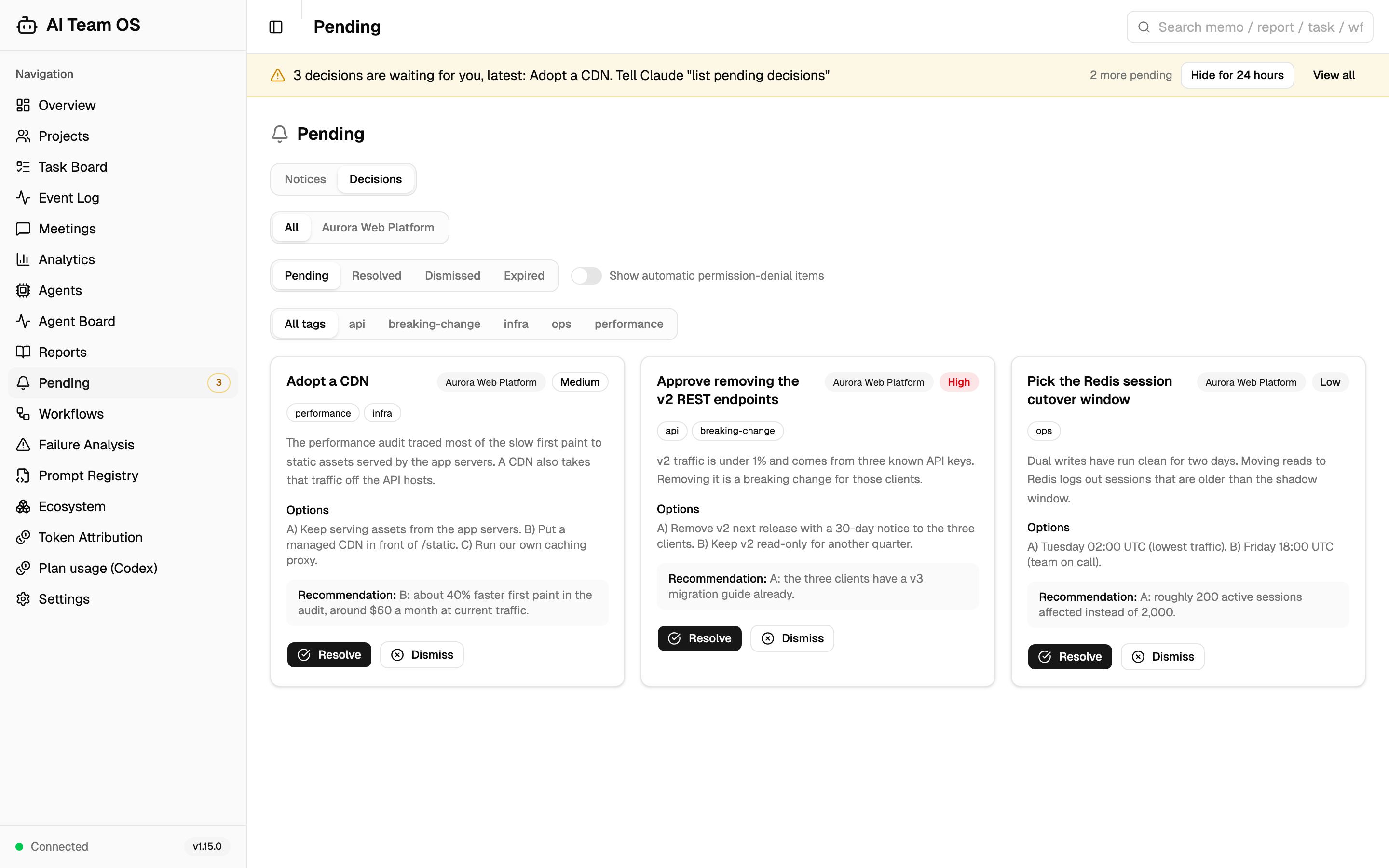
Questions that agents raised for you, each with options, a recommendation, tags and urgency. Resolve one with your answer or dismiss it; the count feeds the sidebar badge and the banner.
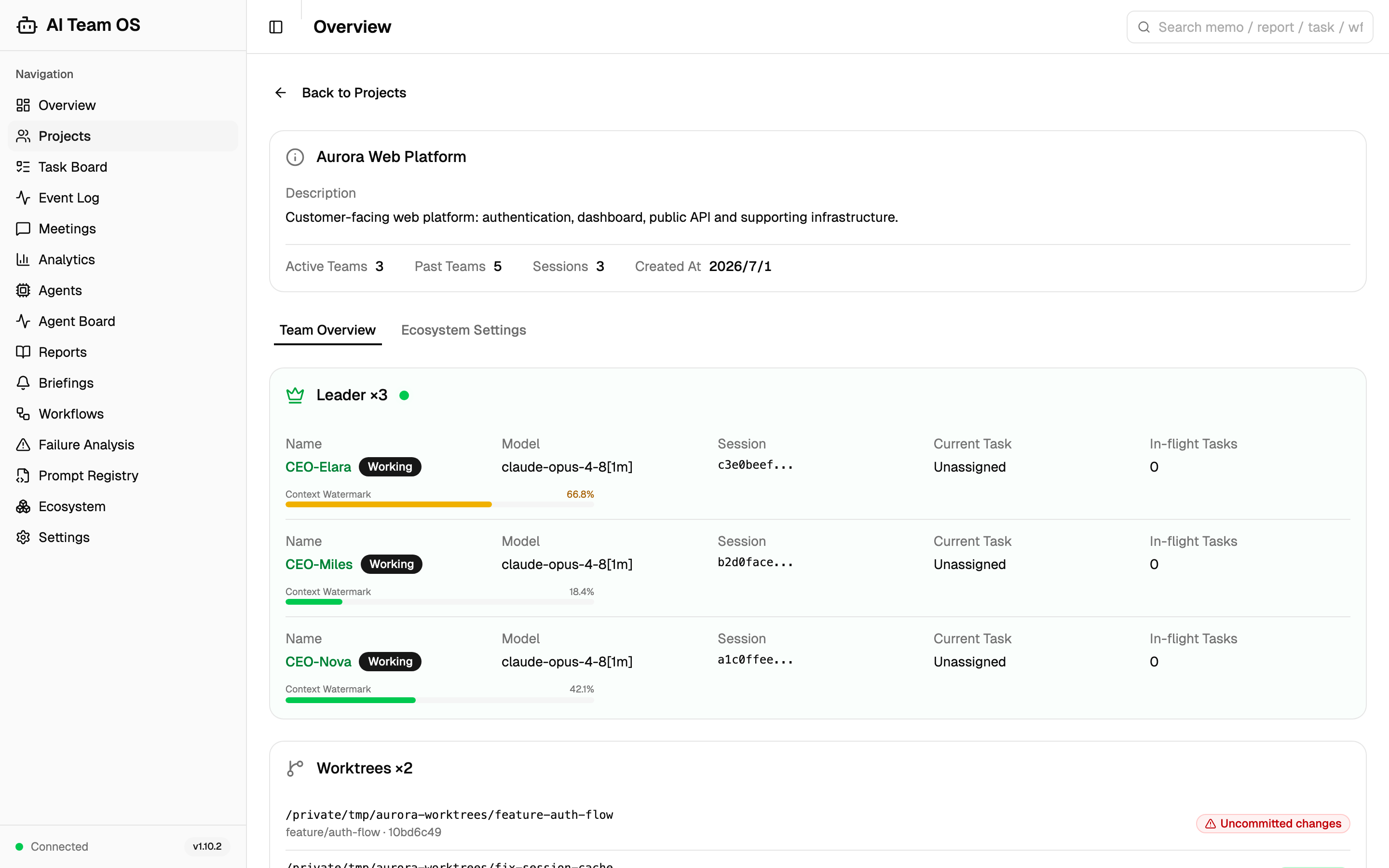
The Leaders working in the project right now, from both hosts: two Claude Code sessions with their context watermarks and a Codex Leader, each with its current task. Below them are the project's Git worktrees with uncommitted-change and merge status.
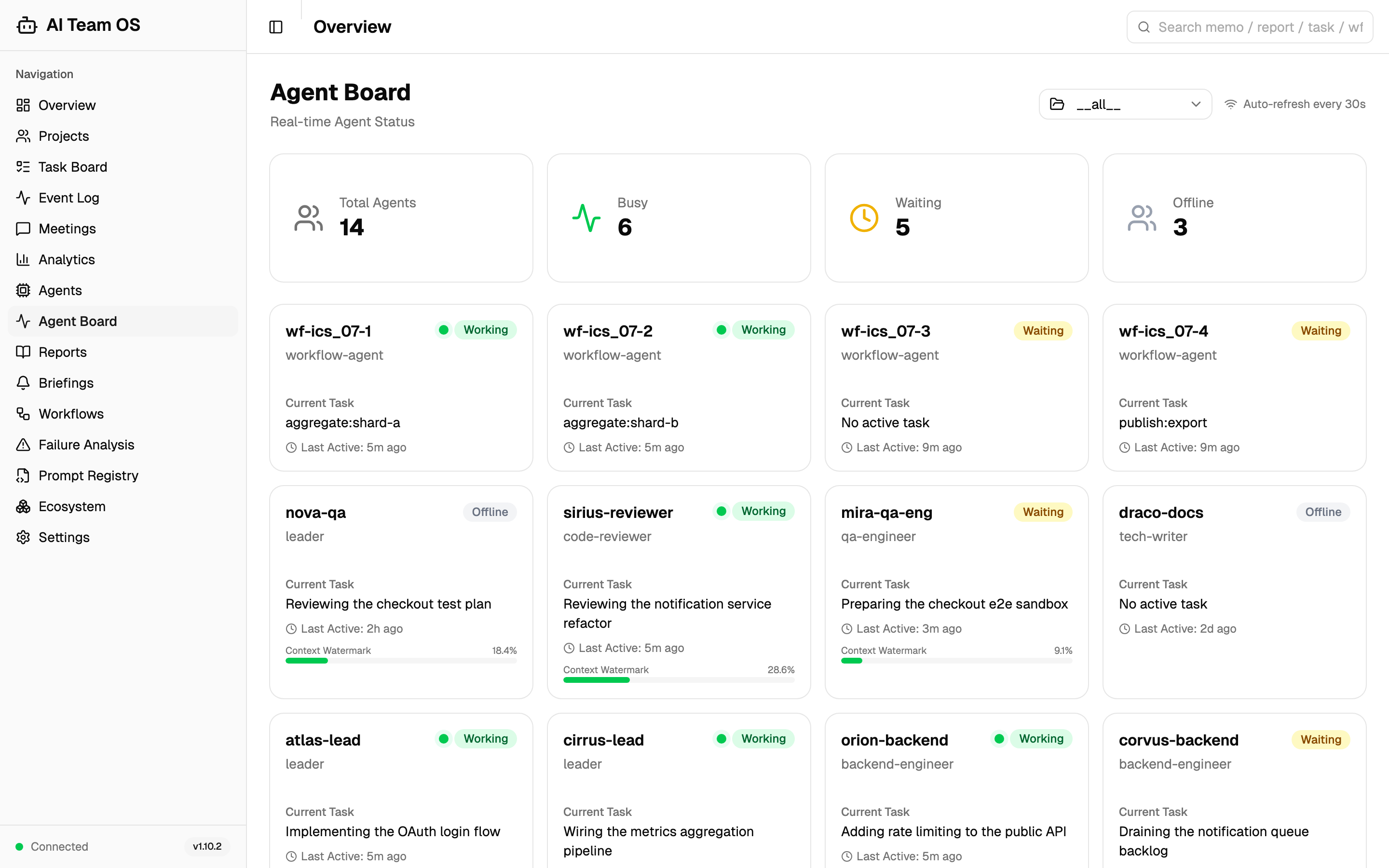
Members with fresh working evidence, grouped by the Leader or workflow that dispatched them. Codex members keep their native nicknames, separate from their roles; waiting and historical members are folded away.
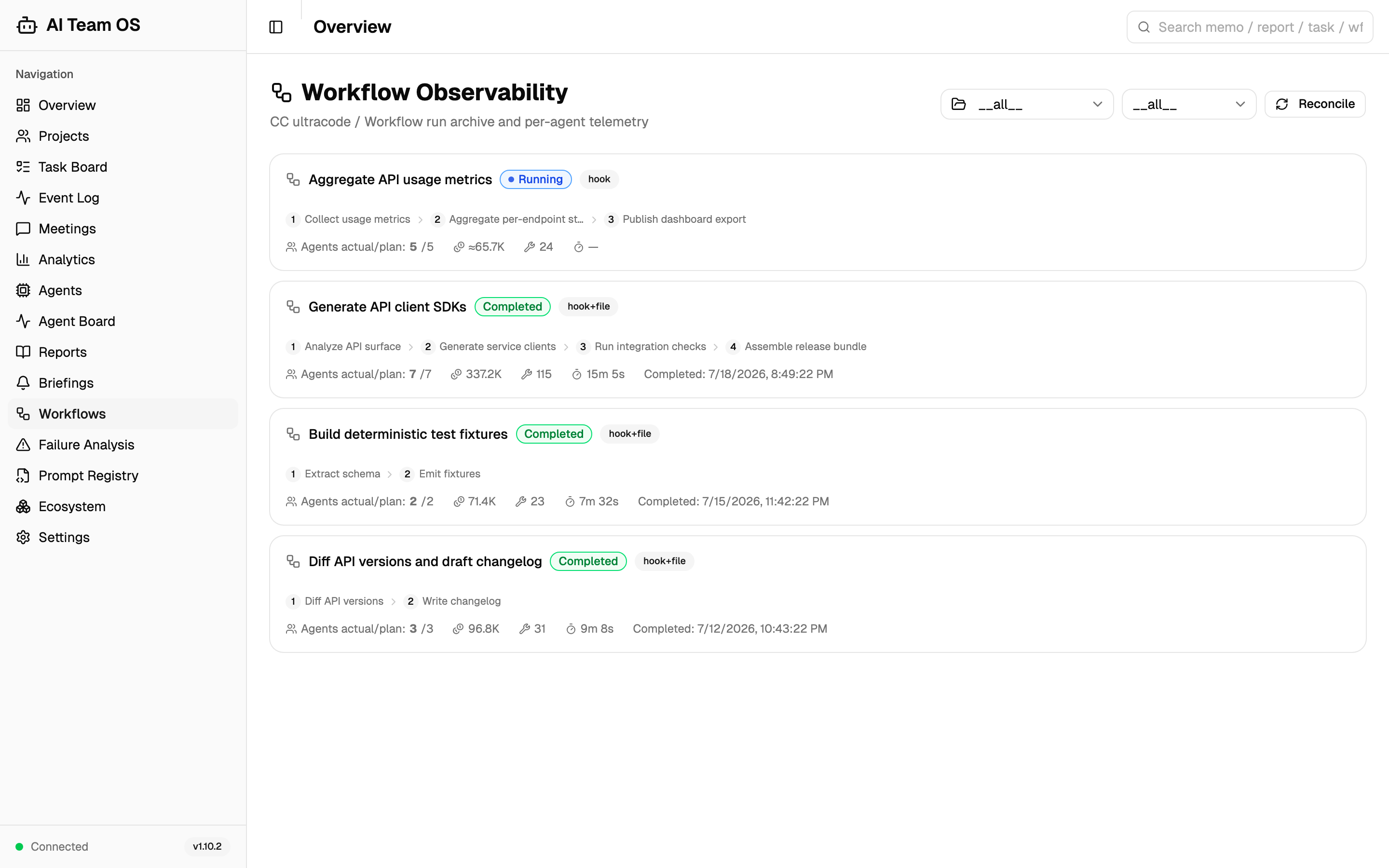
Every Claude Code Workflow run is recorded automatically with its phases, planned and actual agent counts, tokens, tool calls and duration. Filter the list by project or status.
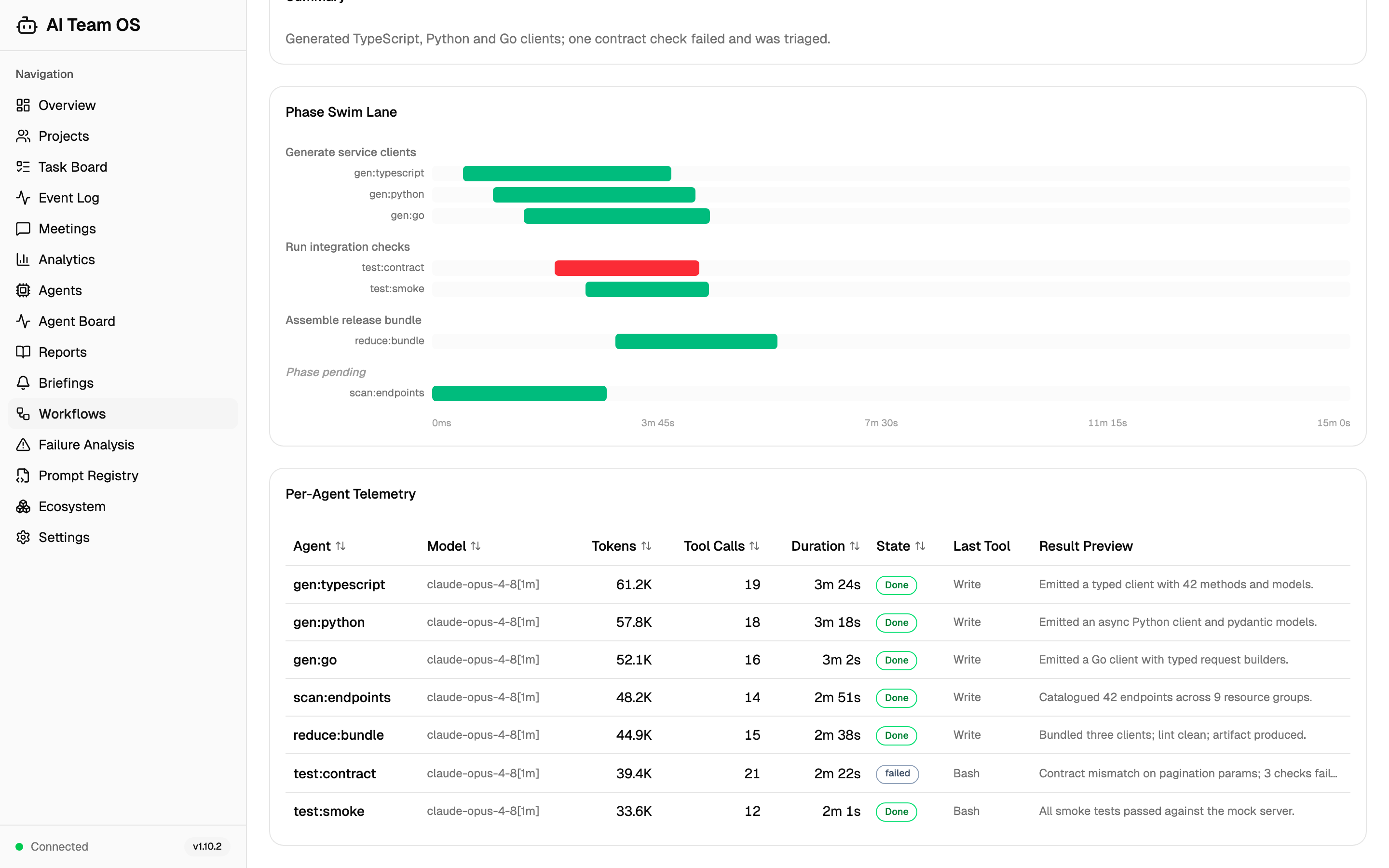
One Claude Code Workflow run: every phase's agents on a shared timeline, with the failed contract check in red, and a table of tokens, tool calls, duration and state for each agent.
Estimated plan capacity in API-equivalent dollars for the 5-hour and weekly windows, next to the native percentage used, and the monitor that keeps sampling while the page is closed. These are local-sample estimates at standard API rates, not charges or balances.
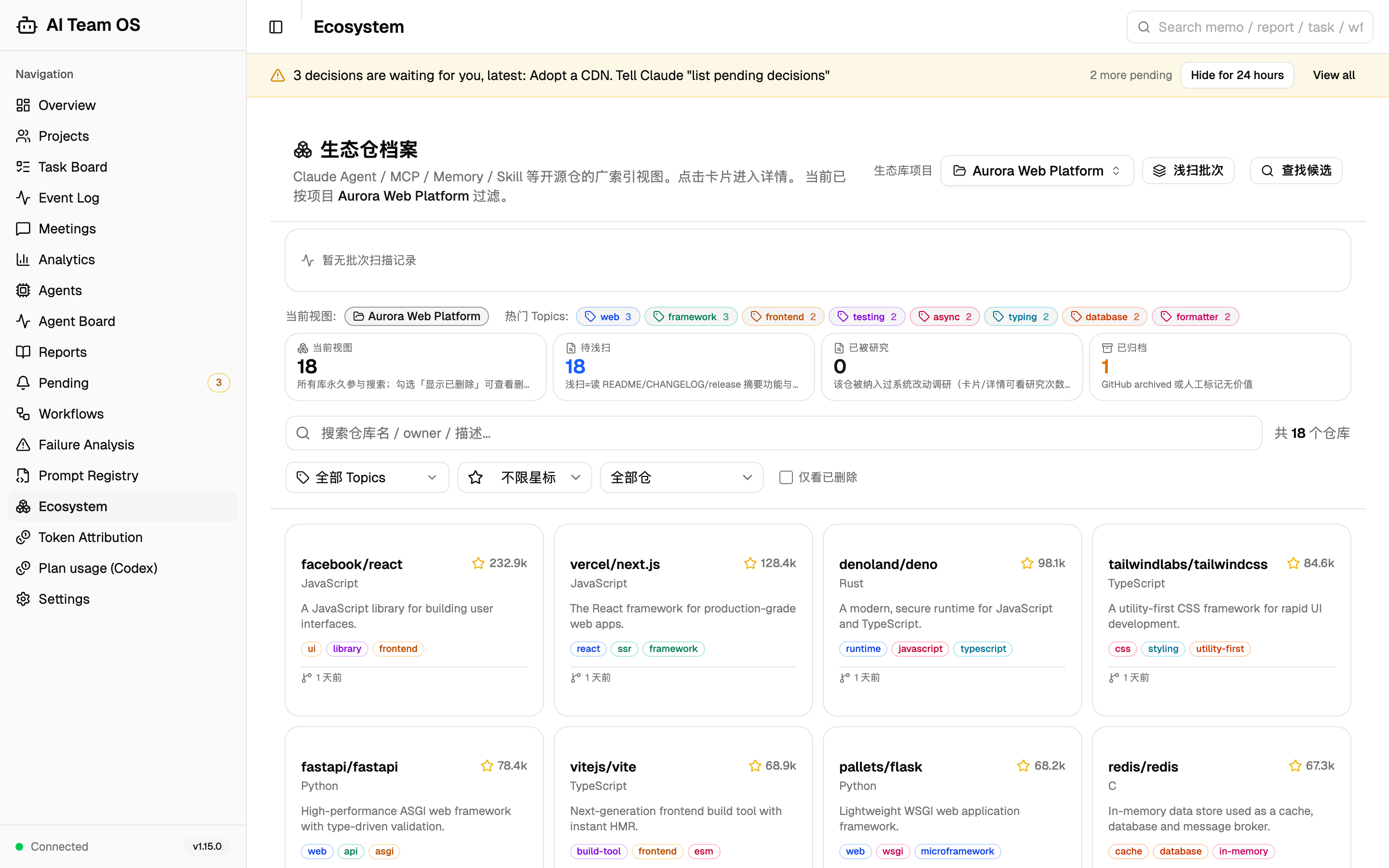
The tracked open-source repositories with stars, language and topic tags, each ready to open for research and integration. This page's interface text is not translated yet, so it appears in Chinese.
These are different operations, not one universal background scheduler:
channel_wait during an active turn. The call returns messages or a timeout and does not automatically acknowledge them.Keep authorization and execution separate from notification. A pending task or new message does not grant permission to start unrelated work.
AI Team OS can coordinate records and handoffs around other MCP servers instead of reimplementing their capabilities. Recipes describe integrations that you configure and authorize in the host where the work runs:
Use find_skill(level=2, category="integration") to discover recipes, or see the full guide: docs/ecosystem-recipes.md
No. Either can use the shared OS services. Connecting both adds cross-host handoffs; it does not require merging their configuration or credentials.
No. channel_wait is an explicit pending call, and a prompt-time unread hint needs a new turn. This version does not add an idle-session Codex wake mechanism.
The OS only displays evidence it can attribute. Missing native metadata stays unknown, tool duration needs trustworthy timing, and full Codex token/cost attribution is unfinished. Historical calls without reliable IDs are not marked complete by guesswork.
The running API, built Dashboard, installed adapter files and host hook trust are separate layers. Update compatible pieces together and verify an actual event through the chain; reloading MCP alone does not replace them all.
With the updated API and SessionStart hooks installed, Codex and Claude Code can emit a short update command for the user and separate release details for the assistant when a newer public stable Release is available. Dashboard language choices are saved by the API and take precedence. In follow mode, Claude Code uses its language setting, while Codex uses the system language; unsupported languages fall back to English. The same session does not repeat the notice on resume or compact. Release checks are cached for six hours, and network failures do not block startup. Notices do not run Git, install packages or restart services. Update commands depend on the installation method; release links and the complete procedure go to the assistant context. An older installation must first receive these hooks; reloading MCP alone does not install them. Claude Code CLI visibility has been checked separately; Codex CLI and desktop rendering still require native UI acceptance.
The tables below are a curated selection — the full inventory lives in
src/aiteam/mcp/tools/and is machine-counted byscripts/check_readme_numbers.sh.
See the MCP argument guide and task lifecycle and usage evidence contract for clearing fields, conflict handling, waiting states and completion rules.
Use aiteam codex-exec run --caller-harness claude-code -- --ephemeral "TASK"
to retain minimum usage receipts for an external Codex execution. Add explicit
--project-id and --task-id values to attribute it. The command streams native
JSONL to stdout and keeps a private local ledger for retry if the API is unavailable.
Existing direct codex exec calls are not intercepted. Receipts without verified
account, model and tier information remain separate from subscription estimates.
See the external execution guide.
channel_wait keeps one MCP call pending: it subscribes before replaying the
project/reader/sender-scoped inbox, then returns persisted message bodies on an
event. It does not schedule model turns or start a daemon. A completed Desktop
turn cannot be restarted by this tool. The default wait is 45 seconds (maximum
300). io_timeout_seconds independently budgets connection, subscription ACK,
and each HTTP read (default 10 seconds, maximum 60). Set the client request
timeout above timeout_seconds + 4 * io_timeout_seconds + 5.
A client must send MCP cancellation or close the session to cancel
the server-side wait; a local timeout or coroutine cancellation does not notify
a server that the client has stopped waiting.
Disconnects return an error with a validated resume_cursor, not an empty inbox.
Use since for the initial
history boundary, then resume with the last processed next_cursor. This scoped
cursor follows SQLite insertion order, so late commits are not skipped because
of an older creation timestamp. A deleted or reused cursor anchor returns an
explicit error rather than silently skipping messages. Waiting never acknowledges
messages automatically; the legacy badge timestamp ACK is separate from this
delivery cursor. Retrying an unprocessed page can repeat messages; deduplicate by ID.
Successful calls include delivery_source: replay for the initial inbox read,
event for a read triggered by a candidate WebSocket event, or timeout_read for
the final read after the wait expires. The final read can still return messages;
an empty final read returns status=timeout. This field identifies the executed
branch, not whether every returned message had a corresponding push frame.
Error responses do not claim a delivery source.
The single largest tool family — the full research funnel from scan to integration:
Development restarts can first use os_restart_api(source_root="/absolute/repo", dry_run=true)
to verify imports without stopping the service. An actual restart preserves the database target
when changing the working directory. Health checks reconcile only the managed port and a verified
process identity; they do not adopt arbitrary listeners. This is on-demand repair, not a daemon.
psutil is an explicit runtime dependency. If it is unavailable on POSIX, read-only process
checks can still recognize an existing API and a confirmed-dead lock owner; uncertain identities
do not authorize killing a process or launching a duplicate service. Health checks use the
current port file or explicit API URL, including non-default ports.
Event delivery isolates slow WebSocket clients with bounded concurrent sends. Dashboard events coalesce query refreshes over 200 ms, preserving in-flight requests until a 30-second refresh deadline. Only the captured request is cancelled at that deadline; a newer request on the same query key is preserved. Later events can retry without a permanently stuck prefix. Ordinary API traffic uses at most four of the five SQLite admission slots, leaving one available for hook events; the total limit remains five.
25 professional role templates are shipped in plugin/agents/, with a shared catalog and recommendation tools. Claude Code can install them as native agent definitions, including global copies in ~/.claude/agents/. Codex can use the role guidance while keeping native dispatch, naming and permissions; CC template frontmatter is not a Codex installation format.
loop/task_wall_engine.py)/workflows swimlane, Workflow detail, the Ecosystem suite, /usage token attribution, /usage/accounts plan capacity, and Settings with model governancescripts/preflight.sh)pipeline_stage_history stays readable)/track, so every version column rendered "-"; effectiveness metrics live on, sourced from real agent activity)trust_score column stays and auto_assign still weights itfind_skill)api_port.txt)/mcp/ on FastAPI)plugin/ and config resources, so install via plugin or source insteadFinal installed-hook acceptance of the Codex/Dashboard observation chain
Full Codex token and cost attribution
Multi-tenant isolation
Production validation and performance optimization
Claude Code Plugin Marketplace listing
Full integration test suite
Documentation site (Docusaurus)
Video tutorial series
ai-team-os/
├── src/aiteam/
│   ├── api/           - FastAPI REST endpoints (241 routes)
│   ├── mcp/
│   │   ├── server.py  — MCP server entry point
│   │   └── tools/     - 18 tool modules (118 MCP tools)
│   │       ├── agent.py, analytics.py, briefing.py, channels.py,
│   │       ├── ecosystem.py, external_exec.py, infra.py, links.py, meeting.py,
│   │       ├── memory.py, notices.py, project.py, reports.py, task.py,
│   │       ├── task_analysis.py, team.py, watchdog.py, workflows.py
│   │       └── __init__.py  — Toolset registration entry
│   ├── loop/          - Task wall engine + watchdog + frozen failure analysis
│   ├── meeting/       — Meeting system
│   ├── memory/        — Team memory
│   ├── orchestrator/  — Team orchestrator
│   ├── storage/       — Storage layer (SQLite, WAL journaling)
│   ├── templates/     — Agent template base classes
│   ├── hooks/         — CC Hook scripts (16 lifecycle events)
│   └── types.py       — Shared type definitions
├── plugin/
│   ├── agents/        - 25 Claude Code Agent templates (.md)
│   ├── harness/codex/ - Independent Codex adapter, hook manifest and helpers
│   └── .claude-plugin/ - Claude Code plugin manifest
├── dashboard/         — React 19 frontend (24 pages)
├── scripts/           — preflight + machine-checked invariants (incl. README number check)
├── docs/              — Design documents + ecosystem recipes
├── tests/             - Unit, integration and end-to-end checks
├── install.py         - Claude Code source installer
└── pyproject.toml
Contributions are welcome! We especially appreciate:
# Set up source dependencies without changing either host's configuration
git clone https://github.com/CronusL-1141/AI-company.git
cd AI-company
python3 -m pip install -e ".[dev]"
npm --prefix dashboard ci

# Local preflight: lint, frontend regression tests, unit tests and invariants
bash scripts/preflight.sh

# CI also checks TypeScript; preflight does not run this command
(cd dashboard && npx --no-install tsc -b --noEmit)
Before submitting a PR, run the full preflight and the separate TypeScript check above. Preflight runs ruff, ESLint, frontend regression tests, the unit test suite and the invariants in scripts/check_invariants.sh; missing lint/frontend dependencies can cause skips, so a successful exit alone does not prove every check ran. Review the output, and do not use --fast for release acceptance.
Release preparation also needs targeted integration/end-to-end checks, Dashboard builds and a complete comparison of dashboard/dist with plugin/dashboard-dist. I3 compares JavaScript filenames only, not every asset's bytes. Keep both READMEs and both CHANGELOGs in sync, inspect distribution and privacy boundaries, and verify the installed hooks and running API/UI separately. Static manifest/trust checks do not prove the host loaded or executed a hook.
MIT License — see LICENSE
AI Team OS - Shared context and accountable work for native coding agents.
Built with Claude Code and Codex · Connected through MCP
Docs · Issues · Discussions
Multi-agent team operating system for Claude Code. 108 MCP tools, 40+ agent templates, 10 lifecycle hooks, 7 pipeline workflows. Persistent teams, structured meetings, task wall, real-time React dashb
ओवरव्यू
Multi-agent team operating system for Claude Code. 108 MCP tools, 40+ agent templates, 10 lifecycle hooks, 7 pipeline workflows. Persistent teams, structured meetings, task wall, real-time React dashboard. No LangChain/AutoGen — pure CC native integration.
टूल
अभी टूल सूची नहीं है। रिमोट सर्वर को पहले हेल्थ चेक के बाद सूची मिलती है।
FAQ
इस पेज पर Cursor, Claude Desktop, Claude Code या VS Code के लिए stdio कॉन्फ़िग कॉपी करें। यह पब्लिशर का इंस्टॉल इस्तेमाल करता है, PlugMCP प्रॉक्सी नहीं।
इस रिकॉर्ड में कोई ज़रूरी एनवायरनमेंट वेरिएबल दर्ज नहीं है।
AI Company stdio पर लोकल चलता है।
पिछली जाँच 2026-10-26 को हुई। Multi-agent team operating system for Claude Code. 108 MCP tools, 40+ agent templates, 10 lifecycle hooks, 7 pipeline workflows. Persistent teams, structured meetings, task wall, real-time React dashboard. No LangChain/AutoGen — pure CC native integration.
