Advanced Multi-Agent AI System with autonomous document processing, web automation, code execution, and intelligent query retrieval powered by LLM agents and MCP (Model Context Protocol) servers
Winner of Bajaj Finserv HackRX 6.0 Hackathon 2025, selected from 10,000+ teams
Autonomous multi-agent AI system with document processing, web automation, and code execution powered by LLM agents and MCP servers
OmniAgent is a sophisticated agentic AI system that combines multiple specialized AI agents with powerful automation capabilities. The system uses Model Context Protocol (MCP) servers to provide autonomous agents with advanced tools for complex task execution.
Core Agentic Capabilities
Multi-format Processing: PDF, PPTX, DOCX, Excel (XLSX), CSV, images (PNG, JPG, TIFF), and plain text files
Advanced OCR Agents: Tesseract and EasyOCR for extracting text from images and scanned documents
Large Document Handling: Intelligent chunking and processing of documents up to thousands of pages
Smart Content Analysis: RAG (Retrieval-Augmented Generation) pipeline with semantic understanding
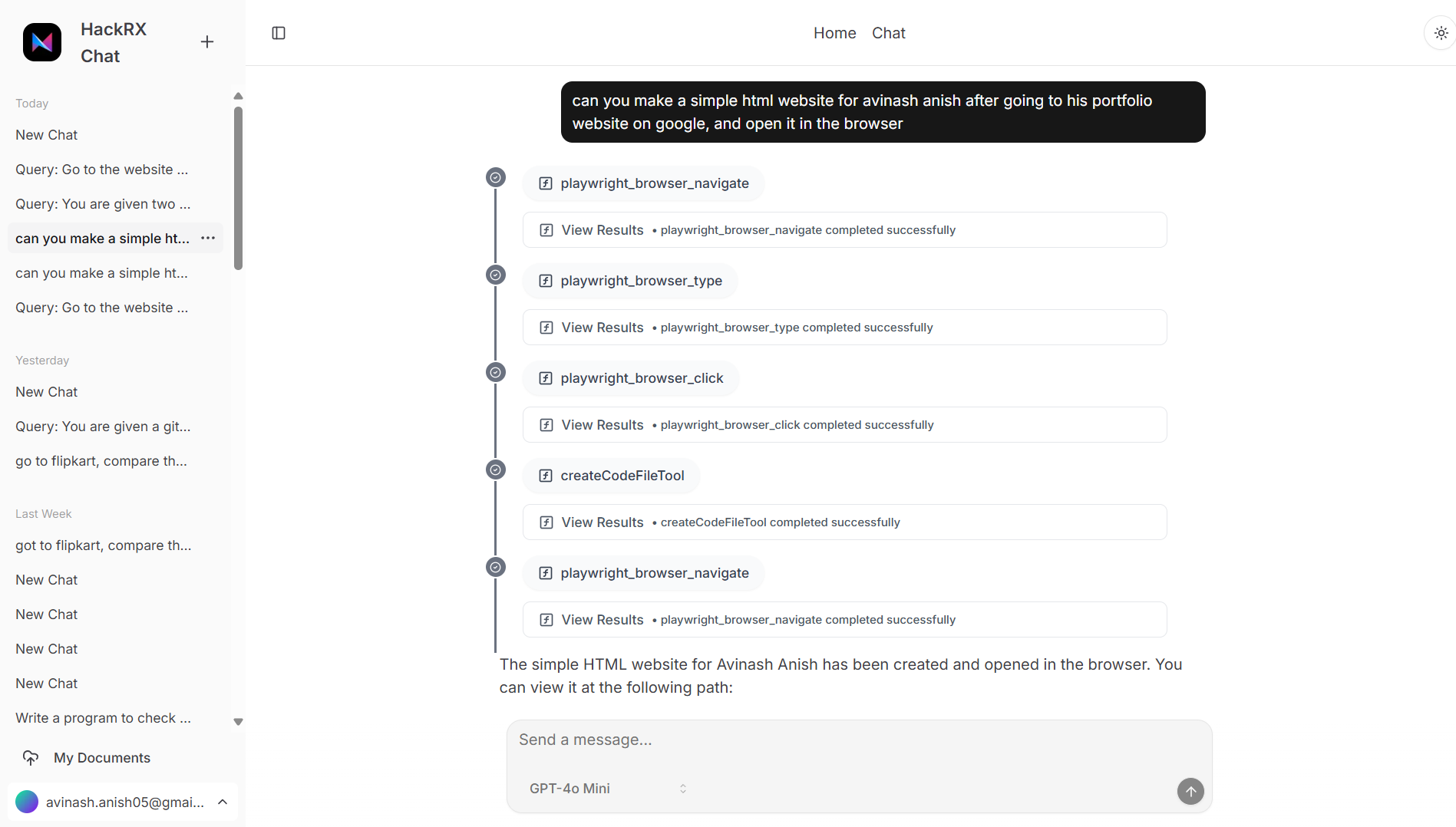
Intelligent Web Crawling: Automated website navigation and content extraction
Dynamic Page Interaction: JavaScript-enabled rendering and form interaction
URL Content Processing: Direct processing of web pages, APIs, and online documents
Real-time Data Extraction: Live web data retrieval with content monitoring
Multi-language Execution: Python, JavaScript, shell commands, and script automation
Repository Analysis: GitHub repository processing and code understanding
Code Generation: Automated code creation and documentation
Interactive Execution: Real-time code execution with result visualization
Natural Language Processing: Complex query interpretation with contextual understanding
Multi-step Task Execution: Breaking down complex requests into executable agent workflows
Cross-source Analysis: Correlating information across documents, web content, and databases
Streaming AI Responses: Real-time agent communication with progress tracking
Multi-Agent Architecture
This full-stack agentic ecosystem features:
Agent Orchestration: Coordinated AI agents with specialized capabilities
MCP Tool Integration: Extensible agent toolkit via Model Context Protocol
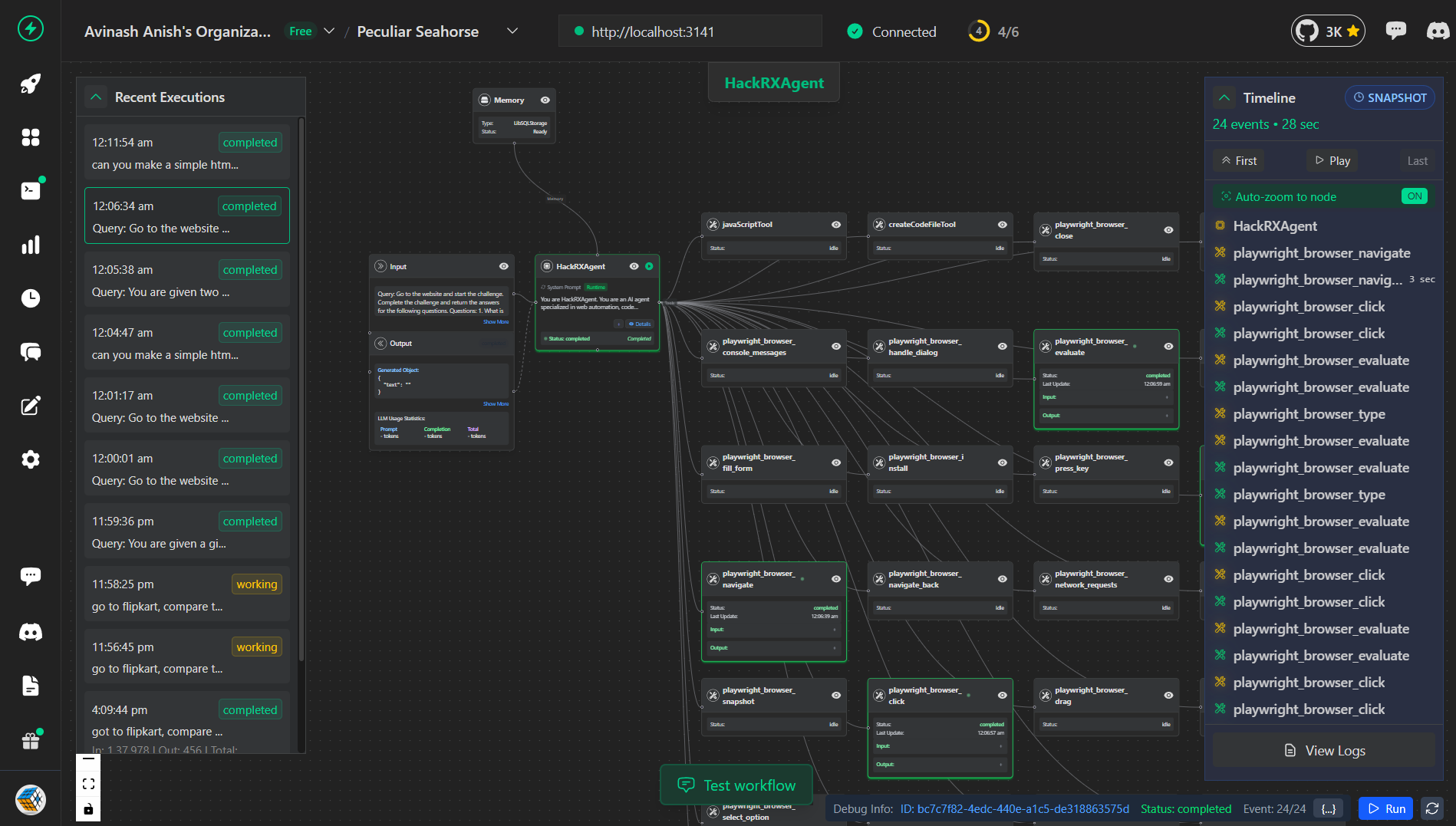
Real-time Observability: VoltAgent monitoring for agent behavior and debugging
High-performance Pipeline: Scalable document, web, and code processing
Interactive Agent Interface: User-friendly chat with streaming agent responses
Architecture
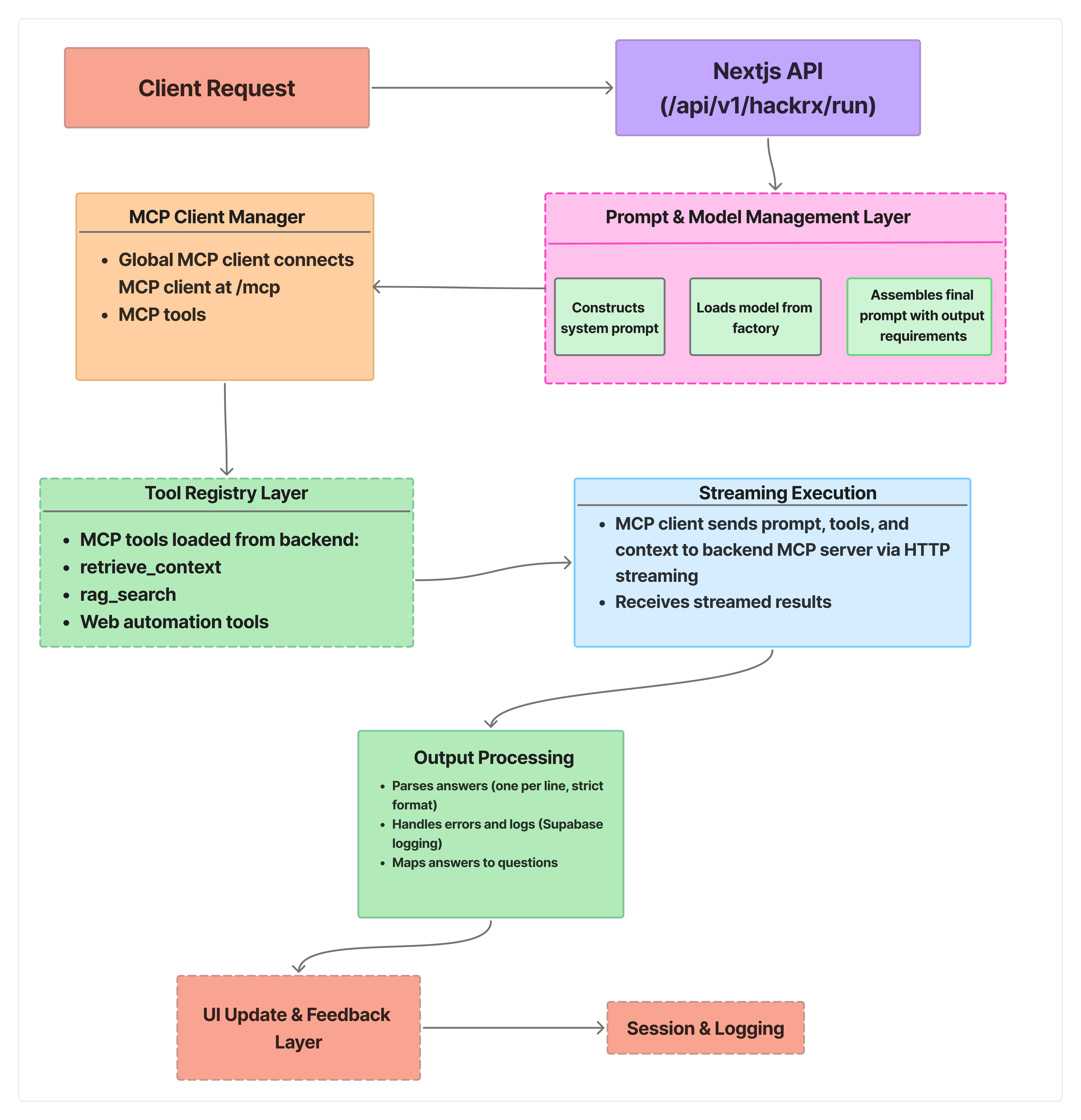
Frontend/Main Backend (Next.js 14+ with TypeScript)
Primary System for Rounds 5, 6, 7:
Chat Interface: Interactive chat UI with streaming responses at /chat
HackRX Evaluation Endpoint: Main backend API at /api/hackrx/run for evaluation purposes
Next.js API Routes: Server-side processing with AI integration
MCP Client: Consumes tools from Python MCP server when needed
Observability: VoltAgent integration for monitoring and debugging (https://voltagent.dev)
Authentication: Supabase Auth with secure user management
Database: PostgreSQL via Supabase with vector support
Python Backend (Supplementary/Tool Provider)
For Rounds 1-4 - This was the primary backend system:
The Python backend serves as a tool provider:
FastAPI Server: High-performance API with automatic documentation
MCP Server: Model Context Protocol server for tool integration using FastMCP
Document Processing: Advanced RAG pipeline with multiple vector store support
AI Integration: Multiple LLM providers (OpenAI, Google Gemini, Groq, Cerebras)
Vector Databases: Support for Pinecone, Qdrant, and PGVector
OCR Processing: Tesseract OCR and EasyOCR for image text extraction
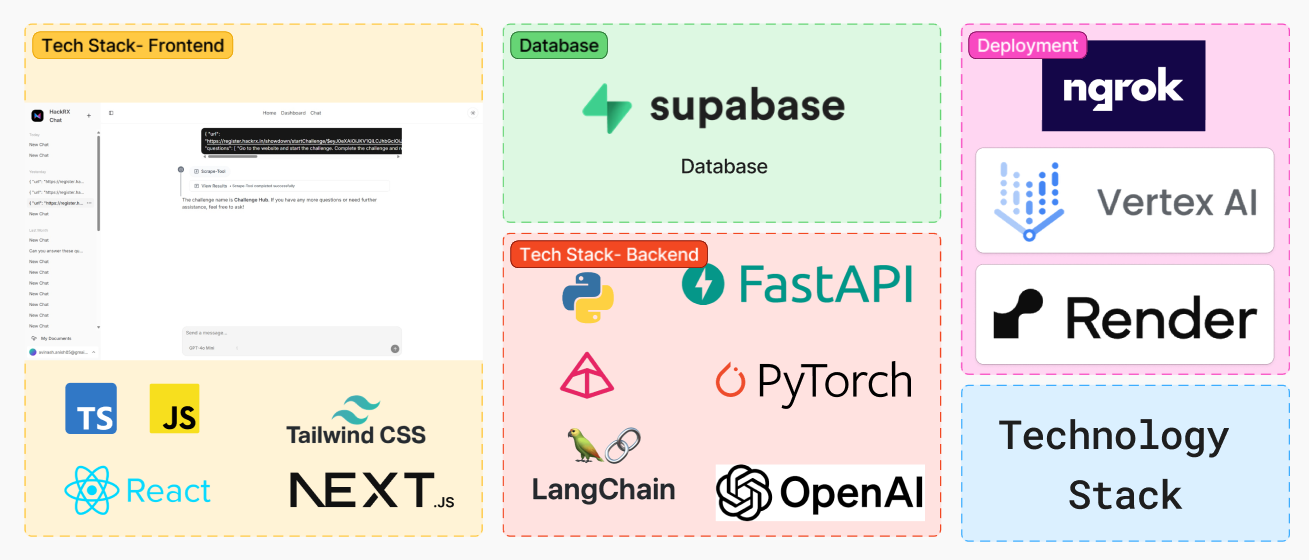
Tech Stack
Component
Technology
Purpose
Frontend Framework
Next.js 14+ with TypeScript
Main application & API routes
UI Components
Radix UI + Tailwind CSS
Modern, accessible interface
State Management
TanStack Query
Frontend data management
HTTP Client
Axios
Frontend API communication
AI Integration
Vercel AI SDK
Streaming AI responses
Authentication
Supabase Auth
User management
Database
Supabase (PostgreSQL)
Data persistence
Observability
VoltAgent
Agent monitoring & debugging
Backend API
FastAPI + Python 3.12+
Document processing tools
MCP Integration
Model Context Protocol
Tool extensibility
Vector Storage
Pinecone, Qdrant, PGVector
Semantic search
Web Automation
Playwright MCP
Browser control
Document Processing
PyMuPDF, LangChain
Multi-format support
OCR Tools
PyMuPDF4LLM, Tesseract OCR, python-pptx, EasyOCR
Document text extraction
AI/ML
LangChain ecosystem, OpenAI GPT, Google Gemini, Groq, Cerebras
Multi-provider AI support
Runtime
Python 3.12+
Backend execution environment
Containerization
Docker + Docker Compose
Deployment
Platform Support
Windows 10/11 with PowerShell
Primary platform
Alternative
Docker (cross-platform)
Cross-platform deployment
Quick Start
IMPORTANT: For Rounds 5, 6, 7, the main backend is the Next.js application. The Python backend is optional and only needed for advanced document processing tools.
Option 1: Frontend/Main Backend Only (Recommended for Rounds 5, 6, 7)
Prerequisites
Node.js 18+
Git
Setup
# Clone the repository
git clone https://github.com/CubeStar1/omni-agent.git
cd omni-agent/frontend

# Install dependencies
npm install

# Configure environment
cp env.example .env.local
# Edit .env.local with your configuration

# Start the application
npm run dev
cd backend
python -m venv venv
.\venv\Scripts\Activate.ps1  # Windows
pip install -r requirements.txt

# Configure environment
cp env.example .env
# Edit .env with your API keys (or leave as is for defaults)

# Start main FastAPI server
python main.py

# Start MCP server (in separate terminal)
python run_mcp.py
cd frontend
npm install
cp env.example .env.local
# Edit .env.local with your configuration (including MCP_URL if using Python tools)
npm run dev
Option 3: Python Tools with Docker (Optional)
The Python backend includes full Docker support:
# Docker setup for Python backend
cd backend
cp .env.example .env
# Edit .env with your API keys

# Using Docker Compose (recommended)
docker-compose up -d

# Or using PowerShell script
.\docker-run.ps1

# To view logs
docker-compose logs -f
Note: Docker is only available for the Python tools backend. The main Next.js application runs natively.
cd frontend

# Start development server (Main Application)
npm run dev

# Production build
npm run build

# Start production server
npm run start

# Run linting
npm run lint
Python Tools Backend (Optional)
cd backend

# Start FastAPI server
python main.py

# Start MCP server
python run_mcp.py

# Run API tests
python test_api.py

# Docker commands
docker-compose up -d              # Start services
docker-compose up -d --build      # Rebuild and start
docker-compose down               # Stop services
docker-compose logs -f            # View logs
License
This project is licensed under the MIT License - see the LICENSE file for details.
अभी टूल सूची नहीं है। रिमोट सर्वर को पहले हेल्थ चेक के बाद सूची मिलती है।
FAQ
सवाल
Omni Agent कैसे इंस्टॉल करें?
इस पेज पर Cursor, Claude Desktop, Claude Code या VS Code के लिए stdio कॉन्फ़िग कॉपी करें। यह पब्लिशर का इंस्टॉल इस्तेमाल करता है, PlugMCP प्रॉक्सी नहीं।
क्या Omni Agent के लिए API key चाहिए?
इस रिकॉर्ड में कोई ज़रूरी एनवायरनमेंट वेरिएबल दर्ज नहीं है।
Omni Agent कौन सा ट्रांसपोर्ट इस्तेमाल करता है?
Omni Agent stdio पर लोकल चलता है।
Omni Agent की पिछली जाँच कब हुई थी?
पिछली जाँच 2026-10-27 को हुई। Autonomous multi-agent AI system with document processing, web automation, and code execution powered by LLM agents and MCP servers