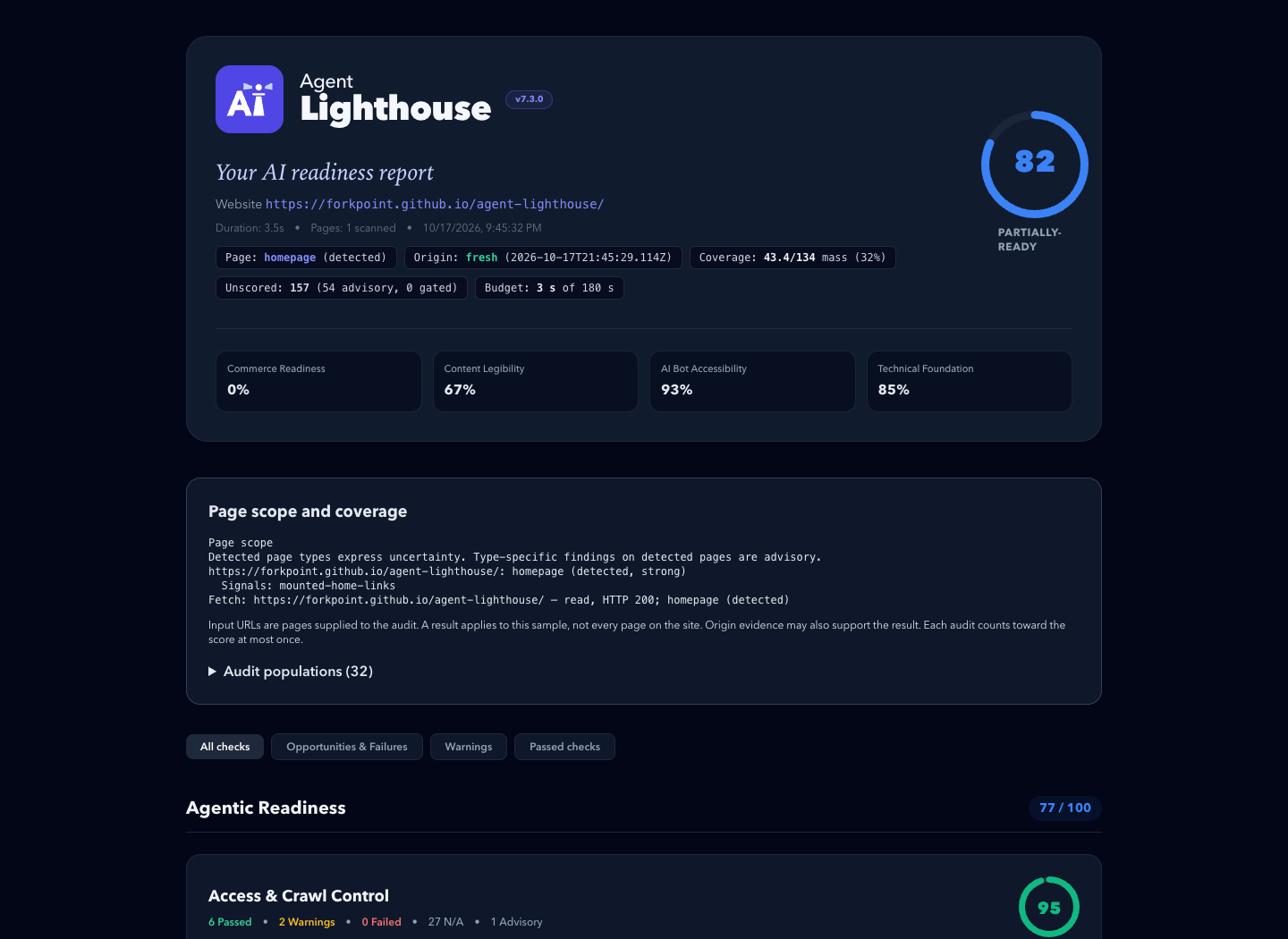
An example report. Its scores describe one past scan, not the site's current state.
Power your agent
पब्लिशर की अपनी कमांड। PlugMCP एंडपॉइंट नहीं।
Host a copy with our keys and logs.
npx -y @forkpoint/[email protected]Claude Code में लोकल कमांड के लिए इंस्टॉल लिंक नहीं है। नीचे दी गई कमांड कॉपी करें और टर्मिनल में चलाएँ।
claude mcp add forkpoint-agent-lighthouse-core -- npx -y @forkpoint/agent-lighthouse-core@10.6.0टर्मिनल में चलाएँ।
{ "mcpServers": { "forkpoint-agent-lighthouse-core": { "command": "npx", "args": [ "-y", "@forkpoint/[email protected]" ] } }}claude_desktop_config.json
रिमोट URL या आपकी मशीन पर कमांड? दोनों इंस्टॉल में क्या अंतर है
PlugMCP पर चलाएँ
A new server you create. It is not this listing's official endpoint. Use the publisher install when you want their URL and their credentials.
लॉन्चपब्लिशर से
An example report. Its scores describe one past scan, not the site's current state.
Core TypeScript engine for auditing websites for AI-agent readiness, LLM crawler access, MCP discovery, structured data, and agentic web signals
Requires Node.js 22.22.2+ (22.x), 24.15.0+ (24.x), or 26+.
# Terminal report, plus HTML and JSON reports in ./reports
npx @forkpoint/agent-lighthouse https://example.com

# Open the HTML report in your browser
npx @forkpoint/agent-lighthouse https://example.com --view

# Fail (exit 1) below a score, for CI
npx @forkpoint/agent-lighthouse https://staging.example.com --min-score 85
223 audits cover llms.txt, robots.txt crawler policy, Schema.org, OpenAPI discovery, WebMCP action surfaces, AEO/GEO content structure, agentic commerce, and operability. Every flag is in the CLI reference; config files and SDK options are in configuration; how the score is built is in scoring.
The agent-lighthouse skill lets a coding agent turn a report into verified fixes, on any website stack. It traces findings through source files and hosting settings, and keeps local fixes apart from deployed scan results.
Install it from this repository's marketplace. In Claude Code:
claude plugin marketplace add ForkPoint/agent-lighthouse
claude plugin install agent-lighthouse@agent-lighthouse
In Codex:
codex plugin marketplace add ForkPoint/agent-lighthouse
codex plugin add agent-lighthouse@agent-lighthouse
From a local checkout, pass /absolute/path/to/agent-lighthouse to marketplace add. Start a new chat after installing. The CLI and MCP npm packages are separate. See the installation and workflow guide.
Agent Lighthouse evaluates websites across 8 agent-journey categories grouped into 3 readiness pillars:
├── 1. Agentic Readiness
│   ├── Access & Crawl Control (robots.txt rules for GPTBot, ClaudeBot, PerplexityBot, blocks, status codes)
│   ├── Machine Discovery (llms.txt, llms-full.txt, sitemaps, feeds, .well-known surfaces)
│   ├── Agent Interfaces (WebMCP manifests, OpenAPI specs, agents.json, search actions)
│   └── Agentic Commerce (product offers, availability, checkout and payment surfaces)
│
├── 2. AI Search Optimization
│   ├── Content Extraction (clean main content, semantic structure, render and response cost)
│   ├── Structured Data (Schema.org Product, Offer, SKU, GTIN, Organization, JSON-LD validity)
│   └── Answer Readiness (direct answerability, step lists, tables, unique data, citations)
│
└── 3. Technical Foundation
    └── Agent Operability & Safety (HTTPS, security.txt, tdmrep, stability, broken agent endpoints)
A pnpm monorepo published under the @forkpoint scope:
- uses: ForkPoint/agent-lighthouse@main
  with:
    url: https://staging.example.com
    min-score: "85"
    github-token: ${{ secrets.GITHUB_TOKEN }}
The action writes terminal, HTML, JSON, and Markdown reports. With github-token it comments the Markdown summary on the pull request. Inputs and pinning are in the GitHub Action guide.
import { runScan } from "@forkpoint/agent-lighthouse-core";
import {
  buildReportView,
  generateHtmlReport,
} from "@forkpoint/agent-lighthouse-report";

const report = await runScan("https://example.com");
const view = buildReportView(report);

// overallScore is null when the scan saw too little to judge the site
console.log(`Overall Score: ${view.overallScore}/100 (${view.scoreTier})`);

const html = generateHtmlReport(report); // standalone HTML report
Options are in programmatic options.
Let Claude Desktop, Cursor or another MCP client run scans through the audit_website tool:
{
  "mcpServers": {
    "agent-lighthouse": {
      "command": "npx",
      "args": ["-y", "@forkpoint/agent-lighthouse-mcp"]
    }
  }
}
Reports are standalone files: attach them to pull requests, send them to clients, or publish a before/after. Put the score in a README with a badge. Share a public site's result through the site score template.
More: media kit (boilerplate, screenshots, logos) · brand guide · brand kit download
git clone https://github.com/ForkPoint/agent-lighthouse.git
cd agent-lighthouse
pnpm install
pnpm build
pnpm test   # deterministic tests with fixed inputs
Contributor rules, including how to add an audit, are in CLAUDE.md.
Apache-2.0 © ForkPoint
Core TypeScript engine for auditing websites for AI-agent readiness, LLM crawler access, MCP discovery, structured data, and agentic web signals
{ "mcpServers": { "forkpoint-agent-lighthouse-core": { "command": "npx", "args": [ "-y", "@forkpoint/[email protected]" ] } }}टूल
अभी टूल सूची नहीं है। रिमोट सर्वर को पहले हेल्थ चेक के बाद सूची मिलती है।
FAQ
इस पेज पर Cursor, Claude Desktop, Claude Code या VS Code के लिए stdio कॉन्फ़िग कॉपी करें। यह पब्लिशर का इंस्टॉल इस्तेमाल करता है, PlugMCP प्रॉक्सी नहीं।
इस रिकॉर्ड में कोई ज़रूरी एनवायरनमेंट वेरिएबल दर्ज नहीं है।
@forkpoint/agent Lighthouse Core stdio पर लोकल चलता है।
पिछली जाँच 2026-11-17 को हुई। Core TypeScript engine for auditing websites for AI-agent readiness, LLM crawler access, MCP discovery, structured data, and agentic web signals