📱 MCP Server for iOS Simulator
A Model Context Protocol (MCP) server that enables LLMs to interact with iOS simulators through natural language commands.
Power your agent
पब्लिशर का इंस्टॉल। PlugMCP एंडपॉइंट नहीं।
Host a copy with our keys and logs.
रजिस्ट्री में अभी कोई पैकेज्ड रिलीज़ नहीं है। रिपॉज़िटरी का README देखें.
रिमोट URL या आपकी मशीन पर कमांड? दोनों इंस्टॉल में क्या अंतर है
PlugMCP पर चलाएँ
A new server you create. It is not this listing's official endpoint. Use the publisher install when you want their URL and their credentials.
लॉन्चपब्लिशर से
This MCP server provides a bridge between Large Language Models (LLMs) and iOS simulators, offering comprehensive control through natural language commands. Here's what it can do:
For detailed usage, see the Installation guide and Supported Commands sections. You can use this server either through direct MCP integration or as a standalone library.
Check out the Architecture section to understand how the components work together to enable natural language control of iOS simulators. For the full execution flow, component contracts, and the session model, see ARCHITECTURE.md. Guidance for agents and contributors working on this repository is in AGENTS.md.
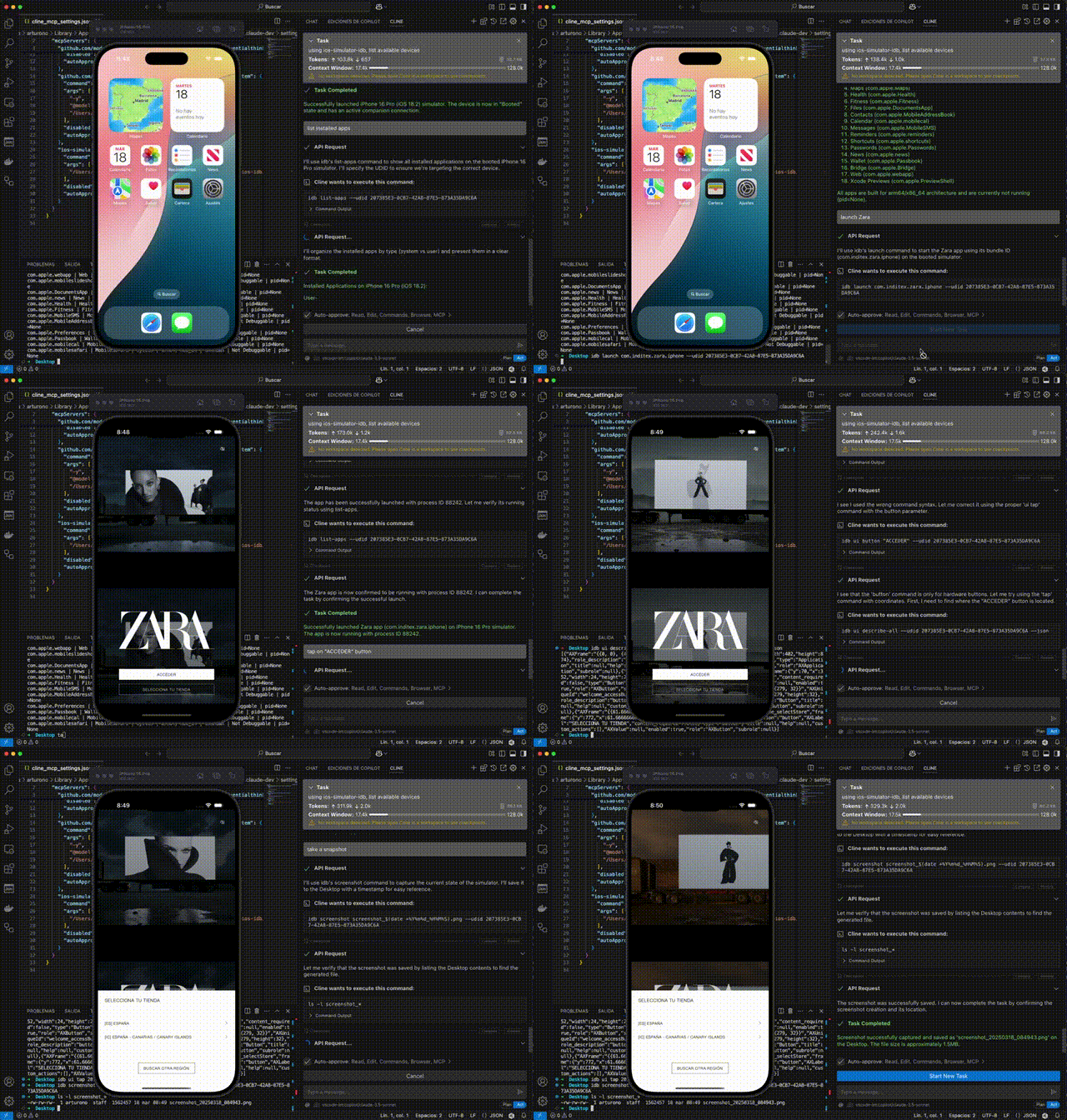
For detailed usage, see the Installation guide and Supported Commands sections. You can use this server either through direct MCP integration or as a standalone library.
Check out the Architecture section to understand how the components work together to enable natural language control of iOS simulators.
The easiest way to install this server is through Cline:
Add this mcp to cline https://github.com/InditexTech/mcp-server-simulator-ios-idb
Alternatively, you can install it manually:
# Clone the repository
git clone https://github.com/InditexTech/mcp-server-simulator-ios-idb.git
cd mcp-server-simulator-ios-idb

# Create and activate Python virtual environment
python3 -m venv venv
source venv/bin/activate  # On Unix/macOS

# Install dependencies
npm install

# Build the project
npm run build

# Start the project
npm start

# Run tests
npm test
The installation process will automatically:
Note: Make sure to keep the virtual environment activated while using the server. If you close your terminal and come back later, you'll need to reactivate the virtual environment with the source venv/bin/activate command before running npm start.
To use this server with Claude or other LLM assistants:
{
  "mcpServers": {
    "ios-simulator": {
      "command": "node",
      "args": ["/path/to/mcp-server-simulator-ios-idb/dist/index.js"],
      "env": {}
    }
  }
}
create a simulator session with iPhone 14
install app /path/to/my-app.ipa
launch app com.example.myapp
tap at 100, 200
take a screenshot
You can also use this package as a library in your own projects:
⚠️ Import side effects: importing the package entry point (
'mcp-server-simulator-ios-idb'/dist/index.js) runs the server startup code at module load: it overrides console output, creates alogs/directory, registersSIGINT/SIGTERM/exception handlers, and starts the MCP stdio server unconditionally. There is currently no opt-out. This applies to any import of the package root — named imports do not opt out of the bootstrap. To use the parser/orchestrator/manager without transport and signal side effects, import the compiled component modules by deep path as shown below (dist/...); note that importingdist/mcp/mcp-server.jsalso bootstraps the MCP server singleton, so avoid that path for library use. The package only declares"main"(noexportsmap), so deep paths resolve normally.
// Deep imports of compiled component modules: these do NOT trigger the
// package root startup (no MCP stdio server, no signal handlers).
import { MCPOrchestrator } from 'mcp-server-simulator-ios-idb/dist/orchestrator/MCPOrchestrator.js';
import { NLParser } from 'mcp-server-simulator-ios-idb/dist/parser/NLParser.js';
import { IDBManager } from 'mcp-server-simulator-ios-idb/dist/idb/IDBManager.js';

async function main() {
  // Compose the components (equivalent to createMCPServer internals)
  const idbManager = new IDBManager();
  const parser = new NLParser();
  const orchestrator = new MCPOrchestrator(parser, idbManager);

  // Process natural language commands

  // Create a simulator session
  const sessionResult = await orchestrator.processInstruction('create session');
  console.log(`Session created: ${sessionResult.data}`);

  // Interact with the simulator
  await orchestrator.processInstruction('tap at 100, 200');

  // Capture a screenshot
  const screenshotResult = await orchestrator.processInstruction('take screenshot');
  console.log(`Screenshot saved at: ${screenshotResult.data}`);
}

main().catch(console.error);
ℹ️ The MCP server itself (currently defined in
src/mcp/mcp-server.ts, not re-exported from the package entry point) is only meaningful when running the actual server process vianpm start/ an MCP client config; itscreateMCPServer()factory simply composes the same three components shown above.
You can also use the individual components directly via deep imports:
import { IDBManager } from 'mcp-server-simulator-ios-idb/dist/idb/IDBManager.js';

// Create instance and use it directly
const idbManager = new IDBManager();

const sessionId = await idbManager.createSimulatorSession({
  deviceName: 'iPhone 12',
  platformVersion: '15.0'
});

await idbManager.tap(sessionId, 100, 200);
mcp-server-simulator-ios-idb/
├── src/                      # Source code
│   ├── adapters/             # Adapter components
│   ├── idb/                  # IDB manager implementation
│   ├── mcp/                  # MCP server implementation
│   ├── orchestrator/         # Command orchestrator
│   ├── parser/              # Natural language parser
│   └── index.ts             # Main entry point
├── scripts/                 # Installation scripts
├── package.json            # Project configuration
└── tsconfig.json          # TypeScript configuration
The NLParser supports the following natural language commands:
The interface supports all commands available in the idb CLI tool, providing a comprehensive set of operations for iOS simulator automation.
The server consists of three main components:
These components are connected through adapters:
The complete execution flow (MCP stdio → orchestrator → parser/registry → adapters → IDBManager → idb / xcrun simctl), component contracts, the session model (activeSessionId vs sessionId → UDID), and a checklist for adding new commands are documented in ARCHITECTURE.md.
To use this server with the Model Context Protocol:
{
  "mcpServers": {
    "ios-simulator": {
      "command": "node",
      "args": ["/path/to/mcp-server-simulator-ios-idb/dist/index.js"],
      "env": {}
    }
  }
}
const result = await useMcpTool({
  serverName: "ios-simulator",
  toolName: "process-instruction",
  arguments: {
    instruction: "create simulator session"
  }
});
This project would not be possible without facebook/idb, which provides the underlying iOS simulator control capabilities. We extend our sincere gratitude to the Facebook/Meta team and all contributors to the idb project for creating and maintaining such a powerful and reliable tool.
This tool is available as open source under the terms of the Apache-2.0.
A Model Context Protocol (MCP) server that enables LLMs to interact with iOS simulators through natural language commands.
टूल
अभी टूल सूची नहीं है। रिमोट सर्वर को पहले हेल्थ चेक के बाद सूची मिलती है।
FAQ
इस पेज पर Cursor, Claude Desktop, Claude Code या VS Code के लिए stdio कॉन्फ़िग कॉपी करें। यह पब्लिशर का इंस्टॉल इस्तेमाल करता है, PlugMCP प्रॉक्सी नहीं।
इस रिकॉर्ड में कोई ज़रूरी एनवायरनमेंट वेरिएबल दर्ज नहीं है।
MCP Server Simulator Ios Idb stdio पर लोकल चलता है।
पिछली जाँच 2026-10-27 को हुई। A Model Context Protocol (MCP) server that enables LLMs to interact with iOS simulators through natural language commands.
