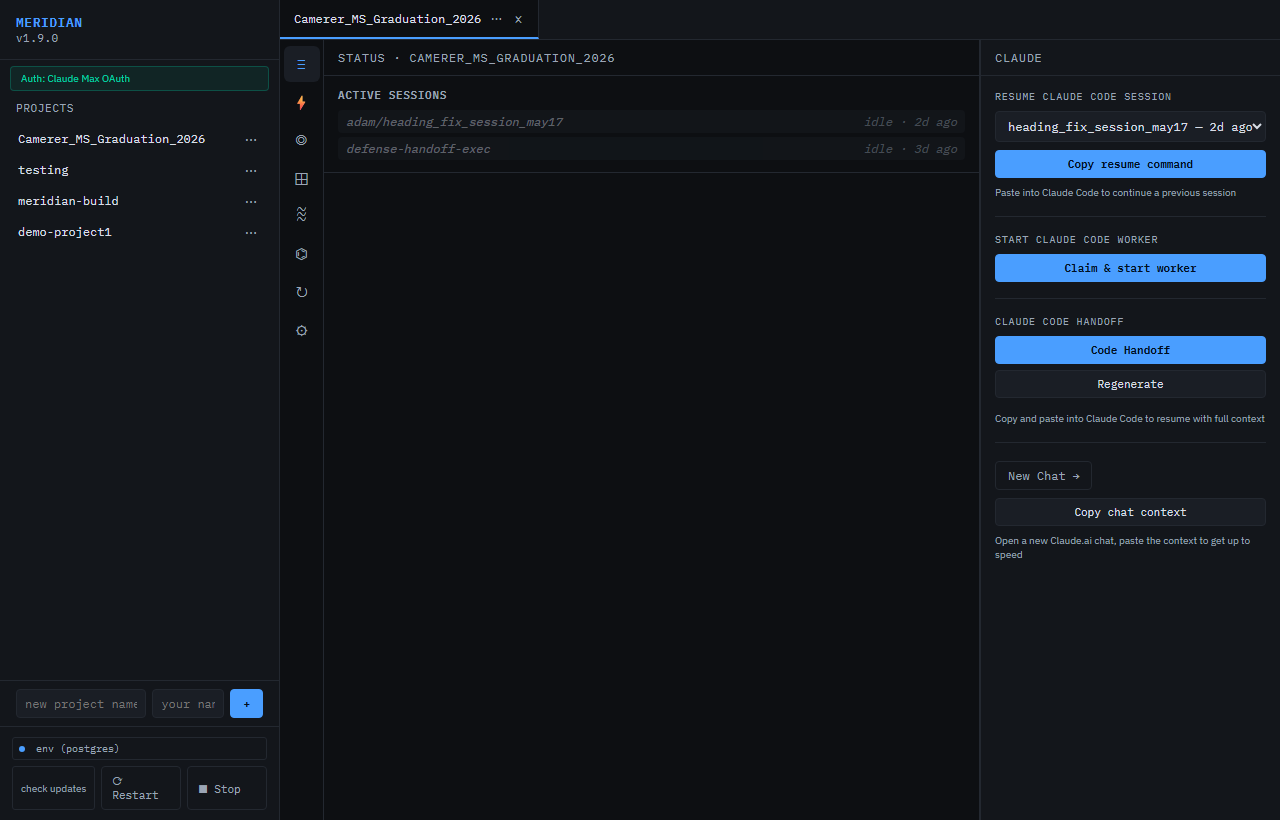
Claude Code has no memory between sessions. Meridian fixes that.
Open-source MCP server for persistent AI session memory — shared task log,
pinned decisions, human-in-the-loop queue, and tiered handoffs. Works with
Claude Code, Cursor, Cline, Claude Desktop, or any MCP client.
Persistent memory, task coordination, and HITL queue for AI coding sessions.
2026-11-09
स्टार
—
टूल
—
अपटाइम
—
Why Meridian
Every AI coding session boots blind. You re-explain the architecture, re-describe
the constraints, re-list what's been tried. When context fills up mid-task,
everything is lost. This is context debt — and it compounds.
Meridian gives your sessions shared memory. They see the same task log, the same
pinned decisions, the same goal state. When context fills up, a new session resumes
from a compressed handoff in seconds. No copy-paste, no re-explaining from scratch.
What it is, in 30 seconds
A local MCP server every AI session connects to. They share goal state, see each
other's task log, and resume from a compressed handoff when context fills up.
Two ways to run Meridian:
Self-host — free forever, any team size. Clone and run in 2 commands.
Hosted at usemeridian.us — 30 days free (no card), then $20/mo Standard.
Quickstart
Option 1 — binary release (recommended)
Signed binaries for Windows, macOS (Apple Silicon), and Linux are attached to
every GitHub release (current: v0.2.6).
Linux / macOS (one-liner via uv):
uv tool install meridian-server
meridian --tunnel --repo .
Linux / macOS (manual binary download):
curl -fsSL https://usemeridian.us/install.sh | sh
Windows (PowerShell, one-liner via uv):
uv tool install meridian-server
meridian --tunnel --repo .
Restart Claude Desktop. New chats have Meridian tools. If a newly deployed
tool is still missing, follow the MCP tool-surface freshness guide
before editing any client cache.
claude.ai web (recommended for planning chat)
Use dnakov/claude-mcp — included as a submodule — to bridge claude.ai to your local Meridian server:
Open chrome://extensions and enable Developer mode
Click Load unpacked and select extensions/claude-mcp
Click the extension icon and set the URL to http://localhost:7878/mcp
All 54+ Meridian tools (checkpoint, log_task, pin_decision, etc.) are now available directly in claude.ai planning chat. No copy-pasting session output.
Hosted tier (no install)
Sign in at usemeridian.us → Settings → MCP client setup → Generate API key → Copy config.
claude.ai (browser) users: install the dnakov/claude-mcp Chrome extension, then visit usemeridian.us/install-mcp for a step-by-step setup guide with one-click copy buttons.
Get your API key at usemeridian.us/settings after sign-in. Free tier: 30 days, no card, full features.
MCP tools — start_session, log_task, claim_task, set_decision,
pin_decision, request_hitl, generate_handoff, and ~50 more.
Symbol-level parallel safety — claim_file can claim a single class or
function (parsed with ast / tree-sitter) so two sessions edit the same file
safely; an overlapping claim is blocked with the free symbols listed.
Live work queue — planners inject sprint items mid-run; executors pick them
up at the next item boundary via a board_change signal, no interruption.
HITL recommended option — request_hitl can flag a safe-default option the
dashboard highlights; Enter submits it, number keys pick others.
GitHub hub (hosted) — connect your repo once in Settings; sessions get read_file,
list_files, search_code, git_log, get_commit injected automatically. No extra install.
Tiered handoffs — L0/L1/L2 compression so a fresh session can resume in seconds.
Webhook intake — push events from LangGraph / Autogen / custom agents into the same dashboard.
Works everywhere — Claude Code, Claude Desktop, Cursor, Windsurf, LangGraph, custom.
How it works
> start_session(project_id="meridian", session_name="feature-x")
  ✓ session registered · sprint loaded · 12 active tasks

> get_tasks(project_id="meridian", limit=5)
  [DONE]    backend / wire decisions_pinned table
  [PENDING] frontend / add notes vtab (claimed by session-2)

> claim_task(task_id="a1f3...")
  ✓ claimed — other sessions skip this one
State lives in data/meridian.db (SQLite) or a Postgres URL via MERIDIAN_DB_URL.
No cloud required for local use.
Team coordination
Point MERIDIAN_DB_URL at a shared Postgres (Neon free tier works great). Every
teammate runs their own local Meridian against the same DB — instant shared
sessions, no Meridian server in the cloud.
Auto-checkpoint with hooks
One command wires Claude Code and Codex to Meridian. Every session start injects
your project context automatically. Every session end snapshots completed work and
writes a delta handoff.
Mac/Linux:
curl -fsSL https://usemeridian.us/hooks.sh | bash
Windows:
irm https://usemeridian.us/hooks.ps1 | iex
Prompts for your Meridian server URL (default http://localhost:7878), then opens
your browser to connect this machine — no project ID or API token to paste. Writes
to ~/.claude/settings.json (Claude Code) or ~/.codex/config.toml (Codex). After
setup, every session automatically:
On start — calls POST /hooks/session-start → injects goal, sprint items,
recent tasks, and pinned decisions into the session context via additionalContext.
On stop — calls POST /hooks/stop → runs auto_capture and writes a delta
handoff so the next session resumes from where this one ended.
No more manual start_session() calls. No lost work when context fills.
Hosted tier
Standard
Pro
Price
$20/mo
$49/mo (waitlist)
Storage
1 GB included
10 GB included
Compute
2 CU · 100 hrs/mo
4 CU · 300 hrs/mo
Bring your own Postgres
✓
✓
OAuth + email magic link
✓
✓
Extra storage
$0.50 / GB-month
$0.50 / GB-month
Support
Email
Priority
30-day free trial · no card required
License
MSL-1.0 — free for local and internal use at any team size. Paid
license required if you host Meridian as a service for others. Converts to
MIT after 6 years.
अभी टूल सूची नहीं है। रिमोट सर्वर को पहले हेल्थ चेक के बाद सूची मिलती है।
FAQ
सवाल
Meridian कैसे इंस्टॉल करें?
इस पेज पर Cursor, Claude Desktop, Claude Code या VS Code के लिए http कॉन्फ़िग कॉपी करें। यह पब्लिशर का इंस्टॉल इस्तेमाल करता है, PlugMCP प्रॉक्सी नहीं।
क्या Meridian के लिए API key चाहिए?
इस रिकॉर्ड में कोई ज़रूरी एनवायरनमेंट वेरिएबल दर्ज नहीं है।
Meridian कौन सा ट्रांसपोर्ट इस्तेमाल करता है?
Meridian तक HTTP से पहुँचा जाता है।
Meridian की पिछली जाँच कब हुई थी?
पिछली जाँच 2026-11-09 को हुई। Persistent memory, task coordination, and HITL queue for AI coding sessions.