context-keeper-remote
Part of the xylem stack.
Power your agent
पब्लिशर का अपना URL। PlugMCP एंडपॉइंट नहीं।
Host a copy with our keys and logs.
https://context-keeper-remote.{account}.workers.dev/mcp/{token}ऊपर दिया Claude बटन नाम और URL भरकर Claude खोलता है। पुष्टि आपको वहीं करनी होती है।
claude mcp add --transport http io.github.jarmstrong158-context-keeper-remote https://context-keeper-remote.{account}.workers.dev/mcp/{token}Run in a terminal.
{ "mcpServers": { "io.github.jarmstrong158-context-keeper-remote": { "command": "npx", "args": [ "-y", "mcp-remote", "https://context-keeper-remote.{account}.workers.dev/mcp/{token}" ] } }}claude_desktop_config.json
रिमोट URL या आपकी मशीन पर कमांड? दोनों इंस्टॉल में क्या अंतर है
PlugMCP पर चलाएँ
A new server you create. It is not this listing's official endpoint. Use the publisher install when you want their URL and their credentials.
लॉन्चपब्लिशर से
Part of the xylem stack.
Cloudflare Worker remote backend for context-keeper (D1). MCP 2026-07-28, dual-era.
A remote MCP server on Cloudflare Workers that exposes context-keeper's rationale store (decisions, pipelines, constraints) over Streamable HTTP. It works as a claude.ai custom connector, including on mobile, so your project's decisions and constraints are available from any Claude session — no PC left running, no tunnel.
It also serves a phone app for reading that store yourself: install it to your home screen once and it opens with no login and no token in the URL. Tabs for recent activity, per-project counts, cambium knowledge, and store health — and tapping any entry gives you the full rationale, not just its title. Optional, opt-in, and on its own read-only credential.
Self-host your own copy in a few clicks with the button above — Cloudflare copies this repo into your GitHub account, creates a fresh D1 database for you, and deploys the Worker. Then you add one secret and paste a URL into Claude. Full walkthrough below; every step is a click, no command line anywhere.
The maintainer's own instance runs at
https://context-keeper-remote.jarmstrong158.workers.dev. Yours will be at your own subdomain after you deploy.
WHERE queries; two writers (desktop +
mobile) don't clobber each other the way whole-file JSON read-modify-write does.Click the Deploy to Cloudflare button at the top of this page. Cloudflare will:
When it finishes, your Worker is live at
https://context-keeper-remote.<your-subdomain>.workers.dev. Note that URL — you'll
need it in Step 3. (You can always find it under Workers & Pages in the
dashboard.)
Nothing to configure in the repo, and no SQL to run — the database starts empty and the Worker creates its tables on the first request.
AUTH_TOKEN secret (Cloudflare dashboard)The Worker refuses every request until it has an auth token, so set one:
AUTH_TOKEN. Value: a long random string (32+ characters
— treat it like a password). Save/Deploy.That value is your connector's password. Keep it somewhere safe; you'll paste it in the next step.
agentsync-remote uses the same AUTH_TOKEN scheme, and additionally needs, in
its Worker's Variables and Secrets:
GH_PAT — a GitHub personal access token, andREPO — set to the owner/repo it should sync.Those two do not apply to context-keeper-remote (this repo) — it only needs
AUTH_TOKEN. See the agentsync-remote README for its specifics.
claude.ai → Settings → Connectors → Add custom connector.
Paste your Worker URL with the token as the final path segment:
https://context-keeper-remote.<your-subdomain>.workers.dev/mcp/<AUTH_TOKEN>
Replace <your-subdomain> with your Worker's subdomain (Step 1) and
<AUTH_TOKEN> with the exact value you set (Step 2).
Save. The tools (record_entry, get_context, query_entries, …) are now
available in your Claude sessions.
Check it works: ask Claude to call get_project_summary. If it answers, the
whole chain (deploy → auto-provisioned D1 → auto-migration → auth) is working.
If you already run local context-keeper, ask Claude (with the connector enabled) to
call import_entries, pasting each file's contents:
decisions.json → import_entries(project, kind="decision", entries=[...])pipelines.json → import_entries(project, kind="pipeline", entries=[...])constraints.json → import_entries(project, kind="constraint", entries=[...])Incoming ids are preserved; existing ids are reported, never overwritten.
Everything above is the MCP connector, which is for Claude to read. Step 5 is for you to read it, from your phone. It needs a clone of this repo and Node 22+, which is the only part of the setup that touches a command line — the connector itself never does.
See the phone view below.
/view is a read-only, server-rendered page of every project's decisions and
constraints. Install it to your home screen and it opens like an app: no login,
no token in the URL, nothing to remember.
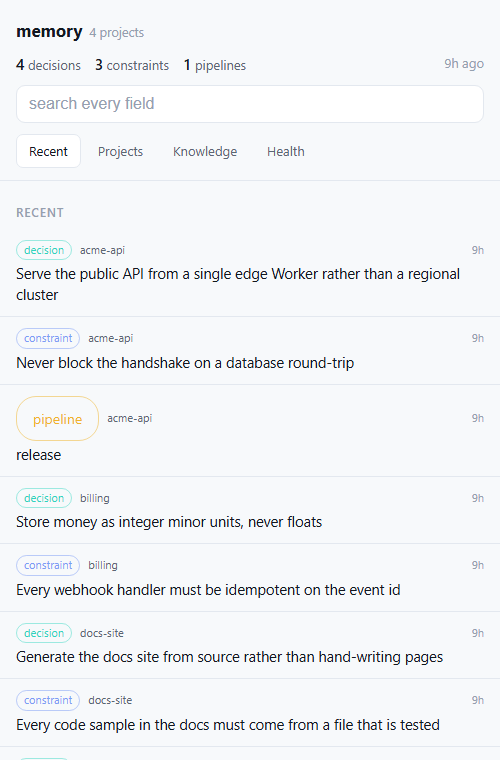 | 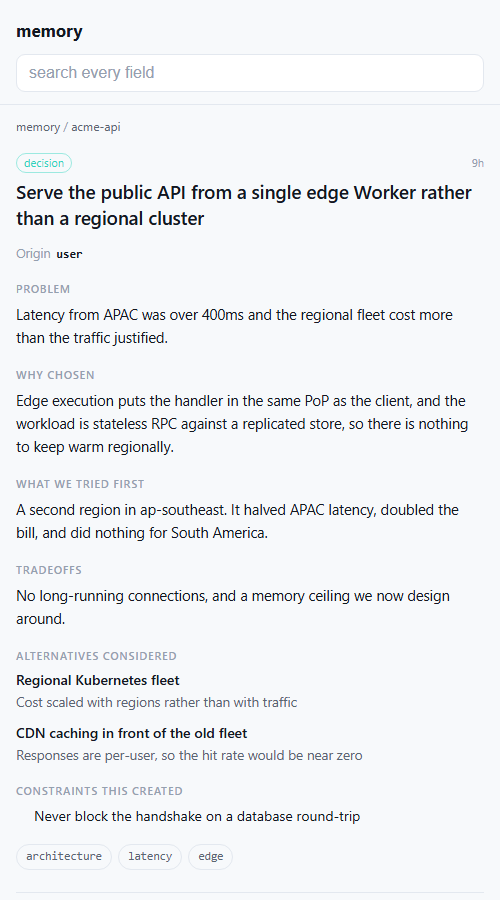 |
| Recent — what changed, across every project | Any entry — the reasoning, not just the title |
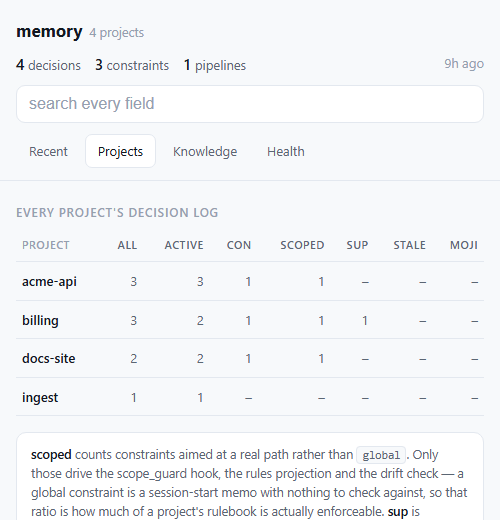 | 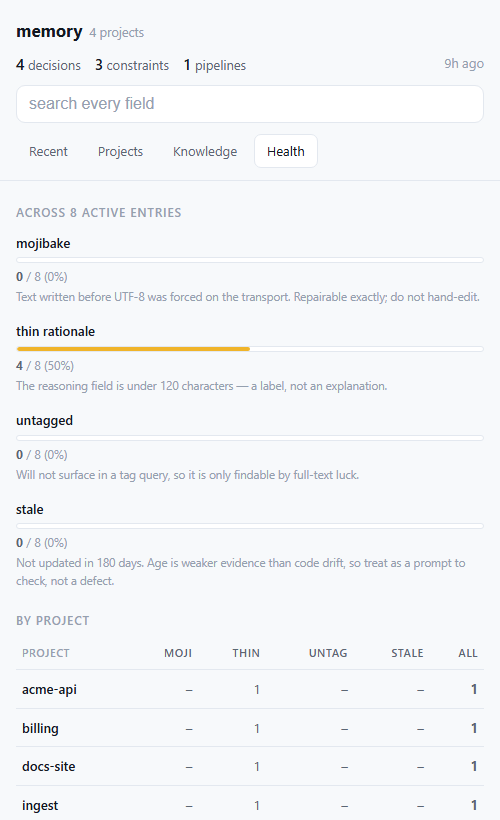 |
| Projects — counts per project, including how much of each rulebook is enforceable | Health — mojibake, thin rationale, untagged, stale |
Synthetic data. Every project and entry above is invented — see docs/screenshots for the dataset and how to regenerate these.
It has four tabs, matching the desktop dashboard:
Tap any row for the full entry: problem, why it was chosen, what was tried first, tradeoffs, alternatives with the reason each was rejected, and — for constraints — scope, hardness, and what enforces it. Search covers every field, including the reasoning, which is usually where the answer is. Superseded entries stay reachable, and each entry links to what it replaced and what replaced it.
1. Create the credential. Double-click scripts/set-view-token.cmd
(macOS/Linux: scripts/set-view-token.sh). From a terminal use the absolute path
— not npm run, which needs the repo as your current directory:
powershell -NoProfile -ExecutionPolicy Bypass -File "/full/path/to/context-keeper-remote/scripts/set-view-token.ps1"
One run generates the token, installs it, waits for the route to answer 200,
copies the URL, opens it in your browser, and prints a QR code.
2. Scan the QR with your phone, then install it:
Then tap through Recent, Projects, Knowledge and Health once while you have signal — the offline cache only fills for pages you have actually opened.
Add -DryRun to run everything except the install, which is the fastest way to
check your setup before touching anything.
A service worker caches every page you open, cache-first with a background revalidate. Measured on the live instance:
So it opens with no signal, and switching tabs is instant rather than a round-trip. A decision log is not a live feed — showing yesterday's answer immediately and correcting it a moment later beats showing nothing for 300ms, and the header carries an "8h ago" stamp so stale data is never presented as current.
Only 200s are cached. A 404 is what this Worker returns for an
unauthenticated or rotated credential, and caching one would mean a device that
rotated its token keeps being told it is signed out — from its own disk, with no
network involved and no obvious way to clear it. Verified in both directions.
The token still never reaches JavaScript. The cookie is HttpOnly, so the
service worker cannot read it; it only issues same-origin requests the browser
attaches it to. What was given up is "no client-side JS at all", not the
credential isolation. The CSP gains script-src 'self' and deliberately not
'unsafe-inline' — the registration lives in its own file so an inline
allowance, which would apply to the whole document including anything a recorded
entry smuggled past the escaper, is never needed.
The token URL is an enrolment step, not a daily one. Visiting it sets a
long-lived HttpOnly cookie, and from then on the bare /view path works from
that device — which is what the home-screen icon opens.
VIEW_TOKEN still revokes every device at
once. There is one revocation path, no session table, and no expiry to track.AUTH_TOKEN, and /mcp never
accepts VIEW_TOKEN. A leaked view URL discloses decision summaries; it cannot
write, deprecate, or delete.VIEW_TOKEN, /view/<anything> returns a bare
404, indistinguishable from a route that was never deployed.npm run view reopens it later (the URL is saved to .view-url, gitignored).
npm run view -- --qr enrols another device without rotating the token —
re-running setup would mint a new one and silently drop every device already
added.
Only relevant if you also run cambium-remote.
scripts/connect-cambium.cmd
It generates a status-only credential, installs it on cambium-remote as
STATUS_TOKEN, verifies the route answers with real counts, and only then sets
CAMBIUM_STATUS_URL here. Nothing to look up or paste.
Why a second credential rather than cambium's connector URL: that URL is
cambium-remote's AUTH_TOKEN, which grants recall over every promoted item —
on the Worker whose team scope reaches every repo under TEAM_OWNER, including
private ones. Copying it here to render three integers would mean a leak of this
Worker discloses cambium's entire reach. STATUS_TOKEN reads the counts and
nothing else. It is also generatable, which is what makes the setup automatic;
AUTH_TOKEN can only ever be re-typed by hand, since Cloudflare stores secrets
write-only.
Self-hosters must add a service binding. A Worker cannot reach another
Worker by fetching its workers.dev hostname — Cloudflare's edge answers 404
and the target never runs, which looks exactly like a rejected token. Add to your
wrangler.toml:
[[services]]
binding = "CAMBIUM"
service = "cambium-remote"
This repo declares it only under [env.production], deliberately: a service
binding names its target, so declaring it at the top level would break the
one-click deploy for anyone whose account has no cambium-remote.
The panel fails soft. If cambium is slow (10s budget), down, or unwired, the page still renders and says so. Only the Knowledge tab makes that call, so the other tabs never pay for it.
git push can deploy the Worker directly, using the wrangler login you already
have — no Cloudflare API token, no GitHub secret, no dashboard:
scripts/install-deploy-hook.cmd
It installs a git pre-push hook. Deploy first, push second: if the deploy
fails the push is aborted, so origin never receives a commit that could not be
deployed. That is the inverse of the failure it replaces — cambium-remote's CI
was accepting every merge and deploying none of them, with main drifting ahead
of the running Worker and nothing to show it.
Main only, skips branch deletes, git push --no-verify skips it once, -Remove
uninstalls.
It refuses to install without -Env in a repo that has named environments,
and that refusal is load-bearing rather than fussy. A bare wrangler deploy uses
the top-level profile — which in this repo is the self-host profile, and that
one deliberately omits database_id so Cloudflare provisions a fresh empty
database. A hook installed without -Env here would bind the live Worker to an
empty D1 on the next push. So:
# cambium-remote -- no named environments, bare deploy is correct
scripts/install-deploy-hook.cmd

# a repo whose real deploy lives under [env.production]
scripts/install-deploy-hook.cmd -Env production
This repo does not need the hook at all — its GitHub Actions deploy works, and a hook would deploy twice per push.
Why not just fix the CI? Because that step genuinely cannot be automated.
GitHub Actions needs CLOUDFLARE_API_TOKEN, and minting a Cloudflare API token
through the API requires an existing token carrying User API Tokens: Edit.
Wrangler's OAuth login does not have it — its 29 scopes are workers/d1/pages/
queues operations plus account:read, with nothing token-management related. No
credential on your machine can create that credential. The paste is Cloudflare's
permission model, not a gap in the tooling. Deploying locally sidesteps the
question entirely.
connect-cambium deploys cambium-remote itself when it finds the status route
missing, using the wrangler login you already have — so you do not need its
GitHub Actions deploy working for the Knowledge tab to work.
You only need it if you want cambium-remote to auto-deploy on every push. Its workflow needs two Cloudflare secrets, and an empty one fails silently: every merge looks green and deploys nothing.
scripts/fix-cambium-ci.cmd
CLOUDFLARE_ACCOUNT_ID is read from wrangler whoami and set automatically — it
is an identifier, not a credential; it is in every dashboard URL.
CLOUDFLARE_API_TOKEN you paste once, and that step is genuinely irreducible:
creating a Cloudflare API token requires an existing token with
User API Tokens: Edit, and wrangler's OAuth login is not one. No credential on
your machine can mint that credential. Everything around it is automated — the
browser opens on the right page, the token is read without echoing, it is
verified against Cloudflare's API before being stored, both secrets go over
stdin rather than argv, and the previously failed run is re-triggered so you watch
it go green instead of taking the script's word for it.
No wrangler command reports the workers.dev host — not whoami,
deployments list, versions list, or deployments status — so it lives in
package.json:
node -e "const p=require('./package.json');p.contextKeeper.workerUrl='https://<worker>.<account>.workers.dev';require('fs').writeFileSync('package.json',JSON.stringify(p,null,2)+'
')"
The setup script reads it before installing anything and refuses to run without it. That ordering is deliberate: a token installed with no URL to put it in is unrecoverable, since Cloudflare cannot read a secret back.
The three that aren't ported are thin wrappers around a handful of commands, so the manual equivalents are short. Connect cambium:
TOKEN=$(head -c 32 /dev/urandom | base64 | tr '+/' '-_' | tr -d '=
')
printf '%s' "$TOKEN" | (cd ../cambium-remote && npx wrangler secret put STATUS_TOKEN)
# wait ~60s for the new version to roll out, then check it answers with counts:
curl -s "https://cambium-remote.<account>.workers.dev/status/$TOKEN" | head -c 200
printf '%s' "https://cambium-remote.<account>.workers.dev/status/$TOKEN"   | npx wrangler secret put CAMBIUM_STATUS_URL --env production
Deploy on push — write .git/hooks/pre-push in the target repo, LF endings,
chmod +x, running npx wrangler deploy (add --env <name> if that repo has
named environments — a bare deploy there targets the self-host profile and will
bind your live Worker to a fresh empty database).
Fix the CI — gh secret set CLOUDFLARE_ACCOUNT_ID and
gh secret set CLOUDFLARE_API_TOKEN against the repo, reading each from stdin.
They target Windows PowerShell 5.1 — the version that ships with Windows and
the one .cmd launches. Five things there are load-bearing and look like they
could be modernised:
RNGCryptoServiceProvider, not RandomNumberGenerator::Fill — the latter is
.NET Core only and throws.WebException status extraction, not -SkipHttpErrorCheck — PowerShell 7 only.??, ?., or ternaries — all PowerShell 7 only, and a parse error here.Invoke-Wrangler. On 5.1, 2>&1 on a native
command wraps each stderr line in an ErrorRecord, and under
$ErrorActionPreference = 'Stop' the first is terminating — so an ordinary
wrangler notice kills the run.[Console]::IsInputRedirected, never
[Environment]::UserInteractive (which is always true), and cast Read-Host to
[string] before matching — $null -notmatch '...' evaluates to empty, not
$true, so the obvious guard fails open.Every run writes a scrubbed log (.view-setup.log, .cambium-setup.log) with the
token masked, so a failure can be read after the window closes.
The URL you paste into Claude embeds AUTH_TOKEN as its last path segment.
Anyone who has the full …/mcp/<AUTH_TOKEN> URL can read and write your entire
store. Treat it exactly like a password:
404 with no
detail (a valid token used with a non-POST method gets 405).AUTH_TOKEN in the Cloudflare dashboard (Step 2). This
immediately invalidates every old URL — any connector using the previous
token starts getting 404s until you update it in claude.ai (Step 3) with the new
value.Everything in this section applies to the view URL too, with one difference in
your favour: VIEW_TOKEN can only read. A leaked view URL exposes every decision
summary in every project on the instance, which may well be the more sensitive half
— but it cannot write, deprecate, or delete anything. That is the entire reason the
two are separate credentials rather than one.
This is a deliberate design choice, not an oversight. claude.ai custom
connectors do not reliably send custom headers, so an Authorization: header —
the obvious alternative — cannot be depended on. Putting the credential in the
path is what makes the connector work at all.
Be clear about the price, because it is not the same as a header:
/mcp/***. The leak surface is everything around the Worker, which is
exactly what you cannot audit.Practical guidance:
AUTH_TOKEN,
update the connector.openssl rand -hex 32). The
comparison is constant-time in both content and length, so length is not
observable — but entropy is still your only defence against guessing.Every tool takes an optional project; if omitted it falls back to the configured
default_project (set it once with config — op='set', key default_project).
The unified tools (config, record_entry) are the current surface; the older
per-operation tools remain as deprecated aliases so existing callers keep
working. New work should prefer the unified tools.
summary, problem, why_chosen, what_we_tried,
tradeoffs, tags. The deprecated rationale field is accepted on input and
mapped to why_chosen when why_chosen is absent.rule, reason, tags.name, purpose, steps, plus any extra fields you pass.dec-001, pipe-003, con-012. Because the same
id recurs across projects, the D1 primary key is composite (project, id).Everything above is for self-hosters. This section is for working on the code itself.
wrangler.toml has two profiles:
database_id.
This is what the Deploy button, wrangler dev, and the local test suite use. With
no id, Cloudflare auto-provisions a fresh database for each self-hoster.[env.production] — pins the maintainer's real database_id and the Worker
name. The maintainer's CI deploys with wrangler deploy --env production so it
keeps hitting the same database and the same URL. Self-hosters never touch this
env.The cambium service binding lives only in [env.production], and that split is
load-bearing rather than tidy. A service binding names its target Worker, so a
top-level [[services]] service = "cambium-remote" would make the one-click deploy
fail in any account that has no such Worker — which is every account but the
maintainer's. Anything that names another Worker, another database by id, or
another account belongs in the named env for the same reason.
Named environments inherit nothing. Every binding the production deploy needs
has to be repeated under [env.production.*], including [observability]. A
binding that exists only at the top level is silently absent from the env CI
actually deploys.
.github/workflows/deploy.yml runs on push to main, and is gated with
if: github.repository == 'jarmstrong158/context-keeper-remote' so forks (which
deploy via Workers Builds instead) don't run failing Actions. Steps: checkout →
Node 22 (Wrangler needs ≥ 22) → npm ci → npm test → wrangler deploy --env production. Tests gate the deploy. It reads two GitHub repo secrets,
CLOUDFLARE_API_TOKEN (needs Workers Scripts: Edit) and CLOUDFLARE_ACCOUNT_ID
— distinct from the Worker's own AUTH_TOKEN.
No network and no Cloudflare credentials required — tests run against a local
workerd D1 via @cloudflare/vitest-pool-workers. Requires Node ≥ 22.
npm install
npm test          # vitest: migrations, cold-start, CRUD, id sequencing, auth, import, ...
npm run typecheck # tsc --noEmit
After a deploy, from any machine with network access:
WORKER_URL="https://context-keeper-remote.<subdomain>.workers.dev/mcp/<AUTH_TOKEN>" \
  node scripts/smoke-test.mjs
Runs initialize → tools/list → record_decision → query_entries against the live
worker.
src/index.ts             fetch handler: token check -> MCP dispatch (schema ensured lazily on first tools/call, not on the handshake)
src/mcp.ts               stateless Streamable HTTP MCP server (createMcpHandler)
src/db.ts                D1 access + runtime migration runner + id generation
src/entries.ts           payload normalization, insert-with-retry, keyword scoring
src/tools/*.ts           one module per tool group
src/view.ts              the phone view: shell, tabs, knowledge panel, dispatch on ?e/?p/?q/?t
src/detail.ts            entry detail, project drill-down, search, supersession trail
src/health.ts            quality flags + the Projects and Health tables
src/install.ts           enrolment cookie, web app manifest, home-screen icon
src/icon-data.ts         GENERATED by scripts/make-icon.mjs -- do not hand-edit
schema.sql               reference copy of the DDL the migration runner embeds
wrangler.toml            default (auto-provision) + [env.production] (pinned) config
.github/workflows/deploy.yml   test-then-deploy on push to main (maintainer repo)
scripts/smoke-test.mjs   live JSON-RPC round-trip check
scripts/set-view-token.*  create VIEW_TOKEN, verify, QR, save the URL  (.cmd = double-click)
scripts/connect-cambium.* generate STATUS_TOKEN on cambium-remote and wire it here
scripts/make-icon.mjs     regenerate the home-screen PNG (npm run make-icon)
test/                    vitest suite (local workerd D1, no network)
Cloudflare Worker remote backend for context-keeper (D1). MCP 2026-07-28, dual-era.
{ "mcpServers": { "io.github.jarmstrong158-context-keeper-remote": { "url": "https://context-keeper-remote.{account}.workers.dev/mcp/{token}", "headers": {} } }}टूल
अभी टूल सूची नहीं है। रिमोट सर्वर को पहले हेल्थ चेक के बाद सूची मिलती है।
FAQ
इस पेज पर Cursor, Claude Desktop, Claude Code या VS Code के लिए http कॉन्फ़िग कॉपी करें। यह पब्लिशर का इंस्टॉल इस्तेमाल करता है, PlugMCP प्रॉक्सी नहीं।
इस रिकॉर्ड में कोई ज़रूरी एनवायरनमेंट वेरिएबल दर्ज नहीं है।
Context Keeper (remote) तक HTTP से पहुँचा जाता है।
पिछली जाँच 2026-11-09 को हुई। Cloudflare Worker remote backend for context-keeper (D1). MCP 2026-07-28, dual-era.
