Read any page: snapshot + evaluate on Hacker News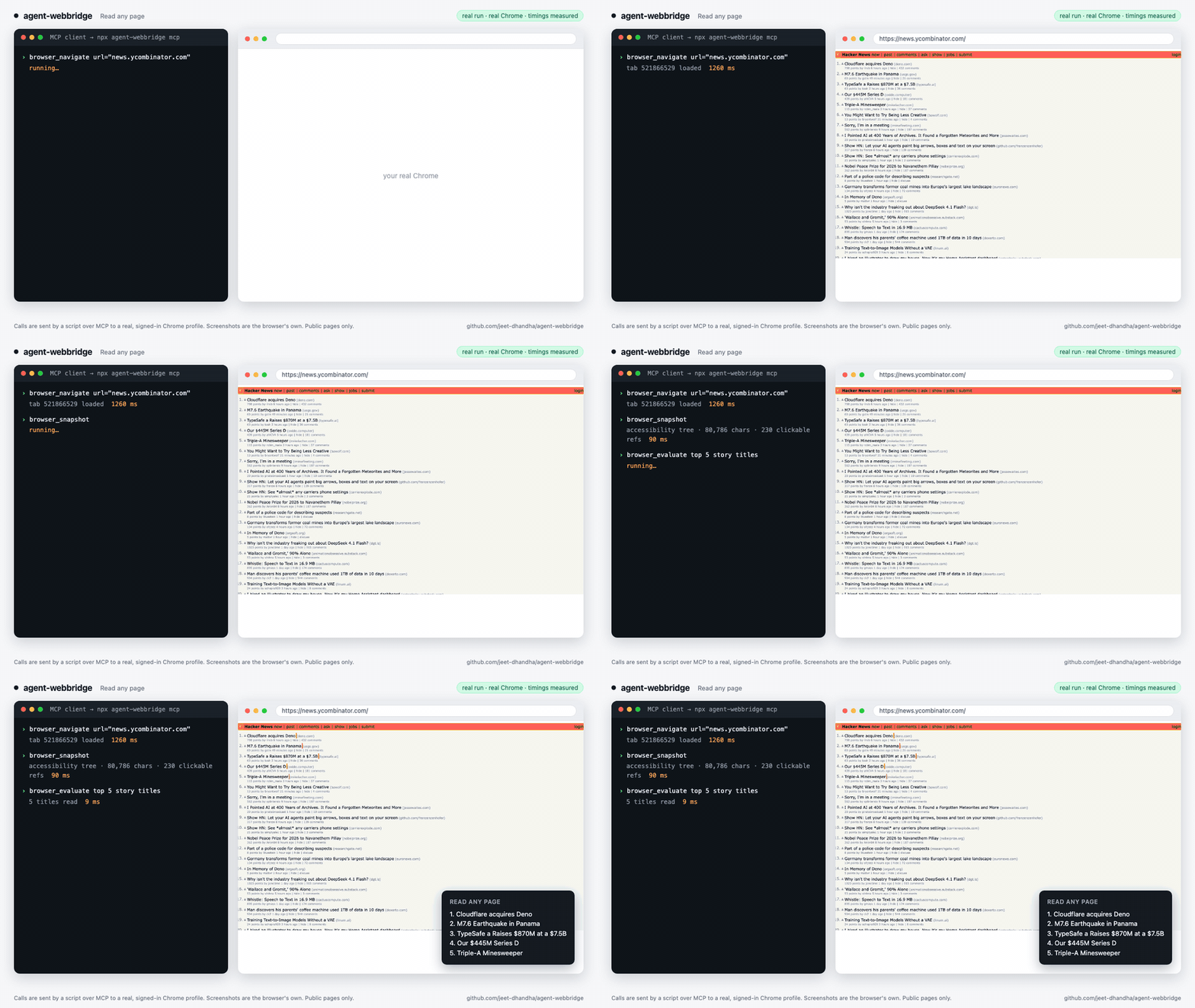 | Five tabs at once: 3.5 s in parallel vs 9.3 s one at a time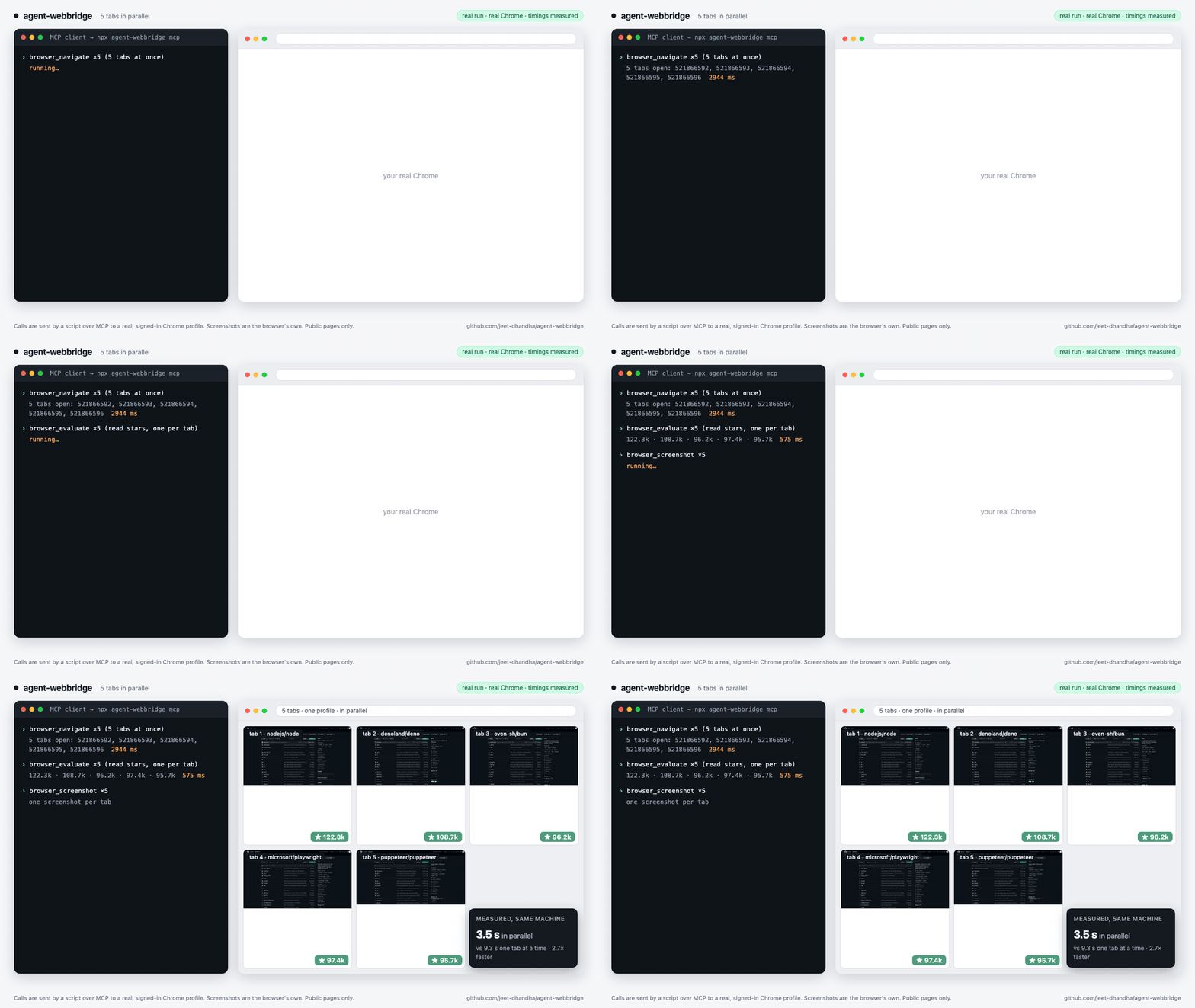 |
Use your real login: a signed-in editor, filled in, stopped before publishing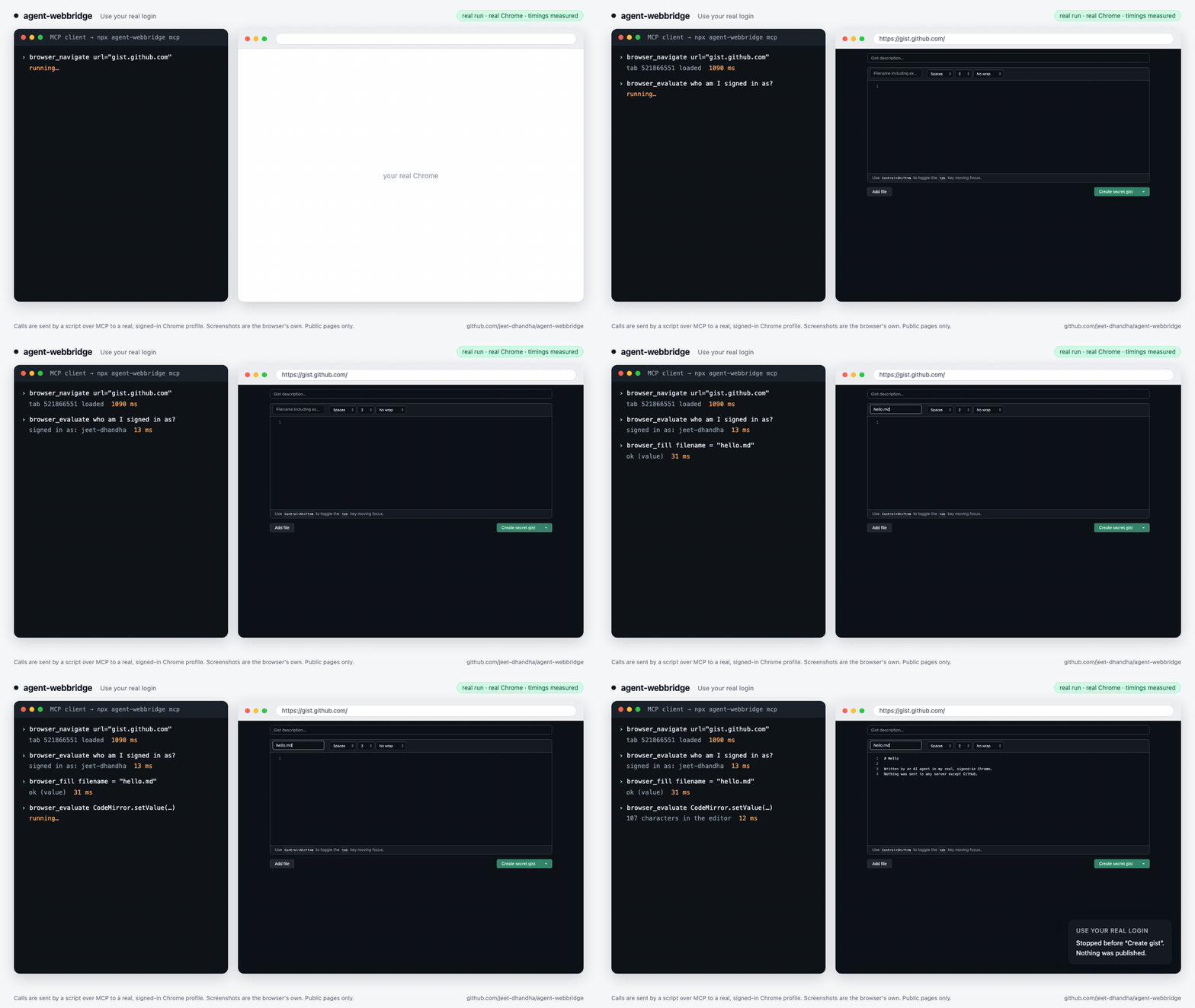 | Fill and submit forms (fields, radios, checkboxes)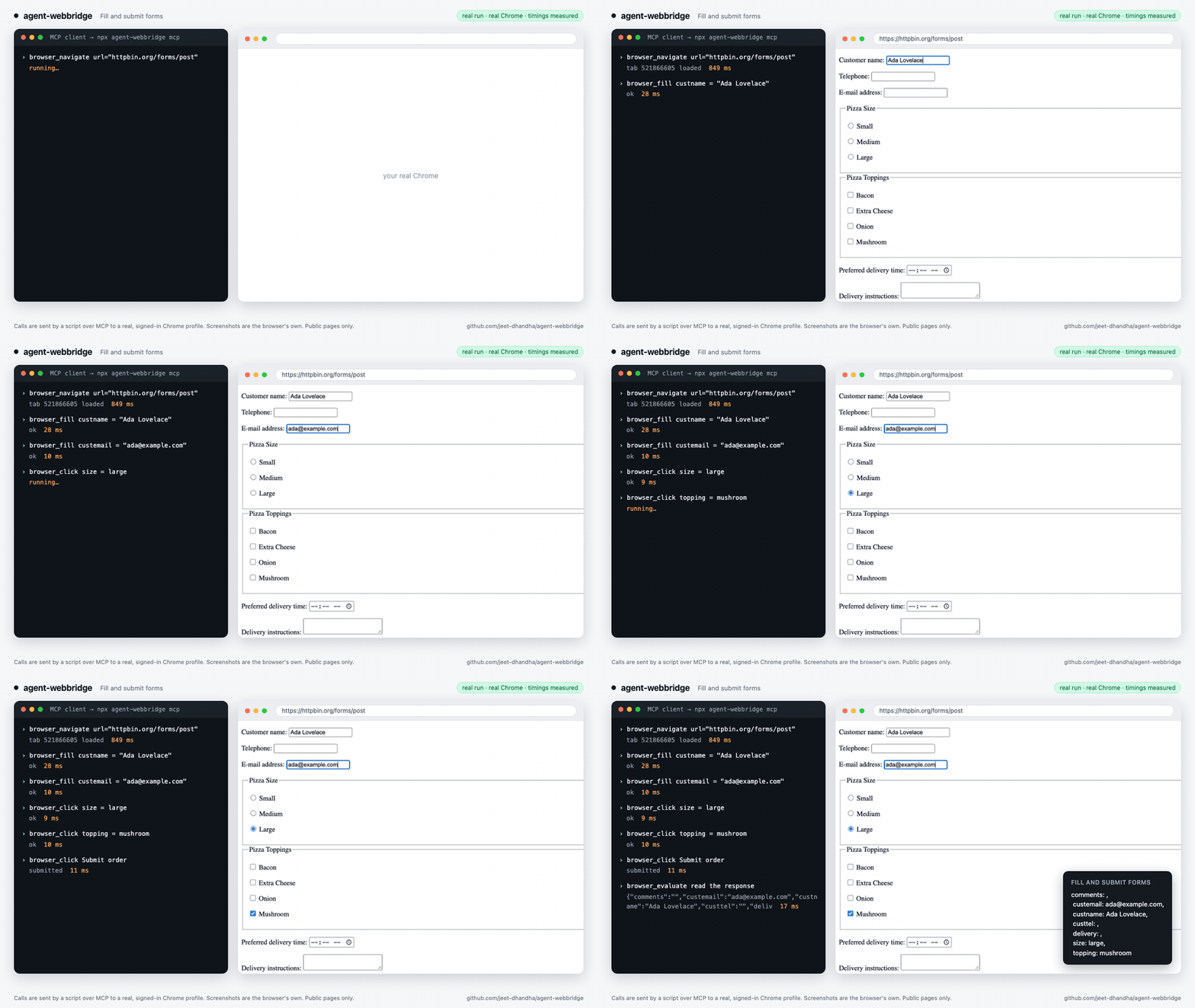 |
Power your agent
पब्लिशर की अपनी कमांड। PlugMCP एंडपॉइंट नहीं।
Host a copy with our keys and logs.
npx -y [email protected]Claude Code में लोकल कमांड के लिए इंस्टॉल लिंक नहीं है। नीचे दी गई कमांड कॉपी करें और टर्मिनल में चलाएँ।
claude mcp add jeet-dhandha-agent-webbridge -- npx -y agent-webbridge@1.3.3टर्मिनल में चलाएँ।
{ "mcpServers": { "jeet-dhandha-agent-webbridge": { "command": "npx", "args": [ "-y", "[email protected]" ] } }}claude_desktop_config.json
रिमोट URL या आपकी मशीन पर कमांड? दोनों इंस्टॉल में क्या अंतर है
PlugMCP पर चलाएँ
A new server you create. It is not this listing's official endpoint. Use the publisher install when you want their URL and their credentials.
लॉन्चWebBridge (
agent-webbridge): Drive your real, logged-in Chrome with Claude Code, Cursor and any MCP client — across multiple Chrome profiles with true per-tab DevTools parallelism. 100% open-source (MIT), zero cloud, no telemetry, all on127.0.0.1.🌐 Interactive site & demo recordings: jeet-dhandha.github.io/agent-webbridge
npm i -g agent-webbridge && awb setup "Work" # once: installs the daemon + the Chrome extension
Then add the MCP server to Claude Desktop, Claude Code, Cursor or Windsurf:
{
  "mcpServers": {
    "chrome": { "command": "npx", "args": ["-y", "agent-webbridge", "mcp"] }
  }
}
Claude Code: claude mcp add chrome -- npx -y agent-webbridge mcp
Or install it as an agent skill (Claude Code, Cursor, Codex and others): npx skills add jeet-dhandha/agent-webbridge
Your agent now has browser_navigate, browser_snapshot, browser_click, browser_fill, browser_evaluate, browser_screenshot and more — all running in your Chrome, with your sessions. Pass profile to choose an account and tabId to run tabs in parallel. If a call fails, browser_status tells the agent which profile isn't connected.
It automates a browser you are already signed in to — use it only on accounts and sites you are entitled to automate, and respect each site's terms.
agent-webbridge is a tiny Node daemon (one runtime dependency: ws) plus a clean-room MV3 Chrome extension. An agent POSTs a command to a local router → the router fans it out to the right profile's daemon → the extension attaches the Chrome DevTools Protocol per tab.
Real runs, not mock-ups: a script sends MCP calls to npx agent-webbridge mcp, which drives a real, signed-in Chrome profile. The screenshots are the browser's own and the timings are measured. Public pages only; nothing is submitted to any account.
| Read any page: snapshot + evaluate on Hacker News | Five tabs at once: 3.5 s in parallel vs 9.3 s one at a time |
| Use your real login: a signed-in editor, filled in, stopped before publishing | Fill and submit forms (fields, radios, checkboxes) |
Timings come from one MacBook on home broadband; yours will differ.
chrome.debugger per tab, so N tabs in one profile run concurrently. In our benchmark, 5 tabs took 3.5 s in parallel vs 9.3 s one at a time (one MacBook; yours will differ).npm i -g agent-webbridge # 1. the daemon + the `awb` CLI
awb setup "Work" # 2. opens the Chrome Web Store; click "Add to Chrome"
awb setup opens the Agent WebBridge listing in your chosen profile and polls while you click Add to Chrome. As soon as it detects the install, it wires the profile to its daemon and brings the fleet up.
Requirements: macOS or Windows · Google Chrome · Node.js ≥ 18.
awb up "Work" "Personal"        # bring profiles up (setup did this on first run)

# Drive any profile by name — using the handy cmd helper function:
cmd(){ curl -s -m 60 -X POST http://127.0.0.1:10086/command -H 'Content-Type: application/json' -d "$1"; echo; }

cmd '{"action":"navigate","args":{"url":"https://news.ycombinator.com"},"session":"scan","profile":"Work"}'

awb down                        # stop the fleet when done
Every call is a POST /command on 127.0.0.1:10086. Wrap payloads in single quotes ('...') to prevent shell quote-escaping issues. "session" groups a task's tabs into one Chrome tab group; "profile" picks which Chrome profile to drive. Pass {"action":"screenshot","args":{"path":"/path/to/img.png"}} to save screenshots directly to disk.
import { WebBridgeClient } from "agent-webbridge";

const client = new WebBridgeClient({ profile: "Work", session: "my-task" });
await client.navigate("https://example.com");
const title = await client.evaluate("document.title");
console.log("Title:", title);
from scripts.awb_client import WebBridgeClient

client = WebBridgeClient(profile="Work", session="my-task")
client.navigate("https://example.com")
title = client.evaluate("document.title")
print("Title:", title)
  AI agent  ──HTTP POST /command──▶  router (127.0.0.1:10086)   routes by "profile"
                                          │
                       ┌──────────────────┼──────────────────┐
                       ▼                  ▼                  ▼
                  daemon "Work"      daemon "Personal"     daemon …      one per profile
                       │  WebSocket
                       ▼
                  MV3 extension      ──chrome.debugger (a Map: one attach PER TAB)──▶
                       │
                       ▼
                  Chrome DevTools Protocol      tab 1 ║ tab 2 ║ tab 3   (concurrent)
The router proxies each command to the per-profile daemon on its deterministic hashed port; the daemon relays over WebSocket to that profile's extension; the extension keeps a Map of chrome.debugger attachments — one per tab — and issues CDP calls. That per-tab map is the whole trick: bridges that funnel everything through a single "current tab" can only drive one tab per profile; this drives N.
<profile> is anything that resolves uniquely — the profile name ("Work"), an email, or the Chrome directory ("Profile 2").
Ship it as a Claude Code skill / plugin — the bundled agent-webbridge skill teaches an agent the full flow (install via awb check --json, then drive over POST /command). To hack on the extension itself, awb install-dev Load-unpacks the in-repo build (chrome://extensions → Developer mode → Load unpacked → agent-webbridge-extension/); it ships its own key, so the dev id is stable across reloads.
Websites update their markup and deploy anti-bot traps all the time. Rather than forcing your agent to guess selectors or fail on edge cases, browse community-maintained, verified playbooks in awb-recipes.
github-gist-create: Create secret or public GitHub Gists via browser UI with active session.google-search-results: Organic SERP extraction from your own signed-in browser.hn-reply-box: Interact with Hacker News threads using authentic user cookies.linkedin-feed-posts: Extract authentic feed updates without session hijacking.npm-most-depended: Extract package download metrics and dependency hierarchies.Hand a recipe to your agent: "Do the github-gist-create recipe from awb-recipes with my Work profile."
To contribute, claim an open issue labelled good first recipe and open a PR!
io.github.jeet-dhandha/agent-webbridge (the registry currently shows 1.3.1)npx skills add jeet-dhandha/agent-webbridgeSet AWB_CHROME_BIN / AWB_CHROME_DIR if Chrome or its data directory is somewhere non-standard (Chrome Beta, portable installs). Linux paths are wired up but untested.
On Windows, run commands from PowerShell or cmd (the curl examples below use bash quoting; in PowerShell use curl.exe and a here-string, or just use the MCP server). The daemon and the Windows code paths are covered by CI on windows-latest; the Chrome-launching steps (awb setup / awb up) are the least-tested part — please open an issue if one misbehaves.
127.0.0.1 only. As of 1.3.1 the router and daemons also refuse requests that carry a web Origin or a non-loopback Host, so a website you visit cannot drive the bridge (see the changelog). Upgrade from earlier versions and restart the fleet with awb down && awb up.127.0.0.1:10086 can do the same, so only run it on a machine and account you trust, and keep irreversible actions (posting, paying, deleting) behind a human confirmation in your agent.MIT © jeet-dhandha
WebBridge (Agent WebBridge): Open-source browser automation & MCP server for Claude Code, Cursor and AI agents. Multi-profile Chrome, parallel tabs, zero cloud.
{ "mcpServers": { "jeet-dhandha-agent-webbridge": { "command": "npx", "args": [ "-y", "[email protected]" ] } }}टूल
अभी टूल सूची नहीं है। रिमोट सर्वर को पहले हेल्थ चेक के बाद सूची मिलती है।
FAQ
इस पेज पर Cursor, Claude Desktop, Claude Code या VS Code के लिए stdio कॉन्फ़िग कॉपी करें। यह पब्लिशर का इंस्टॉल इस्तेमाल करता है, PlugMCP प्रॉक्सी नहीं।
इस रिकॉर्ड में कोई ज़रूरी एनवायरनमेंट वेरिएबल दर्ज नहीं है।
Agent Webbridge stdio पर लोकल चलता है।
पिछली जाँच 2026-10-28 को हुई। WebBridge (Agent WebBridge): Open-source browser automation & MCP server for Claude Code, Cursor and AI agents. Multi-profile Chrome, parallel tabs, zero cloud.