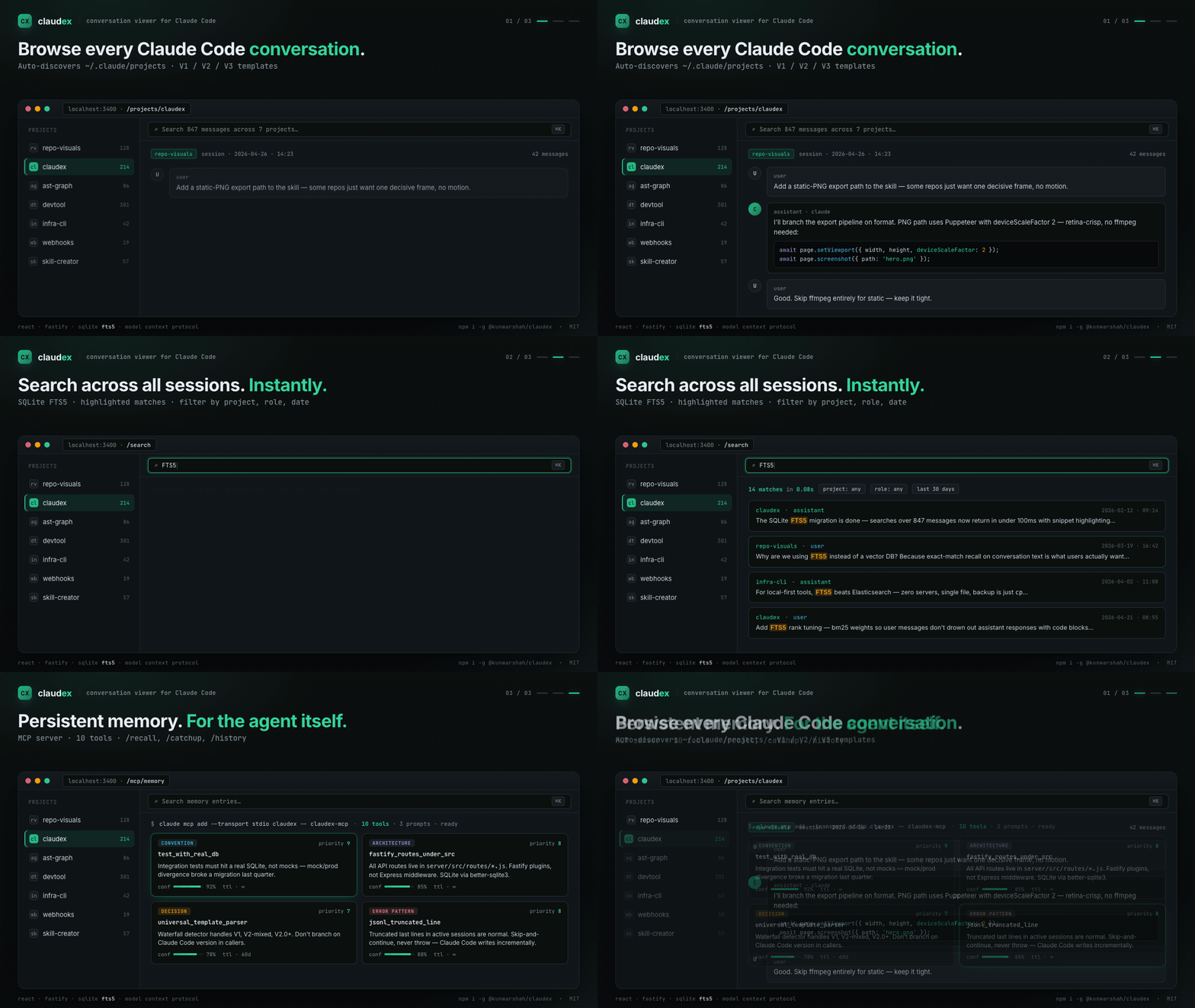
Professional conversation viewer and analysis tool for Claude Code
Category: Development Tools · Conversation Analysis · Usage Monitoring
Claudex is a full-stack web application designed for developers, QA engineers, and researchers who need to inspect, search, and analyze Claude Code conversation histories. Built with React and Fastify, it provides enterprise-grade full-text search using SQLite FTS5, universal template support for all Claude Code versions, and comprehensive analytics dashboards.
MCP server with persistent memory + FTS5 search for Claude Code conversation history. Index your ~/.claude/projects/, expose 10 MCP tools, browse via web UI. MIT-licensed.
MCP Server: Give Claude Code persistent memory — conventions, architecture, decisions, and error patterns survive across sessions
Structured Memory: Store and recall coding knowledge with priority (1-10), confidence, and TTL-based expiration
Auto Project Discovery: Automatically scans ~/.claude/projects directory to discover all conversations across multiple projects
Full-Text Search: Enterprise-grade SQLite FTS5 search engine with advanced filtering by project, session, role, date range, and content highlighting
Universal Template Support: Intelligent template detection and parsing for all Claude Code versions (V1.x, V2-mixed, V2.0+) with automatic format detection
Session Analytics: Comprehensive analytics dashboard with message distribution charts, file operation tracking, and conversation statistics using Tremor React
Export Options: Export conversations to JSON (structured data), HTML (readable format), or plain TXT for archival and sharing
Modern UI: Responsive React interface with 10 themes, 29 fonts, session favorites, and optimized for developer workflows
💖 Support This Project
Claudex is free and open source. If it saves you time and improves your workflow, please consider:
Every contribution helps keep this project alive and growing! 🚀
🚀 Quick Start
Prerequisites
Node.js 18+ and npm
Claude Code installed with conversation history in ~/.claude/projects
Installation
Option 1: npm (Recommended)
# Global installation
npm install -g @kunwarshah/claudex [https://www.npmjs.com/package/@kunwarshah/claudex]

# Then run anywhere:
claudex

# Custom port (if 3400 is in use):
claudex --port 3500

# Custom project directory:
claudex --project-root ~/my-claude-projects

# Or use without installing (npx):
npx @kunwarshah/claudex
Add MCP Server (gives Claude Code persistent memory):
claude mcp add --transport stdio claudex -- claudex-mcp
The viewer automatically detects and parses all Claude Code conversation formats:
V3 Template (Universal - Recommended)
Claude Code v2.0+: New format with role field directly
Claude Code v1.x: Original format with type field
Edge cases: Mixed formats and migration states
New message types: file-history-snapshot support
Role mapping: All system messages → assistant (binary user/assistant classification)
Legacy Templates (Auto-detected)
V2-Mixed: Transition format between V1 and V2
V1: Original Claude Code format
The template detector uses a waterfall detection strategy, automatically selecting the best parser for your conversation files.
🔍 Search System
Building the Search Index
The search index needs to be built before searching:
# Option 1: Via API
curl -X POST http://localhost:3400/api/search/index/build

# Option 2: Via test script
./test-search.sh

# Option 3: Via UI (Search page → "Rebuild Index" button)
When to Rebuild Index
Rebuild the search index when:
First time setup
After template changes
When new conversations are added
If search results seem outdated
Search API Examples
# Basic search
curl -X POST http://localhost:3400/api/search \
  -H "Content-Type: application/json" \
  -d '{"q": "migration", "limit": 10}'

# Search with filters
curl -X POST http://localhost:3400/api/search \
  -H "Content-Type: application/json" \
  -d '{
    "q": "database",
    "projectId": "my-project",
    "role": "user",
    "limit": 20,
    "offset": 0
  }'

# Check index status
curl http://localhost:3400/api/search/index/status
# Run both frontend + backend with hot reload
npm run dev

# Or run separately:
# Terminal 1 - Backend (auto-restarts on changes)
cd server && npm run dev

# Terminal 2 - Frontend (hot module replacement)
cd client && npm run dev
This will check all common problems and provide actionable suggestions.
Common Issues
"No messages found" Despite Messages Existing
Fixed in v1.1.1 - If you see intermittent empty sessions or duplicate key warnings:
# Update to latest version
cd claude-viewer
git pull origin main
npm install && cd server && npm install && cd ../client && npm install && cd ..
npm run dev
# Check what the system sees
npm run check

# Verify path
cat server/.env | grep PROJECT_ROOT
Verify PROJECT_ROOT in .env points to ~/.claude/projects
Check that Claude Code has created conversation files
Run npm run check:fix to auto-create missing directories
Search Not Working
# Quick fix via UI
# Visit http://localhost:3000/search → Click "Rebuild Index"

# Or via command line
curl -X POST http://localhost:3400/api/search/index/build
Port Conflicts
# System checker will detect port conflicts
npm run check

# Auto-detected ports in use show PID
# Kill process: kill <PID>
# Or change PORT in server/.env
# Build image manually
docker build -t claudex:latest .

# Run container manually
docker run -d \
  -p 3400:3400 \
  -v ~/.claude/projects:/root/.claude/projects:ro \
  -v claudex-data:/app/data \
  --name claudex-web \
  claudex:latest

# Check health
docker ps  # Check STATUS column for "healthy"

# View logs
docker logs claudex-web -f

# Stop and remove
docker stop claudex-web && docker rm claudex-web
Docker Features
Multi-stage build: Optimized image size (~200MB)
Non-root user: Runs as nodejs user for security
Health checks: Automatic health monitoring
Persistent volumes: Stores search index and logs
Read-only mounts: Claude projects mounted read-only for safety
Log rotation: JSON logs with 10MB max size, 3 file rotation
Docker Environment Variables
# Override in docker-compose.yml or docker run
-e PORT=3400                           # Server port
-e HOST=0.0.0.0                        # Bind address
-e NODE_ENV=production                 # Environment
-e PROJECT_ROOT=/root/.claude/projects # Claude projects path
Manual Production Build
For non-Docker deployments:
# 1. Install dependencies
npm run install-deps

# 2. Build client
npm run build

# 3. Start server (serves built client)
cd server && NODE_ENV=production npm start
Use the search page to find conversations across all projects
Export conversations to share with team members
Rebuild search index after adding new conversations
Check /api/health endpoint to verify system status
Use npm run dev for the best development experience with hot reload
C
Claudex
kunwar-shah·97 स्टार·
MCP server with persistent memory + FTS5 search for Claude Code conversation history. Index your ~/.claude/projects/, expose 10 MCP tools, browse via web UI. MIT-licensed.
अभी टूल सूची नहीं है। रिमोट सर्वर को पहले हेल्थ चेक के बाद सूची मिलती है।
FAQ
सवाल
Claudex कैसे इंस्टॉल करें?
इस पेज पर Cursor, Claude Desktop, Claude Code या VS Code के लिए stdio कॉन्फ़िग कॉपी करें। यह पब्लिशर का इंस्टॉल इस्तेमाल करता है, PlugMCP प्रॉक्सी नहीं।
क्या Claudex के लिए API key चाहिए?
पब्लिशर ने ये एनवायरनमेंट वेरिएबल बताए हैं: PROJECT_ROOT।
Claudex कौन सा ट्रांसपोर्ट इस्तेमाल करता है?
Claudex stdio पर लोकल चलता है।
Claudex की पिछली जाँच कब हुई थी?
पिछली जाँच 2026-10-28 को हुई। MCP server with persistent memory + FTS5 search for Claude Code conversation history. Index your ~/.claude/projects/, expose 10 MCP tools, browse via web UI. MIT-licensed.