Power your agent
पब्लिशर का इंस्टॉल। PlugMCP एंडपॉइंट नहीं।
Host a copy with our keys and logs.
रजिस्ट्री में अभी कोई पैकेज्ड रिलीज़ नहीं है। रिपॉज़िटरी का README देखें.
रिमोट URL या आपकी मशीन पर कमांड? दोनों इंस्टॉल में क्या अंतर है
PlugMCP पर चलाएँ
A new server you create. It is not this listing's official endpoint. Use the publisher install when you want their URL and their credentials.
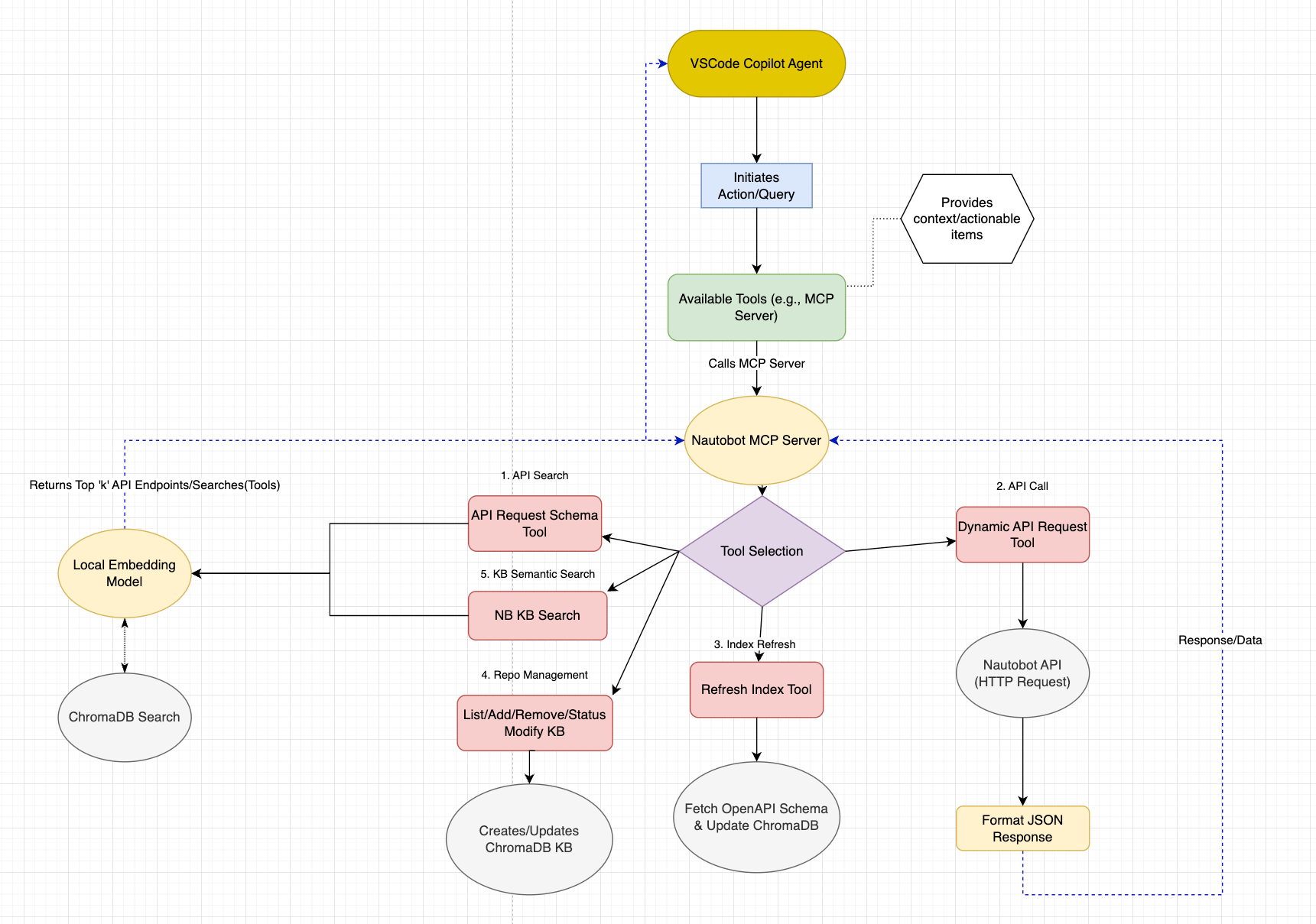
लॉन्चA Model Context Protocol (MCP) server for interacting with Nautobot APIs using semantic search and dynamic API requests. This server provides intelligent access to Nautobot instances and a comprehensive knowledge base of Nautobot-related repositories.
nautobot_dynamic_api_request: Execute any HTTP method against Nautobot APIsnautobot_openapi_api_request_schema: Discover API endpoints through semantic searchnautobot_kb_semantic_search: Search through indexed Nautobot documentation and code
The easiest way to run the Nautobot MCP server is using Docker:
Clone the repository:
git clone <repository-url>
cd nautobot_mcp
Configure environment variables:
cp .env.example .env
# Edit .env with your configuration
Run with Docker Compose:
# For stdio mode (default)
docker compose up -d

# For HTTP mode
MCP_TRANSPORT=http MCP_PORT=8000 docker compose up -d
Clone the repository:
git clone <repository-url>
cd nautobot_mcp
Install dependencies:
# Using uv (recommended)
uv sync

# Or using pip
pip install -e .
Configure environment variables:
cp .env.example .env
# Edit .env with your configuration
Create a .env file with the following variables:
# Nautobot API Configuration
NAUTOBOT_TOKEN=your_nautobot_api_token
NAUTOBOT_ENV=local  # Options: local, nonprod, prod

# Environment-specific URLs and tokens
NAUTOBOT_NONPROD_BASE_URL=https://nautobot-nonprod.example.com/
NAUTOBOT_NONPROD_TOKEN=your_nonprod_token
NAUTOBOT_PROD_BASE_URL=https://nautobot.example.com/
NAUTOBOT_PROD_TOKEN=your_prod_token

# GitHub Configuration (for knowledge base)
GITHUB_TOKEN=your_github_token

# Optional Configuration
SSL_VERIFY=False  # Set to True for production
POSTHOG_API_KEY=disable  # Analytics (optional)
The knowledge base automatically indexes official Nautobot repositories. You can customize this by editing:
config/repositories.json - Official and community repositoriesconfig/user_repositories.json - Your custom repositoriesExample repository configuration:
{
  "name": "nautobot/nautobot",
  "description": "Core Nautobot application",
  "priority": 1,
  "enabled": true,
  "branch": "develop",
  "file_patterns": [".py", ".md", ".txt", ".rst", ".yaml", ".yml"]
}
stdio mode (for MCP clients like Claude Desktop, VS Code, etc.):
# Using docker compose
docker compose up -d

# Or using docker run
docker run -d \
  --name nautobot-mcp \
  --env-file .env \
  -v nautobot-mcp-chroma:/app/backend/chroma_db \
  -v nautobot-mcp-models:/app/backend/models \
  nautobot-mcp:latest --mode stdio
HTTP mode (for web-based integrations):
# Using docker compose
MCP_TRANSPORT=http MCP_PORT=8000 docker compose up -d

# Or using docker run
docker run -d \
  --name nautobot-mcp \
  --env-file .env \
  -e MCP_TRANSPORT=http \
  -e MCP_PORT=8000 \
  -p 8000:8000 \
  -v nautobot-mcp-chroma:/app/backend/chroma_db \
  -v nautobot-mcp-models:/app/backend/models \
  nautobot-mcp:latest --mode http --port 8000
View logs:
# Follow logs
docker compose logs -f

# View last 100 lines
docker compose logs --tail=100
Stop the server:
docker compose down

# To also remove volumes (warning: deletes ChromaDB data)
docker compose down -v
stdio mode:
python main.py
# or
python main.py --mode stdio
HTTP mode:
python main.py --mode http
# or with custom port
python main.py --mode http --port 9000
Legacy server files (still supported):
# stdio mode
python server.py

# HTTP mode
python server_http.py
The server will automatically:
Add to your VS Code MCP settings to use with GitHub Copilot:
Local Installation:
{
	"servers": {
		"nautobot_mcp": {
			"type": "stdio",
			"command": "uv",
			"args": [
				"run",
				"--directory",
				"/path/to/nautobot_mcp",
				"python",
				"main.py",
				"--mode",
				"stdio"
			]
		}
	},
	"inputs": []
}
Docker Installation:
{
	"servers": {
		"nautobot_mcp": {
			"type": "stdio",
			"command": "docker",
			"args": [
				"run",
				"-i",
				"--rm",
				"--env-file",
				"/path/to/nautobot_mcp/.env",
				"-v",
				"nautobot-mcp-chroma:/app/backend/chroma_db",
				"-v",
				"nautobot-mcp-models:/app/backend/models",
				"nautobot-mcp:latest",
				"--mode",
				"stdio"
			]
		}
	},
	"inputs": []
}
Data Persistence:
nautobot-mcp-chroma volumenautobot-mcp-models volumedocker compose down -vEnvironment Variables:
.env file.env file is loaded automatically when using docker composedocker run, use --env-file .env or -e VAR=value for individual variablesTransport Modes:
MCP_TRANSPORT=http or MCP_TRANSPORT=stdioResource Management:
docker compose.yml under deploy.resourcesdocker stats nautobot-mcp-serverLogs:
docker compose logs -fdocker compose.yml under logging
### Example API Requests

#### Search for API Endpoints
```python
# Find endpoints related to devices
query = "get device information"
# Returns relevant endpoints like /dcim/devices/
# Get all locations
method = "GET"
path = "/dcim/locations/"
params = {"limit": 100}
# Find documentation about custom fields
query = "how to create custom fields in Nautobot"
# Returns relevant documentation and code examples
nautobot_mcp/
├── server.py                 # Main MCP server
├── pyproject.toml            # Project configuration
├── .env                      # Environment variables
│
├── config/                   # Configuration files
│   ├── repositories.json     # Official repository definitions
│   └── user_repositories.json # User-defined repositories
│
├── helpers/                  # Core modules
│   ├── nb_kb_v2.py          # Enhanced knowledge base
│   ├── endpoint_searcher_chroma.py # API endpoint search
│   ├── content_processor.py  # Document processing
│   └── manage_repos.py       # Repository management
│
├── utils/                    # Utility modules
│   ├── config.py            # Configuration management
│   ├── embedding.py         # Vector embedding utilities
│   ├── git_manager.py       # Git operations
│   └── repo_config.py       # Repository configuration
│
├── examples/                 # Usage examples
│   ├── example_kb_search.py  # Knowledge base search demo
│   ├── config_demo.py       # Configuration examples
│   └── pynautobot_kb_example/ # PyNautobot integration
│
├── tests/                    # Test suite
│   ├── test_nb_kb_v2.py     # Knowledge base tests
│   ├── test_endpoint_searcher_chroma.py # API search tests
│   └── test_manage_repos.py  # Repository management tests
│
└── backend/                  # Data storage
    └── models/               # Cached embedding models
# Run all tests
pytest

# Run specific test categories
pytest -m "unit"
pytest -m "integration"
pytest -m "not slow"

# Run with coverage
pytest --cov=helpers --cov=utils
The project uses several tools for code quality:
# Format code
ruff format .

# Lint code
ruff check .

# Pre-commit hooks (install once)
pre-commit install
To add repositories to the knowledge base:
Add to configuration:
from helpers.manage_repos import RepositoryManager

manager = RepositoryManager()
manager.add_repository("owner/repo", category="custom", description="My custom repo")
Initialize the repository:
manager.initialize_repositories(force=True)
from helpers.nb_kb_v2 import EnhancedNautobotKnowledge

kb = EnhancedNautobotKnowledge()
results = kb.search("custom field validation", n_results=5)

for result in results:
    print(f"Repository: {result['metadata']['repository']}")
    print(f"File: {result['metadata']['file_path']}")
    print(f"Content: {result['document'][:200]}...")
from helpers.endpoint_searcher_chroma import EndpointSearcherChroma

searcher = EndpointSearcherChroma()
endpoints = searcher.search("create new device", n_results=3)

for endpoint in endpoints:
    print(f"Method: {endpoint['method']}")
    print(f"Path: {endpoint['path']}")
    print(f"Description: {endpoint['description']}")
import requests
from utils.config import config

# Example: Get device count
response = requests.get(
    f"{config.NAUTOBOT_BASE_URL}/api/dcim/devices/",
    headers={"Authorization": f"Token {config.NAUTOBOT_TOKEN}"},
    params={"limit": 1},
    verify=config.SSL_VERIFY
)

total_count = response.json()["count"]
print(f"Total devices: {total_count}")
git checkout -b feature/amazing-feature)git commit -m 'Add amazing feature')git push origin feature/amazing-feature)The examples/ directory contains several demonstration scripts:
example_kb_search.py - Basic knowledge base search functionalityexample_job.py - Example Nautobot job integrationdemo_hybrid_processing.py - Demonstrates hybrid content processingexample_detailed_search_analysis.py - Advanced search analysisfetch_schema.py - OpenAPI schema fetching utilitypynautobot_kb_example/ - PyNautobot integration examplesThe project includes comprehensive tests in the tests/ directory:
# Run all tests
uv run python -m pytest tests/

# Run specific test files
uv run python tests/test_nb_kb_v2.py
uv run python tests/test_endpoint_searcher_chroma.py
uv run python tests/test_manage_repos.py
Test your configuration and server setup:
# Test configuration
uv run python -c "from utils.config import config; print('Config OK:', config.SERVER_NAME)"

# Test server initialization
uv run python -c "from server import main; print('Server imports OK')"
nautobot_openapi_api_request_schema: Search for API endpoints by intentnautobot_dynamic_api_request: Execute API requests with any HTTP methodrefresh_endpoint_index: Manually refresh the endpoint search indexnautobot_kb_semantic_search: Semantic search over Nautobot knowledge base repositoriesnautobot_kb_list_repos: List repositories configured in Nautobot knowledge basenautobot_kb_add_repo: Add a new repository to the Nautobot knowledge basenautobot_kb_remove_repo: Remove an existing repository from the Nautobot knowledge basenautobot_kb_update_repos: Update repositories in the Nautobot knowledge basenautobot_kb_init_repos: Initialize repositories in the Nautobot knowledge basenautobot_kb_repo_status: Show nautobot knowledge base repository status including document counts and indexing statusSSL Certificate Errors:
# Set SSL_VERIFY=False in .env for development
SSL_VERIFY=False
ChromaDB Permission Issues:
# Ensure proper permissions on the backend directory
chmod -R 755 backend/
GitHub API Rate Limits:
# Ensure you have a valid GitHub token
GITHUB_TOKEN=your_github_token
Repository Initialization Fails:
# Force reinitialize repositories
kb = EnhancedNautobotKnowledge()
kb.initialize_all_repositories(force=True)
Container Won't Start:
# Check logs for errors
docker compose logs

# Verify environment variables
docker compose config

# Rebuild the image
docker compose build --no-cache
Volume Permission Issues:
# Check volume permissions
docker compose exec nautobot-mcp ls -la /app/backend/

# If needed, recreate volumes
docker compose down -v
docker compose up -d
Port Already in Use (HTTP mode):
# Check what's using the port
lsof -i :8000

# Use a different port
MCP_PORT=9000 docker compose up -d
Out of Memory Errors:
# Increase memory limits in docker compose.yml
# Under deploy.resources.limits.memory

# Check current usage
docker stats nautobot-mcp-server
ChromaDB Data Not Persisting:
# Verify volumes are created
docker volume ls | grep nautobot-mcp

# Inspect volume
docker volume inspect nautobot-mcp-chroma
Building Behind Corporate Proxy:
# Add proxy settings to docker compose.yml build args
docker compose build \
  --build-arg HTTP_PROXY=http://proxy.example.com:8080 \
  --build-arg HTTPS_PROXY=http://proxy.example.com:8080
Enable debug logging by setting:
LOG_LEVEL=DEBUG
examples/ directory for usage patternsThis project is licensed under the MIT License - see the LICENSE file for details.
Nautobot Model Context Protocol (MCP) Server - Contains STDIO and HTTP Deployments with Embedding Search and RAG.
टूल
अभी टूल सूची नहीं है। रिमोट सर्वर को पहले हेल्थ चेक के बाद सूची मिलती है।
FAQ
इस पेज पर Cursor, Claude Desktop, Claude Code या VS Code के लिए stdio कॉन्फ़िग कॉपी करें। यह पब्लिशर का इंस्टॉल इस्तेमाल करता है, PlugMCP प्रॉक्सी नहीं।
इस रिकॉर्ड में कोई ज़रूरी एनवायरनमेंट वेरिएबल दर्ज नहीं है।
Nautobot stdio पर लोकल चलता है।
पिछली जाँच 2026-10-28 को हुई। Nautobot Model Context Protocol (MCP) Server - Contains STDIO and HTTP Deployments with Embedding Search and RAG.