mcp-box
Power your agent
पब्लिशर का इंस्टॉल। PlugMCP एंडपॉइंट नहीं।
Host a copy with our keys and logs.
रजिस्ट्री में अभी कोई पैकेज्ड रिलीज़ नहीं है। रिपॉज़िटरी का README देखें.
रिमोट URL या आपकी मशीन पर कमांड? दोनों इंस्टॉल में क्या अंतर है
PlugMCP पर चलाएँ
A new server you create. It is not this listing's official endpoint. Use the publisher install when you want their URL and their credentials.
लॉन्चYour AI agent's tools run with your permissions. When an MCP server can call run_command or write files,
a buggy prompt or a malicious instruction can reach your home directory, your SSH keys, and your cloud credentials.
mcp-box puts every MCP server inside a locked-down Docker sandbox with a read-only root filesystem, explicit writable mounts,
dropped Linux capabilities, and per-profile network policy. Only the folders you mount are writable; the rest of your host stays out of reach.
mcp-box is the boringly reliable way to run MCP servers safely: inspectable, reproducible, and default-deny by design.
mcp-box is a single, portable Go binary that launches turnkey, immutable, strictly-isolated
container sandboxes for Model Context Protocol (MCP) servers. Nix is used for deterministic image builds
when present, but it is entirely optional. Without Nix, mcp-box pulls the same pinned OCI image definitions
from GHCR and runs them under the same Docker isolation model. Docker is the only hard requirement.
Same server, same hardening, same sandbox boundary — only the image source changes.
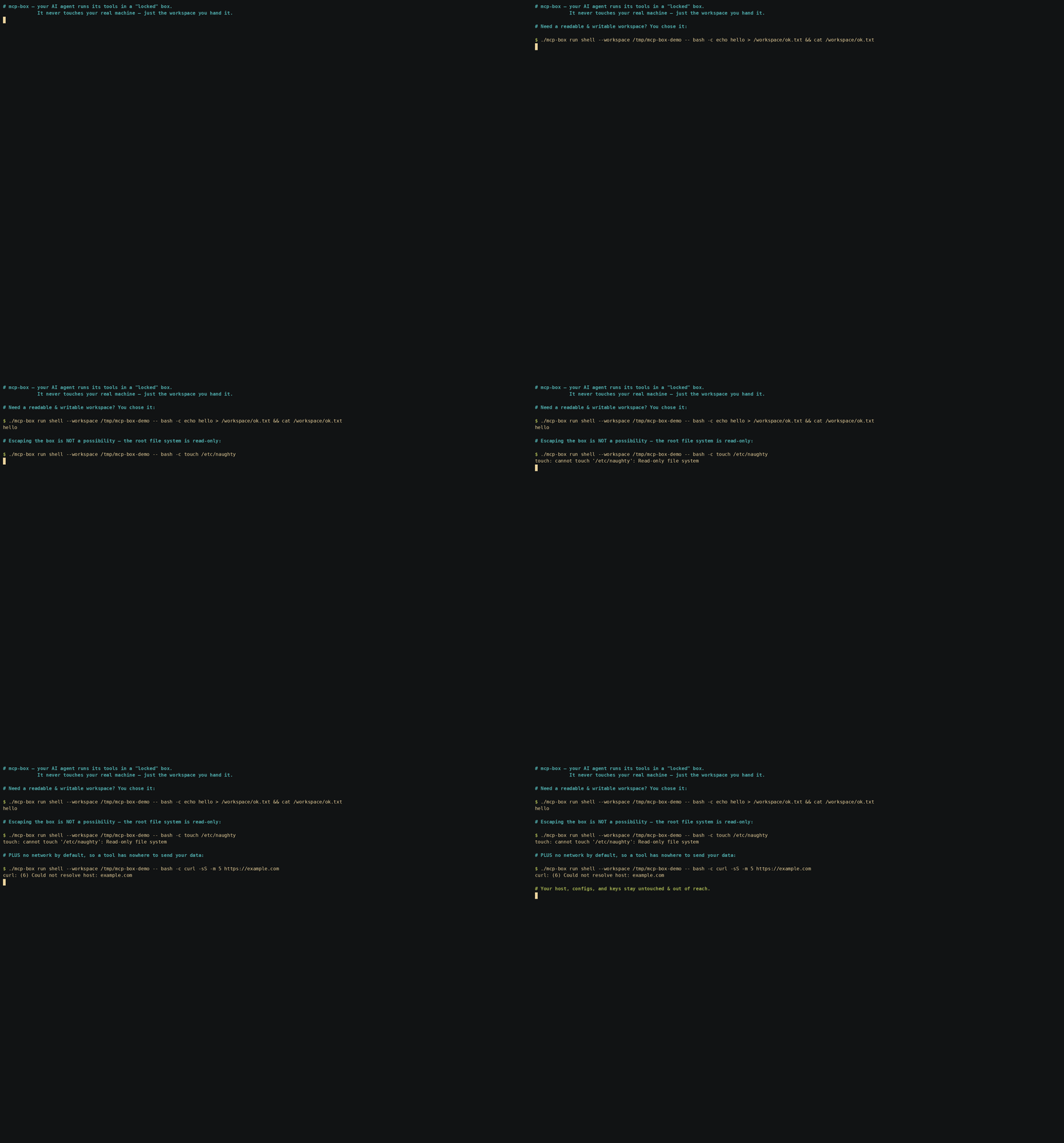
You can audit the sandbox boundary directly by overriding the container command with -- bash -c '...'. These checks prove the boundary itself, not just the MCP server running inside it. The hardening (read-only root, no network, dropped capabilities, host UID mapping) applies to any process in the box:
/workspace are rejected:
./mcp-box run shell -- bash -c 'touch /etc/naughty'
# => touch: cannot touch '/etc/naughty': Read-only file system   (exit 1)
--network none, DNS/egress fail:
./mcp-box run shell -- bash -c 'curl -I https://google.com'
# => curl: (6) Could not resolve host: google.com               (exit 6)
sudo is not even present in the image:
./mcp-box run shell -- bash -c 'sudo -l'
# => bash: line 1: sudo: command not found                       (exit 127)
./mcp-box run shell -- bash -c 'id'
# => uid=<your uid> gid=<your gid> ...   (files in /workspace are owned by you)
--read-only): The entire root filesystem is mounted read-only.--tmpfs): Writable spaces (/tmp and /run) exist solely in RAM and disappear once the container stops.--cap-drop=ALL): The running processes have no special Linux kernel capabilities.no-new-privileges:true): Prevents elevation to root inside the sandbox.--network none.fetch profile is the exception by design: it uses a controlled network mode for web access, while still keeping the container boundary intact.--workspace) are visible to the server at /workspace.-u $(id -u):$(id -g)), ensuring that files written to mounted workspaces are owned by you (not root) and don't trigger host-side permission errors.mcp-box config <server>) prints out paste-ready JSON snippets to plug directly into claude_desktop_config.json or OpenClaw configurations.mcp-box automatically detects this and falls back to pulling pre-built, identical, and secure OCI images directly from the GitHub Container Registry (ghcr.io/lowcache), making Nix entirely optional for the end-user.mcp-box is designed to be inspectable, scriptable, and auditable.
mcp-box run <server> — launch a sandboxed MCP servermcp-box stop <id> — stop a running sandboxmcp-box ps — list active sandboxesmcp-box inspect <id> — show the full sandbox spec and policymcp-box logs <id> — read audit logsmcp-box logs --follow — stream live eventsmcp-box config <server> — print paste-ready client configmcp-box build <server> — rebuild or refresh an OCI image# 1. Get the binary (Docker is the only dependency)
curl -sSL https://github.com/lowcache/mcp-box/releases/latest/download/mcp-box-linux-amd64 -o mcp-box
chmod +x mcp-box && mv mcp-box ~/.local/bin/
# 2. Prove the sandbox holds — this write MUST fail
mcp-box run shell --workspace /tmp/demo -- bash -c 'touch /etc/naughty'
# => touch: cannot touch '/etc/naughty': Read-only file system
# 3. Wire it into your AI client (paste the output into claude_desktop_config.json)
mcp-box config sqlite
mcp-box is not just a runner — it is a trust layer for MCP execution.
Planned core platform features:
readonly, dev, trusted, internet-off, internet-onps / inspect / logs so every sandbox can be checked after launchDepending on your installation path, mcp-box has distinct dependency requirements:
flakes and nix-command enabled).graph TD
subgraph Host [Host Environment]
Agent[AI Agent / Claude Desktop] <-->|stdio piping| CLI[mcp-box CLI]
CLI -->|Checks for Nix| NixDetect{Nix Installed?}
NixDetect -->|Yes: Source Flow| NixBuild[nix build .#server]
NixBuild -->|Stream tarball| DockerLoad[docker load]
NixDetect -->|No: Registry Flow| DockerPull[docker pull ghcr.io]
DockerPull -->|Tag locally| DockerLoad
DockerLoad -->|Loads image| Docker[Docker Engine]
end
subgraph Sandbox [Docker Sandbox]
Server[MCP Server]
Tools[Isolated Tools: git, rg, sqlite3, curl]
Workspace[Mounted Workspace: /workspace]
end
Docker -->|spawns with strict isolation| Sandbox
CLI <-->|stdio piping| Server
Depending on your host environment, you can install and run mcp-box with three different avenues:
For systems that only have Docker installed:
linux/darwin, amd64/arm64):
curl -sSL https://github.com/lowcache/mcp-box/releases/latest/download/mcp-box-linux-amd64 -o mcp-box
chmod +x mcp-box
mv mcp-box ~/.local/bin/ # Or another folder in your PATH
On first execution, mcp-box will automatically detect the absence of Nix and pull the pre-built OCI images from ghcr.io/lowcache into your local Docker daemon.
For systems running Nix/NixOS:
nix run github:lowcache/mcp-box -- list
nix profile install github:lowcache/mcp-box
# flake.nix inputs:
inputs.mcp-box.url = "github:lowcache/mcp-box";

# In systemPackages or home.packages:
inputs.mcp-box.packages.${pkgs.system}.default
On first execution, mcp-box will build the Go binary and OCI images purely from source and load them directly into your local Docker daemon.
If you want to compile the CLI binary manually without Nix:
git clone https://github.com/lowcache/mcp-box.git
cd mcp-box
src/go):
cd src/go
go build -o ../../mcp-box .
You can now run ./mcp-box directly, which will pull OCI layers from the registry or build locally using Nix based on your host environment.
./mcp-box help
./mcp-box list
You can launch any server interactively to test its behavior and tools:
./mcp-box run sqlite --workspace /tmp/sandbox-db -- --db /workspace/test.db
If you want to manually rebuild or force-update a Nix-built image:
./mcp-box build sqlite
mcp-box config <server> prints a ready-to-paste mcpServers JSON block (with an
absolute path to the binary). The same block works for both Claude Desktop and
Claude Code.
./mcp-box config sqlite
Claude Code does not use claude_desktop_config.json. Add the server with one
command — note the nested -- (the first separates claude's flags from the
subprocess; the second is consumed by mcp-box to forward server args):
# user scope (available in every project); drop -s user for the current project only
claude mcp add -s user mcp-box-sqlite -- \
  mcp-box run sqlite --workspace /abs/path/to/workspace -- --db /workspace/db.sqlite
Or, to commit a shareable config to your repo, drop the mcp-box config JSON block
straight into a project-root .mcp.json — it uses the exact {"mcpServers": …}
shape that config emits.
Verify with claude mcp list.
Paste the config block into claude_desktop_config.json. Its location is
OS-specific:
Highly isolated Linux container environments optimized specifically for mcp-servers. Secure AI agent tool execution.
टूल
अभी टूल सूची नहीं है। रिमोट सर्वर को पहले हेल्थ चेक के बाद सूची मिलती है।
FAQ
इस पेज पर Cursor, Claude Desktop, Claude Code या VS Code के लिए stdio कॉन्फ़िग कॉपी करें। यह पब्लिशर का इंस्टॉल इस्तेमाल करता है, PlugMCP प्रॉक्सी नहीं।
इस रिकॉर्ड में कोई ज़रूरी एनवायरनमेंट वेरिएबल दर्ज नहीं है।
MCP Box stdio पर लोकल चलता है।
पिछली जाँच 2026-10-28 को हुई। Highly isolated Linux container environments optimized specifically for mcp-servers. Secure AI agent tool execution.
