Claude Colony
A tmux-based multi-agent orchestration system where multiple Claude Code instances collaborate on software development tasks.
Power your agent
पब्लिशर का इंस्टॉल। PlugMCP एंडपॉइंट नहीं।
Host a copy with our keys and logs.
रजिस्ट्री में अभी कोई पैकेज्ड रिलीज़ नहीं है। रिपॉज़िटरी का README देखें.
रिमोट URL या आपकी मशीन पर कमांड? दोनों इंस्टॉल में क्या अंतर है
PlugMCP पर चलाएँ
A new server you create. It is not this listing's official endpoint. Use the publisher install when you want their URL and their credentials.
लॉन्चपब्लिशर से
A tmux-based multi-agent orchestration system where multiple Claude Code instances collaborate on software development tasks.
Multi-agent Claude Code you can actually control. Spawn specialist teams in tmux, watch them work side-by-side, steer when needed. Built on native Claude Code agents. No black boxes.
Claude Colony enables a team of AI agents to work together on complex tasks. It builds on Claude Code's native agent system (.claude/agents/) — create your agents there, then orchestrate them as a team.
Each agent has a unique persona, role, and area of focus. They communicate via a file-based message broker and are visualized in a tmux session.
┌─────────────────────┬─────────────────────────────┐
│                     │      Specialist Agent 1     │
│                     ├─────────────────────────────┤
│   Manager Agent     │      Specialist Agent 2     │
│      (40%)          ├─────────────────────────────┤
│                     │      Specialist Agent 3     │
│                     ├─────────────────────────────┤
│                     │   Shared Context (10%)      │
└─────────────────────┴─────────────────────────────┘
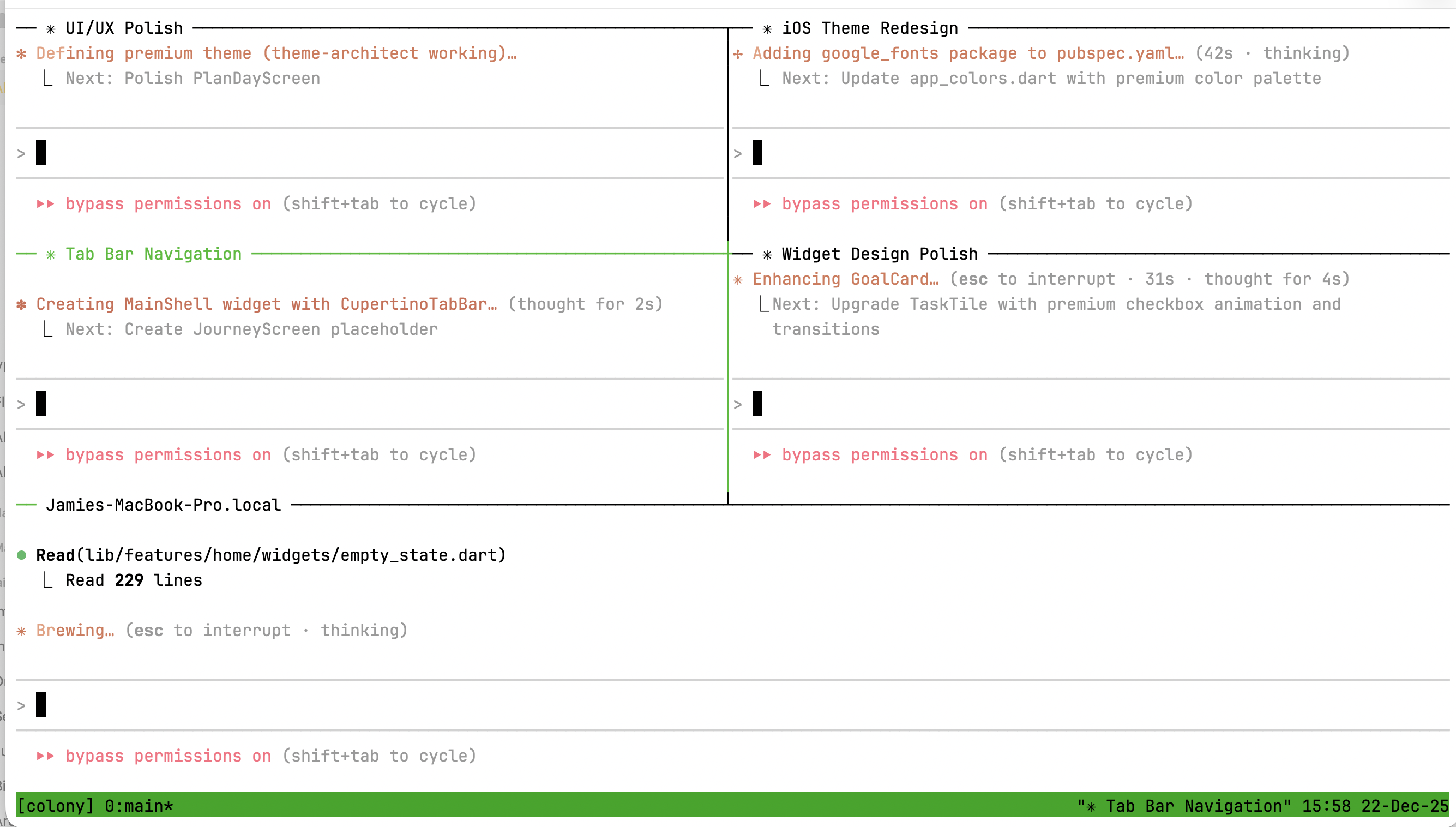
Note: Because each agent is a full Claude Code instance with unlimited capability, token usage can add up quickly. We recommend using Claude Colony with a Max plan for the best experience.
brew install tmux (macOS) or apt install tmux (Linux)# Verify Claude Code is working
claude --version
# Install globally from npm
npm install -g claude-colony

# Or run directly with npx
npx claude-colony --help
git clone https://github.com/jamiemurphy/claude-colony.git
cd claude-colony
npm install && npm run build && npm link
# Initialize colony in your project
colony init

# Start a colony with a preset
colony start --preset fullstack

# Check status
colony status

# Stop the colony
colony stop
Tip: For best results, create custom agents in
.claude/agents/tailored to your project, then build a preset that uses them withcolony create-team.
colony start [options]

Options:
  -p, --preset <name>   Use a preset configuration
  -a, --agents <count>  Number of worker panes (default: 4)
  --no-attach           Don't attach to tmux session
colony create <name> [options]

Options:
  -d, --description <desc>  Agent description
  -m, --model <model>       Model (sonnet, opus, haiku)
  -t, --tools <tools>       Comma-separated tools
  -g, --global              Create in ~/.claude/agents/
  -f, --force               Overwrite existing
Built-in presets for common team configurations:
# List all presets
colony presets

# View preset details
colony presets fullstack

# Start with a preset
colony start --preset fullstack
colony start --preset fullstack

# Agents coordinate via @mentions:
# @ux:       "I'll design the login flow wireframes"
# @frontend: "Building the form based on UX specs"
# @backend:  "Creating /auth endpoints"
# @devops:   "Setting up CI for the new routes"
colony start --preset api-team

# Parallel development:
# @api-dev builds endpoints while @data-dev designs schemas
# @docs documents as features complete
colony start -p fullstack

# In the shared pane, give context:
# @all: "Users report 500 errors on checkout. @backend investigate
#        the /orders endpoint, @frontend check error handling"
Claude Colony uses Claude Code's native agent system. The recommended workflow is:
.claude/agents/*.md filesCreate agents directly in your project's .claude/agents/ directory. These are standard Claude Code agents that work both standalone and in colonies:
---
name: api-designer
description: REST API design specialist
model: sonnet
---

# API Designer

You are an API design specialist focused on RESTful best practices...
# See all available agents (from .claude/agents/ and built-ins)
colony agents

# View agent details
colony agents api-designer

# Create a preset that uses your agents
colony create-team
If you need a quick agent without writing markdown:
colony create my-agent -d "My custom agent" -m sonnet
This creates a .claude/agents/my-agent.md file you can then customize.
After running colony init:
.colony/
├── config.yaml    # Colony configuration
├── state/         # Session state
├── messages/      # Agent communication
├── agents/        # Agent prompts
├── shared/        # Shared data channels
└── reviews/       # Code reviews
Agents communicate using @mentions:
@frontend: Build the login form with validation
@backend: Create the /auth/login endpoint
@all: Team standup in 5 minutes
@manager: I'm blocked on the API schema
Attach to the tmux session:
tmux attach -t colony
Navigation:
Ctrl+B then Arrow Keys - Switch panesCtrl+B then D - Detach (colony keeps running)# Install dependencies
npm install
# Build
npm run build
# Run tests
npm test
# Run tests once
npm run test:run
# Type check
npm run typecheck
# Lint
npm run lint
# Full check
npm run check
MIT
Multi-agent Claude Code you can actually control. Spawn specialist teams in tmux, watch them work side-by-side, steer when needed. Built on native Claude Code agents. No black boxes.
टूल
अभी टूल सूची नहीं है। रिमोट सर्वर को पहले हेल्थ चेक के बाद सूची मिलती है।
FAQ
इस पेज पर Cursor, Claude Desktop, Claude Code या VS Code के लिए stdio कॉन्फ़िग कॉपी करें। यह पब्लिशर का इंस्टॉल इस्तेमाल करता है, PlugMCP प्रॉक्सी नहीं।
इस रिकॉर्ड में कोई ज़रूरी एनवायरनमेंट वेरिएबल दर्ज नहीं है।
Claude Colony stdio पर लोकल चलता है।
पिछली जाँच 2026-10-27 को हुई। Multi-agent Claude Code you can actually control. Spawn specialist teams in tmux, watch them work side-by-side, steer when needed. Built on native Claude Code agents. No black boxes.
