dsh-skill-mcp-center
本插件属于 @max-null/* 插件系列——这一系列共同构成 SSID(思灵 · Seek Soul in Darkness) 桌面体验。SSID 是整合它们的盒:dsh-capture · dsh-chat-rail · dsh-chinese-thinking · dsh-draft-polish · · · · · · · · · · 。
Power your agent
पब्लिशर की अपनी कमांड। PlugMCP एंडपॉइंट नहीं।
Host a copy with our keys and logs.
npx -y @max-null/[email protected]Claude Code में लोकल कमांड के लिए इंस्टॉल लिंक नहीं है। नीचे दी गई कमांड कॉपी करें और टर्मिनल में चलाएँ।
claude mcp add max-null-dsh-skill-mcp-center -- npx -y @max-null/dsh-skill-mcp-center@0.8.0टर्मिनल में चलाएँ।
{ "mcpServers": { "max-null-dsh-skill-mcp-center": { "command": "npx", "args": [ "-y", "@max-null/[email protected]" ] } }}claude_desktop_config.json
रिमोट URL या आपकी मशीन पर कमांड? दोनों इंस्टॉल में क्या अंतर है
PlugMCP पर चलाएँ
A new server you create. It is not this listing's official endpoint. Use the publisher install when you want their URL and their credentials.
लॉन्चपब्लिशर से
本插件属于 @max-null/* 插件系列——这一系列共同构成 SSID(思灵 · Seek Soul in Darkness) 桌面体验。SSID 是整合它们的盒:dsh-capture · dsh-chat-rail · dsh-chinese-thinking · dsh-draft-polish · · · · · · · · · · 。
Skill & MCP management center for DeepSeek Harness — manage skills and MCP servers in Settings, live MCP status in the sidebar
dsh-guardiandsh-habitdsh-memorydsh-node-appearancedsh-plugin-centerdsh-quick-toolbardsh-skill-mcp-centerdsh-ssid-panelsdsh-ssid-zh-uidsh-achievementsThis plugin belongs to the @max-null/* family — a set of plugins that together form the SSID (思灵 · Seek Soul in Darkness) desktop experience.
Skill & MCP management center for DeepSeek Harness (dsh) — manage skills and MCP servers in Settings, with live MCP status in the sidebar.
Skill 与 MCP 管理中心:在设置里管理 skills 与 MCP 服务器,右侧边栏查看 MCP 实时状态。
disable-model-invocation frontmatter (disk-backed skills only). Covers skills shipped inside plugin packages (e.g. @max-null/dsh-skills), not just the user-level roots — the host-level skill filesystem is disabled in web-app, so a plugin's own skills/ directory would otherwise be invisible while its skills are loaded and in effect. Also covers a plugin that mounts @deepseek-ai/dsh-skill-filesystem under an id of its own and points bundledSkillDir at its skills (e.g. dsh-plugin-zhihu-search), including when the patch computes that path with a !!js expression — such a path is read from the entry's fiber, where the Loader has already evaluated it. Deleting a user-level or project-level skill is offered on the same rows, behind a confirmation that names the skill and its path; the entry is moved to ~/.dsh/.skill-trash/ rather than destroyed, so a mistaken deletion stays recoverable. Plugin and built-in skills stay read-only.mcp-client servers, enable/disable without deleting config, all hot-applied through ctx.loader (no restart).dsh-better-sidebar) showing per-server connection state; click a server row to expand its tools' names and descriptions (collapsed by default — a server can expose dozens of them). Names come from tools.schemas(); the redundant mcp__<server>__ prefix is hidden while the full name stays on hover. Polled while visible and following the session.var(--dsw-*) tokens.装完后设置里多出「Skill & MCP」一项,可逐条控制各模型对 Skill/MCP 的可见性。入口: 设置 → Skill & MCP
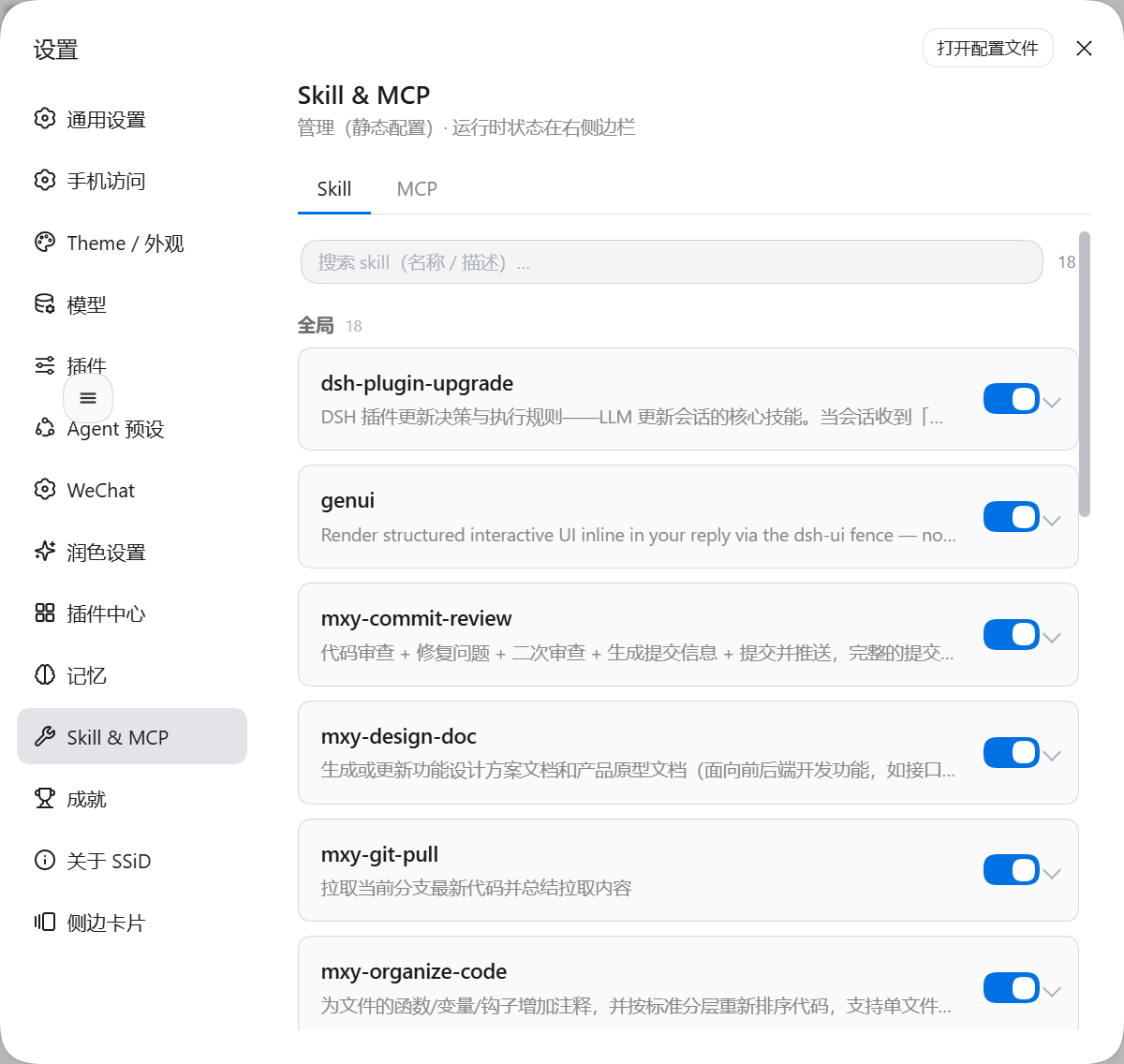
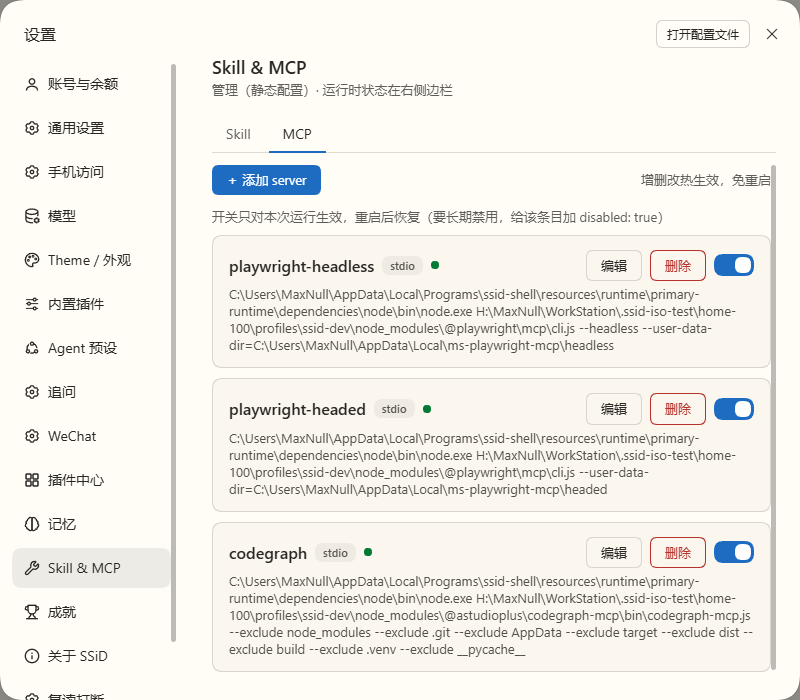
DSH 的 Loader.write() 是空实现,面板上的启停只改内存树——所以 MCP 标签页顶部写明「开关只对本次运行生效,重启后恢复」;要长期禁用,给 cordis.patch.yml 的对应条目加 disabled: true。被面板关掉的条目会在卡片里标「本次运行已停用 · 重启恢复」,而 patch 里持久禁用的条目不标——两种「关」必须能区分:
插件包内自带的技能没有可写的 SKILL.md——改名、移出目录、断链对安装内容都不生效(社区同类项目因此都只能显示「内置只读」)。这里改用 registry 的 rank 遮蔽:停用时注册一个同名占位技能(runtime rank 250 赢过包内 provider ≈550、bundled 600),两个 invocation 都设为 false,于是模型与人都调不到它,但它仍在 catalog 里、仍可被面板列出与管理;启用时调 disposer。停用清单落在 $DSH_HOME/skill-mcp-center/disabled-skills.json,重启后自动重放。
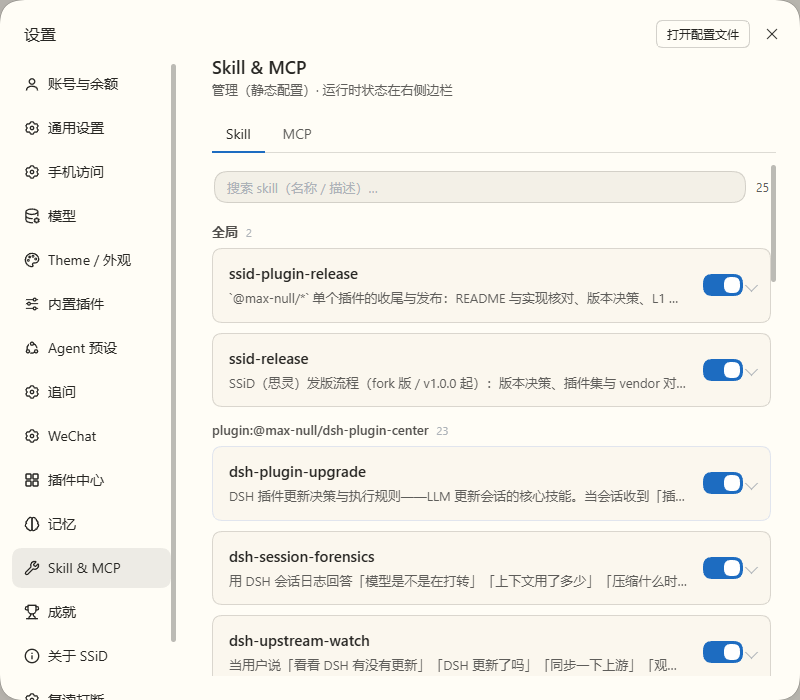
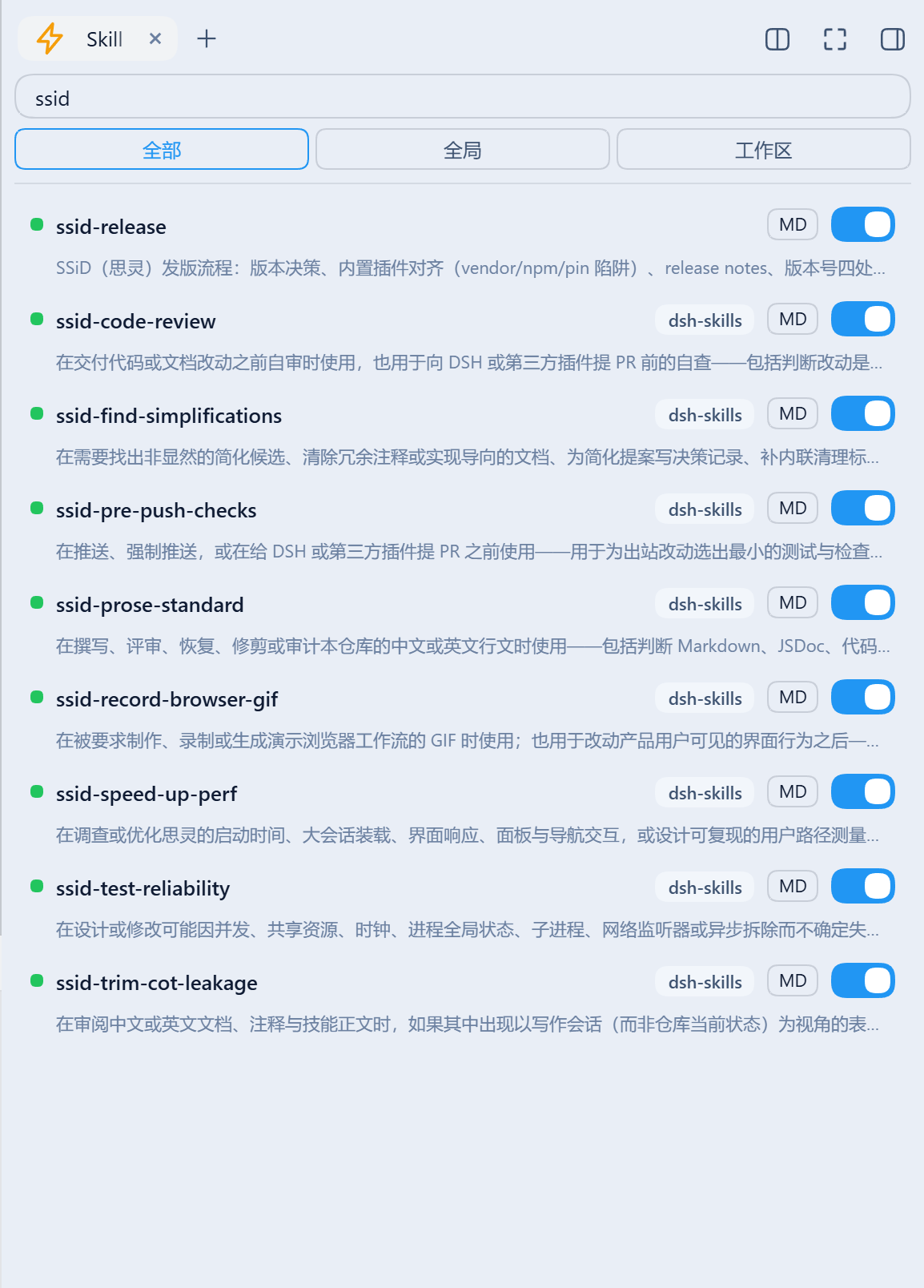
搜索 + 命名空间筛选(全部 / 全局 / 工作区),每条带开关与 MD(查看 SKILL.md)。插件包内自带的 skill 同样列出,并标出来源插件——下图里 8 个 ssid-* 来自 dsh-skills,而用户级的 ssid-release 没有来源标签,这正是两者的区别:
每个 mcp-client 服务器的连接状态与工具数;点服务器行展开工具清单(默认收起,避免几十个工具占满面板)。工具名取自工具表、描述取自 tools.schemas(),冗余的 mcp__<server>__ 前缀隐去(全名留在 hover):
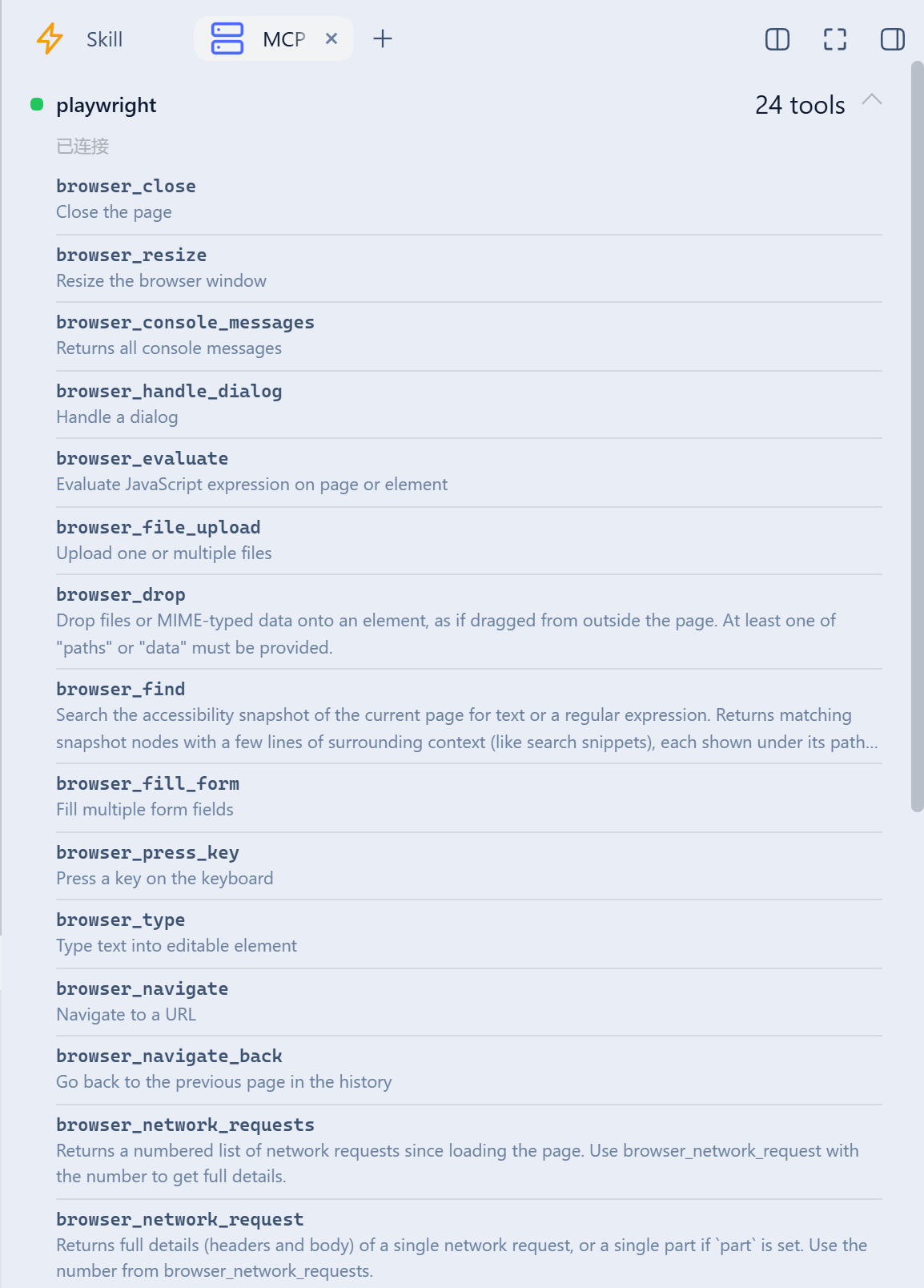
dsh plugin --profile web add github:Max-Null/dsh-skill-mcp-center
# or from npm, once published / 或通过 npm(发布后)
dsh plugin --profile web add @max-null/dsh-skill-mcp-center
Restart dsh web, then open Settings → Skill & MCP. The sidebar "MCP" tab appears only when dsh-better-sidebar is installed (optional peer).
pnpm install
pnpm build   # tsc (host) + esbuild (browser bundle)
Skill & MCP management center for DeepSeek Harness — manage skills and MCP servers in Settings, live MCP status in the sidebar
{ "mcpServers": { "max-null-dsh-skill-mcp-center": { "command": "npx", "args": [ "-y", "@max-null/[email protected]" ] } }}टूल
अभी टूल सूची नहीं है। रिमोट सर्वर को पहले हेल्थ चेक के बाद सूची मिलती है।
FAQ
इस पेज पर Cursor, Claude Desktop, Claude Code या VS Code के लिए stdio कॉन्फ़िग कॉपी करें। यह पब्लिशर का इंस्टॉल इस्तेमाल करता है, PlugMCP प्रॉक्सी नहीं।
इस रिकॉर्ड में कोई ज़रूरी एनवायरनमेंट वेरिएबल दर्ज नहीं है।
@max Null/dsh Skill MCP Center stdio पर लोकल चलता है।
पिछली जाँच 2026-11-16 को हुई। Skill & MCP management center for DeepSeek Harness — manage skills and MCP servers in Settings, live MCP status in the sidebar
