Power your agent
पब्लिशर की अपनी कमांड। PlugMCP एंडपॉइंट नहीं।
Host a copy with our keys and logs.
npx -y @npgamedev/[email protected]Claude Code में लोकल कमांड के लिए इंस्टॉल लिंक नहीं है। नीचे दी गई कमांड कॉपी करें और टर्मिनल में चलाएँ।
claude mcp add npgamedev-godot-mcp-server -- npx -y @npgamedev/godot-mcp-server@1.1.2टर्मिनल में चलाएँ।
{ "mcpServers": { "npgamedev-godot-mcp-server": { "command": "npx", "args": [ "-y", "@npgamedev/[email protected]" ] } }}claude_desktop_config.json
रिमोट URL या आपकी मशीन पर कमांड? दोनों इंस्टॉल में क्या अंतर है
PlugMCP पर चलाएँ
A new server you create. It is not this listing's official endpoint. Use the publisher install when you want their URL and their credentials.
लॉन्चThe npm bridge that connects AI coding assistants to the Godot 4.2+ editor over the Model Context Protocol. Your assistant can create scenes, edit scripts, inspect nodes, run playtests, and read the results back, directly inside the editor while you watch. It pairs with the Godot MCP Toolkit editor plugin, which hosts the WebSocket servers this bridge talks to.
Runs fully locally. No telemetry, no cloud services, no account. Nothing leaves your machine.
This is an independent community project, not affiliated with or endorsed by the Godot Foundation or Anthropic.
Desktop only: Windows, macOS, and Linux. Requires Node.js 22 or newer.
📐 Architecture → covers how the server is built: the entrypoint and startup, the WebSocket bridge, the catalogue and dispatch pipeline,
discover_tools, the GDScript LSP client, and the registry consumer. Also rendered at npgamedev.github.io/godot-mcp-server/architecture.
Built to fit your workflow, not the other way around.
The number that says the most is 150+ operations. That is the real work on offer: create a node, paint a tilemap cell, key an animation track, read a live node mid-playtest, and roughly a hundred and fifty more. Those operations are packaged into up to 113 tools (an always-on core plus 28 on-demand groups), because a tool is a slot in your client's tool budget and an operation is a thing you can actually do. Related actions sit behind one tool, which keeps the list short while the operation count tells the honest story of breadth. Some operations are version-gated, so older Godot versions (down to 4.2) expose fewer. "Up to" is literal.
Two things drive the design, and they carry equal weight:
Tested primarily with Claude Code, and compatible with any MCP client.
npm install -g @npgamedev/godot-mcp-server
Requires Node.js 22 or newer (node --version to check). Clients can also run it without a global install via npx -y @npgamedev/godot-mcp-server, which is the form the config files below use.
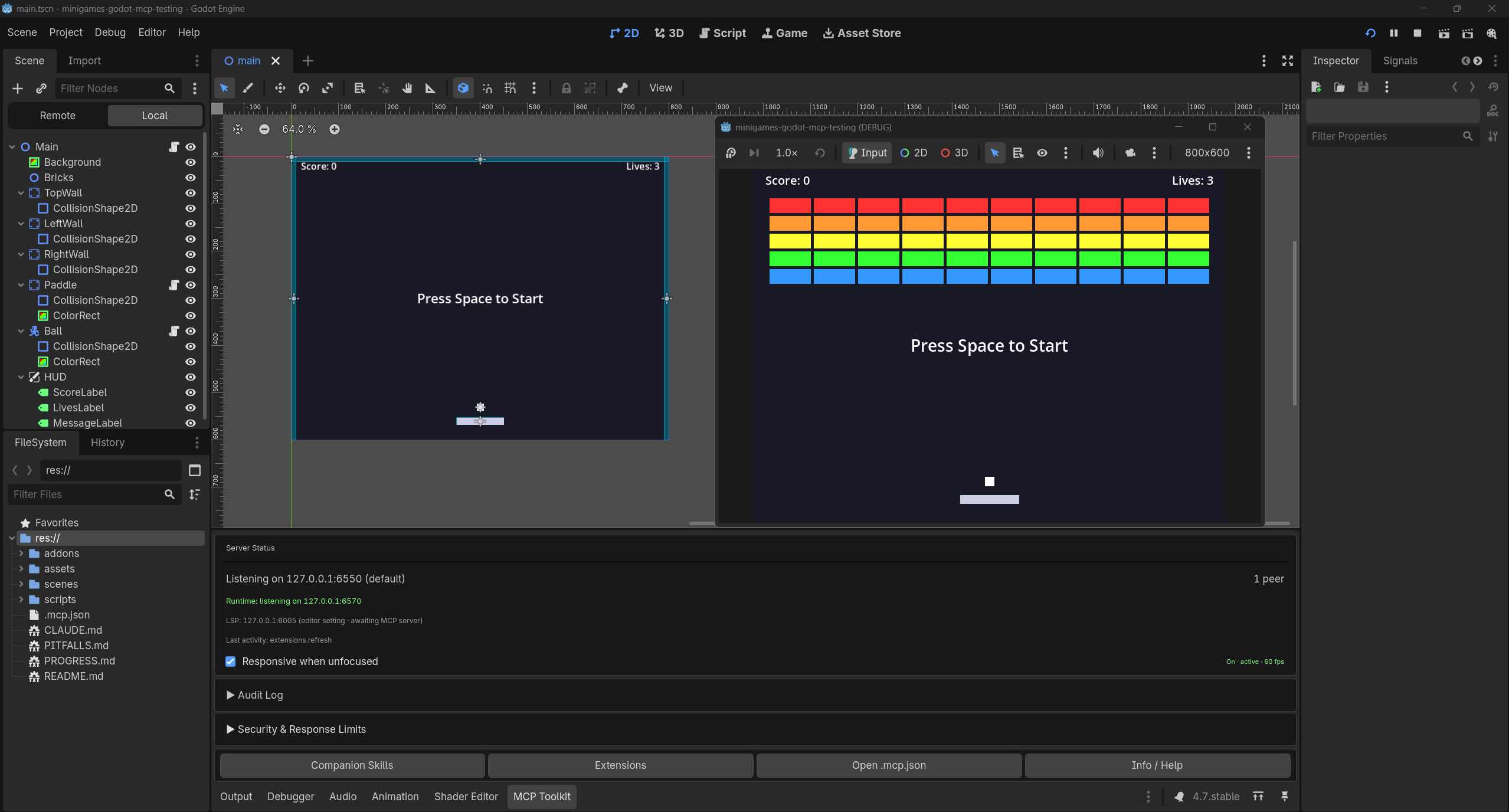
Install the Godot MCP Toolkit from the Godot Asset Store (or GitHub Releases), then enable it: Project Settings → Plugins → Godot MCP Toolkit → Active.
You should see: the MCP dock appears, and the Output log prints
[MCPServer] listening on 127.0.0.1:6550
(the port may land anywhere from 6550 to 6560; the dock's status section names the live one).
The easiest path: let the plugin write the config. Project → Tools → MCP Toolkit → Write .mcp.json creates a correct .mcp.json at your project root (Windows wrapper included), and the dock keeps it healthy.
For every other client (Claude Desktop, Cursor, Windsurf, VS Code, Cline, Codex CLI, Gemini CLI) and the per-OS gotchas, use the client setup guide. It is the canonical setup matrix.
{
  "mcpServers": {
    "godot-mcp-toolkit": {
      "command": "npx",
      "args": ["-y", "@npgamedev/godot-mcp-server"]
    }
  }
}
Current Claude Code on Windows starts this form unchanged. If Claude Code on Windows shows the server failed with spawn npx ENOENT or EINVAL, update Claude Code or wrap the command in cmd /c. The wrapped form, also the usual fix when another Windows client fails the same way (see the client setup guide):
{
  "mcpServers": {
    "godot-mcp-toolkit": {
      "command": "cmd",
      "args": ["/c", "npx", "-y", "@npgamedev/godot-mcp-server"]
    }
  }
}
Paste this into Claude Code from your project directory. It was tested end-to-end with Claude Code, apart from the Windows step. Other clients adapt via the client setup guide. The agent drives the command-line steps; you open the editor and reconnect the client when it asks.
Set up the Godot MCP Toolkit for this project:
1. Install the bridge: npm install -g @npgamedev/godot-mcp-server (check Node >= 22 first).
2. If this project has no .mcp.json, create one with a "godot-mcp-toolkit" server entry
   running "npx -y @npgamedev/godot-mcp-server". On Windows, if the server fails to start
   with spawn npx ENOENT or EINVAL, tell me to update Claude Code, or wrap the command in cmd /c yourself.
3. Fresh setup only: if addons/godot_mcp_toolkit exists but project.godot has no
   [editor_plugins] entry enabling it, add the enable line so the plugin loads on first launch.
   If this project is already open in Godot, tell me to enable it via Project Settings > Plugins instead,
   do not edit project.godot under a running editor.
4. Then STOP and tell me to: open the project in Godot, confirm the dock shows
   "[MCPServer] listening", and reconnect you (the MCP client) so the new config loads.
5. After I confirm, run one read-only probe (list the scene tree or read project settings)
   and report what you see.
macOS, launching your client from Finder/Dock? The standard config connects either way for modern clients. If yours won't, the client setup guide has the fix, from PATH diagnosis to the safe fallbacks.
Launch your MCP client from the project root. The server discovers the plugin through a shared project registry and authenticates with a per-session token automatically.
Then try the first prompt below. This is the kind of result it produces:
If a step does not produce its "you should see", head to the troubleshooting guide. It starts with a 60-second checklist and a connectivity probe.
The last three run in seconds. The first one is a real project, the same kind of small game we build end-to-end when validating a release, in a single agent session. Larger games span multiple sessions, with or without MCP.
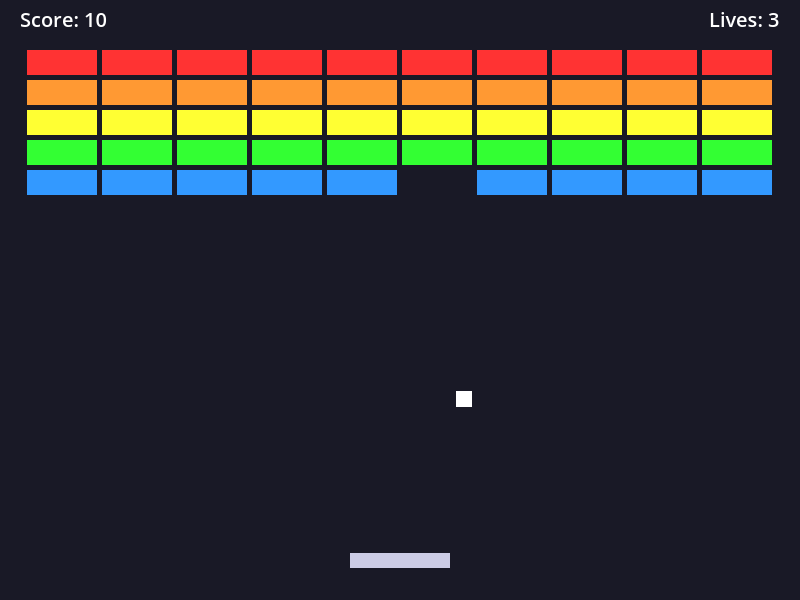
The brick-breaker from prompt 1 above.
The always-on core handles the everyday work: scenes, nodes, scripts, project settings, playtests, screenshots, input simulation, code execution. Specialized surfaces load on demand, and the assistant activates them mid-session with discover_tools, by keyword or by name:
Those 28 groups are the built-in surface. A project can add more: register your own tools through the toolkit's GDScript extension API and they reach the agent through this bridge like any built-in, with no fixed cap on how many, and the ceiling only rises as the toolkit grows.
The authoritative per-tool list (every tool, operation, parameter, and version gate) is the generated tool reference. Which tools exist on which Godot version is in the shipped compatibility guide.
Tested on: Godot 4.2–4.7.x
A few deliberate choices shape the tool surface:
Everything works with zero configuration; the registry handles discovery. The variables below override the dial (connect) side. The listen side (the ports the editor and game bind) is configured on the plugin: see the shipped advanced configuration guide.
Dial-target overrides, resolved with precedence CLI flag > env var > registry discovery > default:
Both --flag value and --flag=value forms are accepted.
With no configuration, the server discovers each editor's port through the shared project registry, so parallel editors and git worktrees need no setup. Pin a port only when you need a deterministic setup (CI, containers).
[!IMPORTANT] A pinned port must be pinned on both sides with the same value: the editor binds where its environment says, and the server dials where yours says. An environment variable is not a sync channel. It is two independent per-process reads, and the common failure is
.mcp.jsonpinning the server while the editor launches without the value (a desktop shortcut does not inherit a shell's export). The server fails fast with a message naming the mismatch instead of hanging; if you don't want to manage this, don't pin.
For supervised environments (classrooms, CI, demos, reviewing an unfamiliar project), set GODOT_MCP_READ_ONLY=1 in the server's env. Every mutating tool is left unregistered, absent from the tool list entirely, no matter what the client or the model asks for. Turn it off and reconnect the client to restore full access; the tool list is decided at connect time. For per-tool permission rules on top (auto-allowing reads, prompting on writes), see the permissions section of the client setup guide.
Most tools work under godot --headless --editor: file, scene, node, script, ClassDB, and project tools all function without a display. Screenshot tools return HEADLESS_UNSUPPORTED, and everything that needs a running game degrades with clear errors (a headless environment has no display for the game process to present). The canonical per-tool headless matrix is in the shipped compatibility guide.
The tool catalogue consumes context-window tokens, so the surface starts small and grows on demand: the startup surface costs ~9,500 tokens, the full surface (every group activated) ~29,100, and read-only mode ~8,700. Per-group costs, the measurement method, and the regeneration command are in docs/token-efficiency.md.
CI fails the build if any of these numbers drift: 113 tools (34 always-on + 2 meta, 79 on-demand) in 28 groups, covering 150+ operations; 40 tools visible in read-only mode.
npm run flows), and dispatch behavior (mutation serialization, cancellation, disconnects) as another. Separate suites, separately maintained.npm run eval) validates tool-call correctness and workflow efficiency against a live editor: "does it work well", separate from smoke's "does it work".tools/list_changed. Tools activated mid-session via discover_tools appear only if the MCP client handles that notification. Current Claude Code versions do, in both interactive and pipe (claude -p) mode (verified 2026-07-19); earlier versions did not process it in pipe mode. If newly activated tools do not appear, reconnect or upgrade the client, or call extensions_refresh to force a re-sync of extension tools.RESPONSE_TOO_LARGE. Pass image_response_mode: "disk" to save the PNG and receive its path, or request a lower image_detail.The default posture is localhost-only, token-authenticated, and auditable:
res:// only by default; path traversal blocked (lexical canonicalization, plugin-side), with a fast server-side pre-filter.GODOT_MCP_READ_ONLY=1 hides every mutating tool, enforced here server-side.127.0.0.1 bind on every socket; never 0.0.0.0.Vulnerability reporting and isolation guidance (containers, VMs, restricted accounts) are in SECURITY.md. Per-tool risk notes and recommended client-side permission rules: the shipped security recommendations; a ready-made Claude Code allow-list example is in the client setup guide.
Disclaimer: We design every layer with defense-in-depth, but no software is immune to misuse or unforeseen vulnerabilities. This project is provided under the MIT License with no warranty. You are responsible for evaluating whether it meets your security requirements before use.
┌─────────────┐          ┌─────────────────────┐          ┌────────────────────┐
│  MCP client │─ stdio ─>│  godot-mcp-server   │─ ws ────>│  godot-mcp-toolkit │
│  (AI agent) │          │  (this package)     │  :6550   │  (Godot plugin)    │
└─────────────┘          └─────────┬───────────┘          └─────────┬──────────┘
                                   │                                │
                                   └──── ws :6570 (runtime) ───────>│
                                         (the running game)        (autoload)
EditorInterface.SceneTree in the running game. Auto-connected when game_start runs with wait_for_runtime: true.Port discovery is automatic via the shared project registry; auth tokens resolve per project (and per worktree). The full story (startup, transport, dispatch, security boundaries, with diagrams) is in docs/architecture/README.md.
Small games, yes. Our validation minigames were each built in a single agent session (the brick-breaker in the examples above is one of them). Larger games take multiple sessions, with or without MCP.
Yes. MIT, both the server and the addon.
Yes. The bundled export plugin strips it from exported builds in every Script Export Mode; the runtime piece self-disables outside debug builds.
Yes, with honest caveats: most tools work under --headless --editor; screenshots and everything needing a running game degrade. See Headless mode above and the shipped compatibility guide's headless matrix.
Supported. Use the mono (.NET) Godot editor build; the standard build cannot load .cs scripts. See the C# section of the shipped compatibility guide.
Yes. Per-project instance isolation (hash-based subdirectories) and per-editor port ranges. See the shipped multi-instance guide.
Nothing. Runs fully locally, no telemetry, no cloud services, no account.
See CONTRIBUTING.md for environment setup, the test layers, and the documentation rules.
This project follows Semantic Versioning. The toolkit plugin and the MCP server bridge are versioned independently; install the latest of each and they negotiate compatibility at connect (see RELEASING.md → Compatibility).
npm install -g @npgamedev/godot-mcp-server@latestSee RELEASING.md for maintainer release process and version policy.
NPGameDev · npgamedev.com · GitHub
For inquiries and requests: [email protected]
Godot and the Godot logo are trademarks of the Godot Foundation. This bridge is an independent community project with no affiliation with or endorsement from the Foundation, and it is not an official Godot product. The name describes what the bridge connects to: the Godot Engine.
MIT: see LICENSE. Upstream notices in ATTRIBUTIONS.md.
MCP server that connects AI coding assistants to the Godot 4.2+ editor (scenes, nodes, scripts, ClassDB, playtests) via the companion godot-mcp-toolkit plugin.
{ "mcpServers": { "npgamedev-godot-mcp-server": { "command": "npx", "args": [ "-y", "@npgamedev/[email protected]" ] } }}टूल
अभी टूल सूची नहीं है। रिमोट सर्वर को पहले हेल्थ चेक के बाद सूची मिलती है।
FAQ
इस पेज पर Cursor, Claude Desktop, Claude Code या VS Code के लिए stdio कॉन्फ़िग कॉपी करें। यह पब्लिशर का इंस्टॉल इस्तेमाल करता है, PlugMCP प्रॉक्सी नहीं।
इस रिकॉर्ड में कोई ज़रूरी एनवायरनमेंट वेरिएबल दर्ज नहीं है।
@npgamedev/godot stdio पर लोकल चलता है।
पिछली जाँच 2026-11-17 को हुई। MCP server that connects AI coding assistants to the Godot 4.2+ editor (scenes, nodes, scripts, ClassDB, playtests) via the companion godot-mcp-toolkit plugin.
