concurrent-browser-mcp
A multi-concurrent browser MCP (Model Context Protocol) server built with Playwright.
中文 | English
Power your agent
पब्लिशर का इंस्टॉल। PlugMCP एंडपॉइंट नहीं।
Host a copy with our keys and logs.
रजिस्ट्री में अभी कोई पैकेज्ड रिलीज़ नहीं है। रिपॉज़िटरी का README देखें.
रिमोट URL या आपकी मशीन पर कमांड? दोनों इंस्टॉल में क्या अंतर है
PlugMCP पर चलाएँ
A new server you create. It is not this listing's official endpoint. Use the publisher install when you want their URL and their credentials.
लॉन्चपब्लिशर से
A multi-concurrent browser MCP (Model Context Protocol) server built with Playwright.
中文 | English
A concurrent browser MCP server that supports multiple parallel browser instances, based on Playwright.
# Global installation
npm install -g concurrent-browser-mcp

# Or use npx directly (no installation required)
npx concurrent-browser-mcp
# Clone repository
git clone https://github.com/sailaoda/concurrent-browser-mcp.git
cd concurrent-browser-mcp

# Install dependencies
npm install

# Build project
npm run build

# Optional: Global link (for local development)
npm link
git clone https://github.com/sailaoda/concurrent-browser-mcp.git
cd concurrent-browser-mcp
./install.sh
# Start server (default configuration)
npx concurrent-browser-mcp

# Custom configuration
npx concurrent-browser-mcp --max-instances 25 --browser firefox --headless false
Choose the appropriate configuration based on your installation method:
{
  "mcpServers": {
    "concurrent-browser": {
      "command": "npx",
      "args": ["concurrent-browser-mcp", "--max-instances", "20"]
    }
  }
}
{
  "mcpServers": {
    "concurrent-browser": {
      "command": "concurrent-browser-mcp",
      "args": ["--max-instances", "20"]
    }
  }
}
If you built from source, you can reference the local build version directly:
{
  "mcpServers": {
    "concurrent-browser": {
      "command": "node",
      "args": ["/path/to/concurrent-browser-mcp/dist/index.js", "--max-instances", "20"],
      "cwd": "/path/to/concurrent-browser-mcp"
    }
  }
}
Or use relative path (if config file and project are in the same directory level):
{
  "mcpServers": {
    "concurrent-browser": {
      "command": "node",
      "args": ["./concurrent-browser-mcp/dist/index.js", "--max-instances", "20"]
    }
  }
}
If you used npm link:
{
  "mcpServers": {
    "concurrent-browser": {
      "command": "concurrent-browser-mcp",
      "args": ["--max-instances", "20"]
    }
  }
}
concurrent-browser-mcp supports flexible proxy configuration to help you use browser automation features in network environments that require proxies.
# Use specified proxy server
npx concurrent-browser-mcp --proxy http://127.0.0.1:7890
The system automatically detects proxies in the following order:
HTTP_PROXY, HTTPS_PROXY, ALL_PROXY# Auto-detection enabled by default (no additional parameters needed)
npx concurrent-browser-mcp
# Explicitly disable auto-detection
npx concurrent-browser-mcp --no-proxy-auto-detect
Using specified proxy:
{
  "mcpServers": {
    "concurrent-browser": {
      "command": "npx",
      "args": ["concurrent-browser-mcp", "--proxy", "http://127.0.0.1:7890"]
    }
  }
}
Disable proxy:
{
  "mcpServers": {
    "concurrent-browser": {
      "command": "npx",
      "args": ["concurrent-browser-mcp", "--no-proxy-auto-detect"]
    }
  }
}
The proxy detection results will be displayed at startup:
🚀 Starting Concurrent Browser MCP Server...
Max instances: 20
Default browser: chromium
Headless mode: yes
Viewport size: 1280x720
Instance timeout: 30 minutes
Cleanup interval: 5 minutes
Proxy: Auto-detection enabled  # or shows detected proxy address
http://proxy-server:porthttps://proxy-server:portsocks5://proxy-server:port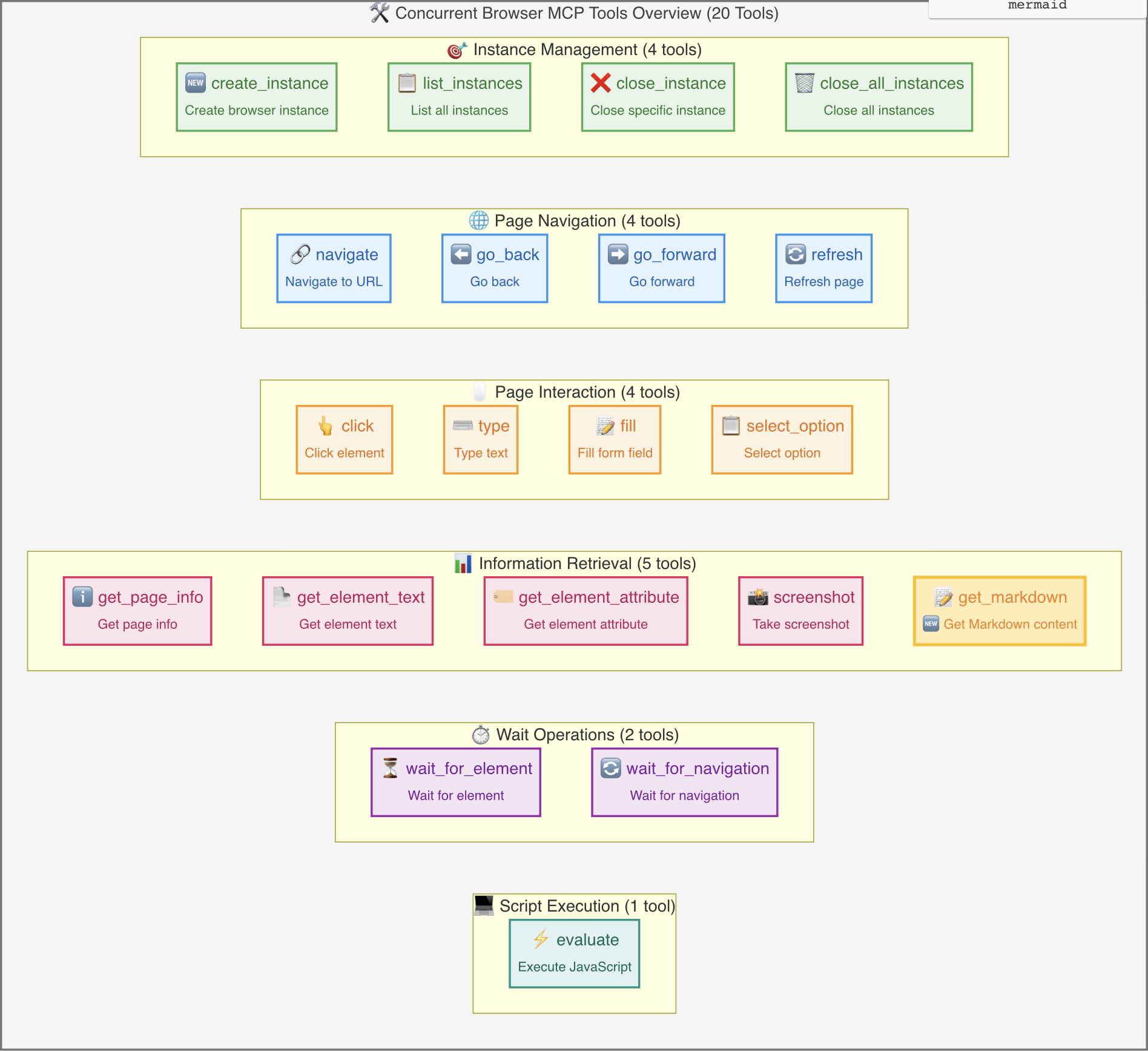
browser_create_instance: Create a new browser instancebrowser_list_instances: List all instancesbrowser_close_instance: Close a specific instancebrowser_close_all_instances: Close all instancesbrowser_navigate: Navigate to a specified URLbrowser_go_back: Go back to previous pagebrowser_go_forward: Go forward to next pagebrowser_refresh: Refresh current pagebrowser_click: Click on page elementsbrowser_type: Type text contentbrowser_fill: Fill form fieldsbrowser_select_option: Select dropdown optionsbrowser_get_page_info: Get detailed page information including full HTML content, page statistics, and metadatabrowser_get_element_text: Get element textbrowser_get_element_attribute: Get element attributesbrowser_screenshot: Take page screenshotsbrowser_get_markdown: 🆕 Get Markdown contentbrowser_wait_for_element: Wait for element to appearbrowser_wait_for_navigation: Wait for page navigation to completebrowser_evaluate: Execute JavaScript code// Create a new Chrome instance
await callTool('browser_create_instance', {
browserType: 'chromium',
headless: false,
viewport: { width: 1920, height: 1080 },
metadata: {
name: 'main-browser',
description: 'Main browser instance'
}
});
// Navigate to website
await callTool('browser_navigate', {
  instanceId: 'your-instance-id',
  url: 'https://example.com'
});

// Click element
await callTool('browser_click', {
  instanceId: 'your-instance-id',
  selector: 'button.submit'
});

// Input text
await callTool('browser_type', {
  instanceId: 'your-instance-id',
  selector: 'input[name="search"]',
  text: 'search query'
});
// Take screenshot
await callTool('browser_screenshot', {
  instanceId: 'your-instance-id',
  fullPage: true
});

// Get page information
await callTool('browser_get_page_info', {
  instanceId: 'your-instance-id'
});
// Create multiple instances for parallel processing
const instances = await Promise.all([
  callTool('browser_create_instance', { metadata: { name: 'worker-1' } }),
  callTool('browser_create_instance', { metadata: { name: 'worker-2' } }),
  callTool('browser_create_instance', { metadata: { name: 'worker-3' } })
]);

// Navigate to different pages in parallel
await Promise.all(instances.map(async (instance, index) => {
  await callTool('browser_navigate', {
    instanceId: instance.data.instanceId,
    url: `https://example${index + 1}.com`
  });
}));
┌─────────────────────────────────────────────────────────────────┐
│                         MCP Client                              │
├─────────────────────────────────────────────────────────────────┤
│                    Concurrent Browser MCP Server                │
│  ┌─────────────────┐  ┌─────────────────┐  ┌─────────────────┐  │
│  │  Browser Tools  │  │ Browser Manager │  │  MCP Server     │  │
│  │                 │  │                 │  │                 │  │
│  │ - Tool Defs     │  │ - Instance Mgmt │  │ - Request       │  │
│  │ - Execution     │  │ - Lifecycle     │  │   Handling      │  │
│  │ - Validation    │  │ - Cleanup       │  │ - Error Mgmt    │  │
│  └─────────────────┘  └─────────────────┘  └─────────────────┘  │
├─────────────────────────────────────────────────────────────────┤
│                        Playwright                              │
│  ┌─────────────────┐  ┌─────────────────┐  ┌─────────────────┐  │
│  │   Browser 1     │  │   Browser 2     │  │   Browser N     │  │
│  │   (Chromium)    │  │   (Firefox)     │  │   (WebKit)      │  │
│  └─────────────────┘  └─────────────────┘  └─────────────────┘  │
└─────────────────────────────────────────────────────────────────┘
In addition to simulation demo scripts, we also provide real browser functionality test scripts that let you see actual screenshot results:
# Run real browser screenshot test
node test-real-screenshot.js
This test script will:
🚀 Starting real browser screenshot test...
✅ Browser started
✅ Page created
🌐 Navigating to https://example.com...
✅ Page loaded successfully
📸 Taking screenshot and saving as screenshot-2025-07-19T11-04-18-660Z.png...
✅ Screenshot saved: screenshot-2025-07-19T11-04-18-660Z.png
📊 File size: 23.57 KB
📂 File location: /path/to/screenshot-2025-07-19T11-04-18-660Z.png
🌐 Visiting https://github.com...
✅ github screenshot saved: screenshot-github-2025-07-19T11-04-18-660Z.png (265.99 KB)
🛑 Browser closed
After testing, you can find actual screenshot files in the project directory:
# View generated screenshot files
ls -la screenshot-*.png

# Open in system default image viewer
open screenshot-*.png    # macOS
start screenshot-*.png   # Windows
xdg-open screenshot-*.png # Linux
# 1. Clone project
git clone https://github.com/sailaoda/concurrent-browser-mcp.git
cd concurrent-browser-mcp

# 2. Install dependencies
npm install

# 3. Build project
npm run build

# 4. Local link (optional, for global command testing)
npm link
# Build TypeScript project
npm run build

# Development mode (file watching)
npm run dev

# Run code linting
npm run lint

# Fix code formatting issues
npm run lint:fix

# Clean build artifacts
npm run clean

# Run tests
npm test
concurrent-browser-mcp/
├── src/                    # Source code directory
│   ├── index.ts           # CLI entry point
│   ├── server.ts          # MCP server main logic
│   ├── browser-manager.ts # Browser instance manager
│   └── tools.ts           # MCP tool definitions and implementation
├── dist/                  # Build artifacts directory
├── assets/                # Static resources directory
├── examples/              # Example scripts
├── test-real-screenshot.js # Real test script
├── config.example.json    # Configuration example
├── package.json           # Project configuration
├── tsconfig.json         # TypeScript configuration
└── README.md             # Project documentation
After building, you can use the local version in several ways:
# Run built files
node dist/index.js --max-instances 20

# Use absolute path in MCP configuration
{
  "mcpServers": {
    "concurrent-browser": {
      "command": "node",
      "args": ["/absolute/path/to/concurrent-browser-mcp/dist/index.js", "--max-instances", "20"]
    }
  }
}
# Execute link in project root directory
npm link

# Now you can use it like a global package
concurrent-browser-mcp --max-instances 20

# Use in MCP configuration
{
  "mcpServers": {
    "concurrent-browser": {
      "command": "concurrent-browser-mcp",
      "args": ["--max-instances", "20"]
    }
  }
}
# Run directly in project directory
cd /path/to/concurrent-browser-mcp
npm run build
node dist/index.js

# MCP configuration using relative path
{
  "mcpServers": {
    "concurrent-browser": {
      "command": "node",
      "args": ["./concurrent-browser-mcp/dist/index.js"],
      "cwd": "/parent/directory/path"
    }
  }
}
# Run real browser tests
node test-real-screenshot.js

# Run simulated MCP call tests
node examples/demo.js

# Start development server (with debug output)
node dist/index.js --max-instances 5 --browser chromium --headless false
git checkout -b feature/amazing-feature)git commit -m 'Add some amazing feature')git push origin feature/amazing-feature)A concurrent browser MCP server that supports multiple parallel browser instances, based on Playwright.
टूल
अभी टूल सूची नहीं है। रिमोट सर्वर को पहले हेल्थ चेक के बाद सूची मिलती है।
FAQ
इस पेज पर Cursor, Claude Desktop, Claude Code या VS Code के लिए stdio कॉन्फ़िग कॉपी करें। यह पब्लिशर का इंस्टॉल इस्तेमाल करता है, PlugMCP प्रॉक्सी नहीं।
इस रिकॉर्ड में कोई ज़रूरी एनवायरनमेंट वेरिएबल दर्ज नहीं है।
Concurrent Browser stdio पर लोकल चलता है।
पिछली जाँच 2026-10-28 को हुई। A concurrent browser MCP server that supports multiple parallel browser instances, based on Playwright.
