paprika-3-mcp
A Model Context Protocol (MCP) server that exposes your Paprika 3 recipes as LLM-readable resources — and lets an LLM like Claude create or update recipes in your Paprika app.
Power your agent
पब्लिशर का इंस्टॉल। PlugMCP एंडपॉइंट नहीं।
Host a copy with our keys and logs.
रजिस्ट्री में अभी कोई पैकेज्ड रिलीज़ नहीं है। रिपॉज़िटरी का README देखें.
रिमोट URL या आपकी मशीन पर कमांड? दोनों इंस्टॉल में क्या अंतर है
PlugMCP पर चलाएँ
A new server you create. It is not this listing's official endpoint. Use the publisher install when you want their URL and their credentials.
लॉन्चपब्लिशर से
A Model Context Protocol (MCP) server that exposes your Paprika 3 recipes as LLM-readable resources — and lets an LLM like Claude create or update recipes in your Paprika app.
MCP Server for creating/editing recipes in Paprika 3 with natural language
See anything missing? Open an issue on this repo to request a feature!
create_paprika_recipeupdate_paprika_recipeYou can download a prebuilt binary from the Releases page.
If you're on macOS, the easiest way to install is with Homebrew:
brew tap soggycactus/tap
brew install paprika-3-mcp
Go to the latest release.
Download the appropriate archive for your operating system and architecture:
paprika-3-mcp_<version>_linux_amd64.zip for Linuxpaprika-3-mcp_<version>_windows_amd64.zip for WindowsExtract the zip archive:
unzip paprika-3-mcp_<version>_<os>_<arch>.zip
.zip file and select Extract All, or use a tool like 7-Zip.Move the binary to a directory in your system's $PATH:
Linux:
sudo mv paprika-3-mcp /usr/local/bin/
Windows:
paprika-3-mcp.exe to any folder in your PATH (e.g., %USERPROFILE%\bin)You can verify the server is installed by checking:
paprika-3-mcp --version
You should see:
paprika-3-mcp version v0.1.0
If you haven't setup MCP before, first read more about how to install Claude Desktop client & configure an MCP server.
To add paprika-3-mcp to Claude, all you need to do is create another entry in the mcpServers section of your claude_desktop_config.json file:
{
  "mcpServers": {
    "paprika-3": {
      "command": "paprika-3-mcp",
      "args": [
        "--username",
        "<your paprika 3 username (usually email)>",
        "--password",
        "<your paprika 3 password>"
      ]
    }
  }
}
Restart Claude and you should see the MCP server tools after clicking on the hammerhead icon:
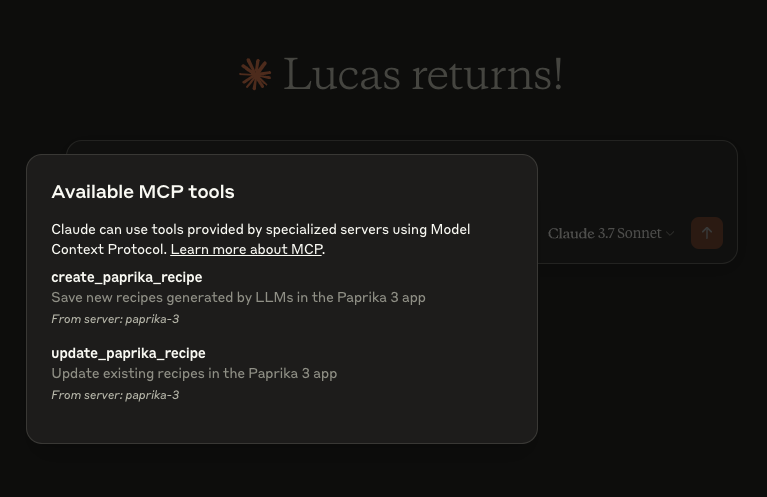
This project is open source under the MIT License © 2025 Lucas Stephens.
The MCP server writes structured logs using Go’s slog with rotation via lumberjack. Log files are automatically created based on your operating system:
💡 Logs are rotated automatically at 100MB, with only 5 backup files kept. Logs are also wiped after 10 days.
MCP Server for creating/editing recipes in Paprika 3 with natural language
टूल
अभी टूल सूची नहीं है। रिमोट सर्वर को पहले हेल्थ चेक के बाद सूची मिलती है।
FAQ
इस पेज पर Cursor, Claude Desktop, Claude Code या VS Code के लिए stdio कॉन्फ़िग कॉपी करें। यह पब्लिशर का इंस्टॉल इस्तेमाल करता है, PlugMCP प्रॉक्सी नहीं।
इस रिकॉर्ड में कोई ज़रूरी एनवायरनमेंट वेरिएबल दर्ज नहीं है।
Paprika 3 stdio पर लोकल चलता है।
पिछली जाँच 2026-10-28 को हुई। MCP Server for creating/editing recipes in Paprika 3 with natural language
