Power your agent
पब्लिशर की अपनी कमांड। PlugMCP एंडपॉइंट नहीं।
Host a copy with our keys and logs.
npx -y [email protected]Claude Code में लोकल कमांड के लिए इंस्टॉल लिंक नहीं है। नीचे दी गई कमांड कॉपी करें और टर्मिनल में चलाएँ।
claude mcp add sorbh-basecoat-ui-mcp -- npx -y basecoat-ui-mcp@2.0.1टर्मिनल में चलाएँ।
{ "mcpServers": { "sorbh-basecoat-ui-mcp": { "command": "npx", "args": [ "-y", "[email protected]" ] } }}claude_desktop_config.json
रिमोट URL या आपकी मशीन पर कमांड? दोनों इंस्टॉल में क्या अंतर है
PlugMCP पर चलाएँ
A new server you create. It is not this listing's official endpoint. Use the publisher install when you want their URL and their credentials.
लॉन्चGive your AI assistant the full Basecoat UI component library (the shadcn/ui look in plain HTML + Tailwind, no React), so it writes correct Basecoat markup instead of guessing class names.
Kept in sync with Basecoat releases. Basecoat 1.0.2 shipped with breaking API changes; this MCP was updated to it the same day.
While building my hobby project — turning old devices into a Digital Photo Frame — I struggled with UI components. I wanted to use Basecoat CSS, the HTML port of ShadCN UI, but there was no MCP server to easily pull components and docs into AI-assisted coding.
So I built one.
This is my first MCP server, and it’s here to make working with Basecoat (and ShadCN-style components) effortless for everyone. Feedback and contributions are welcome!
A Model Context Protocol (MCP) server that provides programmatic access to Basecoat CSS components and their usage documentation. This server allows AI assistants to help developers build HTML interfaces using the Basecoat CSS framework.
class="btn" data-variant="outline", .field, method-based JS).No install needed: every client runs the server with npx.
claude mcp add basecoat-ui -- npx -y basecoat-ui-mcp
Add to claude_desktop_config.json:
{
  "mcpServers": {
    "basecoat-ui": {
      "command": "npx",
      "args": ["-y", "basecoat-ui-mcp"]
    }
  }
}
Click Install in Cursor above, or add to ~/.cursor/mcp.json:
{
  "mcpServers": {
    "basecoat-ui": {
      "command": "npx",
      "args": ["-y", "basecoat-ui-mcp"]
    }
  }
}
Click Install in VS Code above, or add to .vscode/mcp.json:
{
  "servers": {
    "basecoat-ui": {
      "command": "npx",
      "args": ["-y", "basecoat-ui-mcp"]
    }
  }
}
Add to ~/.codeium/windsurf/mcp_config.json:
{
  "mcpServers": {
    "basecoat-ui": {
      "command": "npx",
      "args": ["-y", "basecoat-ui-mcp"]
    }
  }
}
Add to ~/.codex/config.toml:
[mcp_servers.basecoat-ui]
command = "npx"
args = ["-y", "basecoat-ui-mcp"]
Run npx -y basecoat-ui-mcp as a stdio server.
Ask your assistant something like:
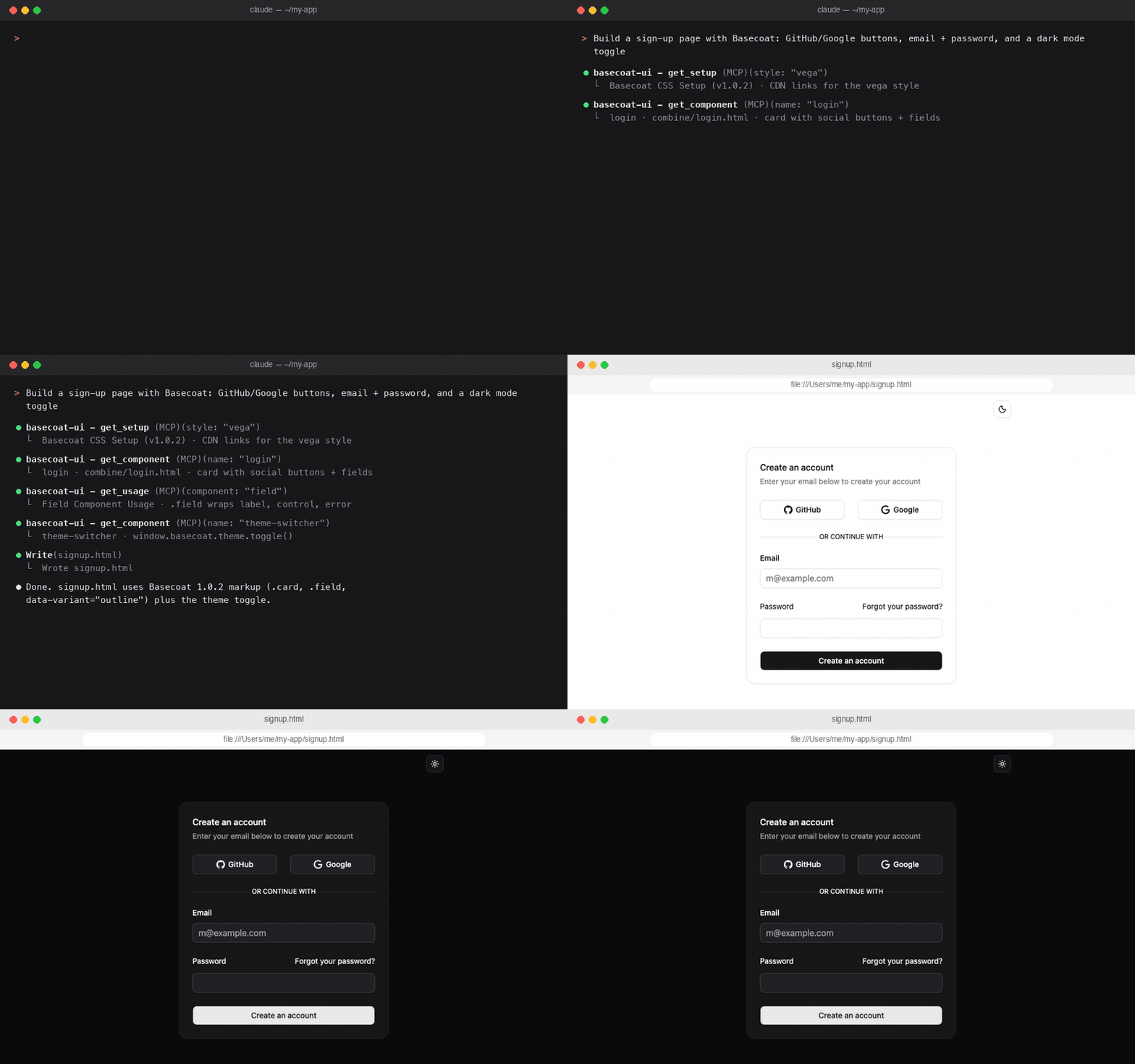
Build a sign-up page with Basecoat: a card with GitHub/Google buttons, email and password fields, and a dark mode toggle.
It will call get_setup, pull the matching components and usage docs, and return HTML that uses the real Basecoat 1.0 API.
git clone https://github.com/Sorbh/basecoat-ui-mcp.git
cd basecoat-ui-mcp
npm install
Point your client at the local copy:
{
  "mcpServers": {
    "basecoat-ui": {
      "command": "node",
      "args": ["/path/to/basecoat-ui-mcp/server.js"]
    }
  }
}
Composed examples: chat, login, settings, interactive pagination.
Version 2.0.0 of this MCP targets Basecoat 1.0.2, which has breaking changes from Basecoat 0.3.x:
btn-outline → class="btn" data-variant="outline", btn-sm-icon → data-size="icon-sm"..form wrapper was removed; wrap each label and control in <div class="field">.basecoat:toast, basecoat:sidebar, basecoat:theme) were replaced by methods: toaster.toast(), sidebar.toggle(), window.basecoat.theme.toggle().dialog-alert was renamed to alert-dialog.If your project still has 0.x markup, load Basecoat's compatibility stylesheet after Basecoat while you migrate (@import "basecoat-css/compat";). See style-guide.md for the full migration guide.
basecoat-mcp/
├── components/           # HTML component files
│   ├── combine/         # Composed page examples
│   ├── feedback/        # Alerts, badges, dialogs, toasts
│   ├── forms/           # Buttons, fields, inputs, selects
│   ├── interactive/     # Command, combobox, dropdowns, tooltips
│   ├── layout/          # Cards, tables, avatars, items
│   └── navigation/      # Tabs, accordion, sidebar
├── usage/               # Usage documentation (same categories)
├── scripts/             # Setup and theme scripts
├── style-guide.md       # Full Basecoat 1.0 style and migration guide
├── server.js            # MCP server implementation
├── package.json
└── README.md
Categories are read from disk, so adding a folder under components/ or usage/ is enough to expose it.
Basecoat CSS is a comprehensive CSS framework that provides:
Learn more at basecoatui.com
MIT License - see LICENSE file for details.
git checkout -b feature/amazing-featuregit commit -m 'Add amazing feature'git push origin feature/amazing-featureA Model Context Protocol (MCP) server that provides programmatic access to Basecoat CSS components and their usage documentation. This server allows AI assistants to help developers build HTML interfa
{ "mcpServers": { "sorbh-basecoat-ui-mcp": { "command": "npx", "args": [ "-y", "[email protected]" ] } }}ओवरव्यू
A Model Context Protocol (MCP) server that provides programmatic access to Basecoat CSS components and their usage documentation. This server allows AI assistants to help developers build HTML interfaces using the Basecoat CSS framework.
टूल
अभी टूल सूची नहीं है। रिमोट सर्वर को पहले हेल्थ चेक के बाद सूची मिलती है।
FAQ
इस पेज पर Cursor, Claude Desktop, Claude Code या VS Code के लिए stdio कॉन्फ़िग कॉपी करें। यह पब्लिशर का इंस्टॉल इस्तेमाल करता है, PlugMCP प्रॉक्सी नहीं।
इस रिकॉर्ड में कोई ज़रूरी एनवायरनमेंट वेरिएबल दर्ज नहीं है।
Basecoat Ui stdio पर लोकल चलता है।
पिछली जाँच 2026-10-28 को हुई। A Model Context Protocol (MCP) server that provides programmatic access to Basecoat CSS components and their usage documentation. This server allows AI assistants to help developers build HTML interfaces using the Basecoat CSS framework.

