Gemini Function Calling + Model Context Protocol(MCP) Flight Search
Power your agent
Instal dari penerbit. Bukan endpoint PlugMCP.
URL remote atau perintah di mesin Anda? Perbedaan kedua cara instal
Jalankan di PlugMCP
A new server you create. It is not this listing's official endpoint. Use the publisher install when you want their URL and their credentials.
BukaDari penerbit
Model Context Protocol (MCP) with Gemini 2.5 Pro. Convert conversational queries into flight searches using Gemini's function calling capabilities and MCP's flight search tools
This project demonstrates how to use Google's Gemini 2.5 Pro with function calling capabilities to interact with the mcp-flight-search tool via Model Context Protocol (MCP). This client implementation shows how to:
mcp-flight-search) using stdio communicationmcp-flight-search tool via stdioBefore running this client, you'll need:
mcp-flight-search package installedThis project relies on several Python packages:
google-generativeai: Google's official Python library for accessing Gemini 2.5 Pro and other Google AI models.
mcp-sdk-python: Model Context Protocol (MCP) SDK for Python.
ClientSession for managing MCP communicationStdioServerParameters for configuring server processesmcp-flight-search: A flight search service built with MCP.
asyncio: Python's built-in library for writing asynchronous code.
json: Python's built-in JSON encoder and decoder.
Clone the Repository:
git clone https://github.com/arjunprabhulal/mcp-gemini-search.git
cd mcp-gemini-search
Install Dependencies:
# Install required Python libraries
pip install -r requirements.txt
# Install the MCP flight search tool
pip install mcp-flight-search
Set Environment Variables:
export GEMINI_API_KEY="YOUR_GEMINI_API_KEY"
export SERP_API_KEY="YOUR_SERPAPI_API_KEY"
Replace the placeholder values with your actual API keys:
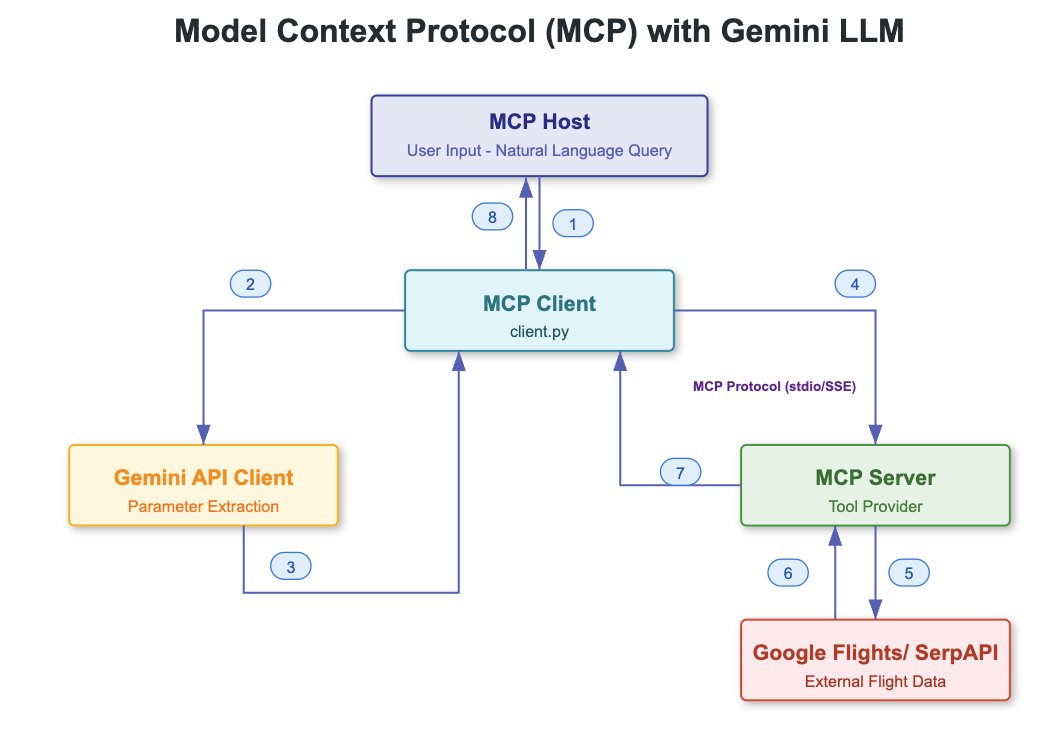
This project integrates multiple components to enable natural language flight search. Here's how the system works:
User to Client
client.py) processes the inputClient to MCP Server
mcp-flight-search)Client to Gemini 2.5 Pro
Client to MCP Tool
MCP Server to SerpAPI
Input Processing
User Query → Natural Language Text → Gemini 2.5 Pro → Structured Parameters
Flight Search
Parameters → MCP Tool → SerpAPI → Flight Data → JSON Response
Result Handling
JSON Response → Parse → Format → Display to User
Client ↔ MCP Server
MCP Server ↔ SerpAPI
Client ↔ Gemini 2.5 Pro
The integration includes error handling at multiple levels:
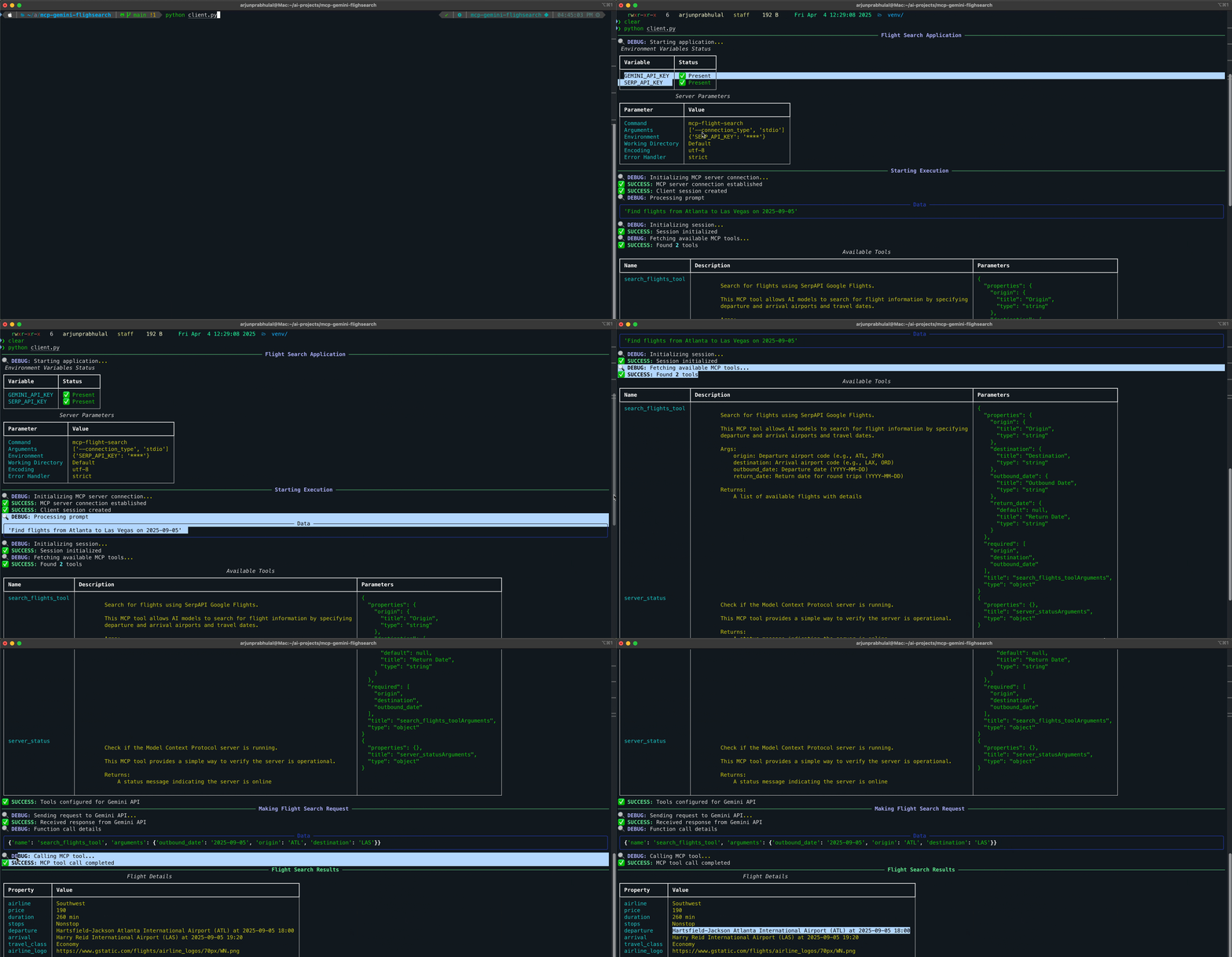
Run the client:
python client.py
The script will:
This client uses the mcp-flight-search tool, which is available at:
For more articles on AI/ML and Generative AI, follow me on Medium: @arjun-prabhulal
This project is licensed under the MIT License.
Model Context Protocol (MCP) with Gemini 2.5 Pro. Convert conversational queries into flight searches using Gemini's function calling capabilities and MCP's flight search tools
Tool
Belum ada daftar tool. Server remote mendapatkannya setelah pemeriksaan kesehatan pertama.
FAQ
Salin konfigurasi stdio untuk Cursor, Claude Desktop, Claude Code, atau VS Code di halaman ini. Konfigurasi ini memakai instalasi dari penerbit, bukan proxy PlugMCP.
Tidak ada variabel lingkungan wajib yang tercantum di catatan ini.
MCP Gemini Search berjalan secara lokal melalui stdio.
Terakhir diperiksa 2026-10-27. Model Context Protocol (MCP) with Gemini 2.5 Pro. Convert conversational queries into flight searches using Gemini's function calling capabilities and MCP's flight search tools
