Power your agent
Perintah milik penerbit sendiri. Bukan endpoint PlugMCP.
Host a copy with our keys and logs.
npx -y [email protected]Claude Code tidak punya tautan instal untuk perintah lokal. Salin perintah di bawah dan jalankan di terminal.
claude mcp add avito-mcp -- npx -y avito-mcp@2.1.1Jalankan di terminal.
{ "mcpServers": { "avito-mcp": { "command": "npx", "args": [ "-y", "[email protected]" ] } }}claude_desktop_config.json
URL remote atau perintah di mesin Anda? Perbedaan kedua cara instal
Jalankan di PlugMCP
A new server you create. It is not this listing's official endpoint. Use the publisher install when you want their URL and their credentials.
BukaConnect your AI client to your Avito account: read chats and statistics, prepare replies, and manage listings and orders.
Ask your AI client in plain language; it uses this MCP server to call the official Avito APIs. 148 tools across 18 APIs cover buyer chats, listings, statistics, promotion and orders. Run it on your computer or your own server.
You bring an AI client and an Avito account with API access. The client provides the model; this project provides the connection and tools. Automatic replies and scheduled reports need an agent or scheduler configured separately.
New in v2.1.1: step-by-step setup, complete English and Russian workflow and troubleshooting guides, and explicit demo versus live-account instructions. Release notes.
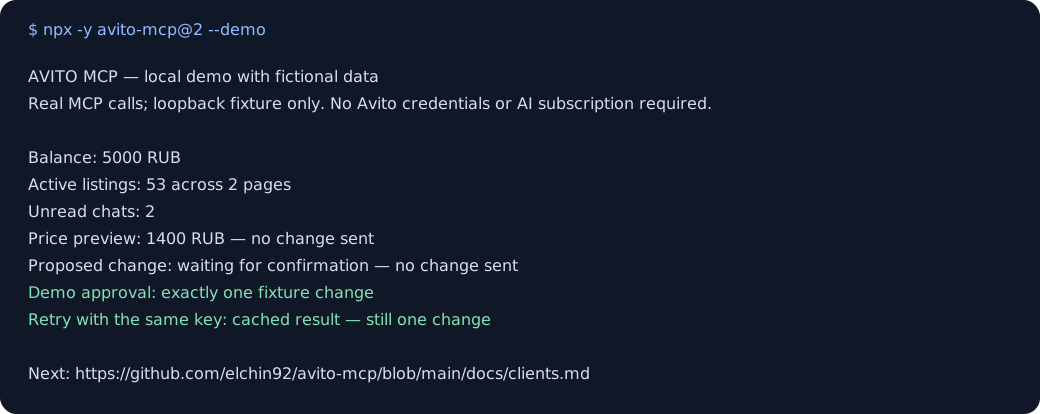
npx -y avito-mcp@2 --demo
The demo uses fictional data: 53 listings and 2 unread chats. It runs locally, needs no Avito keys and sends no requests to Avito. It walks through a report, a price preview, confirmation and a repeated request that changes the price only once. The first npx run downloads the npm package; from source, use npm run demo.
To use your own Avito account, follow the quick start and omit --demo. Normal server calls use your configured account; demo data never replaces it.
Profiles use existing environment variables to expose a focused tool set. The recipes explain what to ask, which tools are involved, and how to check the result.
You need Node.js 22.12+, an MCP-capable AI client, and Avito API credentials for your account. Obtain Client_id, Client_secret, and numeric Profile_id through Avito's API account page. Available methods depend on your account's API access; installing this server does not grant additional Avito permissions.
For Claude Desktop, merge this into its MCP config using Settings → Developer → Edit Config. For Cursor, use your personal ~/.cursor/mcp.json. Replace the three placeholders locally and keep the filled config out of Git.
{
  "mcpServers": {
    "avito": {
      "command": "npx",
      "args": ["-y", "avito-mcp@2"],
      "env": {
        "Client_id": "YOUR_CLIENT_ID",
        "Client_secret": "YOUR_CLIENT_SECRET",
        "Profile_id": "YOUR_PROFILE_ID",
        "AVITO_MCP_MODE": "read_only"
      }
    }
  }
}
Restart the client and ask: “Use Avito to show my account balance and the first page of active listings. Do not change anything.” A successful answer should show your real balance and listing IDs, or an empty list if the account has no listings. The example starts in read_only; without this setting the server's default remains full_access.
VS Code, Zed, Codex and ChatGPT use their own setup formats. Copy the client-specific config, then try a workflow. The examples pin major version 2; pin an exact published version for controlled deployments.
These are documented configurations, not a claim that every client/version has been tested against a live Avito account. Report compatibility results with the client version and operating system.
The bundled API snapshot covers 138 Swagger operations plus local and meta tools. The full manifest has 148 tools; default registration exposes 144, because token-returning tools and local image uploads require separate opt-ins. read_only exposes 80 before allowlist filtering. Inspect avito://manifest or build dist/manifest.json for exact names, schemas and risks.
Resources include the tool manifest, active configuration, rate limits, pending confirmations and webhook events. Five built-in prompts cover a daily overview, unread chats, promotion preparation, tool explanations and a safety report. Resource and prompt reference.
read_only, guarded, and full_access, plus AVITO_MCP_ALLOW_TOOLS / AVITO_MCP_DENY_TOOLS, control which tools are available.dryRun: true previews a destructive request without sending it. It does not reserve an action or validate the live account's permission to execute it.idempotencyKey deduplicates the same tool and arguments within the configured retention period. Reuse the same key for the same intended operation. If the outcome is uncertain, reconcile with Avito before retrying or choosing a new key.Business calls use the real Avito account. Start with reads and previews. Ready-to-use safety configurations describe stronger approval controls, upload boundaries and recovery.
For a hosted agent or several clients, use Streamable HTTP on your own HTTPS domain. Set AVITO_MCP_TRANSPORT=http, AVITO_MCP_HTTP_PUBLIC_URL=https://mcp.example.com, and a strong AVITO_MCP_OAUTH_OWNER_PASSWORD, together with the Avito credentials.
Deployment, OAuth, Caddy and nginx configuration. bearer and none modes do not claim conformance with the MCP authorization specification; use OAuth for clients that discover authorization automatically.
The optional receiver buffers incoming Avito events and exposes them through a tool and a subscribable resource. An external agent must consume those events and decide whether to respond. Receiver setup.
AVITO_MCP_PROTOCOL_ERA selects legacy (default, MCP 2025-11-25), dual (both revisions), or modern (MCP 2026-07-28). A default stdio installation keeps serving the legacy revision; enabling the newer revision is explicit.
AVITO_MCP_HTTP_MAX_SESSIONS and AVITO_MCP_HTTP_SESSION_IDLE_SEC apply to legacy 2025-11-25 only. Modern HTTP uses AVITO_MCP_HTTP_MAX_INFLIGHT and AVITO_MCP_HTTP_MAX_STREAMS instead. Protocol details and limits.
Public tool names, documented valid arguments, environment variables, resource URIs and prompt names follow SemVer. See versioning details, migration from 1.3.x, and CHANGELOG.
Token-returning tools and image uploads stay hidden until explicitly enabled. Tokens and runtime state are stored locally with restricted file permissions. Safety configuration, security policy and private reporting, and operational diagnostics describe the boundaries.
git clone https://github.com/elchin92/avito-mcp.git
cd avito-mcp
npm ci
cp .env.example .env
# Fill in your credentials locally.
npm run build:release
Configure your client to run node /absolute/path/to/dist/server.js. Pass credentials through its env, or set AVITO_ENV_FILE to the absolute path of your filled .env file. Dockerfile and systemd installer are included; read operations and .env.example before deploying.
Contributors: CONTRIBUTING explains the shared tool factory and validation. Run npm run verify:release before a code PR. CI checks types, tests, coverage, package installation and deployment behavior; live Avito smoke tests are a separate, explicit check.
The Auction, Autostrategy, Autoteka, Jobs, Realty reports and Short-term rent API specifications are not bundled. This project also does not provide a model, a hosted agent service, or a scheduler. See the roadmap for concrete contribution opportunities.
Questions and bug reports: GitHub Issues · Support. Useful contributions include a reproducible bug, a tested client configuration, or a clearer workflow. If the project helps you, a GitHub star helps other Avito users find it.
MIT. Independent project; not affiliated with Avito. See NOTICE for the trademark and API-terms notice.
MCP server for Avito: 148 tools for buyer chats, listings, promotion and orders, with dry runs and confirmation for consequential actions. Supports MCP 2025-11-25 (default) and 2026-07-28 via AVITO_MC
{ "mcpServers": { "avito-mcp": { "command": "npx", "args": [ "-y", "[email protected]" ] } }}Ringkasan umum
MCP server for Avito: 148 tools for buyer chats, listings, promotion and orders, with dry runs and confirmation for consequential actions. Supports MCP 2025-11-25 (default) and 2026-07-28 via AVITO_MCP_PROTOCOL_ERA.
Tool
Belum ada daftar tool. Server remote mendapatkannya setelah pemeriksaan kesehatan pertama.
FAQ
Salin konfigurasi stdio untuk Cursor, Claude Desktop, Claude Code, atau VS Code di halaman ini. Konfigurasi ini memakai instalasi dari penerbit, bukan proxy PlugMCP.
Tidak ada variabel lingkungan wajib yang tercantum di catatan ini.
Avito berjalan secara lokal melalui stdio.
Terakhir diperiksa 2026-11-14. MCP server for Avito: 148 tools for buyer chats, listings, promotion and orders, with dry runs and confirmation for consequential actions. Supports MCP 2025-11-25 (default) and 2026-07-28 via AVITO_MCP_PROTOCOL_ERA.
