D365 F&O MCP Server
22 AI tools that know every X++ class, table, form, and EDT in your D365FO codebase
Power your agent
Perintah milik penerbit sendiri. Bukan endpoint PlugMCP.
Host a copy with our keys and logs.
npx -y [email protected]Claude Code tidak punya tautan instal untuk perintah lokal. Salin perintah di bawah dan jalankan di terminal.
claude mcp add d365fo-mcp -- npx -y d365fo-mcp@1.21.0Jalankan di terminal.
{ "mcpServers": { "d365fo-mcp": { "command": "npx", "args": [ "-y", "[email protected]" ] } }}claude_desktop_config.json
URL remote atau perintah di mesin Anda? Perbedaan kedua cara instal
Jalankan di PlugMCP
A new server you create. It is not this listing's official endpoint. Use the publisher install when you want their URL and their credentials.
BukaGrounded AI development for Dynamics 365 Finance & Operations — works with GitHub Copilot and Claude Code
These connect an editor to a server that is already deployed — see Quick Start if you still need to set one up.
AI assistants excel at C#, Python, and JavaScript. X++ is different: your D365FO codebase is private, deeply customized, and invisible to every model — so AI confidently generates code that doesn't compile.
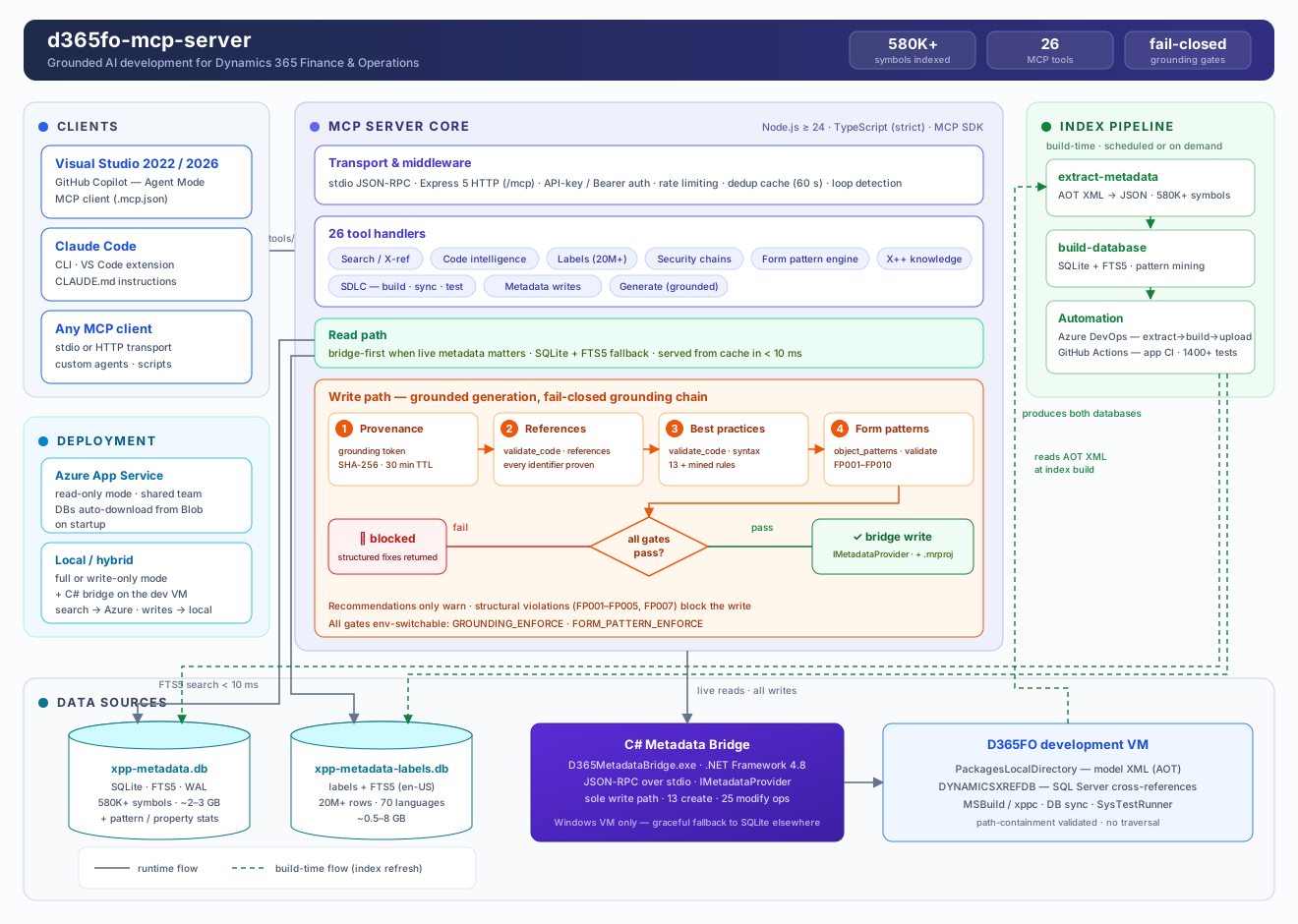
This server pre-indexes your entire D365FO installation (580 000+ symbols across standard, ISV, and custom models) and exposes it as 22 specialized MCP tools (axdb_sql and trace_d365fo only once configured). Every signature, every CoC wrapper, every label, every form pattern — verified against your real metadata before the AI writes a single line.
Forms are the hardest artifact to generate correctly — each pattern dictates required containers, ordering, and allowed sub-patterns. The form pattern engine makes it a guided pipeline:
flowchart LR
    A["object_patterns<br/>(domain=form, action=analyze)"] --> B["object_patterns<br/>(domain=form, action=spec)"]
    B --> C["generate_object<br/>objectType=form, cloneFrom"]
    C --> D["object_patterns<br/>(domain=form, action=validate) FP001–FP010"]
    D -->|clean| E["d365fo_file<br/>(action=create) write + project"]
    D -->|errors| C
Structural violations (wrong order, missing container, disallowed control) block the write — recommendations only warn. Mined pattern statistics from your own environment ground every suggestion in reality.
From D365FO platform update 10.0.49 (PU74), Visual Studio 2026 is the supported IDE for X++ development — Microsoft no longer supports VS 2022. Earlier platform versions still use VS 2022 ≥ 17.14. Details
Installing on your own D365FO VM — the usual case. One line in PowerShell installs Node.js if it is missing, installs the server from npm, and runs the setup wizard, which asks where the index should live and builds the C# bridge for you:
irm https://raw.githubusercontent.com/dynamics365ninja/d365fo-mcp-server/main/install.ps1 | iex
Already have Node.js 24+? Then the one-liner has nothing to bootstrap and you can skip it:
npm install -g d365fo-mcp
d365fo-mcp setup
Re-running either is safe. An installation made before the npm package existed is a git checkout, and both are left exactly where they are and updated in place.
Your team already runs a shared server? Then you install nothing — point your editor at it:
npx d365fo-mcp connect https://your-server.azurewebsites.net
Both paths in full — prerequisites, editor configuration for every scenario, the required instruction file, and how to verify grounding actually works: docs/QUICK_START.md
One shared instance for the whole team — the metadata index lives in Blob Storage and downloads automatically on startup.
Deployment guide: docs/SETUP_AZURE.md — includes CI/CD pipeline automation
MIT
{ "mcpServers": { "d365fo-mcp": { "command": "npx", "args": [ "-y", "[email protected]" ] } }}Tool
Belum ada daftar tool. Server remote mendapatkannya setelah pemeriksaan kesehatan pertama.
FAQ
Salin konfigurasi stdio untuk Cursor, Claude Desktop, Claude Code, atau VS Code di halaman ini. Konfigurasi ini memakai instalasi dari penerbit, bukan proxy PlugMCP.
Tidak ada variabel lingkungan wajib yang tercantum di catatan ini.
D365fo berjalan secara lokal melalui stdio.
Terakhir diperiksa 2026-10-28. MCP Server for X++ Code Completion in D365 Finance & Operations
