PostgreSQL SSH MCP Server
A secure PostgreSQL MCP server with built-in SSH tunneling. Connect to databases through bastion hosts automatically — no manual required.
Power your agent
Perintah milik penerbit sendiri. Bukan endpoint PlugMCP.
Host a copy with our keys and logs.
npx -y @iflow-mcp/[email protected]Claude Code tidak punya tautan instal untuk perintah lokal. Salin perintah di bawah dan jalankan di terminal.
claude mcp add iflow-mcp-zlash65-postgresql-ssh-mcp -- npx -y @iflow-mcp/zlash65-postgresql-ssh-mcp@1.2.1Jalankan di terminal.
{ "mcpServers": { "iflow-mcp-zlash65-postgresql-ssh-mcp": { "command": "npx", "args": [ "-y", "@iflow-mcp/[email protected]" ] } }}claude_desktop_config.json
URL remote atau perintah di mesin Anda? Perbedaan kedua cara instal
Jalankan di PlugMCP
A new server you create. It is not this listing's official endpoint. Use the publisher install when you want their URL and their credentials.
Bukassh -L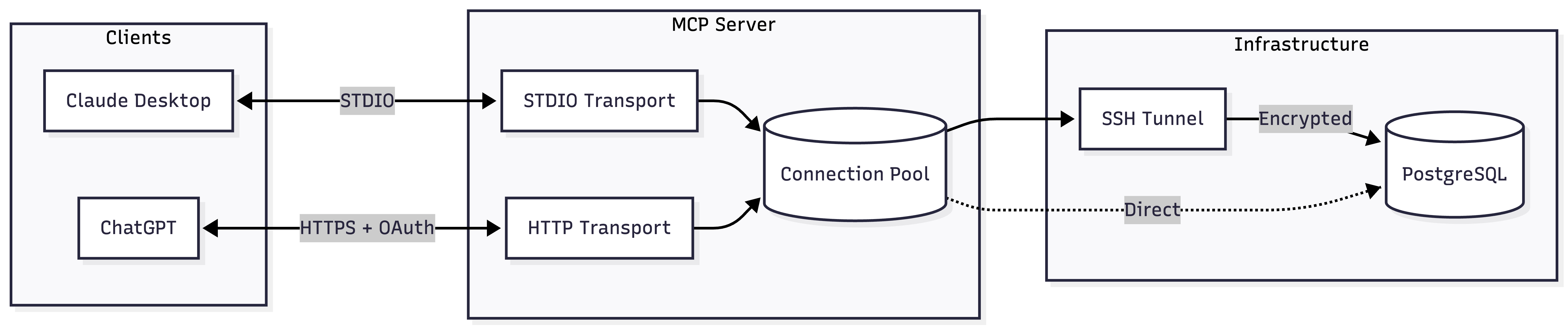
Add to your Claude Desktop config:
{
  "mcpServers": {
    "postgres": {
      "command": "npx",
      "args": ["-y", "@zlash65/postgresql-ssh-mcp"],
      "env": {
        "DATABASE_URI": "postgresql://user:password@localhost:5432/mydb"
      }
    }
  }
}
DATABASE_URI="postgresql://user:pass@localhost:5432/mydb" npx @zlash65/postgresql-ssh-mcp-http
Then configure ChatGPT to connect to https://your-subdomain.example.com/mcp.
Note: ChatGPT requires HTTPS. Use a tunnel (ngrok, Cloudflare Tunnel) for local testing.
*Either DATABASE_URI or all individual connection variables are required.
*Required when SSH_ENABLED=true
**Either SSH_PRIVATE_KEY_PATH or SSH_PASSWORD is required
*Required when MCP_AUTH_MODE=oauth
docker build --target runtime -t postgresql-mcp .
docker run -e DATABASE_URI="postgresql://..." postgresql-mcp
docker build --target runtime-http -t postgresql-mcp-http .
docker run -p 3000:3000 -e DATABASE_URI="postgresql://..." postgresql-mcp-http
# Install dependencies
npm install

# Build
npm run build

# Run tests
npm test

# Type check
npm run typecheck

# Lint
npm run lint
PostgreSQL MCP Server with built-in SSH tunneling for secure database access through bastion hosts
{ "mcpServers": { "iflow-mcp-zlash65-postgresql-ssh-mcp": { "command": "npx", "args": [ "-y", "@iflow-mcp/[email protected]" ] } }}Tool
Belum ada daftar tool. Server remote mendapatkannya setelah pemeriksaan kesehatan pertama.
FAQ
Salin konfigurasi stdio untuk Cursor, Claude Desktop, Claude Code, atau VS Code di halaman ini. Konfigurasi ini memakai instalasi dari penerbit, bukan proxy PlugMCP.
Tidak ada variabel lingkungan wajib yang tercantum di catatan ini.
@iflow MCP/zlash65 Postgresql Ssh berjalan secara lokal melalui stdio.
Terakhir diperiksa 2026-11-16. PostgreSQL MCP Server with built-in SSH tunneling for secure database access through bastion hosts
