Apple Books MCP
Model Context Protocol (MCP) server for Apple Books.
Power your agent
Perintah milik penerbit sendiri. Bukan endpoint PlugMCP.
Host a copy with our keys and logs.
uvx apple-books-mcp==0.9.0Claude Code tidak punya tautan instal untuk perintah lokal. Salin perintah di bawah dan jalankan di terminal.
APPLE_BOOKS_MCP_ENABLE_WRITES=<value> APPLE_BOOKS_DATA_DIR=<value> APPLE_BOOKS_MCP_THREADS=<value> APPLE_BOOKS_QUERY_TIMEOUT=<value> claude mcp add vgnshiyer-apple-books-mcp -- uvx apple-books-mcp==0.9.0Jalankan di terminal.
{ "mcpServers": { "vgnshiyer-apple-books-mcp": { "command": "uvx", "args": [ "apple-books-mcp==0.9.0" ], "env": { "APPLE_BOOKS_MCP_ENABLE_WRITES": "<value>", "APPLE_BOOKS_DATA_DIR": "<value>", "APPLE_BOOKS_MCP_THREADS": "<value>", "APPLE_BOOKS_QUERY_TIMEOUT": "<value>" } } }}claude_desktop_config.json
URL remote atau perintah di mesin Anda? Perbedaan kedua cara instal
Jalankan di PlugMCP
A new server you create. It is not this listing's official endpoint. Use the publisher install when you want their URL and their credentials.
Bukachapter_id="current") and your highlights when it needs them.«...».And much more!
List and search tools return one page at a time: 50 annotations or 200 books by default, limit between 1 and 500, and offset for the next page. When there is more, the output says so and names the next offset.
How results work:
[175] Title by Author, to pass on as book_id, annotation_id or collection_id. A numeric string such as "175" is accepted too; true, false and fractions are not ids.color) comes back as an MCP error (isError) whose message names what to do next, often another tool to call. An empty result ("No books matched …") is a normal answer, not an error.<book_text>…</book_text>. The server's instructions tell Claude that this text is untrusted data from the book, never instructions to follow.Off by default. Enable by adding --enable-writes to the server args:
"args": ["apple-books-mcp", "--enable-writes"]
With the Claude Desktop extension, turn on Allow editing collections in the extension's settings instead.
Apple provides no automation API for collections, so these write directly to the library database — behind guard rails: every write refuses while Books is open, takes an automatic WAL-safe backup first (~/.py_apple_books/backups/), validates the schema and aborts on drift, and only touches user-created collections (plus "Want to Read" membership). Deleting a collection never deletes the books in it.
⚠️ If iCloud sync for collections is enabled, direct edits may not propagate to other devices and can be reverted by a cloud re-sync.
describe_book has a Readable text line saying whether the chapter tools can read the book, and if not why: yes (EPUB), a PDF, DRM-protected, not downloaded (in iCloud only, an Apple Books Store title, or never downloaded) or a missing file. It is worked out from the library's records and file metadata, without opening the book: reading a file that is only in iCloud would make macOS download it.
Open in Books links (ibooks://assetid/…) open the book in Apple Books. They appear in describe_book, describe_annotation, get_current_reading_position and the Currently Reading resource.
Only works for non-DRM EPUBs downloaded to this Mac (imported books, Project Gutenberg, Standard Ebooks, etc.). Apple Books Store purchases are usually FairPlay-protected and return a clear error, and iCloud-only books a "not downloaded" hint; describe_book's "Readable text" line tells in advance.
Attachable data objects accessible from Claude Desktop's resource picker.
One-click workflows, accessible from Claude Desktop's prompt picker.
mcp >= 1.12 (< 2) and py-apple-books >= 1.10 (< 2).uvx runs apple-books-mcp without a separate install step.
brew install uv  # for macos
uvx apple-books-mcp --version
The first run downloads about 14 MB of dependencies and can take up to a minute, which is close to how long Claude waits for a server to start. Running the command above once in Terminal warms uv's cache before you add the server to Claude. --version prints the apple-books-mcp, mcp and py-apple-books versions uvx resolved.
Then add the server to Claude with the JSON config or the Claude Code command below.
Claude Desktop can also install apple-books-mcp as an extension, without editing its config: download apple-books-mcp-<version>.mcpb from the latest GitHub release, double-click it (or open Settings → Extensions → Install Extension… and pick the file), and click Install. Desktop installs uv and the locked dependencies itself. Allow editing collections in the extension's settings does the same as --enable-writes.
On organization-managed Claude (Team/Enterprise), admins can limit Desktop Extensions to an allowlist or turn them off. If the .mcpb install is refused, use the JSON config below. If user-added MCP servers are also disabled by policy, ask your admin to approve the extension.
Needs Python 3.10 or newer (the python3 that ships with macOS is 3.9). Install into a virtual environment:
python3 -m venv ~/.venvs/apple-books-mcp
~/.venvs/apple-books-mcp/bin/pip install apple-books-mcp
~/.venvs/apple-books-mcp/bin/apple-books-mcp --version
Upgrade later with ~/.venvs/apple-books-mcp/bin/pip install -U apple-books-mcp.
⚠️ The Docker image is deprecated and only partly works: a Linux container can't be granted the macOS permission, can't reach book files stored in iCloud Drive (so the tools that read book text fail), and can't tell whether Books is running (so collection writes are unsupported). Use uvx instead.
It can still serve library metadata and annotations. Mount the Apple Books container read-only and keep stdin open with -i. The image runs as an unprivileged user and reads the library from the same mount path as before:
docker run -i --rm -v ~/Library/Containers/com.apple.iBooksX/Data/Documents:/root/Library/Containers/com.apple.iBooksX/Data/Documents:ro ghcr.io/vgnshiyer/apple-books-mcp:latest
In a Claude config, spell out your home directory: Claude doesn't expand ~.
{
    "mcpServers": {
        "apple-books-mcp": {
            "command": "docker",
            "args": [
                "run", "-i", "--rm",
                "-v", "/Users/YOU/Library/Containers/com.apple.iBooksX/Data/Documents:/root/Library/Containers/com.apple.iBooksX/Data/Documents:ro",
                "ghcr.io/vgnshiyer/apple-books-mcp:latest"
            ]
        }
    }
}
The first time the server reads your library, macOS asks whether the program that started it may "access data from other apps", because Apple Books keeps its library in its own app container (~/Library/Containers/com.apple.iBooksX/). Click Allow.
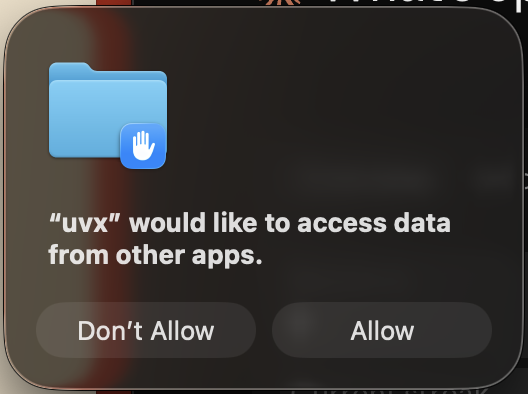
macOS asks about the program Claude launches, not about apple-books-mcp itself:
uvx with the recommended Claude Desktop config (the prompt above);claude when the server is configured in Claude Code;The permission belongs to that program, so anything else it launches can use it too. apple-books-mcp only reads the library, plus the book files for chapter text; it changes nothing unless you pass --enable-writes.
To check, run uvx apple-books-mcp --doctor in Terminal: it reports whether the program running it may read the library and, if not, how to fix it. Run that way it checks your terminal app's permission, which macOS asks about separately from uvx or Claude.
Asked again after an update? Homebrew's uv/uvx and Homebrew or uv-managed Python builds aren't signed by a registered developer, so after brew upgrade uv (or a Python upgrade) macOS treats them as a new program and asks again. Click Allow.
Clicked "Don't Allow"? Tools then fail with "macOS denied access to the Apple Books library". (Older releases failed at startup instead, with "No sqlite files found in … Please open Apple Books at least once".) This permission has no switch in System Settings. To be asked again, run:
tccutil reset SystemPolicyAppData
This clears the "data from other apps" decisions for all apps. Then quit and reopen Claude, and click Allow. Adding the program (e.g. /opt/homebrew/bin/uvx) to Full Disk Access in System Settings > Privacy & Security also works, but grants far more access.
Quit Claude Desktop (Cmd+Q) before editing ~/Library/Application Support/Claude/claude_desktop_config.json: Desktop rewrites the file while it runs, so edits made while it's open can be lost.
{
    "mcpServers": {
        "apple-books-mcp": {
            "command": "uvx",
            "args": [ "apple-books-mcp" ]
        }
    }
}
Plain apple-books-mcp still picks up new releases: uv checks PyPI for a newer version whenever its cached copy of the package index is more than 10 minutes old, which is usually the case when Claude starts. apple-books-mcp@latest gains nothing over that and makes uv build a fresh environment on every launch (3–12 s instead of about 1 s).
Because uvx checks PyPI at launch, the server won't start while PyPI is unreachable. To avoid that:
uv tool install apple-books-mcp once. The same uvx config then uses the installed copy and starts in about a second without contacting PyPI. Installed copies don't update themselves: run uv tool upgrade apple-books-mcp to get new releases."args": ["--offline", "apple-books-mcp"] to run whatever version uv has already cached (after at least one online run), without any network access.Point Claude at the script inside the virtual environment from Using pip, with your home directory spelled out:
{
    "mcpServers": {
        "apple-books-mcp": {
            "command": "/Users/YOU/.venvs/apple-books-mcp/bin/apple-books-mcp"
        }
    }
}
Claude Code doesn't read the Claude Desktop config. Add the server with:
claude mcp add --scope user apple-books-mcp -- uvx apple-books-mcp
and check it with /mcp.
Set these in the server's "env" in the Claude config (e.g. "env": {"APPLE_BOOKS_MCP_THREADS": "4"} next to "args"), or with claude mcp add -e NAME=value.
uvx apple-books-mcp --doctor in Terminal checks the versions, finds the library, explains macOS permission problems and prints counts of what it read. It only reads, and never prints titles or text.~/Library/Logs/Claude/mcp-server-apple-books-mcp.log (named after your mcpServers key) has the server's own output, including Python tracebacks. For more detail, add "-v" to the args: the server then logs its version, the mcp and py-apple-books versions it runs with, and each request.~/Library/Logs/Claude/mcp.log lists failures. Its "Server started and connected successfully" line only means the process was launched, not that it works.~/Library/Logs/Claude/main.log records "Connected to apple-books-mcp (N tools)" when a Claude Code or Cowork session in Desktop loaded the tools.uvx apple-books-mcp --version in Terminal shows which versions uvx resolves.mcp-server-apple-books-mcp.log.
No module named 'mcp.server.fastmcp': uv picked an apple-books-mcp release older than 0.8.1 together with mcp 2.x, which removed the API those releases were built on (on Python 3.12 and older, uvx could even fall back to 0.1.2). 0.8.1 and newer work with Python 3.10+ and stay on mcp 1.x. Run uv cache clean apple-books-mcp, check that uvx apple-books-mcp --version reports 0.8.1 or newer, then quit and reopen Claude.No module named 'server' error in front of the real one is noise from releases before 0.8.4.uvx apple-books-mcp --version once in Terminal, then reopen Claude.main.log is harmless./mcp and reconnect apple-books-mcp, or restart Claude Code.Thank you for considering contributing to this project!
Clone the repository and let uv create the virtual environment and install the package with its dependencies:
uv sync
uv run apple-books-mcp --version
uv run pytest
To build the Claude Desktop extension locally, install the pinned packer, then build:
npm ci --ignore-scripts --prefix mcpb
uv run python scripts/build_mcpb.py
This writes dist/apple-books-mcp-<version>.mcpb and the registry's dist/server.json (--out DIR picks another folder). python scripts/build_mcpb.py --smoke dist/apple-books-mcp-<version>.mcpb installs the bundle the way Claude Desktop does and checks the server it starts.
Maintainers: publishing a GitHub release runs the release workflow, which checks the tag against every version field, publishes to PyPI, attaches the .mcpb to the release and publishes to the MCP Registry.
Logs go to stderr, which Claude Desktop writes to ~/Library/Logs/Claude/mcp-server-<name>.log. Without flags the server logs only warnings and errors; -v adds startup details (versions, whether writes are enabled) and a line per request; -vv adds debug output from the MCP SDK.
With Claude Desktop
{
    "mcpServers": {
        "apple-books-mcp": {
            "command": "uv",
            "args": [
                "--directory",
                "/path/to/apple-books-mcp/",
                "run",
                "apple-books-mcp",
                "-v"
            ]
        }
    }
}
With inspector
npx @modelcontextprotocol/inspector uv --directory /path/to/apple-books-mcp run apple-books-mcp
If you encounter a bug, have a feature request, or want to discuss something related to the project, please open an issue on the GitHub repository. When opening an issue, please provide:
Bug Reports: Describe the issue in detail. Include steps to reproduce the bug if possible, along with any error messages or screenshots.
Feature Requests: Clearly explain the new feature you'd like to see added to the project. Provide context on why this feature would be beneficial.
General Discussions: Feel free to start discussions on broader topics related to the project.
1️⃣ Fork the GitHub repository https://github.com/vgnshiyer/apple-books-mcp
2️⃣ Create a new branch for your changes (git checkout -b feature/my-new-feature).
3️⃣ Make your changes and test them thoroughly.
4️⃣ Push your changes and open a Pull Request to main.
Please provide a clear title and description of your changes.
Apple Books MCP is licensed under the Apache 2.0 license. See the LICENSE file for details.
Apple Books MCP Server
{ "mcpServers": { "vgnshiyer-apple-books-mcp": { "command": "uvx", "args": [ "apple-books-mcp==0.9.0" ], "env": { "APPLE_BOOKS_MCP_ENABLE_WRITES": "<value>", "APPLE_BOOKS_DATA_DIR": "<value>", "APPLE_BOOKS_MCP_THREADS": "<value>", "APPLE_BOOKS_QUERY_TIMEOUT": "<value>" } } }}Tool
Belum ada daftar tool. Server remote mendapatkannya setelah pemeriksaan kesehatan pertama.
FAQ
Salin konfigurasi stdio untuk Cursor, Claude Desktop, Claude Code, atau VS Code di halaman ini. Konfigurasi ini memakai instalasi dari penerbit, bukan proxy PlugMCP.
Penerbit mencantumkan variabel lingkungan berikut: APPLE_BOOKS_MCP_ENABLE_WRITES, APPLE_BOOKS_DATA_DIR, APPLE_BOOKS_MCP_THREADS, APPLE_BOOKS_QUERY_TIMEOUT.
Apple Books berjalan secara lokal melalui stdio.
Terakhir diperiksa 2026-10-27. Apple Books MCP Server
