💼 Google Jobs API: Job Listings in Clean JSON
The most efficient, reliable, and developer-friendly way to use the Google Jobs API.
Actor page: apify.com/johnvc/Google-Jobs-Scraper Input schema: apify.com/johnvc/Google-Jobs-Scraper/input-schema
エージェントを強化
公開元自身の URL です。PlugMCP のエンドポイントではありません。
キーとログ付きでコピーをホスト。
https://mcp.apify.com/?tools=johnvc/Google-Jobs-Scraper上の Claude ボタンを押すと、名前と URL が入力された状態で Claude が開きます。確定の操作は Claude 側で行います。
claude mcp add --transport http io.github.johnisanerd-google-jobs https://mcp.apify.com/?tools=johnvc/Google-Jobs-ScraperRun in a terminal.
{ "mcpServers": { "io.github.johnisanerd-google-jobs": { "command": "npx", "args": [ "-y", "mcp-remote", "https://mcp.apify.com/?tools=johnvc/Google-Jobs-Scraper" ] } }}claude_desktop_config.json
リモート URL か、手元のマシンのコマンドか 2 つのインストール方法の違い
PlugMCP で実行
A new server you create. It is not this listing's official endpoint. Use the publisher install when you want their URL and their credentials.
起動公開元より
The most efficient, reliable, and developer-friendly way to use the Google Jobs API.
Actor page: apify.com/johnvc/Google-Jobs-Scraper Input schema: apify.com/johnvc/Google-Jobs-Scraper/input-schema
Google Jobs listings with apply links and full descriptions. Paid, on Apify's hosted MCP.
The Google Jobs API searches Google Jobs and returns clean, structured JSON, one record per listing. Each job includes title, company, location, source platform, the full description, structured highlights (qualifications, responsibilities, benefits), parsed metadata (posting date, schedule type, benefits), and direct apply links across platforms (LinkedIn, Indeed, company site, and more). Supports location targeting, location-radius search, country and language filtering, and pagination.
Looking for per-result pricing instead of per-page? See the pay-per-result edition.

Clone the repository
git clone https://github.com/johnisanerd/Apify-Google-Jobs-Scraper.git
cd Apify-Google-Jobs-Scraper
Install dependencies with UV
# Install UV if you do not have it:
curl -LsSf https://astral.sh/uv/install.sh | sh

# Install project dependencies:
uv sync
Configure your API key
cp .env.example .env
# Edit .env and add your Apify API key
# Get your free API key at: https://apify.com?fpr=9n7kx3
Run the example
uv run python google-jobs-search-scraper.py
export APIFY_API_TOKEN="your_api_key_here"
uv run python google-jobs-search-scraper.py
One record per job, fully detailed. Every listing comes with title, company, location, source, the full description, structured highlights, and parsed metadata, so you can load it straight into an ATS, a dashboard, or an analysis pipeline.
Direct apply links. Each job includes apply options across platforms (LinkedIn, Indeed, the company careers site, and more) with direct URLs.
Targeted search. Filter by location, country, language, and Google domain, and use location-radius search to focus on a specific area.
Predictable, pay-per-use pricing. Billing is per page processed, with no subscription. You control cost with the page limit.
Easy to automate. Call it from Python in a few lines, or load it as an MCP tool so assistants like Claude and Cursor can search jobs for you on demand.
{
  "query": "Software Engineer",
  "location": "San Francisco, CA",
  "max_pagination": 1
}
{
  "query": "Data Scientist",
  "location": "Berlin, Germany",
  "country": "de",
  "language": "de",
  "include_lrad": true,
  "lrad_value": "10",
  "max_pagination": 1
}
A real result for Software Engineer in San Francisco (one item per job; the full description, job_highlights, extensions, and detected_extensions are present but omitted here for readability, and job_id is truncated).
{
  "title": "Software Engineer",
  "company_name": "Lockheed Martin",
  "location": "San Francisco, CA",
  "via": "Lockheed Martin Careers",
  "apply_options": [
    {
      "title": "Lockheed Martin Careers",
      "link": "https://www.lockheedmartinjobs.com/job/owego/software-engineer/694/93796107616"
    }
  ],
  "job_id": "eyJqb2JfdGl0bGUiOiJTb2Z0d2FyZSBFbmdpbmVlciIsImNvbXBhbnlfbmFtZSI6...",
  "query": "Software Engineer",
  "country": "us",
  "language": "en",
  "google_domain": "google.com",
  "search_timestamp": "2026-05-29T11:10:36",
  "total_jobs_found": 10,
  "pages_processed": 1
}
Each job record also includes the full description text, a job_highlights array (qualifications, responsibilities, benefits), an extensions array of raw tags (for example Full-time), and a detected_extensions object with parsed fields like posting date and schedule type.
You can load the Google Jobs API as an MCP tool so assistants call it for you. The MCP server URL preloads just this one Actor:
https://mcp.apify.com/?tools=actors,docs,johnvc/Google-Jobs-Scraper
Authenticate with OAuth in the browser when offered, or with your Apify API token (the same APIFY_API_TOKEN used by the Python example). Get a token at https://console.apify.com/settings/integrations and a free Apify account at https://apify.com?fpr=9n7kx3 .
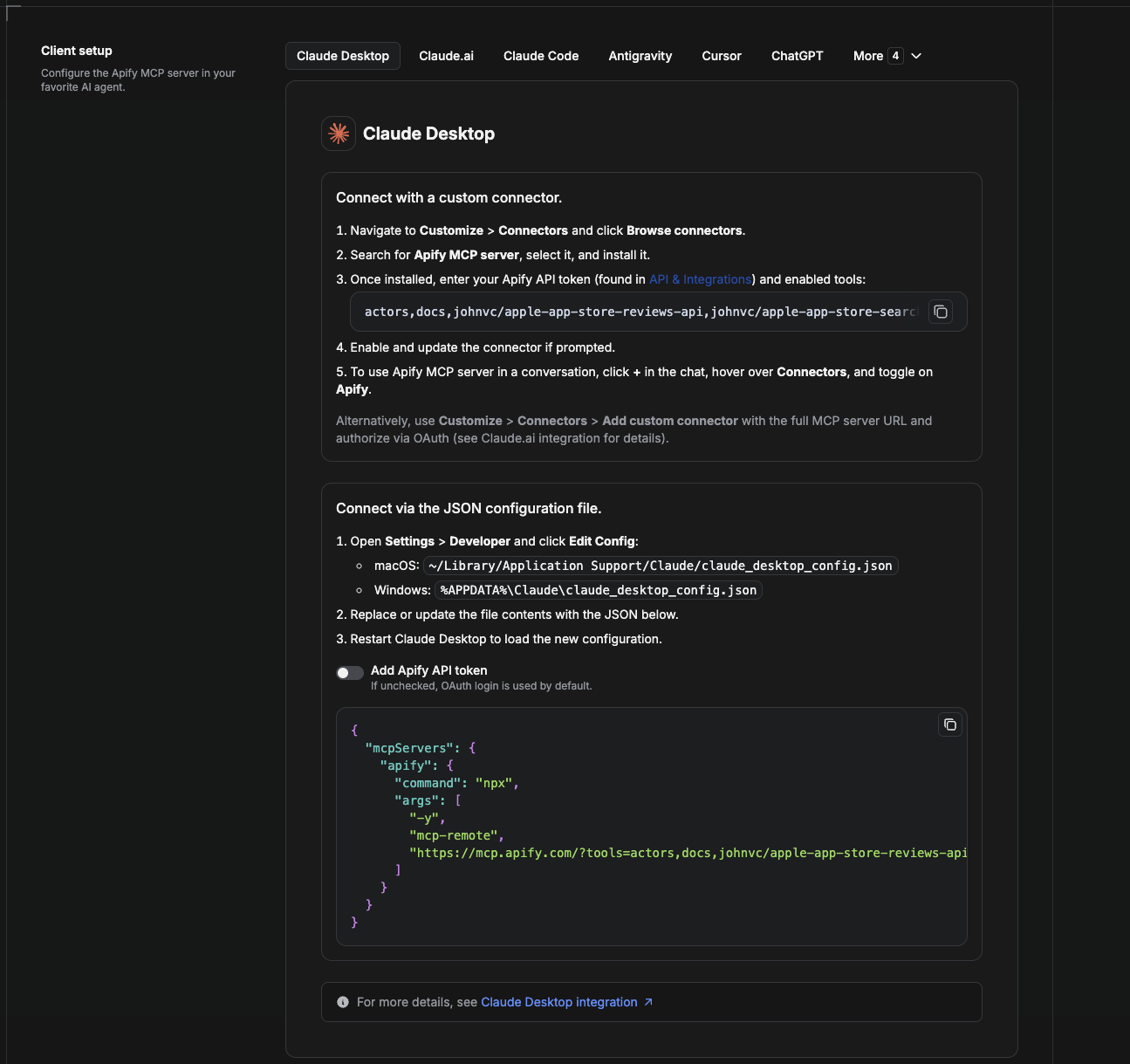
Cowork is the desktop app's automation mode. To give it the Google Jobs API as a tool, add the Apify MCP server as a connector.
claude_desktop_config.json directly).
~/Library/Application Support/Claude/claude_desktop_config.json%APPDATA%\Claude\claude_desktop_config.json{
"mcpServers": {
"apify": {
"command": "npx",
"args": [
"-y",
"mcp-remote",
"https://mcp.apify.com/?tools=actors,docs,johnvc/Google-Jobs-Scraper"
]
}
}
}
Download the desktop app and start a free trial: https://claude.ai/referral/uIlpa7nPLg More help: https://docs.apify.com/platform/integrations/claude-desktop
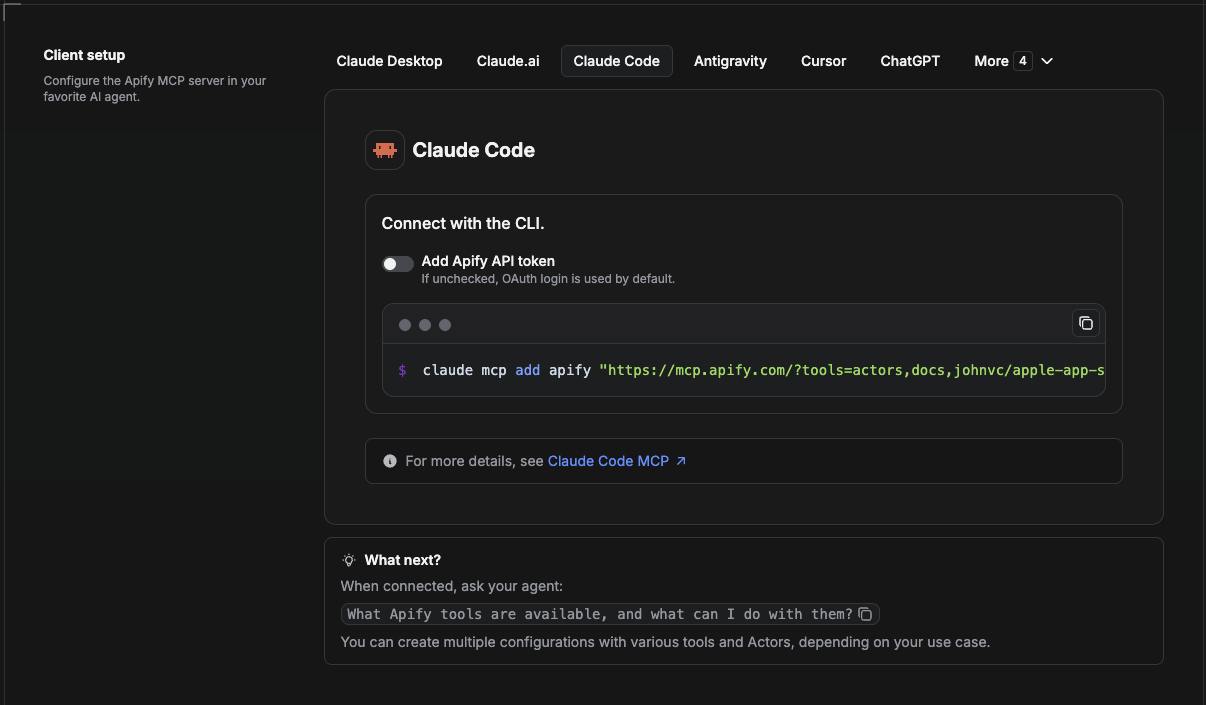
Claude Code is the command-line tool. Add the Actor's MCP server with one command:
claude mcp add --transport http apify \
  "https://mcp.apify.com/?tools=actors,docs,johnvc/Google-Jobs-Scraper"
To use a token instead of browser OAuth:
claude mcp add --transport http apify \
  "https://mcp.apify.com/?tools=actors,docs,johnvc/Google-Jobs-Scraper" \
  --header "Authorization: Bearer YOUR_APIFY_TOKEN"
Then verify with claude mcp list, or run /mcp inside a session. Ask Claude Code to call the Google Jobs API.
Try Claude Code free: https://claude.ai/referral/uIlpa7nPLg Claude Code MCP docs: https://code.claude.com/docs/en/mcp
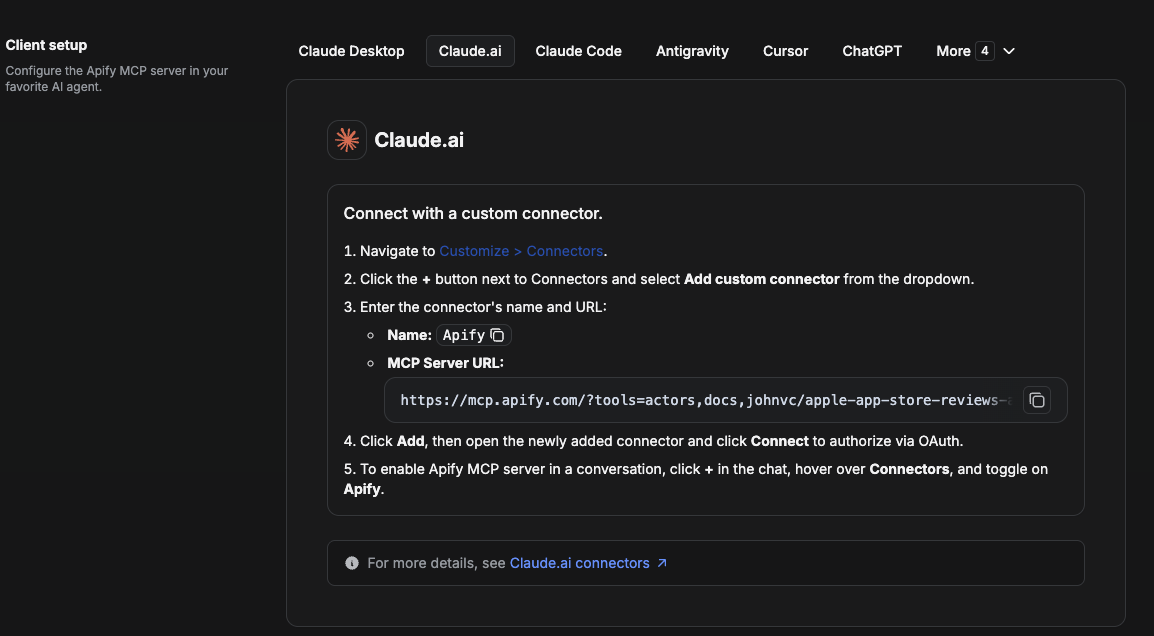
On claude.ai you add Apify as a connector, then enable just this Actor's tool.
johnvc/Google-Jobs-Scraper.https://mcp.apify.com/?tools=actors,docs,johnvc/Google-Jobs-Scraper, using OAuth when prompted.Open Claude on the web: https://claude.ai/referral/uIlpa7nPLg
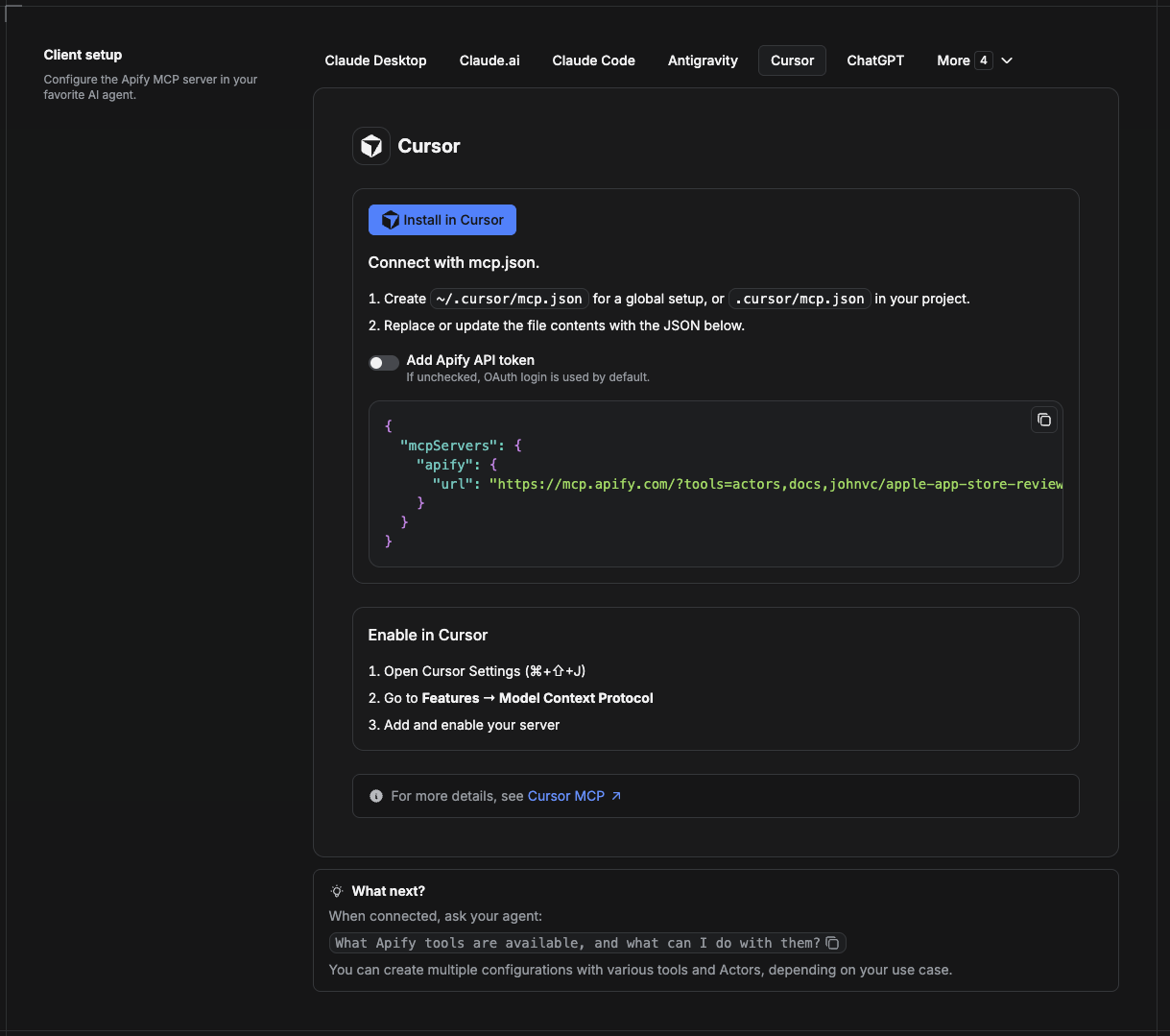
Cursor reads MCP servers from a project file at .cursor/mcp.json.
.cursor/mcp.json:{
"mcpServers": {
"apify": {
"url": "https://mcp.apify.com/?tools=actors,docs,johnvc/Google-Jobs-Scraper"
}
}
}
{
  "mcpServers": {
    "apify": {
      "url": "https://mcp.apify.com/?tools=actors,docs,johnvc/Google-Jobs-Scraper",
      "headers": { "Authorization": "Bearer YOUR_APIFY_TOKEN" }
    }
  }
}
New to Cursor? Get it here: https://cursor.com/referral?code=XQP4VBLI3NNX
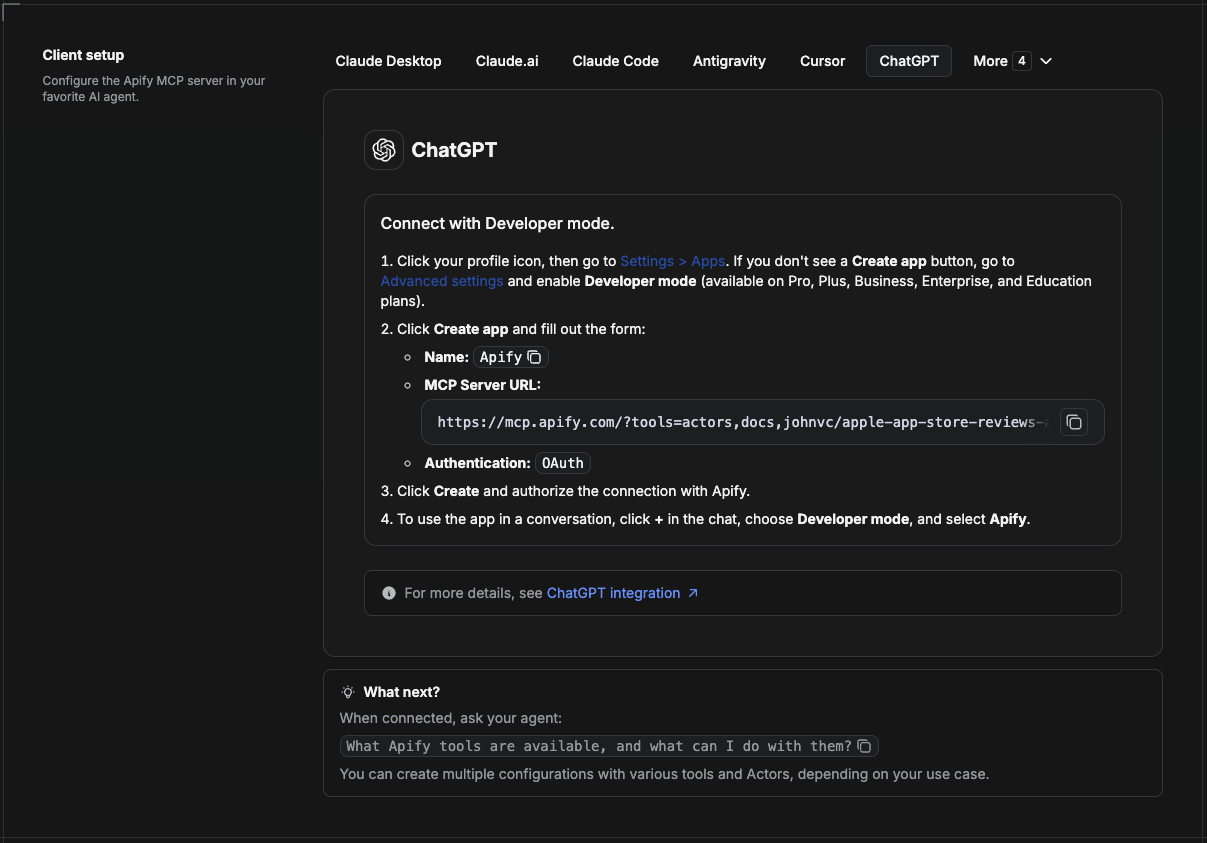
ChatGPT connects to the Apify MCP server through Developer mode (available on ChatGPT Pro, Plus, Business, Enterprise, and Education plans).
https://mcp.apify.com/?tools=actors,docs,johnvc/Google-Jobs-ScraperUse the Google Jobs API to power recruiting tools, market research, and analytics with reliable, structured results.
Open a ready-to-send prompt about the Google Jobs API in the AI of your choice:
Last Updated: 2026.10.27
Google Jobs listings with apply links and full descriptions. Paid, on Apify's hosted MCP.
{ "mcpServers": { "io.github.johnisanerd-google-jobs": { "url": "https://mcp.apify.com/?tools=johnvc/Google-Jobs-Scraper", "headers": {} } }}ツール
ツール一覧はまだありません。リモートサーバーは、最初のヘルスチェック後に取得されます。
よくある質問
このページで Cursor、Claude Desktop、Claude Code、VS Code 用の http 設定をコピーできます。PlugMCP のプロキシではなく、公開元のインストール方法を使います。
このレコードに必須の環境変数は記載されていません。
Google Jobs には HTTP で接続します。
最終チェックは 2026-11-16 です。 Google Jobs listings with apply links and full descriptions. Paid, on Apify's hosted MCP.