Features
Worker Orchestration
- Persistent State - Session state survives context compaction via MCP server
- Parallel Workers - Run multiple Claude Code workers simultaneously via tmux
에이전트 강화
게시자가 제공하는 설치 방식입니다. PlugMCP 엔드포인트가 아닙니다.
원격 URL인가요, 내 컴퓨터에서 실행하는 명령인가요? 두 설치 방식의 차이
PlugMCP에서 실행
A new server you create. It is not this listing's official endpoint. Use the publisher install when you want their URL and their credentials.
실행게시자 제공
MCP server for orchestrating parallel Claude Code worker swarms with protocol-based behavioral governance, persistent state, and real-time monitoring dashboard
http://localhost:3456 with Server-Sent EventsThe orchestrator pattern separates concerns for reliable long-running sessions:
Workers follow a two-phase lifecycle when plan mode is enabled (complexity >= 30):
For long-running features, the Ralph Loop replaces single long-lived sessions:
Sessions survive crashes and machine restarts:
resume_session detects crashes, loads checkpoints, restarts dead workersshutdown_session creates checkpoint and stops workers cleanlyThis separation enables:
brew install tmux on macOS)One-liner install (recommended):
curl -fsSL https://raw.githubusercontent.com/cj-vana/claude-swarm/main/install.sh | bash
This will clone the repo, build, register the MCP server, and install the /swarm skill.
git clone https://github.com/cj-vana/claude-swarm.git
cd claude-swarm
npm install
npm run build

# Add to Claude Code
claude mcp add claude-swarm --scope user -- node $(pwd)/dist/index.js

# Install the skill (optional but recommended)
mkdir -p ~/.claude/skills/swarm && cp skill/SKILL.md ~/.claude/skills/swarm/
Tell Claude to use the swarm:
Use /swarm to build a REST API with authentication, user management, and tests
Or follow the workflow phases manually:
Phase 1: Setup
  → orchestrator_init - Initialize session with features
  → configure_verification - Set up test/build commands
  → set_dependencies - Define feature order

Phase 2: Pre-Work (per feature)
  → get_feature_complexity - Check if competitive planning needed
  → enrich_feature - Add relevant context

Phase 3: Execute
  → start_worker or start_parallel_workers

Phase 4: Monitor
  → sleep 180 - Wait before checking
  → check_worker (heartbeat: true) - Lightweight status
  → send_worker_message - Guide if stuck

Phase 5: Complete
  → run_verification - Run tests
  → mark_complete - Record success/failure
  → commit_progress - Git checkpoint

Phase 6: Review
  → check_reviews - Monitor automated reviews
  → get_review_results - See findings
/swarm SkillThe /swarm skill provides guided orchestration with a complete workflow:
Use /swarm to build a REST API with authentication, user management, and tests
The skill automates:
setup_analyze)Installing the skill:
mkdir -p ~/.claude/skills/swarm && cp skill/SKILL.md ~/.claude/skills/swarm/
See skill/SKILL.md for the complete workflow reference.
Protocols define behavioral constraints that govern worker actions, enabling safe autonomous operation with clear boundaries.
{
  "id": "safe-refactoring-v1",
  "name": "Safe Refactoring Protocol",
  "version": "1.0.0",
  "priority": 100,
  "constraints": [
    {
      "id": "no-secrets",
      "type": "file_access",
      "rule": {
        "type": "file_access",
        "deniedPaths": ["**/.env", "**/secrets.*", "**/credentials.json"]
      },
      "severity": "error",
      "message": "Cannot access files that may contain secrets"
    }
  ],
  "enforcement": {
    "mode": "strict",
    "preExecution": true,
    "postExecution": true,
    "onViolation": "block"
  }
}
1. protocol_register - Register a new protocol
2. protocol_activate - Activate for enforcement
3. start_worker - Workers are validated against active protocols
4. [worker runs with continuous monitoring]
5. get_violations - Review any constraint violations
Workers can propose new protocols validated against immutable base constraints:
1. get_base_constraints - View immutable security rules
2. propose_protocol - Worker submits proposal
3. review_proposals - See pending proposals with risk scores
4. approve_protocol / reject_protocol - Human review for high-risk
Base Constraints (cannot be overridden):
/etc, system files)For complex features, spawn two planners with different approaches:
1. get_feature_complexity(featureId)     # Analyze complexity (0-100)
2. start_competitive_planning(featureId) # Spawn Planner A & B
3. [wait for planners to complete]
4. evaluate_plans(featureId)             # Compare and pick winner
5. start_worker(featureId)               # Implement with winning plan
Real-time confidence scoring detects struggling workers:
Levels: High (80-100), Medium (50-79), Low (25-49), Critical (0-24)
set_confidence_threshold(35)       # Configure alert level
get_worker_confidence(featureId)   # Get detailed breakdown
For fully autonomous execution, use auto_orchestrate:
auto_orchestrate(projectDir, strategy: "adaptive", maxConcurrent: 5)
This handles Phases 3-5 automatically:
Automated code and architecture reviews run after all workers complete:
1. All features complete -> session status changes to "reviewing"
2. Code review worker analyzes: bugs, security, style, test coverage
3. Architecture review worker analyzes: coupling, patterns, scalability
4. Findings aggregated into progress log
5. Session completes with review summary
Review workers output structured JSON findings:
.claude/orchestrator/workers/code-review.findings.json.claude/orchestrator/workers/architecture-review.findings.jsonSeverity levels: clean, minor, moderate, major, critical
Convert review findings into actionable features:
# View available issues from reviews
implement_review_suggestions(projectDir)

# Create features from specific issues
implement_review_suggestions(projectDir, issueIndices: [0, 2, 5])

# Auto-select warnings and errors
implement_review_suggestions(projectDir, autoSelect: true, minSeverity: "warning")
Configure or trigger manually:
configure_reviews(enabled: true, skipOnFailure: false)
run_review(reviewTypes: ["code", "architecture"])
get_review_results(format: "detailed")
Automatically configure repositories with development best practices:
# Analyze repository freshness and missing configs
setup_analyze(projectDir)

# Initialize setup with parallel workers
setup_init(projectDir)

# Check setup progress
setup_status(projectDir)
# Skip specific config types
setup_init(projectDir, skipConfigs: ["dependabot", "release-please"])

# Force overwrite existing files
setup_init(projectDir, force: true)

# Override platform detection
setup_init(projectDir, platform: "gitlab")
The orchestrator creates git snapshot branches before each worker starts, enabling safe rollback of failed features.
start_worker creates swarm/{featureId} branch at current HEADrollback_feature to restore pre-worker state# Rollback all files changed by feature
rollback_feature(projectDir, featureId: "feature-1")
# Rollback specific files only
rollback_feature(projectDir, featureId: "feature-1", files: ["src/component.ts"])
Warning: When rolling back in parallel worker environments, other workers' changes to the same files will also be reverted.
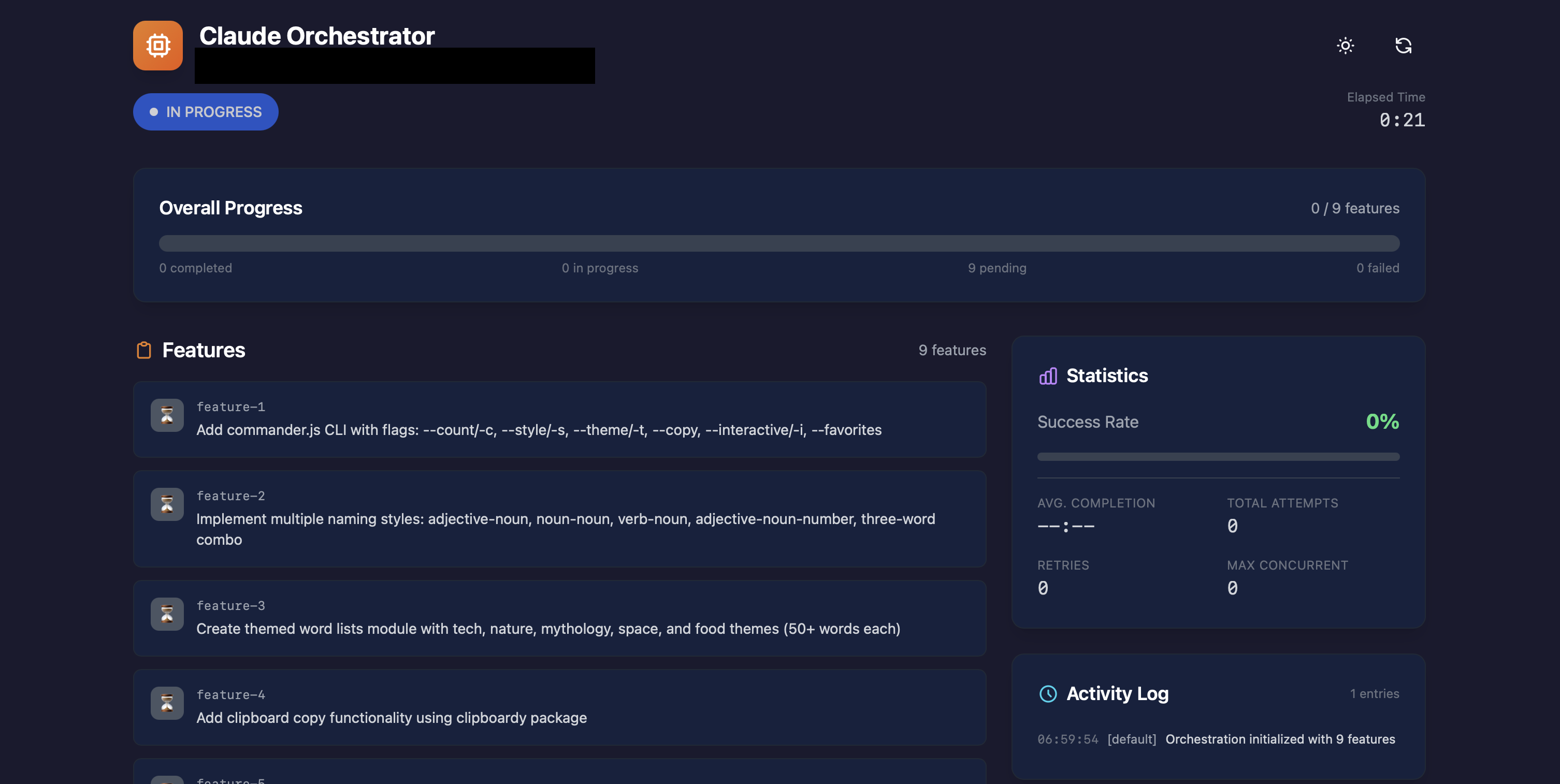
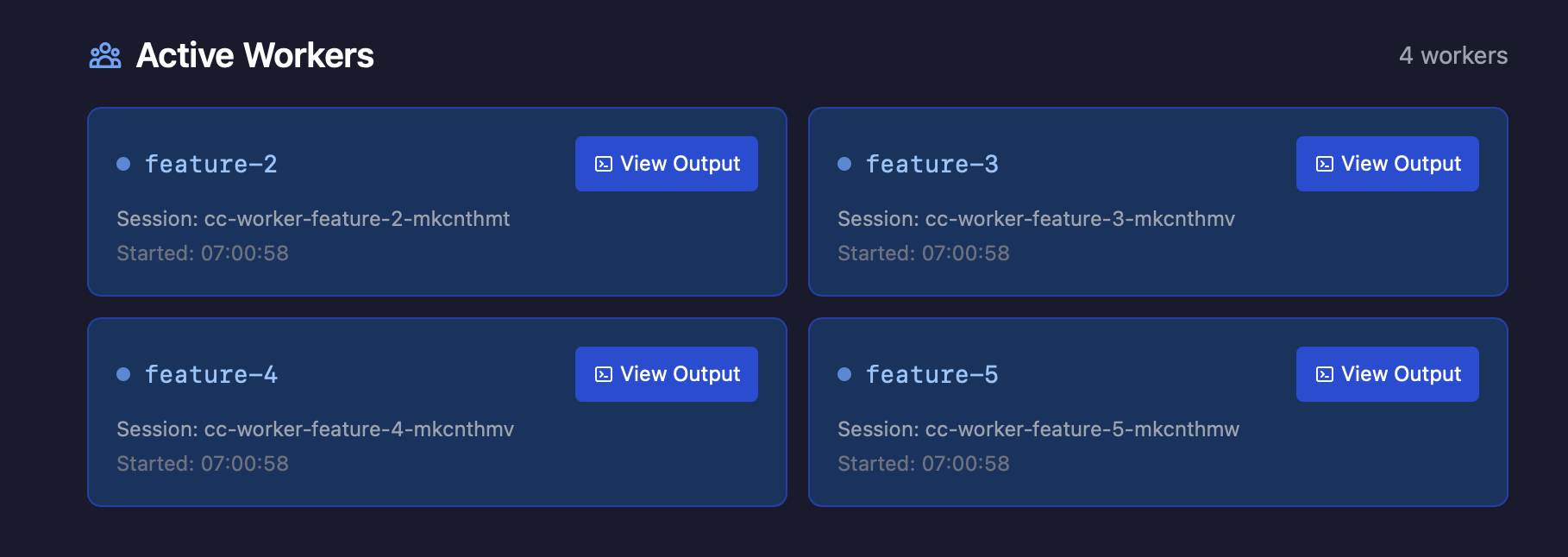
A real-time web dashboard is available at http://localhost:3456:
The dashboard exposes a REST API for programmatic access:
Server-Sent Events (/api/events):
status - Session status changesfeature - Feature status updatesworker - Active worker count changesreviewWorker - Review worker status updateslog - New progress log entriesheartbeat - Keep-alive (every 15s)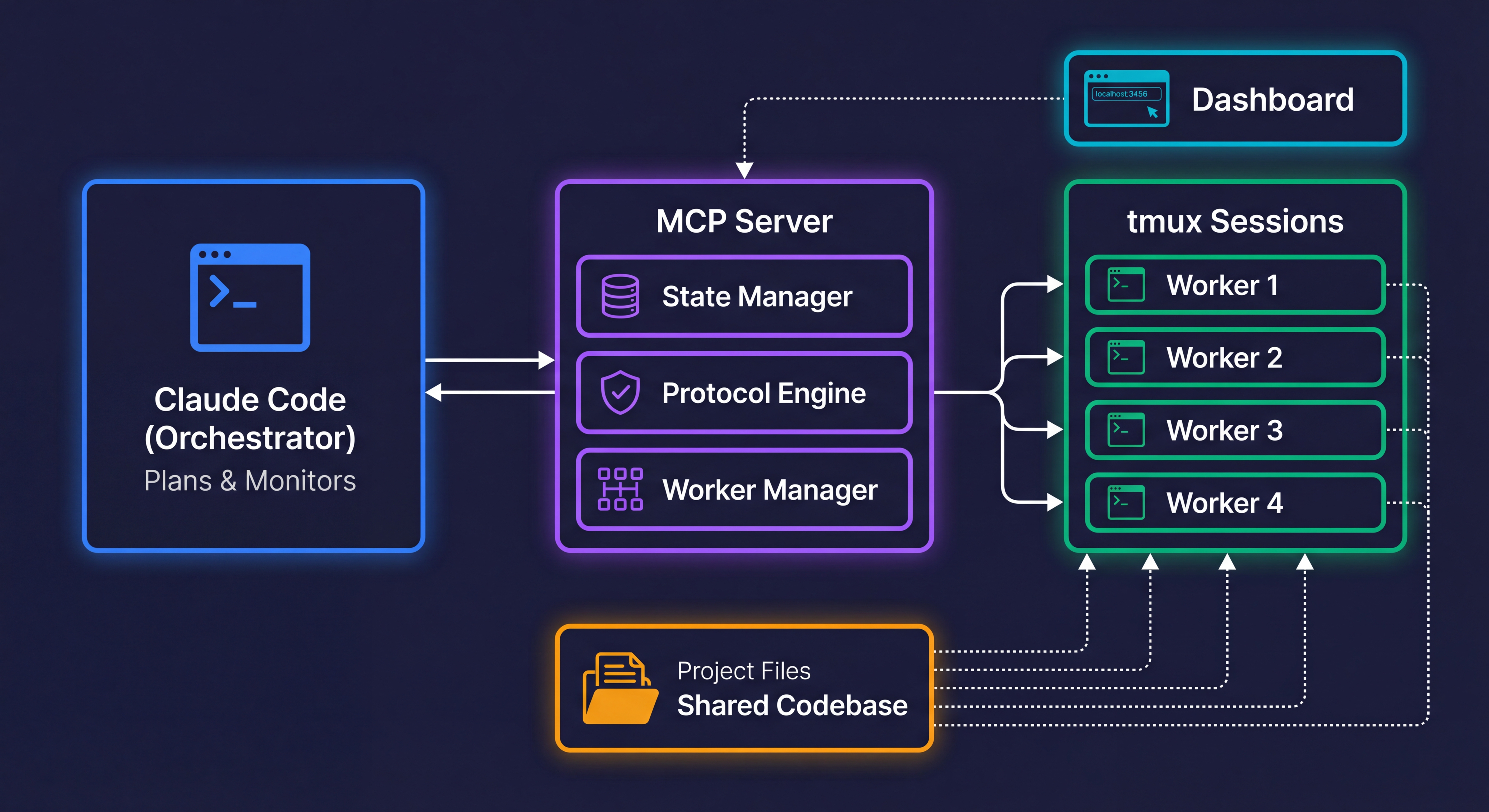
Claude Code orchestrates workers through the MCP Server. Workers run in isolated tmux sessions and share access to the project codebase. The dashboard provides real-time monitoring via SSE.
Configure commands that workers must run before marking features complete:
configure_verification(projectDir, commands: ["npm test", "npx tsc --noEmit"])
Workers will run these commands and fix any errors before completion. Allowed commands include:
npm test, npm run test, yarn test, pnpm testnpx tsc --noEmit, npx vitest, npx jestpytest, python -m pytestcargo test, cargo checkgo test, make testyour-project/
├── .claude/orchestrator/
│ ├── state.json # Session state
│ ├── feature_list.json # Feature status
│ ├── protocols/
│ │ ├── registry.json # Protocol definitions
│ │ ├── active.json # Active protocols
│ │ ├── violations.json # Violation records
│ │ ├── audit.json # Audit log
│ │ └── proposals/ # Pending proposals
│ ├── sync/ # Cross-instance sync
│ ├── checkpoints/ # Session checkpoints for crash recovery
│ │ └── *.json # Timestamped state snapshots
│ ├── heartbeat.json # Orchestrator liveness detection
│ ├── learnings.json # Failure pattern learning
│ ├── locks/ # File-based mutual exclusion
│ │ └── *.lock # Per-file lock files
│ ├── worktrees/ # Git worktree directories
│ └── workers/
│ ├── *.prompt # Worker prompts
│ ├── *.log # Worker output logs
│ ├── *.done # Completion markers
│ ├── *.status # Worker status
│ ├── *.plan.json # Competitive plans
│ ├── *.confidence # Self-reported confidence
│ ├── *.worker-plan.json # Worker plan-phase output
│ ├── *.plan-done # Plan phase completion markers
│ ├── *.progress.md # Ralph Loop progress files
│ ├── code-review.findings.json # Code review results
│ └── architecture-review.findings.json # Architecture review results
├── claude-progress.txt # Human-readable log
└── init.sh # Environment setup
crypto.randomUUID()isDangerousRegexPattern() detects catastrophic backtrackingsafeRegexTest() falls back to literal matching for dangerous patternsexecFile with arguments, prompts via filesRun orchestrator_status to check state, or orchestrator_init to start fresh.
check_worker(featureId) to see current outputget_worker_confidence(featureId) to check confidence scoresend_worker_message(featureId, "guidance") to provide directionmark_complete(featureId, success: false) triggers auto-retryCall orchestrator_status(projectDir) - the MCP server maintains all state externally.
orchestrator_statusset_dependencies to modify the chainget_violations() to see what was violatedresolve_violation(violationId, resolution) if false positive# List all worker sessions
tmux list-sessions | grep cc-worker
# Attach to a worker session
tmux attach -t cc-worker-feature-1-abc123
# Capture recent output
tmux capture-pane -t <session-name> -p -S -100
Use resume_session(projectDir) - it automatically detects crashes via stale heartbeat, loads the latest checkpoint, and restarts dead workers. Set restartDeadWorkers: true (default) to auto-restart Ralph Loop workers that were running.
Check the Ralph Loop progress file (.claude/orchestrator/workers/{featureId}.progress.md) for error patterns across iterations. The progress file records issues encountered in each iteration, helping identify systematic problems.
Lower the complexity threshold (default: 30) via configure_plan_mode(projectDir, { complexityThreshold: 50 }) so only higher-complexity features trigger planning. Or disable per-feature by setting planMode: false on the feature.
The monitor auto-stops after 5 consecutive errors (circuit breaker). Check MCP server logs and restart if needed.
Contributions welcome! See CONTRIBUTING.md for guidelines.
MIT
MCP server for orchestrating parallel Claude Code worker swarms with protocol-based behavioral governance, persistent state, and real-time monitoring dashboard
도구
아직 도구 목록이 없습니다. 원격 서버는 첫 상태 확인 후에 도구 목록이 생깁니다.
FAQ
이 페이지에서 Cursor, Claude Desktop, Claude Code 또는 VS Code용 stdio 설정을 복사합니다. PlugMCP 프록시가 아니라 게시자의 설치 방식을 사용합니다.
이 레코드에는 필수 환경 변수가 등록되어 있지 않습니다.
Claude Swarm은(는) stdio를 통해 로컬에서 실행됩니다.
마지막 확인: 2026-10-27. MCP server for orchestrating parallel Claude Code worker swarms with protocol-based behavioral governance, persistent state, and real-time monitoring dashboard
