godot-mcp-loop
Let AI agents edit your Godot 4 game and check their own work. An MCP server + Godot editor addon focused on the verification loop: change → run → observe → judge.
日本語 README · Tools · · · ·
에이전트 강화
게시자의 자체 명령입니다. PlugMCP 엔드포인트가 아닙니다.
Host a copy with our keys and logs.
npx -y [email protected]Claude Code에는 로컬 명령용 설치 링크가 없습니다. 아래 명령을 복사해 터미널에서 실행합니다.
claude mcp add io.github.ai-osho-godot-mcp-loop -- npx -y godot-mcp-loop@0.9.0터미널에서 실행합니다.
{ "mcpServers": { "io.github.ai-osho-godot-mcp-loop": { "command": "npx", "args": [ "-y", "[email protected]" ] } }}claude_desktop_config.json
원격 URL인가요, 내 컴퓨터에서 실행하는 명령인가요? 두 설치 방식의 차이
PlugMCP에서 실행
A new server you create. It is not this listing's official endpoint. Use the publisher install when you want their URL and their credentials.
실행게시자 제공
Let AI agents edit your Godot 4 game and check their own work. An MCP server + Godot editor addon focused on the verification loop: change → run → observe → judge.
日本語 README · Tools · · · ·
Drive a live Godot 4 editor: edit scenes and scripts, run and test the game, record GIFs.
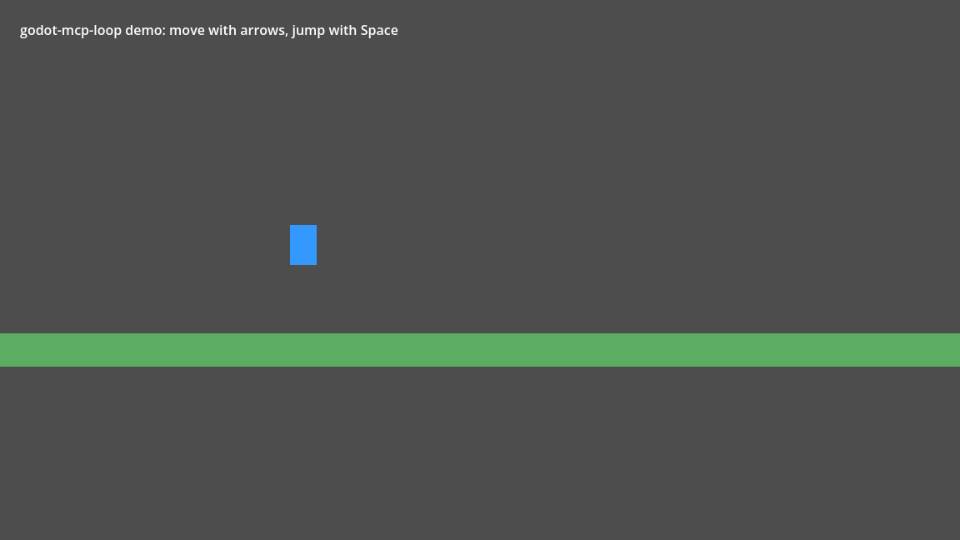
There are many Godot MCP servers that let an agent edit scenes. Few let it find out whether the edit worked. godot-mcp-loop gives the agent a play-tester's toolkit — launch the game, send real input, wait for conditions, read live state, take screenshots, collect errors — plus declarative scenario tests that return a pass/fail report with the failing value. Editing is deliberately conservative: every change is undoable, previewable, validated before it is applied, and sandboxed to your project.
godot_status                                    → editor connected, Godot 4.7.2, main.tscn open
script_write res://player.gd (dry_run)          → unified diff; compile errors with line numbers if any
script_write res://player.gd                    → written (undoable)
game_run                                        → game running, runtime connected
game_input [{action: move_right, hold_ms: 1000}]
game_wait_for Player position:x > 250           → met after 0.8 s
screenshot                                      → (image)
logs_read source=game min_level=error           → []
scenario_run res://tests/move_right.yaml        → PASSED (7/7 steps)
game_run, game_input (actions, keys, mouse, with real timing; can record values every frame), game_wait_for
(checked every frame, reports the last value on timeout), game_query, screenshot, logs_read.edit_undo only ever reverts edits made via MCP;
dry_run everywhere; GDScript is compiled before it is written; property values are validated before anything changes.res:// paths only; no writes to .godot/, .git/
or the addon; no arbitrary-code-execution tool. Security notes.Logger API added in 4.5 — but are not tested yet.As a Claude Code plugin (Claude Code 2.1.275+; asks for your Godot project path once):
/plugin install godot-mcp-loop --marketplace AI-osho/godot-mcp-loop
The plugin registers the godot-loop MCP server and the agent skill; it runs the npm package, so keep the addon it
copies into your project in step (the addon and server must share a version).
With npm (Node.js 20+): With npm (Node.js 20+):
Listed in the official MCP Registry as
io.github.AI-osho/godot-mcp-loop— clients that browse the registry can add it from there; the steps below are the same.
npx -y godot-mcp-loop@latest install-addon /ABS/my-game --skill
--skill also adds the agent skill (step 5 below). The command prints the version to use next.claude mcp add godot-loop -- npx -y godot-mcp-loop@<version> --project /ABS/my-game
godot_status.From source:
addons/mcp_loop into your project's addons/ folder, then enable
Project › Project Settings › Plugins › MCP Loop. The plugin registers an autoload MCPLoopRuntime
(inactive in exported games).git clone https://github.com/AI-osho/godot-mcp-loop.git
cd godot-mcp-loop/server && npm ci && npm run build
claude mcp add godot-loop -- node /ABS/godot-mcp-loop/server/dist/index.js --project /ABS/my-game
godot_status..claude/skills/godot-mcp-loop into your project's .claude/skills/ (or
~/.claude/skills/ for every project). It teaches the agent the loop, deterministic checks with game_step,
scenario patterns and pixel art. It follows the Agent Skills format, so other agents
that read skills can use it too.scripts/new-game.sh ~/games/my-game --name "My Game" --register-claude
creates a Godot project with the addon enabled, the agent skill, short AGENTS.md / CLAUDE.md files, a
scenarios/ folder and an initial git commit, and registers the MCP server with Claude Code for that folder
(--claude-config DIR for a separate Claude Code configuration). Then open it with godot -e --path ~/games/my-game.
For long builds the project also gets PROGRESS.md (goal, status, done, next, decisions, known issues), which the
agent keeps current, and Claude Code project settings (.claude/settings.json): a session-start hook prints
PROGRESS.md, the last commits and uncommitted changes into the agent's context — at startup, on resume, after
/clear and after context compaction — the godot-loop tools run without permission prompts, and destructive shell
commands (rm -rf, force push, git reset --hard, git clean) are denied. Claude Code applies the allow rule once you
accept its trust prompt for the folder.
This repository is itself a Godot project with a tiny platformer
(examples/platformer, arrow keys + Space). Open it in Godot, point the server at the repository root, and ask your
agent to "run scenario_run on res://examples/platformer/scenarios/move_right.yaml" — then try
intentional_failure.yaml to see a failure report.
addons/mcp_loop, enables the plugin and drops the agent
skill into .claude/skills/):
cd my-game && npx -y godot-mcp-loop@latest install-addon . --skill
godot -e --path . — the bridge starts with the editor and listens on
127.0.0.1.npx -y godot-mcp-loop@latest --project /absolute/path/to/my-game, then ask for
godot_status: it should report the Godot version, the project and the scene the editor has open.scenario_run {"path": "res://scenarios/coins.yaml"}". A failing step comes back with the observed value and a
screenshot."movie": {} and "save_to": "res://qa/evidence/tour", then open
qa/evidence/tour/movie.gif — the whole run, plus a contact sheet of the key frames.Five complete games live in examples/. Each was generated end to end by an AI agent through
godot-mcp-loop from a single prompt — code, NES-style pixel art (image_write), input actions, test hooks and
regression scenarios — and then verified independently: every scenario passes and random-input runs log no errors.
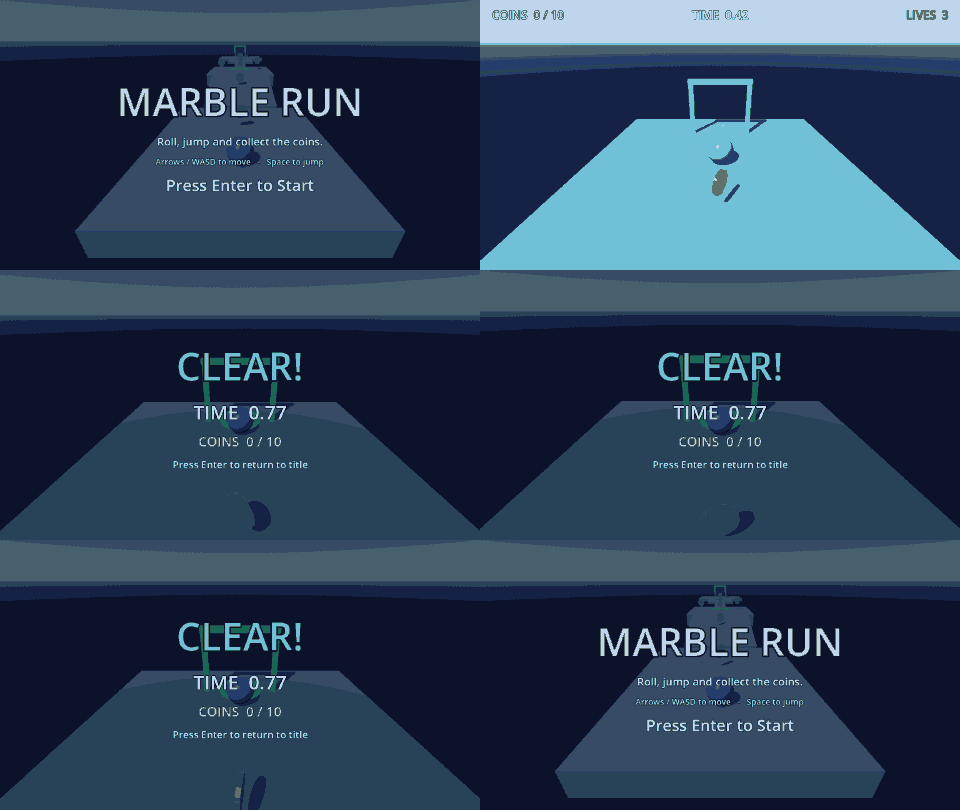
The 3D sample ships with the package, so you can open it without cloning this repository:
npx -y godot-mcp-loop@latest sample marble-3d ./marble-3d
cd marble-3d && npx -y godot-mcp-loop@latest install-addon . --skill && godot -e --path .
It is the game the 3D tools were built against: seven scenarios (7_gap_needs_jump.yaml proves a gap cannot be
rolled over), a chase camera, coins, checkpoints, lives and a timed clear. npx -y godot-mcp-loop@latest sample
lists everything bundled.
Play one with game_run {"scene": "res://examples/shooter/shooter.tscn"} (or open the scene and press F6) and
replay its checks with scenario_run {"path": "res://examples/shooter/scenarios/4_boss_clear.yaml"} — or all of them
with {"path": "res://examples/shooter/scenarios"}. Controls and details: examples/README.md.
Full reference: docs/tools.md.
Add --headless to Project Settings › Editor › Run › Main Run Args to run games without a window (everything
except screenshot works). The repository's own CI runs a headless editor and headless games on Linux for the
end-to-end tests — see .github/workflows/ci.yml.
scripts/test-godot-unit.sh                   # GDScript unit tests (headless)
cd server && npm run typecheck && npm test   # TypeScript unit tests
npm run build && npm run test:e2e            # end-to-end against a real headless editor + game
E2E_GAME_WINDOW=1 npm run test:e2e           # same, with game windows (enables screenshot checks)
script_write validates GDScript only; a script that references its own new class_name may compile-check
slightly less strictly.MIT © OSHO
Drive a live Godot 4 editor: edit scenes and scripts, run and test the game, record GIFs.
{ "mcpServers": { "io.github.ai-osho-godot-mcp-loop": { "command": "npx", "args": [ "-y", "[email protected]" ] } }}도구
아직 도구 목록이 없습니다. 원격 서버는 첫 상태 확인 후에 도구 목록이 생깁니다.
FAQ
이 페이지에서 Cursor, Claude Desktop, Claude Code 또는 VS Code용 stdio 설정을 복사합니다. PlugMCP 프록시가 아니라 게시자의 설치 방식을 사용합니다.
이 레코드에는 필수 환경 변수가 등록되어 있지 않습니다.
Godot MCP Loop은(는) stdio를 통해 로컬에서 실행됩니다.
마지막 확인: 2026-11-08. Drive a live Godot 4 editor: edit scenes and scripts, run and test the game, record GIFs.
