flutter-mcp-toolkit
Inspect and drive a running Flutter app from your AI assistant.
에이전트 강화
게시자의 자체 명령입니다. PlugMCP 엔드포인트가 아닙니다.
Host a copy with our keys and logs.
docker run -i --rm ghcr.io/arenukvern/flutter-mcp-toolkit:7.1.1Claude Code에는 로컬 명령용 설치 링크가 없습니다. 아래 명령을 복사해 터미널에서 실행합니다.
claude mcp add io.github.arenukvern-flutter-mcp-toolkit -- docker run -i --rm ghcr.io/arenukvern/flutter-mcp-toolkit:7.1.1터미널에서 실행합니다.
{ "mcpServers": { "io.github.arenukvern-flutter-mcp-toolkit": { "command": "docker", "args": [ "run", "-i", "--rm", "ghcr.io/arenukvern/flutter-mcp-toolkit:7.1.1" ] } }}claude_desktop_config.json
원격 URL인가요, 내 컴퓨터에서 실행하는 명령인가요? 두 설치 방식의 차이
PlugMCP에서 실행
A new server you create. It is not this listing's official endpoint. Use the publisher install when you want their URL and their credentials.
실행flutter-mcp-toolkit is a Dart MCP server + Flutter package for AI agents (Codex, Zed, Cursor, Intent, Claude Code, Cline, and more). Agents can inspect a running Flutter app, take semantic snapshots, tap widgets, type into forms, hot-reload, and read logs. Apps can also register their own MCP tools and resources at runtime via MCP Toolkit — all without leaving the conversation. The result is a closed feedback loop between agent and app.
And one step further: the toolkit is becoming a chain of declarative automation APIs — the same observe/act/verify vocabulary runs through interactive MCP (fmt_*), the CLI, programmatic Dart scenarios (flutter_mcp_harness), and declarative build+lifecycle runners like oka, all over the universal AutomationDriver contract. See The Automation Chain. (OpenAI describes this pattern as harness engineering.)
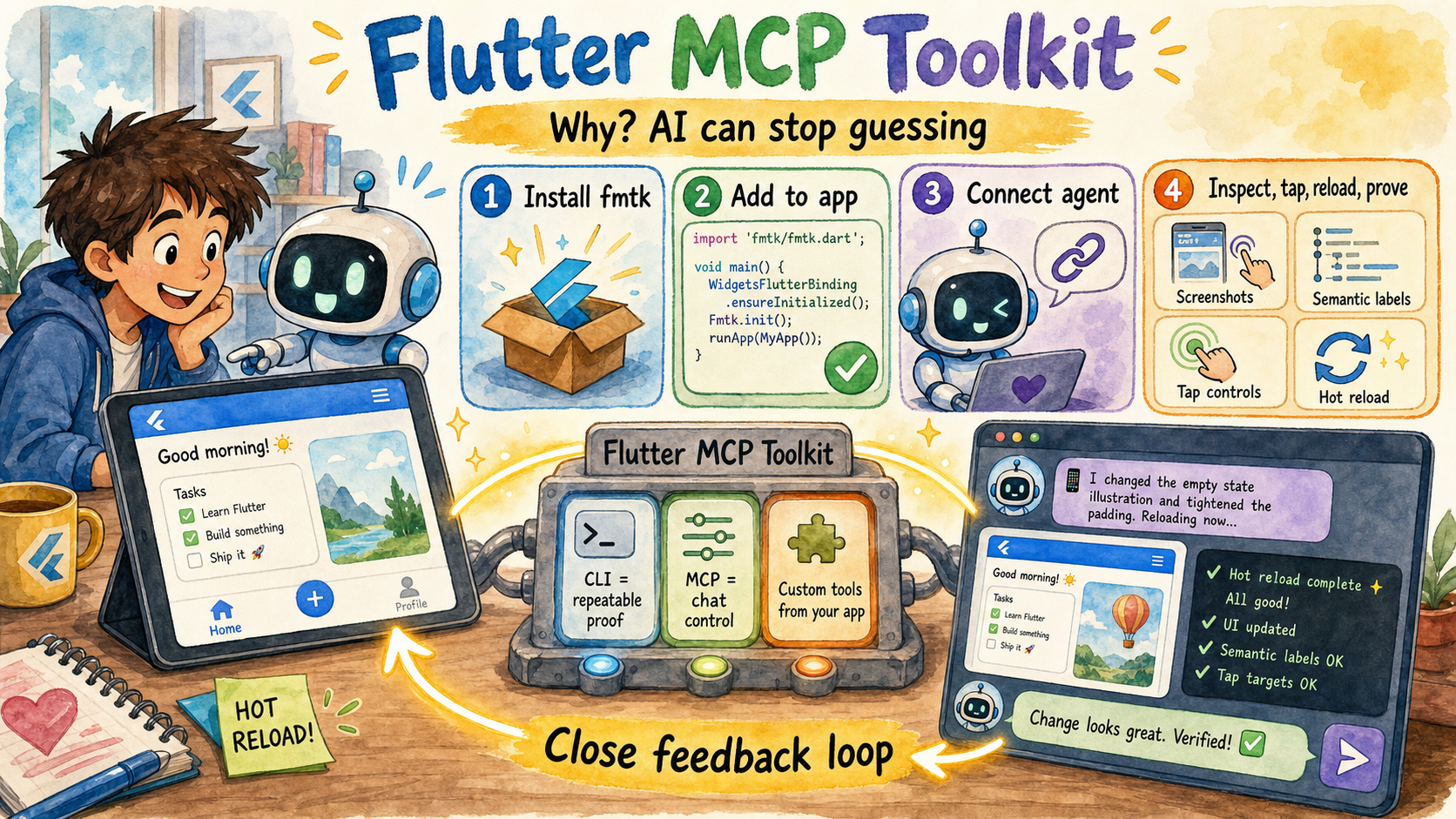
The picture's story: the toolkit gives an AI assistant a shared window and control loop into a running Flutter app, so it can inspect state, act like a user, hot reload, read proof, and use custom tools from your app instead of guessing.
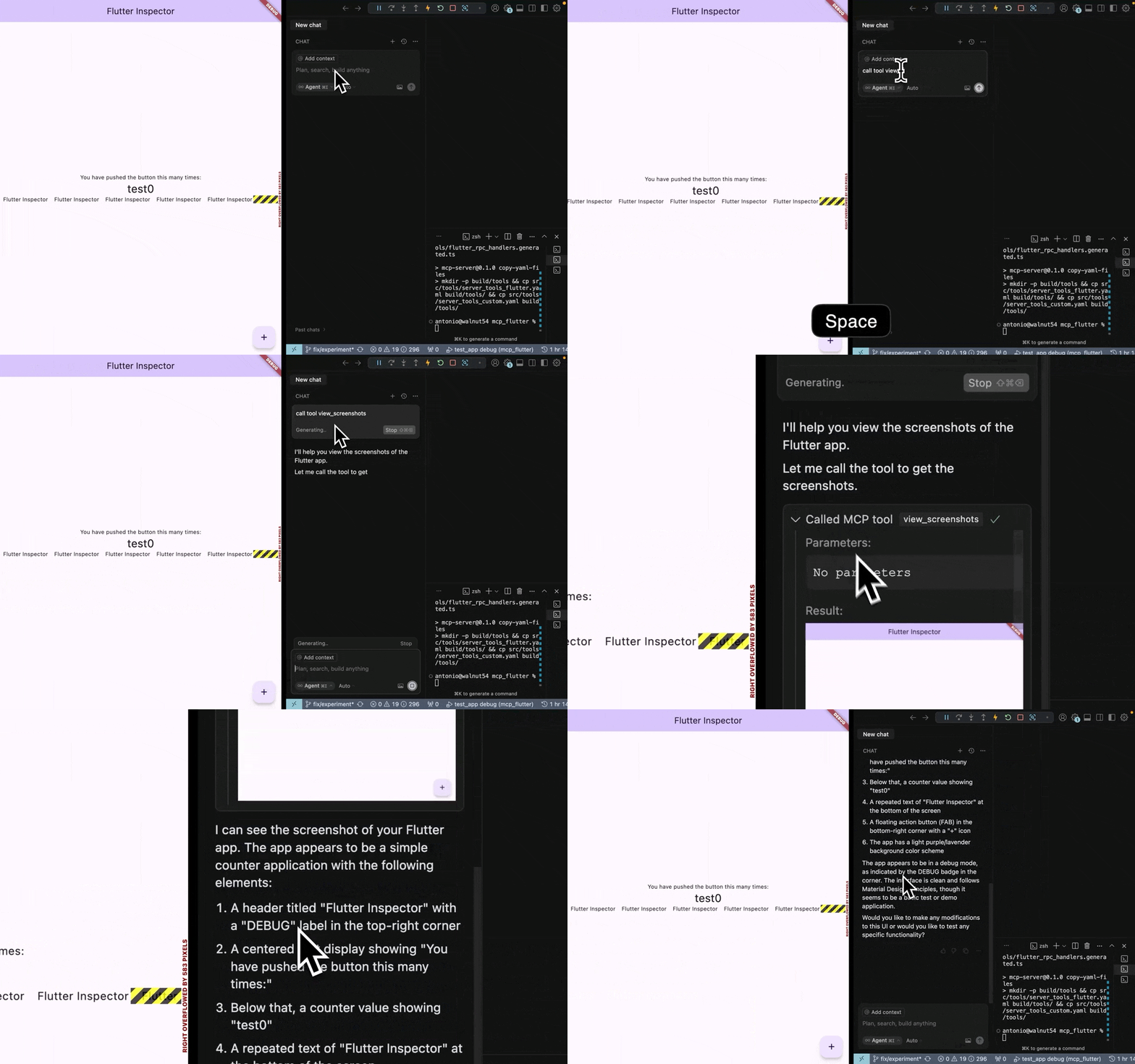
# 1. Install the binary
curl -fsSL https://raw.githubusercontent.com/Arenukvern/mcp_flutter/main/install.sh | bash
# Installs flutter-mcp-toolkit plus the short fmtk alias for repeated CLI loops.

# 2. Add the toolkit to your Flutter app
cd my-flutter-app
flutter-mcp-toolkit codegen-init   # adds mcp_toolkit + emits main.dart snippet

# 3. Install skills for your AI agent
flutter-mcp-toolkit init claude-code   # or: cursor | codex | cline | agents-skills | all
# Alternative (skills only): npx skills add Arenukvern/mcp_flutter -a cursor -y

# 4. Run
flutter run --debug
That's it. Your AI agent can now inspect and drive the running app — and your app can expose custom MCP tools at runtime (see Dynamic Tools Registration below).
2026-10-02 — 6.0.0 released: the invoke tier (ADR-0017) — the app's intent registry is the single action source; the harness driver lists (driver.actions()) and invokes it (InvokeAction) with schema-validated args, IntentAutomationAction.custom routes hints, and any web surface (Jaspr, plain JS) composes via window.__mcpActions. flutter_mcp_harness 0.2.x on pub.dev; server 6.0.0 on the MCP registry.
2026-10-01 — The toolkit is becoming a chain of declarative automation APIs: universal AutomationDriver contracts (universal_automation_*), the programmatic flutter_mcp_harness package, and oka as the build+lifecycle runner. New: The Automation Chain guide + flutter-mcp-automation-chain skill.
2026-07-11 - v4 new Live Demos records: v4 semantic snapshot etc.. with Grok Build CLI, v4 with IntentCall power - WebMCP projection
2026-05-26 — v3.1.0: Platform-view capture routing, macOS/iOS Simulator host screenshots, web CDP tab capture (SCK → CDP → flutter_layer), and cross-platform showcase platform views.
The official registry serves an OCI image from GHCR. Point any MCP client at it:
{
  "mcpServers": {
    "flutter-mcp-toolkit": {
      "command": "docker",
      "args": [
        "run",
        "-i",
        "--rm",
        "--network=host",
        "ghcr.io/arenukvern/flutter-mcp-toolkit:6.0.0"
      ]
    }
  }
}
See Docker guide for flags, version pinning, and networking notes.
Maintainers submitting to official stores: marketplace submission runbook. Full matrix: marketplace distribution.
fmt_* MCP tools, binaries, client config keys, validate-runtime.bootstrapFlutter parameter removal, intentcall renames.MCPCallEntry removal, AgentCallEntry, platform codegen sync, fmt_migrate_agent_entries.intentcall_* dependency policy, consumer proof gates, and the boundary between mcp_flutter and upstream IntentCall architecture.The server binary lives in mcp_server_dart and is shipped through GitHub
Release artifacts as flutter-mcp-toolkit, fmtk, and
flutter-mcp-toolkit-server; it is not a pub.dev package.
Different surfaces own different parts of the lifecycle, and all of them
drive the same ext.mcp.toolkit.* extensions through the universal
AutomationDriver
contract (universal_automation_* family):
Guide: The Automation Chain ·
skill: flutter-mcp-automation-chain.
The showcase/ folder holds examples that test the whole
stack end-to-end — a minimal instrumented Flutter app
(showcase/flutter_demo) and a static web page
(showcase/web_demo) — each driven live by a
checked-in composition root:
make drive-flutter   # instrumented tier: ToolkitDriver over the VM service
make drive-web       # browser tier: CdpDriver over CDP (headless Chrome)
packages/harness implements the shared contract for the Flutter tier
(ToolkitDriver),
so one observe/act/verify vocabulary covers Flutter apps, browsers, and
OS-native targets — the same pipeline composition style oka uses.
The default toolkit surface exposes 31 MCP tools under the fmt_* capability prefix across four categories (35 with the --dumps debug tools enabled):
See the flutter-mcp-toolkit-{guide,inspect,control,debug} skills for the full
reference (installed by flutter-mcp-toolkit init or npx skills add Arenukvern/mcp_flutter).
Install options: AI agent setup.
Flutter apps can register custom tools and resources at runtime. See how it
works in this short YouTube video.
The same arguments.connection targeting is supported by the CLI's exec,
batch, daemon command/execute, daemon watch/start, and snapshot step args.
[!NOTE] There is official MCP Server for Flutter from Flutter team which exposes Dart tooling. The main goal of this project is to bring power of MCP server tools by creating them in Flutter app, using dynamic MCP tools registration and close feedback loop for AI Agent. See how it works in short YouTube video. See Quick Start for more details. See original motivation behind the idea.
Dump RPC methods (like dump_render_tree) can produce huge token output and
are disabled by default. Enable with --dumps. See
mcp_server_dart README for the full flag surface.
Generally, since you use MCP server to connect to Flutter app in Debug Mode, it should be safe to use. However, I still recommend to review how it works in ARCHITECTURE.md, how it can be modified to improve security if needed.
This MCP server is verified by MseeP.ai.
Connection Issues
arguments.connection.uri and paste exact Flutter machine app.debugPort.wsUriconnection_selection_required, retry with arguments.connection.targetId using one URI from availableTargets (or set arguments.connection.uri directly)AI Tool Not Detecting Inspector
Dynamic Tools Not Appearing
mcp_toolkit package is properly initialized in your Flutter appMCPToolkitBinding.instance.addEntries()fmt_list_client_tools_and_resources to verify registrationThe Flutter MCP Server is registered with Smithery's registry, making it discoverable and usable by other AI tools through a standardized interface.
┌─────────────────┐     ┌───────────────────────┐     ┌─────────────────┐
│                 │     │  Flutter App with     │     │                 │
│  Flutter App    │<--->│  mcp_toolkit          │<--->│ flutter-mcp-    │
│  (Debug Mode)   │     │  (VM Svc. Extensions  │     │ toolkit-server  │
│                 │     │  + Dynamic Tools)     │     │                 │
└─────────────────┘     └───────────────────────┘     └─────────────────┘
Contributions are welcome! See CONTRIBUTING.md (maintainer releases, binary checksums) and the contribution guide. Pull requests and issues: GitHub.
Huge thanks to all contributors for making this project better!
This roster is maintained with all-contributors.
To add someone, update .all-contributorsrc and
regenerate the README table, or use the all-contributors bot/CLI from a PR.
More detail: docs/contributing/contributors.mdx.
MIT - Feel free to use in your projects!
Flutter and Dart are trademarks of Google LLC.
Inspect and drive Flutter debug apps/games: semantic snapshots, search, and custom client tools
{ "mcpServers": { "io.github.arenukvern-flutter-mcp-toolkit": { "command": "docker", "args": [ "run", "-i", "--rm", "ghcr.io/arenukvern/flutter-mcp-toolkit:7.1.1" ] } }}도구
아직 도구 목록이 없습니다. 원격 서버는 첫 상태 확인 후에 도구 목록이 생깁니다.
FAQ
이 페이지에서 Cursor, Claude Desktop, Claude Code 또는 VS Code용 stdio 설정을 복사합니다. PlugMCP 프록시가 아니라 게시자의 설치 방식을 사용합니다.
이 레코드에는 필수 환경 변수가 등록되어 있지 않습니다.
Flutter MCP Toolkit은(는) stdio를 통해 로컬에서 실행됩니다.
마지막 확인: 2026-11-15. Inspect and drive Flutter debug apps/games: semantic snapshots, search, and custom client tools