에이전트 강화
게시자의 자체 명령입니다. PlugMCP 엔드포인트가 아닙니다.
Host a copy with our keys and logs.
mcpb https://github.com/Gwakko/agent-in-browser/releases/download/v0.1.2/agent-in-browser-0.1.2.mcpbClaude Code에는 로컬 명령용 설치 링크가 없습니다. 아래 명령을 복사해 터미널에서 실행합니다.
claude mcp add io.github.gwakko-agent-in-browser -- mcpb https://github.com/Gwakko/agent-in-browser/releases/download/v0.1.2/agent-in-browser-0.1.2.mcpb터미널에서 실행합니다.
{ "mcpServers": { "io.github.gwakko-agent-in-browser": { "command": "mcpb", "args": [ "https://github.com/Gwakko/agent-in-browser/releases/download/v0.1.2/agent-in-browser-0.1.2.mcpb" ] } }}claude_desktop_config.json
원격 URL인가요, 내 컴퓨터에서 실행하는 명령인가요? 두 설치 방식의 차이
PlugMCP에서 실행
A new server you create. It is not this listing's official endpoint. Use the publisher install when you want their URL and their credentials.
실행A real browser for any AI agent, any model, and any test runner — one dependency-free binary.
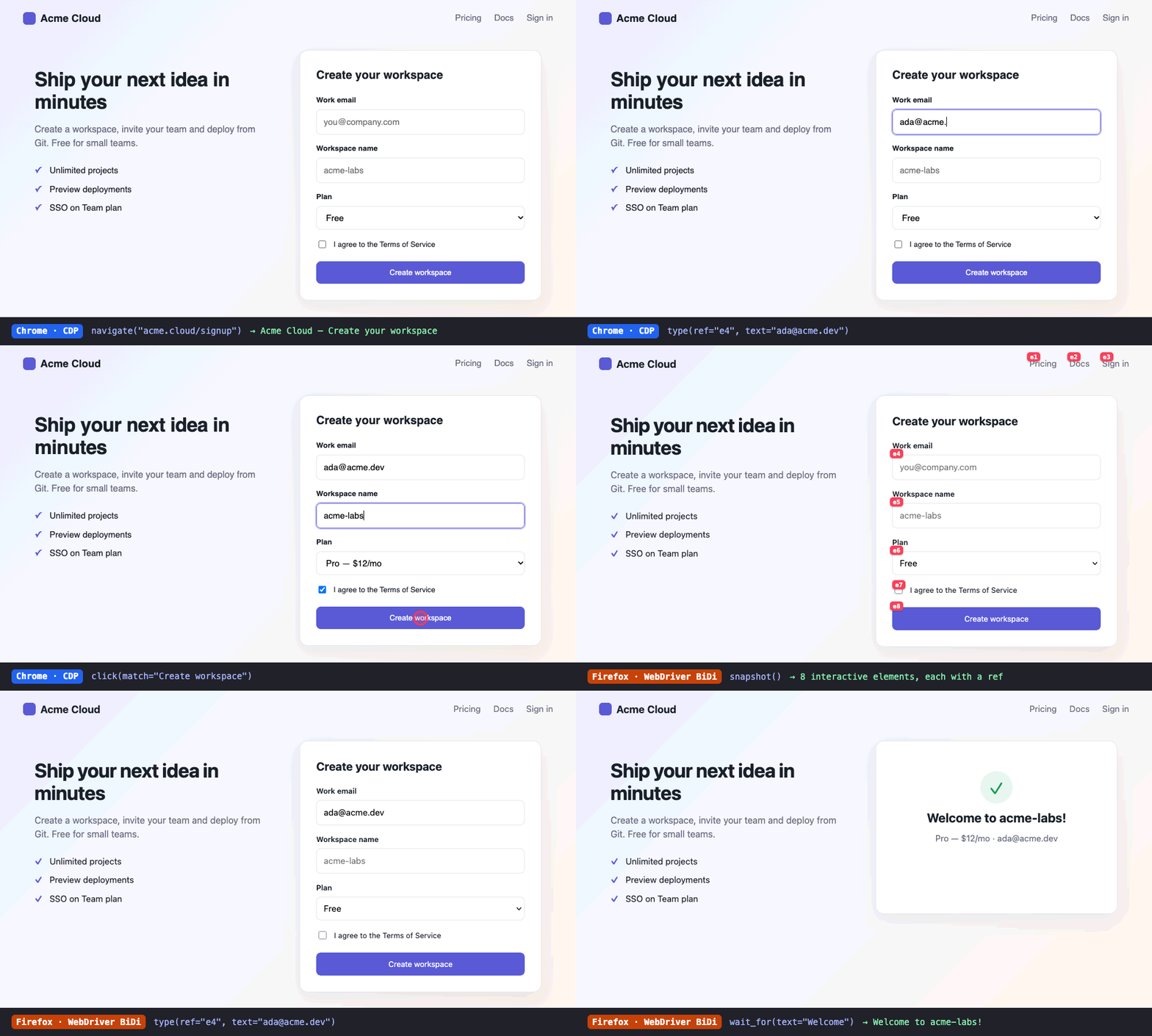
Real recording, not a mock-up. The agent reads the page as a snapshot with element refs, types, fills the form and clicks, first in Chrome (CDP), then in Firefox (WebDriver BiDi). Regenerate it with task demo.
agent-in-browser is an open take on "Claude in Chrome". It doesn't need an extension or a vendor-specific runtime. It drives the browsers you already have through their native automation protocols:
It's available three ways, all backed by the same tool catalogue:
agent-in-browser mcp): plugs into Claude Code, Claude Desktop, Cursor, Codex, Gemini CLI, Windsurf, VS Code/Copilot, Zed, opencode and any other MCP client, whatever model sits behind it.agent-in-browser call <tool> …): for agents without MCP, for scripts, and for humans. Calls share one persistent browser.agent-in-browser run test.yaml --browser chrome,firefox): replays tool calls as automated tests across a browser matrix, with JUnit/JSON reports.An agent skill (skills/agent-in-browser/SKILL.md) ships inside the binary and teaches agents the workflow.
# macOS / Linux
curl -fsSL https://raw.githubusercontent.com/Gwakko/agent-in-browser/main/scripts/install.sh | sh

# Windows (PowerShell)
irm https://raw.githubusercontent.com/Gwakko/agent-in-browser/main/scripts/install.ps1 | iex

# Homebrew (macOS / Linux)
brew install gwakko/tap/agent-in-browser

# With Go
go install github.com/gwakko/agent-in-browser/cmd/agent-in-browser@latest

# From a checkout (needs Task: https://taskfile.dev)
task install            # → ~/.local/bin/agent-in-browser + alias `aib`
agent-in-browser setup claude-code --write    # runs `claude mcp add --scope user …`
agent-in-browser setup cursor --write         # merges ~/.cursor/mcp.json (a .bak is kept)
agent-in-browser setup codex --write          # appends to ~/.codex/config.toml
agent-in-browser setup gemini --write         # ~/.gemini/settings.json
agent-in-browser setup vscode                 # prints the snippet for .vscode/mcp.json
agent-in-browser skill install --for claude   # ~/.claude/skills/agent-in-browser (also: codex, agents, --dir)
Claude Desktop, one click: download agent-in-browser-<version>.mcpb from the latest release and open it. It also appears in the MCP Registry as io.github.Gwakko/agent-in-browser.
Without --write, setup only prints the config. Pass browser options through with --args "--browser firefox --headless". See docs/integrations.md for every client.
agent-in-browser call navigate url=localhost:3000
agent-in-browser call snapshot
#   - textbox "Email" [ref=e3] (required, type=email)
#   - button "Sign up" [ref=e7]
agent-in-browser call type ref=e3 [email protected]
agent-in-browser call click ref=e7
agent-in-browser call wait_for text=Welcome
agent-in-browser call console_messages level=error
agent-in-browser call screenshot            # → prints PNG path
agent-in-browser stop
Useful flags (they work anywhere on the command line): --browser firefox, --headless, --instance work for a second, independent browser, --endpoint http://127.0.0.1:9222 to attach to a browser you started yourself, and --viewport 390x844.
name: signup
browsers: [chrome, firefox]
steps:
  - navigate: http://localhost:3000/signup
  - fill_form:
      fields:
        - { selector: "#email", value: "[email protected]" }
        - { match: "I accept the terms", value: true }
  - click: Sign up
  - wait_for: { text: "Welcome" }
  - assert: { url_contains: "/dashboard", no_console_errors: true }
agent-in-browser run tests/*.yaml --browser chrome,firefox,edge --junit report.xml
Full format: skills/agent-in-browser/references/scenarios.md.
browser_status · browsers_installed · tabs_list · tab_new · tab_select · tab_close · navigate · snapshot · find · click · hover · type · press_key · fill_form · scroll · wait_for · get_text · screenshot · evaluate · console_messages · network_requests · resize · browser_close
Arguments are documented in docs/tools.md, which task docs:tools generates.
 agent ──MCP/stdio──┐
 shell ──call───────┼──▶ tools ──▶ session ──▶ Driver ──CDP──────▶ Chrome / Edge / Brave / …
 CI ────run yaml────┘     (one catalogue)  (attach|launch)  └─BiDi─────▶ Firefox
                                                            page lib (injected JS):
                                                            snapshot · refs · fill · find
~/.agent-in-browser/profiles/<instance>-<browser>) and is detached, so it survives MCP server restarts. Separate CLI calls reuse it through ~/.agent-in-browser/instances/<name>.json.task build # bin/agent-in-browser
task test # unit tests
task test:e2e # scenario on every installed browser
task smoke # CLI scenario run, chrome+firefox
task inspect # MCP Inspector against the local build
task build:all # cross-compile 6 targets into dist/
task release TAG=v0.1.0 # tag → GitHub Actions → goreleaser
127.0.0.1 only. Even so, any local process can drive that browser, so don't sign it into accounts you wouldn't hand to the agent.License: MIT
Real browser for any agent: Chrome/Edge/Brave via CDP, Firefox via BiDi. Refs, forms, console, net.
{ "mcpServers": { "io.github.gwakko-agent-in-browser": { "command": "mcpb", "args": [ "https://github.com/Gwakko/agent-in-browser/releases/download/v0.1.2/agent-in-browser-0.1.2.mcpb" ] } }}도구
아직 도구 목록이 없습니다. 원격 서버는 첫 상태 확인 후에 도구 목록이 생깁니다.
FAQ
이 페이지에서 Cursor, Claude Desktop, Claude Code 또는 VS Code용 stdio 설정을 복사합니다. PlugMCP 프록시가 아니라 게시자의 설치 방식을 사용합니다.
이 레코드에는 필수 환경 변수가 등록되어 있지 않습니다.
Agent In Browser은(는) stdio를 통해 로컬에서 실행됩니다.
마지막 확인: 2026-11-09. Real browser for any agent: Chrome/Edge/Brave via CDP, Firefox via BiDi. Refs, forms, console, net.
