OpenGame Showcases
Public browser-game showcases from OpenGame.
Website: https://opengame.app/
에이전트 강화
게시자의 자체 명령입니다. PlugMCP 엔드포인트가 아닙니다.
Host a copy with our keys and logs.
npx -y [email protected]Claude Code에는 로컬 명령용 설치 링크가 없습니다. 아래 명령을 복사해 터미널에서 실행합니다.
claude mcp add io.github.opengameapp-browser-game -- npx -y opengame-browser-game-mcp@0.1.3터미널에서 실행합니다.
{ "mcpServers": { "io.github.opengameapp-browser-game": { "command": "npx", "args": [ "-y", "[email protected]" ] } }}claude_desktop_config.json
원격 URL인가요, 내 컴퓨터에서 실행하는 명령인가요? 두 설치 방식의 차이
PlugMCP에서 실행
A new server you create. It is not this listing's official endpoint. Use the publisher install when you want their URL and their credentials.
실행게시자 제공
Public browser-game showcases from OpenGame.
Website: https://opengame.app/
Local tools for planning and validating focused browser-game prototypes.
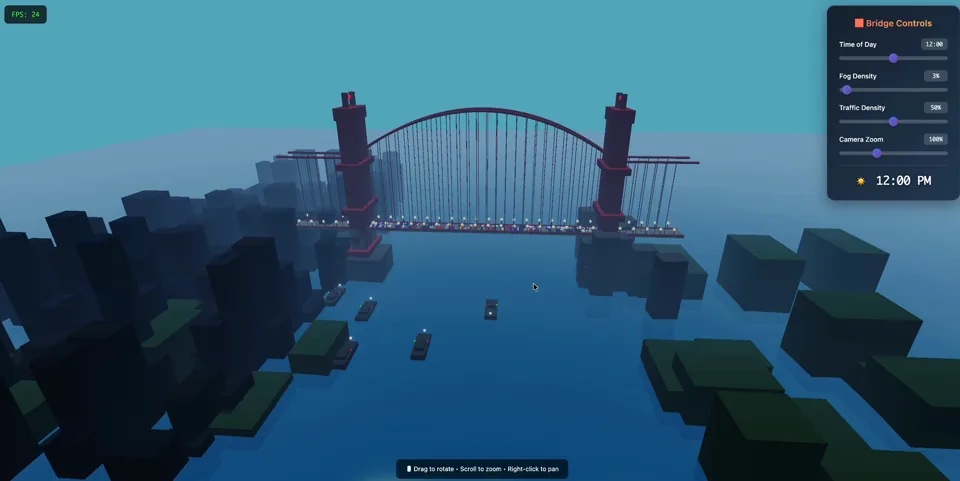
Golden Gate Bridge — 3D Cinematic
Click the poster to play the live demo, or watch the video preview.
This repository is intentionally small. It contains public showcase material only: playable static HTML examples, prompts, and links to the matching OpenGame pages. It does not contain OpenGame production runtime code, deployment configuration, credentials, user data, billing data, or analytics exports.
Open the HTML files directly in a browser:
open showcases/golden-gate-bridge/index.html
open showcases/vaporwave-platformer/index.html
The Golden Gate Bridge showcase imports Three.js from jsDelivr. The Vaporwave Platformer is self-contained.
Reusable public Skills now have a dedicated canonical repository: opengameapp/OpenGame-skills. Install them from that source:
npx skills add opengameapp/OpenGame-skills \
  --skill opengame-browser-game-builder

npx skills add opengameapp/OpenGame-skills \
  --skill opengame-marketplace-publisher
The legacy skills/ folder is retained temporarily so existing
marketplace source links do not break during migration. New Skills and future
versions are maintained only in the dedicated repository. See its
Skill catalog.
The mcp/ directory contains independently installable Model Context
Protocol servers. The first server, OpenGame Browser Game
MCP, gives AI clients deterministic tools to
scope a browser-game vertical slice, choose Canvas/DOM or Three.js/WebGL,
validate a brief, and discover these public showcases. It is local, read-only,
requires no API key, and never connects to OpenGame production systems.
Install it from the
public npm package
or find io.github.opengameapp/browser-game in the
Official MCP Registry.
It is also listed on
LobeHub Market.
See the MCP publishing guide for the versioned
release process.
Use the prompt files in prompts/ as starting points, then remix them with OpenGame on the official website:
Included:
Not included:
MIT for the showcase material in this repository. Third-party runtime libraries loaded by examples remain under their own licenses.
PokeBonk is an unofficial fan experiment. Its code license does not grant rights to third-party character names, designs or trademarks; see its license and attribution notes.
Product support: [email protected]
General contact: [email protected]
Local tools for planning and validating focused browser-game prototypes.
{ "mcpServers": { "io.github.opengameapp-browser-game": { "command": "npx", "args": [ "-y", "[email protected]" ] } }}도구
아직 도구 목록이 없습니다. 원격 서버는 첫 상태 확인 후에 도구 목록이 생깁니다.
FAQ
이 페이지에서 Cursor, Claude Desktop, Claude Code 또는 VS Code용 stdio 설정을 복사합니다. PlugMCP 프록시가 아니라 게시자의 설치 방식을 사용합니다.
이 레코드에는 필수 환경 변수가 등록되어 있지 않습니다.
Browser Game은(는) stdio를 통해 로컬에서 실행됩니다.
마지막 확인: 2026-11-10. Local tools for planning and validating focused browser-game prototypes.