OPENROUTER_API_KEY — API key for the default model provider (OpenRouter). Not needed if another provider's key variable is set; run `sitelooper doctor` to see which one is used.
Claude Code에는 로컬 명령용 설치 링크가 없습니다. 아래 명령을 복사해 터미널에서 실행합니다.
Write browser tests in plain English. Run them in CI as plain Playwright. Repair them automatically when the app changes.
sitelooper is a CLI with a small LLM agent inside. You give it one instruction at a time, such as
"sign in as [email protected], create a ticket titled 'k7 Bench' and report its id". It works the
live browser and returns one verified result. Every step it gets right is compiled into a
procedure that replays with , and can be exported as a
standalone spec.
Record a browser flow once with a model, then compile it to a Playwright spec that needs no model.
OPENROUTER_API_KEY
마지막 확인
2026-11-10
스타
—
도구
—
가동 시간
—
no model, no tokens and no cost
@playwright/test
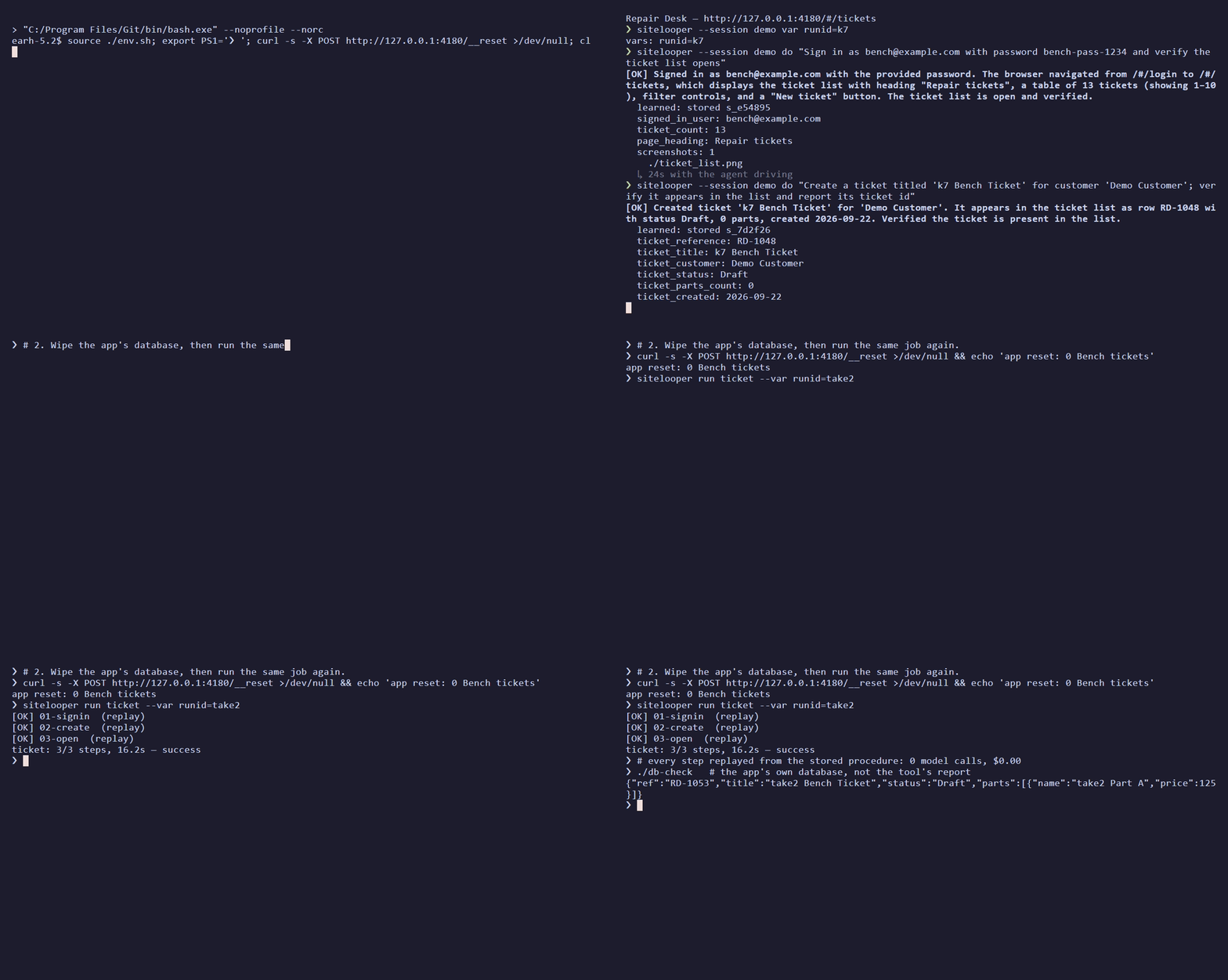
Recorded once against the in-repo repair-desk app (24s, 28s and 42s with the agent driving).
The app is reset, the same flow replays in 16s with zero model calls, and then the app's own
state is queried.
How it works
Record. A cheap model follows your instructions. As it works, sitelooper records durable
locators, where each value came from, and what each step changed on the page.
Replay. The recording replays deterministically. If the app has changed under a step, only
that step goes back to the model, and a recovery that validates is pinned into the flow, so
the flow heals itself over runs.
Compile.sitelooper build emits a Playwright spec with effect checks on every step. It
runs in CI with no sitelooper daemon and no model.
Results
Ten self-hosted apps, each job done once to record it, then twice more with no model, then as a
compiled Playwright spec. The comparator is agent-browser
driven by an LLM, which redoes the job on every run. Every run was scored against the app's own
database or API, never against the tool's own report. September 2026:
app
sitelooper, first run
sitelooper replay ×2
compiled spec
agent-browser, GPT-6 Luna
agent-browser, GPT-6.1 Sol
repair-desk
6/6 · $0.02 · 187s
6/6 · $0 · 52s
6/6
6/6 · $0.01
6/6 · $0.29
Odoo
6/6 · $0.07 · 589s
6/6 · $0 · 193s
6/6
3/6 · $0.02
6/6 · $0.37
Grafana
6/6 · $0.09 · 615s
6/6 · $0 · 145s
pass
5/6, then 6/6 · $0.04
4/6 · $0.33
Kanboard
6/6 · $0.05 · 357s
6/6 · $0 · 56s
4/4 + 2 report-only
6/6, duplicate comment · $0.005
6/6 · $0.23
OpenProject
7/7 · $0.05 · 377s
7/7 · $0 · 93-132s
5/5 + 2 report-only
7/7, duplicate comment · $0.02
7/7 · $0.38
Gitea
7/7 · $0.04 · 324s
7/7 · $0 · 76s
5/5 + 2 report-only
6/7 · $0.09
7/7 · $0.25
Vikunja
7/7 · $0.04 · 270s
7/7 · $0 · 76s
5/5 + 2 report-only
7/7, duplicate comment · $0.01
7/7 · $0.28
EspoCRM
7/7 · $0.06 · 454s
7/7 · $0 · 165s
refused to compile
1/7 · $0.02
7/7 · $0.23
Snipe-IT
7/7 · $0.04 · 298s
7/7 · $0 · 78s
5/5 + 2 report-only
1/7 · $0.02
7/7 · $0.25
Ghost
7/7 · $0.02 · 142s
7/7 · $0 · 46s
5/5 + 2 report-only
7/7 · $0.005
7/7 · $0.10
sitelooper verified every objective in all 30 runs, with GPT-6 Luna writing the
instructions and DeepSeek V4.1 Flash driving the browser. Every replay ran with zero model
calls. Nine of the ten compiled specs pass; EspoCRM's refuses to compile rather than guess.
agent-browser on the same model was clean on 3 of 11 runs. It failed outright on Odoo,
EspoCRM and Snipe-IT, posted duplicate comments on three apps, and twice reported work as done
that the app had not saved.
On GPT-6.1 Sol, about 20× the per-token price, agent-browser was clean on 9 of 10. It still
pays that price on every run, and on Grafana it again reported unsaved settings as verified.
Report-only objectives ask a run to state a value in its final report, which a compiled spec does
not write.
bench/RESULTS.md: the protocol, the models, costs, and what the benchmark
does not show
bench/SWEEPS.md: one row per sweep, with the cause of every miss
Quick start
You need Node 20+ and an OpenRouter API key for authoring. The compiled
tests need only @playwright/test.
npm install -g sitelooper
npm install -D @playwright/test && npx playwright install chromium
export OPENROUTER_API_KEY=sk-or-...
sitelooper doctor        # shows the provider and models it will use, and why
sitelooper init          # writes sitelooper.config.json
Record one logical outcome per instruction. Use {{env:NAME}} for credentials, and declare
values that should change between runs with var. Here, demo becomes a {{runid}} slot:
sitelooper --session ticket --learn open http://localhost:3000
sitelooper --session ticket var runid=demo
sitelooper --session ticket do "Sign in as {{env:TEST_USER}} using {{env:TEST_PASSWORD}} and verify the dashboard opens"
sitelooper --session ticket do "Create a ticket titled 'demo Test'; verify it appears and report its id"
sitelooper --session ticket assert "the ticket list shows 'demo Test' with status Open"
sitelooper --session ticket stop --save-flow ticket
sitelooper flow export ticket --out .sitelooper/procedures.json
Build the test and run it:
sitelooper build ticket --var runid=test-{n} --reset-cmd "npm run reset:e2e"
# or, if your Playwright fixtures already prepare fresh data:
# sitelooper build ticket --var runid=test-{n} --fixture-isolation
# with a reset command, build converges by default (2 rounds): it re-records the steps a refusal or
# a failing spec names (the model works those steps only). Tune or opt out:
# sitelooper build ticket --var runid=test-{n} --reset-cmd "npm run reset:e2e" --converge 3 [--rerecord-runs 2] [--json]
# sitelooper build ticket --var runid=test-{n} --reset-cmd "npm run reset:e2e" --no-converge
npx playwright test tests/sitelooper/ticket.spec.ts
ticket.flow.ts is generated: it holds the procedures, a typed input/output API, named steps and
effect checks. ticket.spec.ts belongs to you. Add business assertions and fixtures there, and
recompiling will never overwrite it.
Why an agent's own script doesn't rerun
Asking the agent to write a script from what it did fails for structural reasons:
The run's values are baked in. The script quotes today's record id, so tomorrow it opens
yesterday's record, or works the wrong one to completion and reports success.
The selectors name positions, not things.tr:nth-of-type(3), generated class names, a
textbox named after the current minute.
The waits are gone. Each of the agent's observation turns was a pause the app needed.
Nobody checks the effect. A click can "succeed" on the wrong element, and a save can be
refused by a dialog the script never saw.
sitelooper treats the recording as evidence to compile, not text to replay:
Locator chains, including role and name, label, test id and a structural path. Candidates
are retired by measuring which ones resolve on each replay.
Parameters, not literals. Typed values become slots, and declared values become
{{runid}}. A value that one step read and a later step used is threaded between them live. An
id the app minted is re-read on each run, and anything with no source is left for recovery
instead of being guessed.
Effect gates. A step that ran but did not produce its recorded effect stops the replay
before the next step acts on the wrong state.
A recovery ladder. Each step first replays with zero model calls. If that fails, a cheap
model recovers it; if that is blocked, a stronger model tries; if that fails too, the run halts
and reports per-step state.
Nothing app-specific in the tool. App knowledge goes in an optional per-session briefing,
so a fix for one app never becomes a hack for it.
Using it in a project
Readiness means running the emitted code
build <flow-or-bundle> compiles the flow and runs the readiness gate. check <name.flow.ts> --ready runs the same gate on an existing artifact. Plain compile works offline, and plain
check runs the spec once.
build also converges by default when a reset command is available (--reset-cmd or
resetCommand in the project config): it runs the compiled spec once and, if the compile is
refused, the spec fails, or it passes only through a blocking locator fallback (below), re-records
the step it names (2 rounds; --converge N sets the
count), then runs the readiness gate on the spec that passed. Without a reset command it cannot
check against a clean app, so it compiles and runs readiness exactly as before and prints one line
(and, with --json, a convergence: { skipped: true, why } field) saying convergence was skipped.
Re-recording calls the model: with no API key configured, build compiles and checks once and stops
with status unavailable if a re-record is needed. --no-converge restores compile plus readiness only.
Convergence also redoes work the recording did that the flow left out. An instruction that changed
the app but did not report success is not a flow step (omitted in the flow file, an omitted-work
warning at compile); when nothing later in the flow entered its values again, build puts the
instruction back as a step where it was recorded (04b-… after 04-…, so no existing step id
moves), re-records it with the model, and drops the omission once the step is pinned. Without
convergence build stops before readiness and says which instruction is missing: a spec that passes
without that work does not show the task was done. Plain compile still only warns.
The gate requires three clean executions with retries disabled. Each run starts from state
prepared by the reset command or by declared fixtures, and it uses at least two distinct datasets
({n} becomes 1, 2, 3). No step may be skipped or unresolved, and no locator fallback may
decide what a run acts on or uses: a fallback on an action, or on a read whose value a later step
or assertion uses, blocks. A fallback on a read that only feeds the final report is listed under
warnings in the evidence and does not block. Convergence applies the same rule, so a spec it
calls converged is not refused by readiness for the same fallback. The gate uses your
Playwright config and project (--config, --project). Evidence goes to
<name>.readiness.json, or to --report <file.json>. Three clean runs are an execution gate, not
a statistical guarantee against flakiness.
--negative-spec <file> adds an authored fault-injection test that must fail its outcome
assertion, and it reports failureDetection: verified. See
project fixtures and negative checks.
Assertions: conditions that must hold on every run
do records what the agent did. assert records something you want to be true, and it makes
that check impossible to skip. It takes a sentence and never acts on the page:
sitelooper --session ticket assert "the order total is 370.00"
sitelooper --session ticket assert "no error banner is showing"
The sentence is checked against the page now. Exit 0 means it held, 1 means it did not, and
2 means the check could not run. In a --learn session a passing assert is also recorded as its
own step of the saved flow. A model finds the element once, at record time. After that the step
replays and compiles with no model.
An assert can record seven conditions: an element is visible, an element is hidden, its text
equals a value, its text contains a value, a count of matching elements, a form field's value,
and the page url contains a value.
The expected value must be written in the sentence. It can be a literal, the value of a declared
var, or a value an earlier step reported. A value the agent only read off the page does not count:
"the total is correct" would turn into "the total equals whatever it shows", and the page would
agree with itself on every run. If the sentence states no value to compare with, the assert fails
and says so.
A recorded assert is strict. If it does not hold, or its element cannot be found, there is no
recovery ladder, no model call and no re-pin, and nothing may skip it as already done:
In sitelooper run the step's status is assert-failed and the flow halts.
In the compiled spec the test fails with assertion failed: <your sentence> — <detail>, or
assertion could not be checked: <your sentence> — <detail> when no recorded locator found the
element.
assert is for conditions a sentence can state. For anything else, such as a computed
comparison or a check against the app's own API, write an expect call in your .spec.ts. That
file is yours, and recompiling never overwrites it. See
choosing between the two.
Project configuration
sitelooper init creates sitelooper.config.json. The nearest ancestor config supplies
defaults, and CLI flags override them. Never put credentials in this file.
targetUrl may be relative to Playwright's baseURL. fixtureIsolation: true replaces the
reset command. flow export bundles a flow with its pinned procedures so that another machine can
compile it. Commit the bundle, the config and the generated files.
One-time codes
Put a test account's TOTP seed (base32, or the whole otpauth:// URI) in an environment variable
and write {{totp:NAME}} where the code goes. The code is generated when it is typed. Recordings
and compiled specs keep only the marker, never the seed or a code.
export TEST_TOTP=JBSWY3DPEHPK3PXP   # a test user's seed, never a real person's
sitelooper --session ticket do "Enter the authentication code {{totp:TEST_TOTP}} and verify the dashboard opens"
A proposal does a live triage run and convergence runs, and then checks a staged candidate under
plain Playwright next to your original spec. Review it before you apply it. apply writes exactly
the source that was checked, and it refuses if anything has changed since then. Your .spec.ts is
never rewritten. When a diagnostic points at a bad recording, run rerecord <flow> <step> to
re-record just that step in isolation.
Override flags are kept separate: --allow-demoted accepts a diagnosed demoted procedure, and
--overwrite-spec replaces the user scaffold.
Calling from another agent
--json returns versioned results (schemaVersion, stage, outcome, nextActions as
argument arrays). --report <file.json> writes the same document to a fixed path. Progress goes
to stderr. For multiline instructions, use do --instruction-file <file> or do --stdin.
do returns {report: {status, summary, details?, evidence?}, turns, usage, model}. On a turn or
time cap it also returns actions, the tool calls that ran, so a caller can check state before
resuming. Snapshots, retries and tool chatter stay inside the daemon.
The sitelooper plugin teaches Claude to write browser tests, repair them and drive the browser
with this CLI. It has three skills (write-browser-test, fix-browser-test, sitelooper) and no
hooks or servers:
The skills are in plugin/skills/, and they also ship in the npm package. To use
them without the plugin, copy each folder to ~/.claude/skills/. See
plugin/README.md for what the plugin runs and sends.
MCP server
sitelooper mcp is a stdio MCP server. It gives an MCP client tools to open a page, run do and
assert, build and check a flow, and repair or re-record a step. It runs the CLI underneath, so
sessions are shared with your terminal. Set your model key (for example OPENROUTER_API_KEY) in
your own environment. Prefer inheriting it or a prompted input to writing it into a JSON file.
Add --scope project to share it through .mcp.json, or --scope user for all projects. The key is
inherited from the shell that starts Claude Code. On native Windows, use
-- cmd /c npx -y [email protected] mcp.
Cursor (.cursor/mcp.json, or ~/.cursor/mcp.json for all projects), Claude Desktop
(claude_desktop_config.json) and Windsurf (mcp_config.json) use the same shape:
${env:NAME} reads the variable from your environment in Cursor and Windsurf. In Claude Desktop,
leave env out and set the key as a user environment variable before you start the app.
VS Code (.vscode/mcp.json) uses servers and can prompt for the key without storing it:
Tools: open, do, assert, set_var, peek, screenshot, save_flow, list_flows,
build_start, check, repair_propose, repair_apply, rerecord, job_status, sessions,
stop, doctor. Builds and other long runs return a job_id to poll with job_status. See
docs/mcp.md for inputs, safety rules and troubleshooting.
Reference
Providers
The LLM layer is an OpenAI-compatible adapter with presets.
Preset
Base URL
Default model
Escalation model
Key env var
openrouter (default)
https://openrouter.ai/api/v1
deepseek/deepseek-v4.1-flash (DeepSeek backend)
z-ai/glm-5.3
OPENROUTER_API_KEY
zhipu
https://api.z.ai/api/paas/v4
glm-5.2
—
GLM_API_KEY / ZHIPU_API_KEY
novita
https://api.novita.ai/openai
deepseek/deepseek-v4-flash
zai-org/glm-5.3
NOVITA_API_KEY
openai
https://api.openai.com/v1
gpt-5-mini
—
OPENAI_API_KEY
anthropic
https://api.anthropic.com (native Messages API)
claude-sonnet-5
—
ANTHROPIC_API_KEY
Every field resolves in the order flag > env > config file > preset: --provider,
--model, --base-url, --fallback-model; SITELOOPER_PROVIDER, SITELOOPER_MODEL,
SITELOOPER_FALLBACK_MODEL, SITELOOPER_BASE_URL, SITELOOPER_API_KEY; and
sitelooper config set <key> <value>, which writes ~/.sitelooper/config.json. Prefer env for
the key.
No provider named. A Z.ai key keeps zhipu. Otherwise OPENROUTER_API_KEY selects
openrouter, a generic SITELOOPER_API_KEY goes to zhipu, and with no key at all the
default is openrouter. sitelooper doctor prints the choice and the reason.
Routing pin. With its default model, the openrouter preset sends
{"provider":{"only":["DeepSeek"]}}, which is the backend the benchmark prices assume.
SITELOOPER_EXTRA_BODY replaces it, and '{}' turns it off. SITELOOPER_FALLBACK_EXTRA_BODY
sets the same for the escalation model.
Escalation. An instruction reported blocked is retried once on the escalation model, in
the same browser, which is told to re-check state before it repeats anything. A verified
failure is not retried. --no-escalate turns this off.
Configuration
Env / flag
Default
SITELOOPER_CHANNEL
chrome → msedge → bundled
browser channel
SITELOOPER_EXECUTABLE
—
explicit browser binary
SITELOOPER_HEADED=1, --headed
headless
visible window (first call of a session)
SITELOOPER_HOME
~/.sitelooper
sessions, skills, flows, config
SITELOOPER_SKILLS=1, --learn
off
learning mode; SITELOOPER_SKILLS_DIR relocates the store
SITELOOPER_FLOWS_DIR
~/.sitelooper/flows
flow files
SITELOOPER_RECORD=1, --record
off
webm per tab; paths printed by stop
SITELOOPER_SCRIPT=1, --script
off
record every action as a raw Playwright step (exploratory)
--max-turns
30
agent turn cap per instruction
--timeout
300
wall-clock seconds per instruction
--turn-timeout
90
seconds for one LLM call before it is aborted and nudged
Run sitelooper --help for the full command reference.
What it will not do
Canvas-rendered content has no DOM to read or verify. The agent reports blocked.
Anti-bot evasion, CAPTCHA solving and crawling are out of scope. sitelooper is for apps you
operate or are authorised to test.
Vision. The agent is text-only and reads the accessibility tree and the DOM.
Guessing credentials. A missing or rejected credential is reported as blocked immediately,
never retried.
Development
npm run build                         # tsc -> dist/
npm test                              # unit tests
BP_BROWSER_TESTS=1 npx vitest run     # + browser-backed replay tests (needs Chrome/Edge)
test/rebuild.test.ts recompiles real published recordings and pins what they compile to. It
runs the built engine, so build before you test. The benchmark procedure and targets are under
bench/.
sitelooper was previously published on npm as sleep-walker. Env-var prefixes and home
directories from its earlier names still work as aliases; the old command names do not.